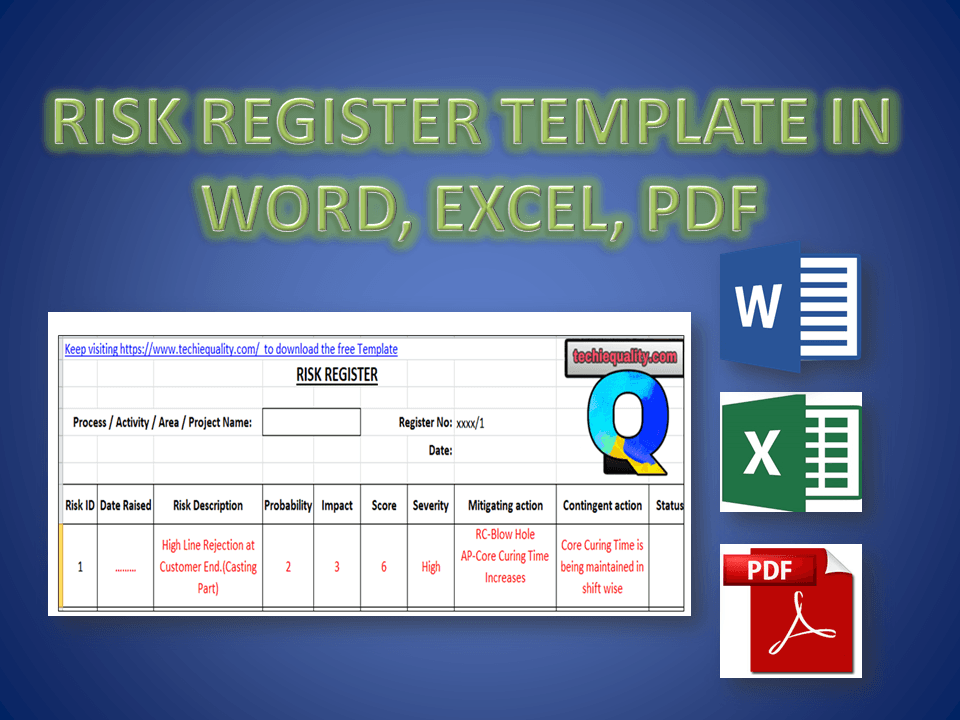
Hi Reader! Today we are going to discuss an important topic, which is called Risk-based thinking and Risk management. The organization uses different types of tools to identify the Risks but here, we will be discussing one of the popular tools, i.e. Risk Register. As we know most probably business standards like QMS, EMS, OH&SMS, etc. are now risk-based thinking approaches. So we will only concentrate on learning how to use the Risk register with Examples.
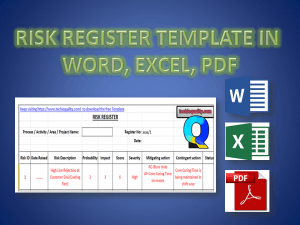
Step-1: Download the Above Template by simply clicking on the Download link.
Step-2: Read carefully the terminology.
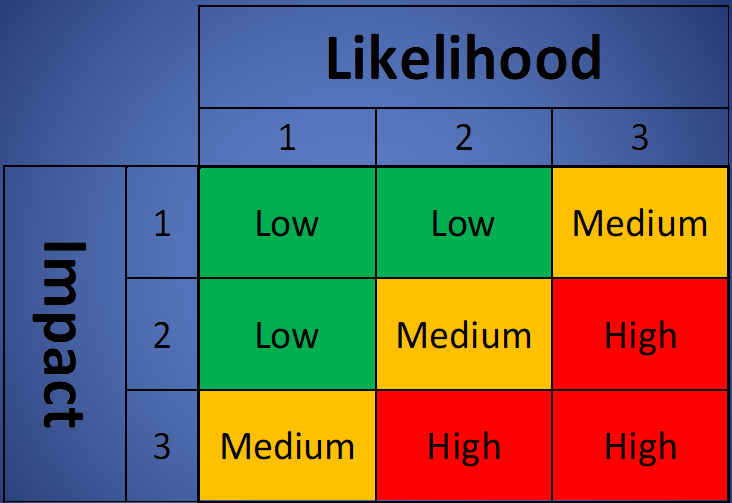
Step-3: The severity Table is given in the Excel Template in a Separate Sheet, So don’t forget to download the Excel Template.
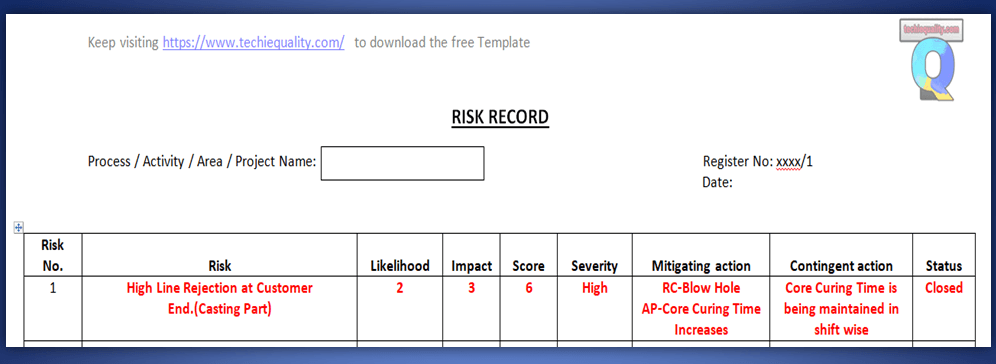
Step-4: Read carefully the sample example written in red colour in Template.
Example: Before I describe the Template, Please go through the below figure.
Risk Register Template
Terminology:
[1] Risk No.: Unique identification of each and every identified risk.
[2] Risk: Details about the Risk.
[3] Mitigating Action: Action to eliminate the Impact of Risk.
[4] Contingent Action: Action to eliminate the re-occurrence of Risk.
Here, in the above Figure, I have taken an Example of Customer complaints. So let’s get started with details about the above complaint.
High Line rejection at the Customer end was the Risk which has the score value 6 and severity is coming under the High Level. The criteria of probability and impact depend upon the organization’s decision. For a sample basis, I have taken the severity ranking according to the below data;
A Mitigation plan has taken w.r.t the Root Cause Analysis, so here Increasing the core curing time was thecorrective action and contingent action is thePreventive action. Which is “Core curing time is being maintained shift-wise”.
FAQ:
Q1: Where can we use this template?
A1: You can use this template in Project management, Risk Management, to identify the QMS, EMS OHSAS, and Business-related risks.
Q2: Who will decide the Criteria of Probability, Impact, and Severity?
A2: The organization itself will decide the criteria as to what it would be.
Our Author is an experienced professional in Quality Management Systems, Quality Assurance, Operations, and Business Excellence, with cross-industry expertise in Automotive, AMR, Robotics, Battery Manufacturing, Foundry, and Sheet Metal industries. He has strong expertise in international standards including IATF 16949, ISO 9001, ISO 14001, ISO 45001, and ISO 17025, along with methodologies such as TQM, TPM, and Six Sigma. He holds a degree in Mechanical Engineering along with an MBA, combining strong technical acumen with strategic business insight, he is a Certified Internal Auditor, Lead Auditor, and Six Sigma Black Belt, with a proven track record in driving quality transformation and operational excellence.
Through TECHIEQUALITY, he shares practical insights, quality tools, and industry best practices to help professionals improve processes and achieve operational excellence.
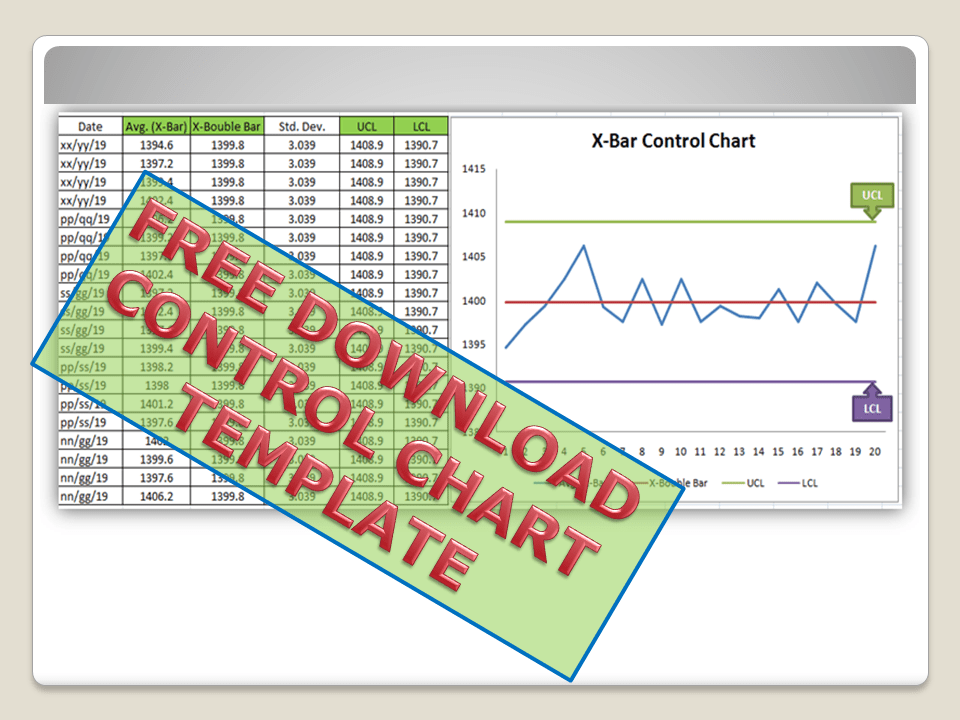
Control Chart Excel Template |How to Plot Control Chart in Excel | Download Template:
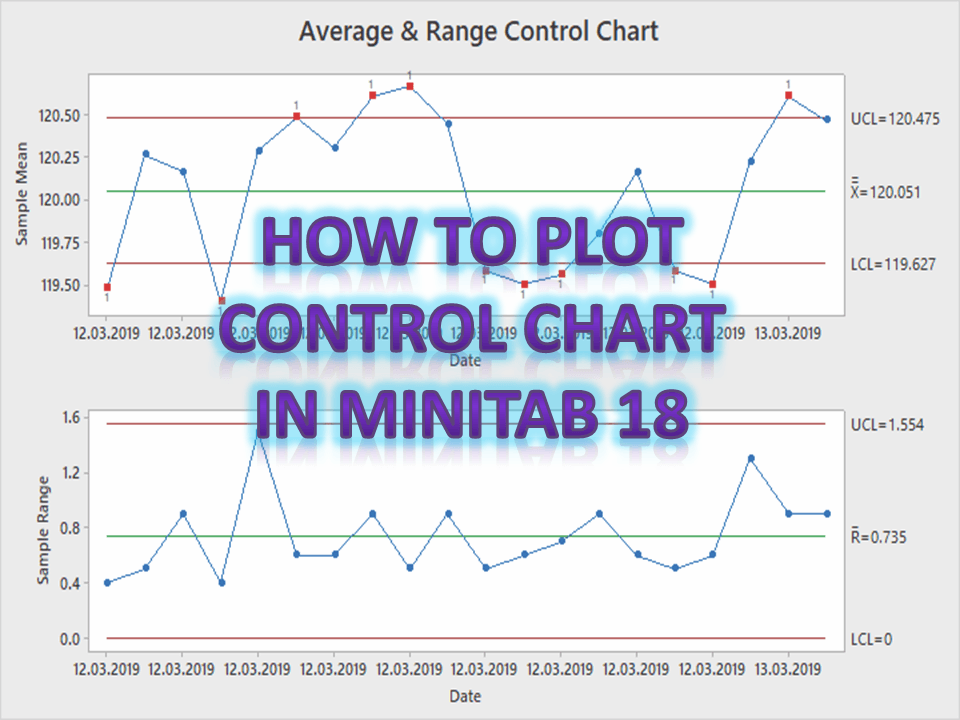
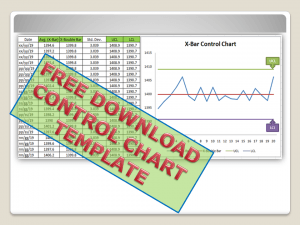
Hi! Reader, today we will guide you on how to plot a control chart in Excel with an example. To take more concentration on Process Improvement, the control chart always takes vital rules to identify the Special causes and common causes in Process Variation. Control Chart Excel Template is available here; just download it by clicking on the below link.
A Control Chart is a graphic representation of a characteristic of a process, showing plotted values of some statistic gathered from that characteristic, a centerline, and one or two control limits. It has two basic uses as an adjustment to determine if a process has been operating in statistical control and to aid in maintaining statistical control.
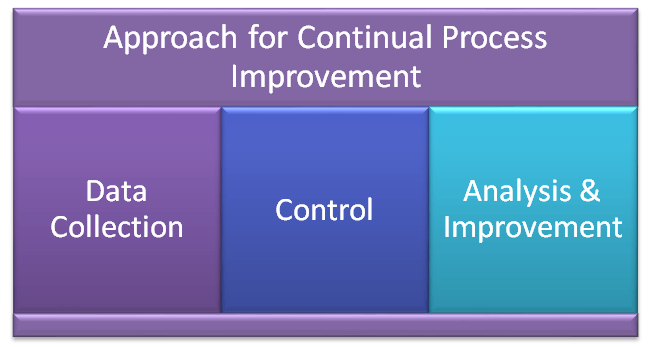
Control Chart Approach
for Continual Process Improvement:
Data Collection.
Control.
Analysis and Improvement.
Data Collection:-
To Collect Data and Plot the Control Chart.
Control:-
Calculate control limits from process data.
Identify Special Causes of Variation and Act upon them.
Analysis & Improvement:-
Quantify Common Cause Variation, and take action to reduce it.
How to Create Control Chart Excel Template| Step-by-Step Guides (X-Bar & Range Chart) with Example:
Step-1: Collect The Data day-wise/shift-wise.
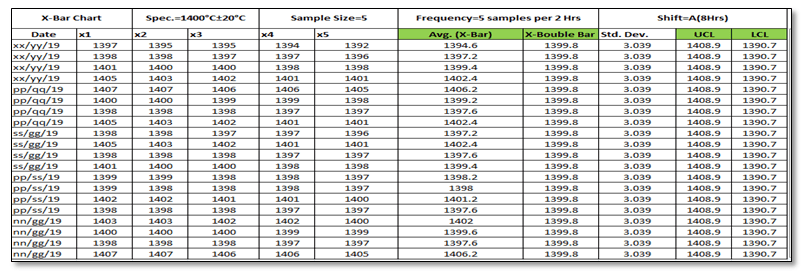
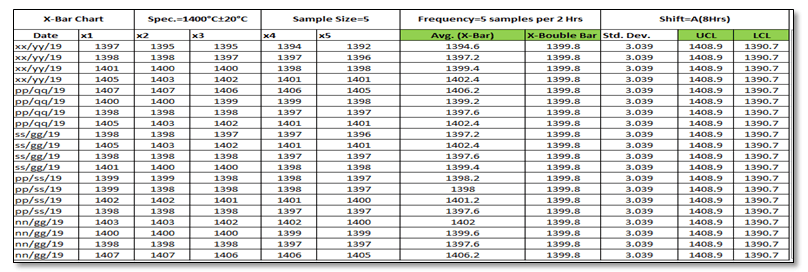
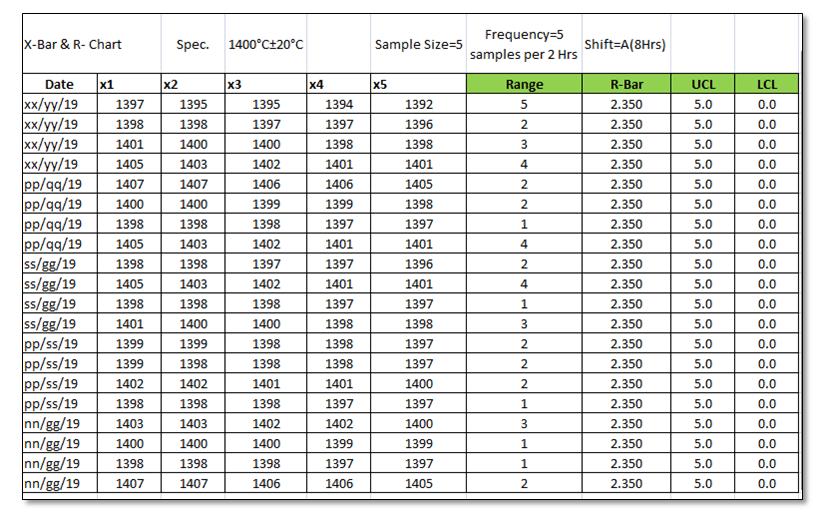
As you can see in the above figure, we have collected data with a sample size of 5 for A-Shift with frequency (5 samples per 2 hours). So we have only one shift data for 5 days. Total 100 number observations. You are supposed to collect the data as per the Control Plan or Quality Assurance Plan.
Step-2: Select
the Data types and applicable Control Chart.
So we have variable type data and the sample size is 5. Hence the applicable Chart is the Average and Range Chart (X-Bar & Range).
Step-3: According to data type and Sample size, presently we are going to plot the X-Bar & R-Chart. So individually we will plot both charts (X-Bar Chart & Range Chart). First, we will plot the X-bar chart and then the R-chart.
3.1 X-Bar Chart:
Before we start, just go through the green highlighted terms in the above figure as [1] Average
[2] X-Double Bar means an average of average. [3] Standard Deviation. [4] UCL. [5] LCL.
Calculation:
[1] Average:
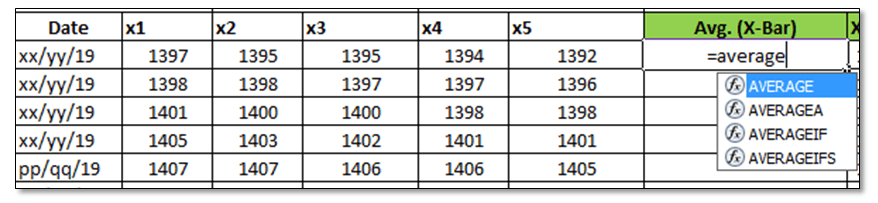
Make sure that your attention is now on the right side corner of the above figure. To calculate the average value of individual subgroup size. You have to type as (=average)and then double click on the average function and next select the sample value from x1 to x5.
[2] X-Double Bar: After calculating the Average value of all Subgroups (Individual Date wise), now we have to calculate the average of Average (Average of X-Bar).
[3] Standard
Deviation: Standard Deviation of Average (X-Bar),
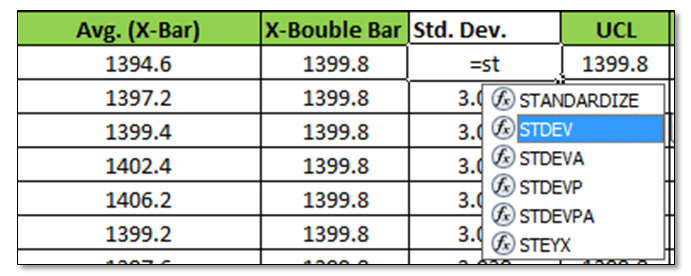
Type as (=Stdev) and select all X-Bar Data to Calculate the
Std. Dev. of Average.
[4] UCL:
UCL=X Double Bar +3*Sigma
UCL= X Double Bar +3*Standard Deviation
For the calculation of the UCL in Excel use the above formula.
[5]LCL:
LCL=X Double Bar -3*Sigma
LCL= X Double Bar -3*Standard Deviation
Use the above Formula in Excel.
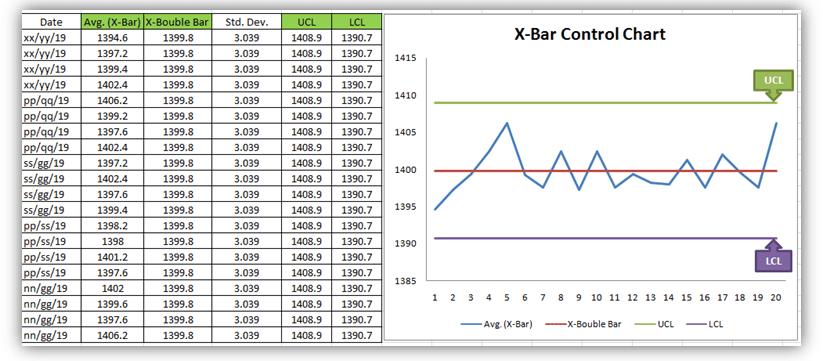
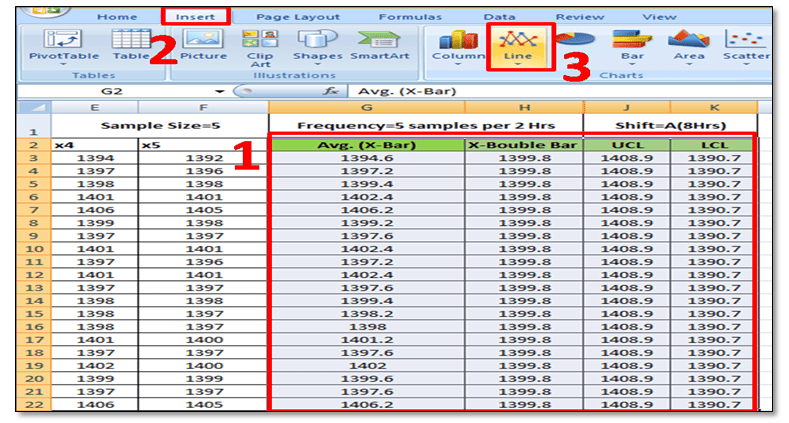
3.11 Plot X-Bar Chart: This is the last step to plot the X-Bar Chart by using Line Graph in Excel, follow the below steps:
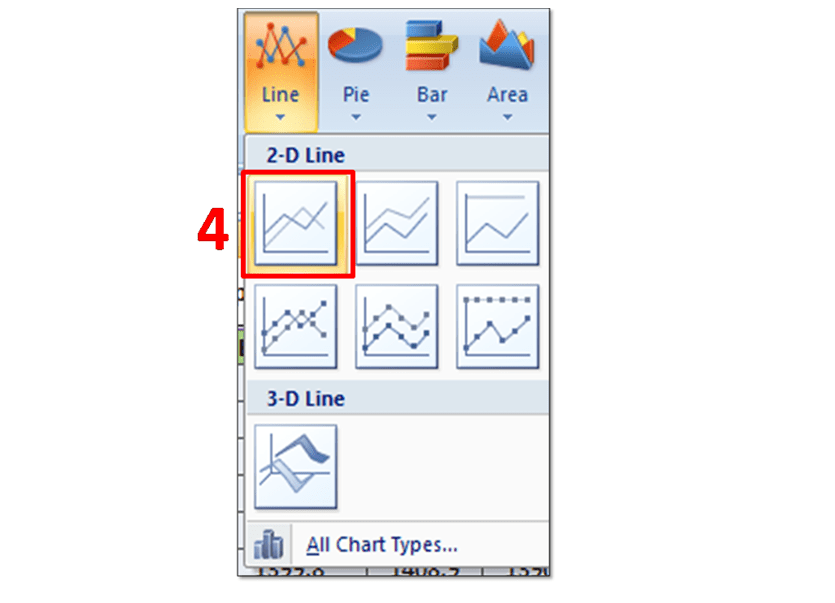
Simply Follow Sl. No.1 to 4.
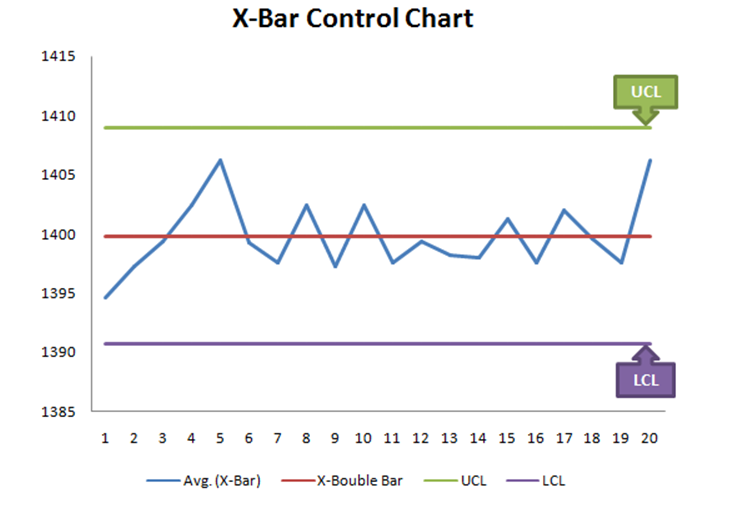
In Sl. No.1, Select X-Bar, X-Double Bar, UCL, LCL, and then select Insert Option and next to Line Chart. After selecting the Line Graph/Chart, The X-Bar Control Chart Excel Template will be ready as below.
3.2 Range Chart:
To Plot the
R-Control Chart, we have to calculate the [1] Range. [2] R-Bar (Average of
Range). [3]UCL. [4]LCL.
[1] Range: R=Max. Value – Min. Value of Subgroup.
[2] R- Bar (Average of Range): Put the Excel formula of average.
[3] UCL:
UCL= D4 x R-Bar
UCL= 2.114 x R-Bar Value of individual Subgroup. (Note for
Subgroup Size 5, D4=2.114).
Use this formula in Excel to calculate the UCL.
[4] LCL:
LCL=D3 x R-Bar
LCL=0 (Note Foe subgroup size 5, D3=0)
Simply put the “0” in the Excel sheet.
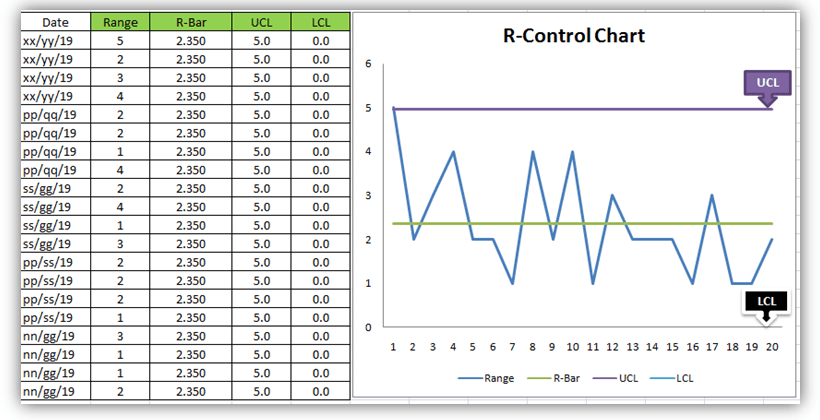
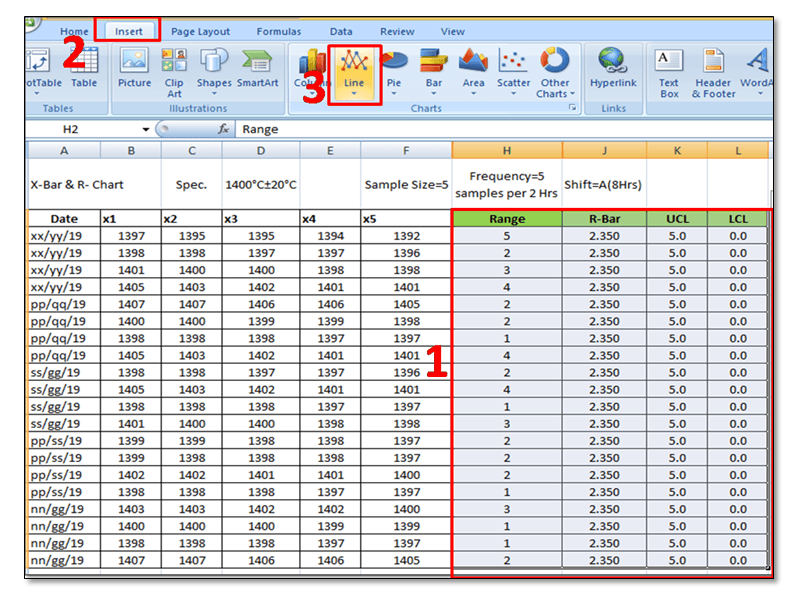
3.22 Plot R-Chart: Just follow steps 1 to 3, and select the line chart.
In step-1, you have to select the “Range, R-Bar, UCL, and
LCL” simultaneously and then select the Line Chart, after selecting the line
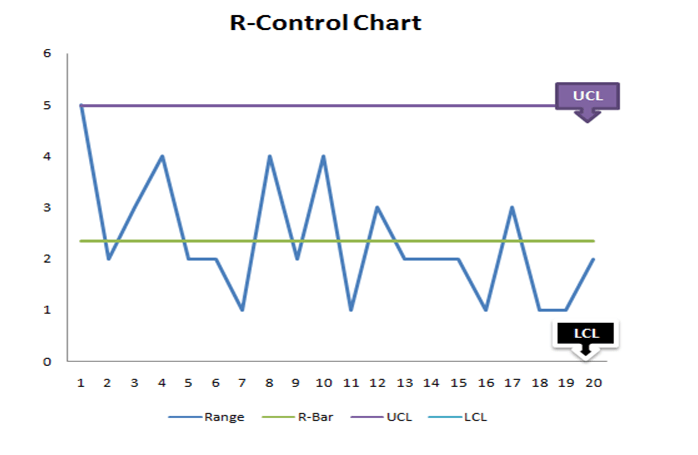
chart R-Control Chart Excel Template will be ready as below
Q2: How to add upper and lower control limits in Excel?
A2: Carefully read the aforesaid Articles.
Q3: How to create a control chart in Excel 2013?
A3: Step by Step guide is described above with Statistical process control chart examples. Please go through it.
Q4: How to create a Six Sigma control chart in Excel?
A4: Control charts are classified into two types [1] Variable type and [2] Attribute Type. Both two types are further classified into several as
[1]Variable types
X and MR Chart
X-Bar and Range
X-Bar and S
[2] Attribute Chart
np-chart
p-chart
u-chart
c-chart
In the above articles, we have described only how to create an X-bar and range type Control Chart in Excel with a process control chart example. As you can see all these above types of control charts are used in Six Sigma projects but the applicable chart depends on Data type and Subgroup size (Sample size).
Q5: How to calculate upper and lower control limits (UCL & LCL) in Excel?
A5: For X-Bar
Chart-UCL:
UCL=X Double Bar +3*Sigma
UCL= X Double Bar +3*Standard Deviation
For the calculation of the UCL in Excel, use the above formula.
LCL:
LCL=X Double Bar -3*Sigma
LCL= X Double Bar -3*Standard Deviation
Use the above Formula in Excel.
For R-Chart:
UCL:
UCL= D4 x R-Bar
UCL= 2.114 x R-Bar Value of individual Subgroup. (Note for
Subgroup Size 5, D4=2.114).
Our Author is an experienced professional in Quality Management Systems, Quality Assurance, Operations, and Business Excellence, with cross-industry expertise in Automotive, AMR, Robotics, Battery Manufacturing, Foundry, and Sheet Metal industries. He has strong expertise in international standards including IATF 16949, ISO 9001, ISO 14001, ISO 45001, and ISO 17025, along with methodologies such as TQM, TPM, and Six Sigma. He holds a degree in Mechanical Engineering along with an MBA, combining strong technical acumen with strategic business insight, he is a Certified Internal Auditor, Lead Auditor, and Six Sigma Black Belt, with a proven track record in driving quality transformation and operational excellence.
Through TECHIEQUALITY, he shares practical insights, quality tools, and industry best practices to help professionals improve processes and achieve operational excellence.
MTBF and MTTR Template, Format, Calculation| Manufacturing Example:
What is MTBF?
Hi, readers in this article we will be covering both MTBF and MTTR calculation with a manufacturing example. So read carefully, learn the concept, and implement it in your organization. Mean time between failures (MTBF) is the arithmetic average time between failures. It helps to measure the performance of a machine or assets. In manufacturing industries, we are always worried about the breakdown of machine or equipment failure, which can make a large loss and ultimately increase the downtime (Stop time) of the machine. Uptime is a big factor to enhance productivity. The higher the MTBF means the machine runs a long time before failing.
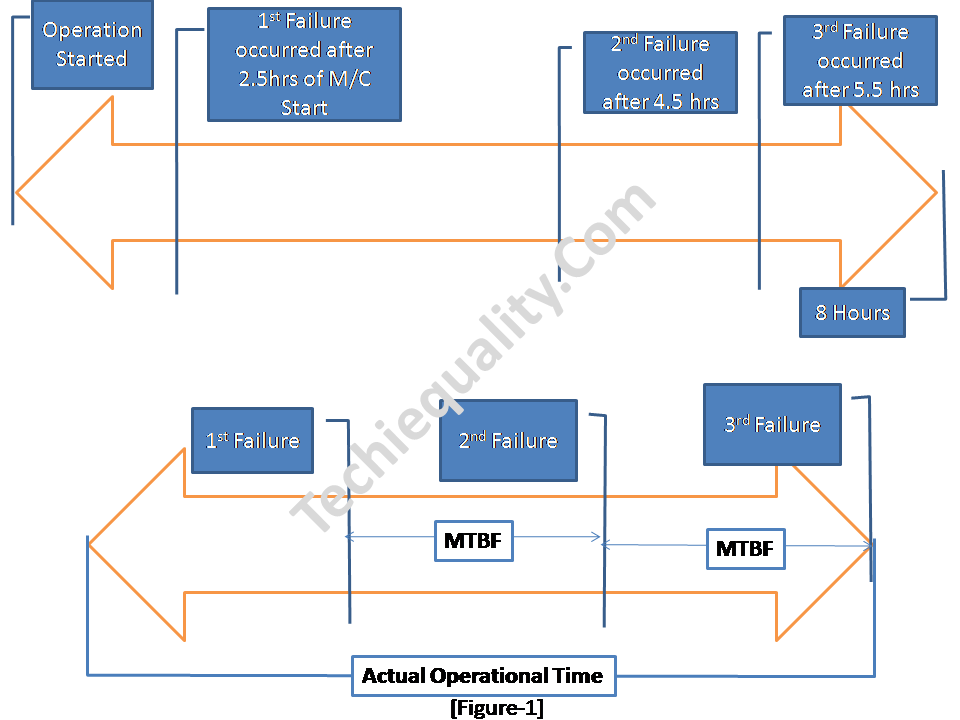
[Figure]
As you can see in the above figure operation has stopped after 8 hours of duration but meanwhile, three failures have occurred. Due to this failure machine was stopped for maintenance. In this case, 8 hours was the available operational time but 6 hours was the total running time. Considering all the above data, the MTBF value is 2 hours. It means the average time between 1st failure & 2nd failure or 2nd failure & 3rd failure is 2 hours. In the manufacturing industry, there are multiple operations and several machines are being used for production. So during the calculation of MTBF, you have to think about multiple factors.
DOWNLOAD– Template of MTBF and MTTR. (mttr, mtbf formula excel)
MTBF Formula:
The total operational time or total run time divided by the total number of failures.
MTBF= (Total Operational Time ÷ Total Number of Failures)
Calculation of MTBF (Mean Time Between Failures):
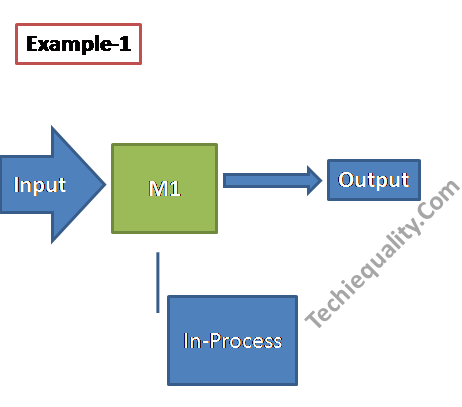
Let, for example, a product “XYZ” has manufactured in a simple method by using a single machine [see the below figure]. This machine runs three shifts per day with monthly 26 working days. But in last month’s operation, the maintenance person had booked the machine’s total number of failures (Breakdown) was 5. And total break-down time was 3 hours. According to all the above data, Monthly MTBF has been calculated and mentioned below;
[Example-1]
MTBF = Total operational time ÷ Total number of failures
Total operational time (Run time):
= Planned production time – Stop time
(624 hours – Stop time)
= (624- 81), here stop time included the lunch time, dinner time, tea time, breakdown time, tool changeovers time)
=543 hours
Now, the Total Operational Time of last month = 543 hours, Total number of failures of last month =5 times.
MTBF of last month = (543÷5) hours
=108.6 hours
Similarly, we have calculated the MTBF of a complex process having multiple numbers of machines.
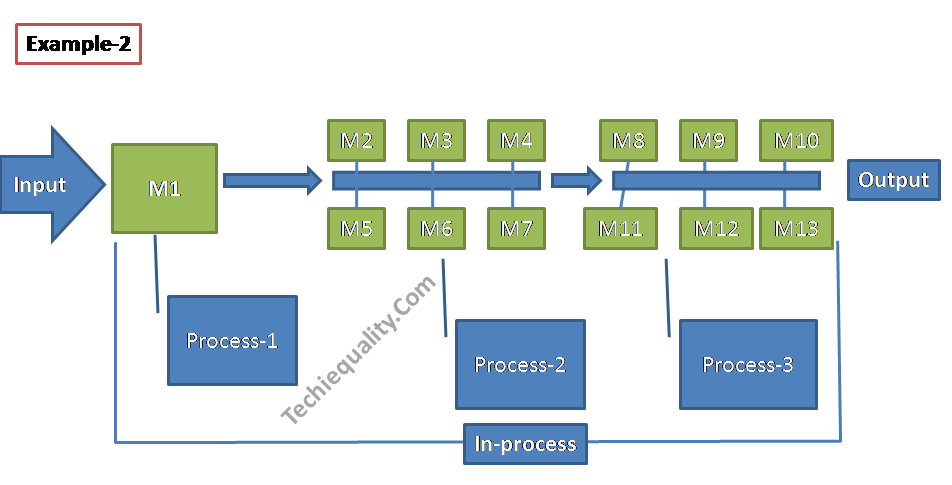
[Example-2]
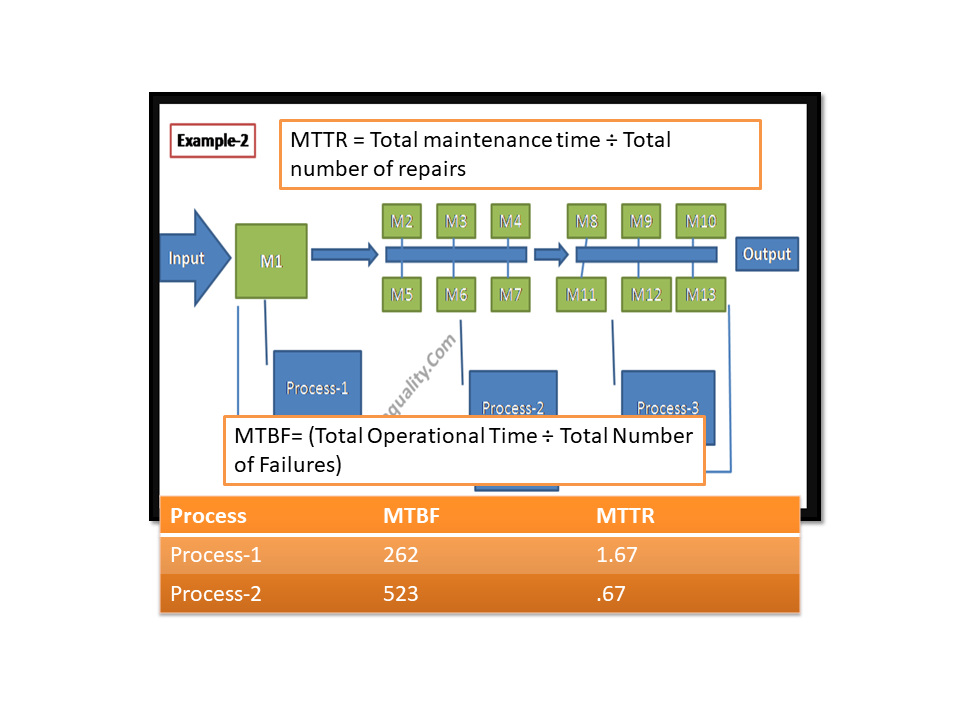
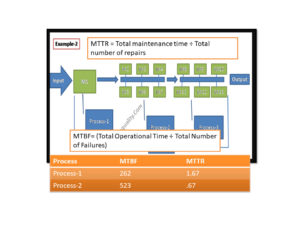
In example 2, all 13 machines run together to produce a product. There is a total of three sub-process i.e. process-1, 2 &3. And process-1 has 1 machine and process-2 &3 have 6 machines each. First of all, we will calculate the MTBF value of each process and then the overall process. Details of data like a machine running time, failure frequency, etc. are given below,
MTBF of Last month:
Total Operation Shift = A, B, C (3 shifts).
Total Number of Machines = 13
Working days of last month = 25 days
Total Number of failures (B/D) =12 times [process-1 =2, process-2 =6, process-3 =4]
Total breakdown time = 10 hours [process-1 =1, process-2 =8, process-3 =1]
Stop time of each machine per day due to Lunch, Dinner, and tea = 3 hours
MTBF of Process-1:
MTBF = Total operational time ÷ Total number of failures
Total operational time (Run time):
= Planned production time – Stop time
(600 hours – Stop time)
= (600- 76)
=524 hours.
Now, Total Operational Time of last month = 524 hours, Total number of failures of last month = 2 times.
MTBF of last month = (524÷2) hours
=262 hours
MTBF of Process-2:
MTBF = Total operational time ÷ Total number of failures
Total operational time (Run time):
= Planned production time – Stop time
(3600 hours – Stop time)
= (3600- 458)
=3142 hours
Now, Total Operational Time of last month = 3142 hours, Total number of failures of last month = 6 times.
MTBF of last month = (3142÷6) hours
=523.666 hours
MTBF of Process-3:
MTBF = Total operational time ÷ Total number of failures
Total operational time (Run time):
= Planned production time – Stop time
(3600 hours – Stop time)
= (3600- 451)
=3149 hours
Now, Total Operational Time of last month = 3149 hours, Total number of failures of last month = 4 times.
It is the average time required to correct and repair a failed component or equipment or device to put it in working order. It reflects how much average time is spent to correct or repair the component.
MTTR Formula:
Total maintenance time or total B/D time divided by the total number of failures.
MTTR = Total maintenance time ÷ Total number of repairs.
MTTR Calculation (Mean time to repair):
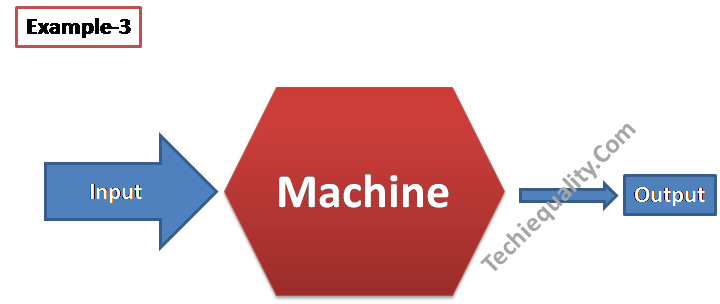
Example-3.
It’s a simple manufacturing process consisting of a single machine. In last month 3 times machine was stopped due to breakdown & the total breakdown or repair time was 2 hours. So here we are going to calculate the MTTR, details of the calculation are given below.
[Example-3]
MTTR = Total maintenance time ÷ Total number of repairs.
= (2 ÷ 3)
= 0.67 hours
Example-4:
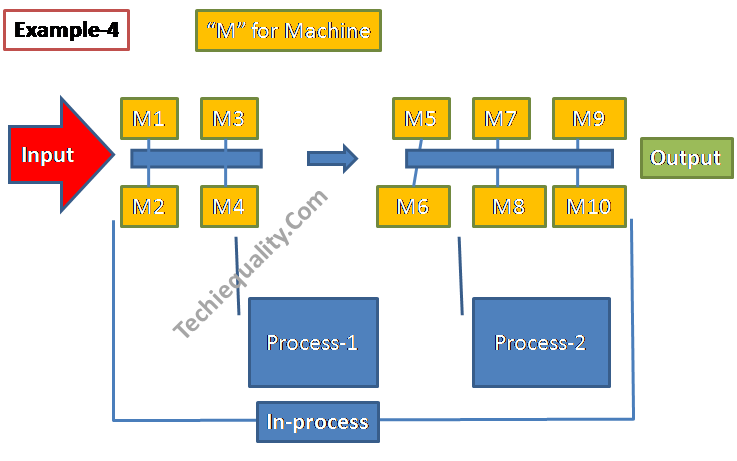
[Example-4]
In Example-4, the whole process is covered by the two sub-process i.e. process-1 and process-2. In first sub-process has a total of 4 machines and similarly, the second process has a total of 6 machines in operation. All data related to breakdown and frequency of failure are given in below table;
Process
Breakdown or Maintenance time
Frequency of failure or total number of repairs
Process-1
5 hours
3
Process-2
4 hours
6
MTTR of Process-1: 1.67 hours
MTTR of Process-2: 0.67 hours
Overall process MTTR = (1.67 + 0.67) ÷2
=1.17 hours
Process
MTTR in Hours
Process-1
1.67
Process-2
0.67
Overall Process
1.17
MTTR-Table
Why MTBF and MTTR are important for manufacturing industries?
MTTR indicates the efficiency of corrective action of machine failure and similarly
MTBF indicates the average machine run time between failures.
Monitoring both indicators can give the idea to control your maintenance method and indicate the opportunity for improvement in the same field. You can easily identify the training needed for your maintenance personnel after analyzing the values. You can also categorize the production loss w.r.t breakdown time.
What is the requirement of IATF 16949 w.r.t MTBF and MTTR?
As per the standard requirement, an organization shall document the maintenance objectives, for example, the objective of MTTR and MTBF.
How do you calculate MTBF and MTTR?
We have calculated the MTBF and MTTR with a manufacturing example, please read the above example.
What is the MTTR formula?
MTTR = Total maintenance time ÷ Total number of repairs.
How do you calculate MTBF?
MTBF= (Total Operational Time ÷ Total Number of Failures)
How to reduce the MTTR hours and How to increase the MTBF hours?
For improving both the parameters, we have to keep the focus on below things, like
Do the periodic CLIT (Cleaning, Lubrication, Inspection, and tightening).
Do the Kaizen on machines.
provide the training to the maintenance team.
Display the OPL for the machine operators for a better understanding of the machine’s operation.
Visual marking on the machine and introducing the poka-yoke
The above points are not limited to the given list but you can do more best practices to improve the MTTR and MTBF.
Free Templates / Formats of QM: we have published some free templates or formats related to Quality Management with manufacturing / industrial practical examples for better understanding and learning. if you have not yet read these free template articles/posts then, you could visit our “Template/Format” section. Thanks for reading…keep visiting techiequality.com
Our Author is an experienced professional in Quality Management Systems, Quality Assurance, Operations, and Business Excellence, with cross-industry expertise in Automotive, AMR, Robotics, Battery Manufacturing, Foundry, and Sheet Metal industries. He has strong expertise in international standards including IATF 16949, ISO 9001, ISO 14001, ISO 45001, and ISO 17025, along with methodologies such as TQM, TPM, and Six Sigma. He holds a degree in Mechanical Engineering along with an MBA, combining strong technical acumen with strategic business insight, he is a Certified Internal Auditor, Lead Auditor, and Six Sigma Black Belt, with a proven track record in driving quality transformation and operational excellence.
Through TECHIEQUALITY, he shares practical insights, quality tools, and industry best practices to help professionals improve processes and achieve operational excellence.
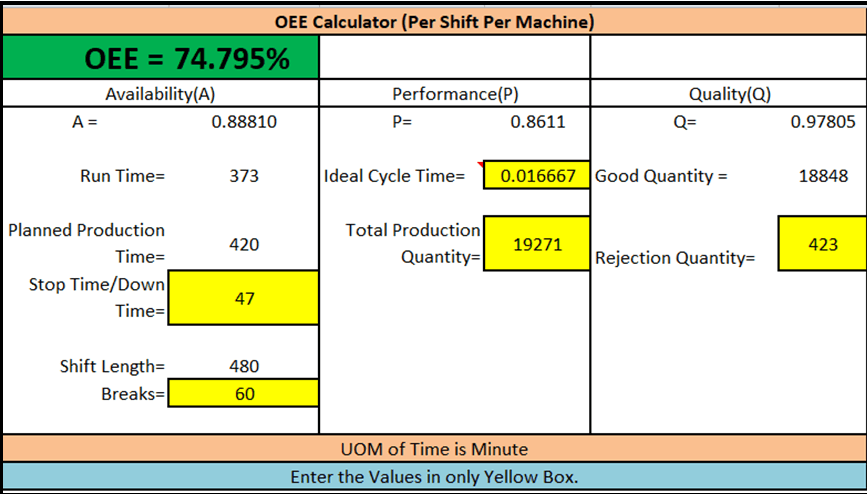
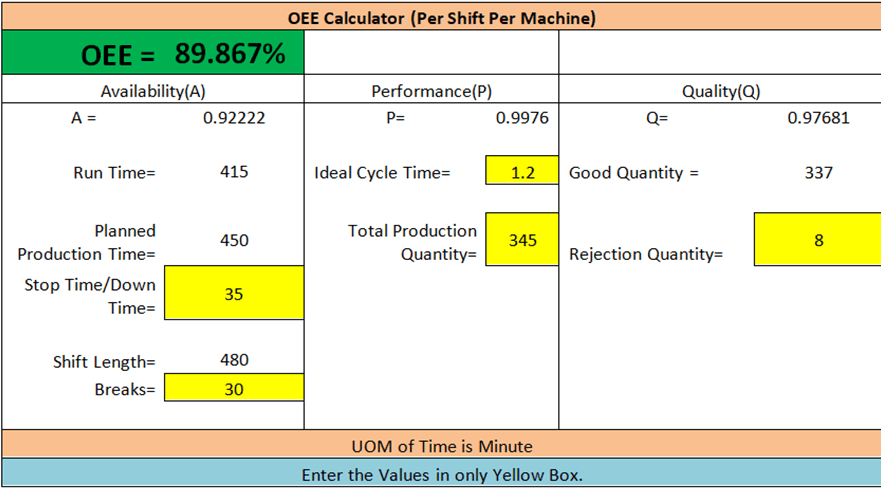
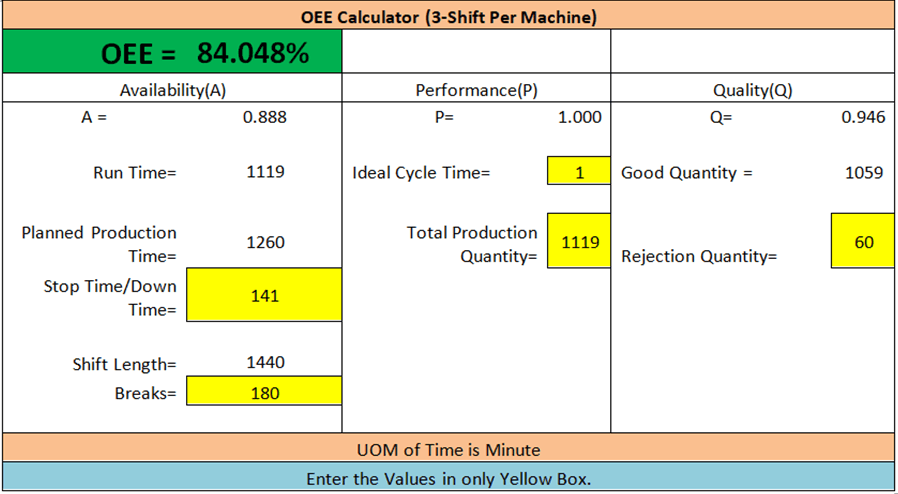
OEE Means, Overall Equipment Effectiveness. Seiichi Nakajima has invented overall equipment effectiveness in the 1960s to evaluate the manufacturing operation how effectively it is utilized.
Overall Equipment effectiveness is a methodology to measure the productivity of Process industries.
OEE = A x P x Q (A-Availability. P-Performance. Q-Quality). OEE is the main key performance indicator for Total Productive Maintenance and also for IATF 16949.
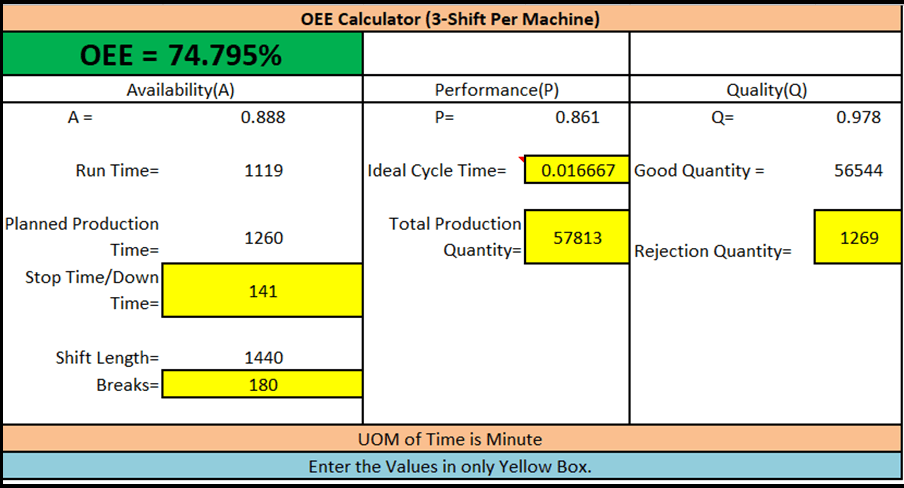
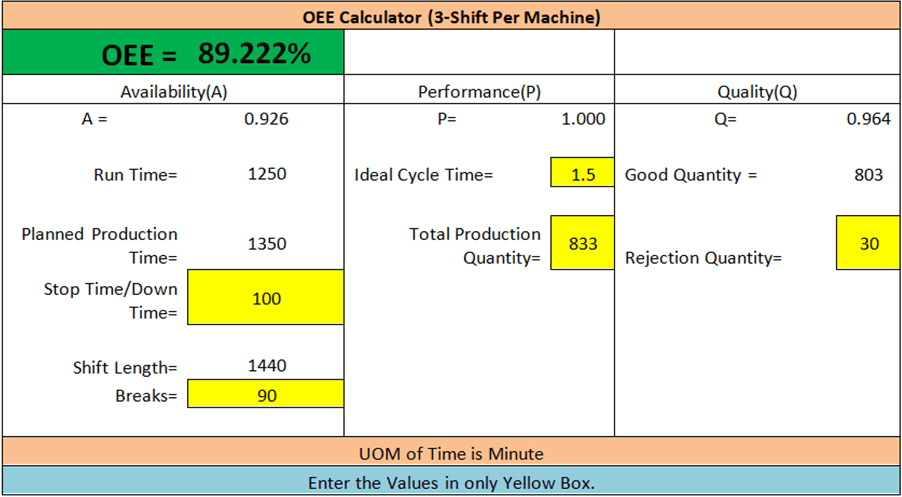
Planned Production Time= 1350, Total Production Quantity= 833 Rejection Quantity= 30 Stop Time/Down Time= 100
Shift Length= 1440
Breaks= 90
UOM of Time is Minute.
Now, I hope it’s clear to all “how to calculate the overall equipment effectiveness” by using the above Template. If you would like to calculate manually and would like to know more about the formula then click here.
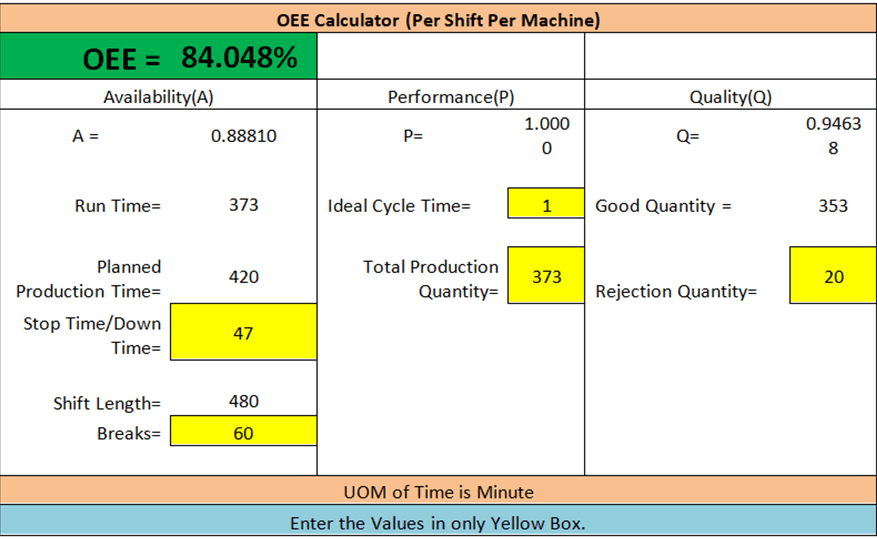
I hope you understand the concept of OEE, but I would like to request you calculate the Rate of Quality of the below conditions and match your answer with our solution.
suppose a company produced 50000 quantities of product A and rejected quantities are 200 nos. Calculate the rate of quality and rate of quality percentage.
Solution:
Total parts Produced = 50000 nos
Total parts rejected = 200 nos
Rate of quality = [Total parts produced – Total parts rejected] / Total parts produced
Our Author is an experienced professional in Quality Management Systems, Quality Assurance, Operations, and Business Excellence, with cross-industry expertise in Automotive, AMR, Robotics, Battery Manufacturing, Foundry, and Sheet Metal industries. He has strong expertise in international standards including IATF 16949, ISO 9001, ISO 14001, ISO 45001, and ISO 17025, along with methodologies such as TQM, TPM, and Six Sigma. He holds a degree in Mechanical Engineering along with an MBA, combining strong technical acumen with strategic business insight, he is a Certified Internal Auditor, Lead Auditor, and Six Sigma Black Belt, with a proven track record in driving quality transformation and operational excellence.
Through TECHIEQUALITY, he shares practical insights, quality tools, and industry best practices to help professionals improve processes and achieve operational excellence.
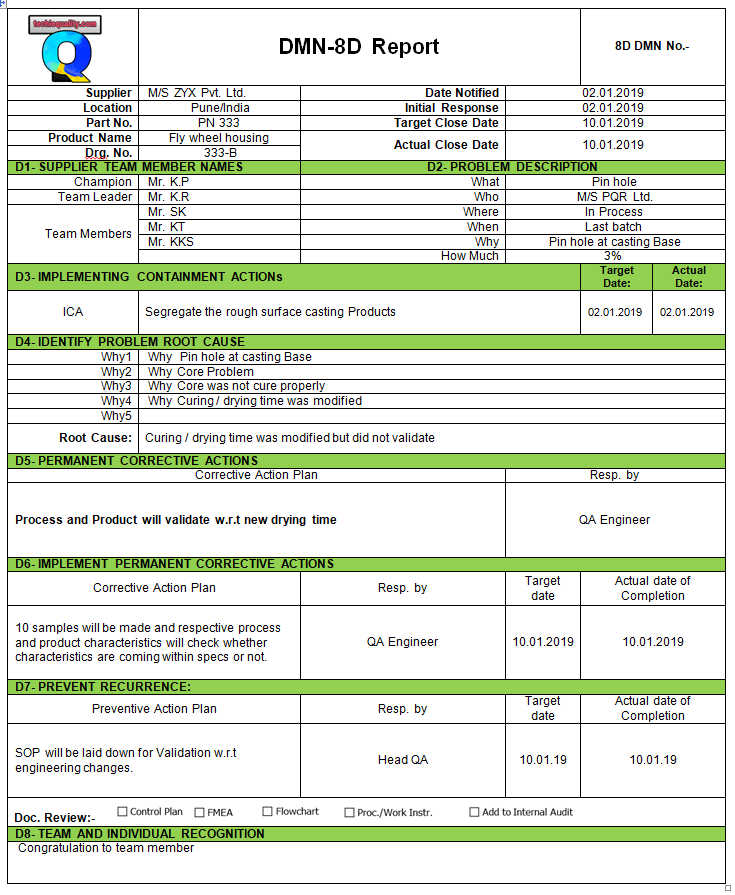
8D Report, Format, or Template is ready for you just click on Download. Here we will describe the 8D Report with a Manufacturing related example.
DOWNLOAD-(8D-DMN Report Template /format /form in Excel Format)
Basic Info. of 8D Report:
It’s a Problem-solving approach followed by Eight Critical Steps. This is used to provide excellent guidelines to identify the Root cause of The Problem or Issue. Moreover, an 8D approach is used to implement the solutions to prevent recurring problems. It was first used in the automotive industry.
Generally, Customer asks their Suppliers / Vendors / External Providers to submit the 8D Report as of and when they find the Defective material at their ends as BOP, Raw Materials, etc.
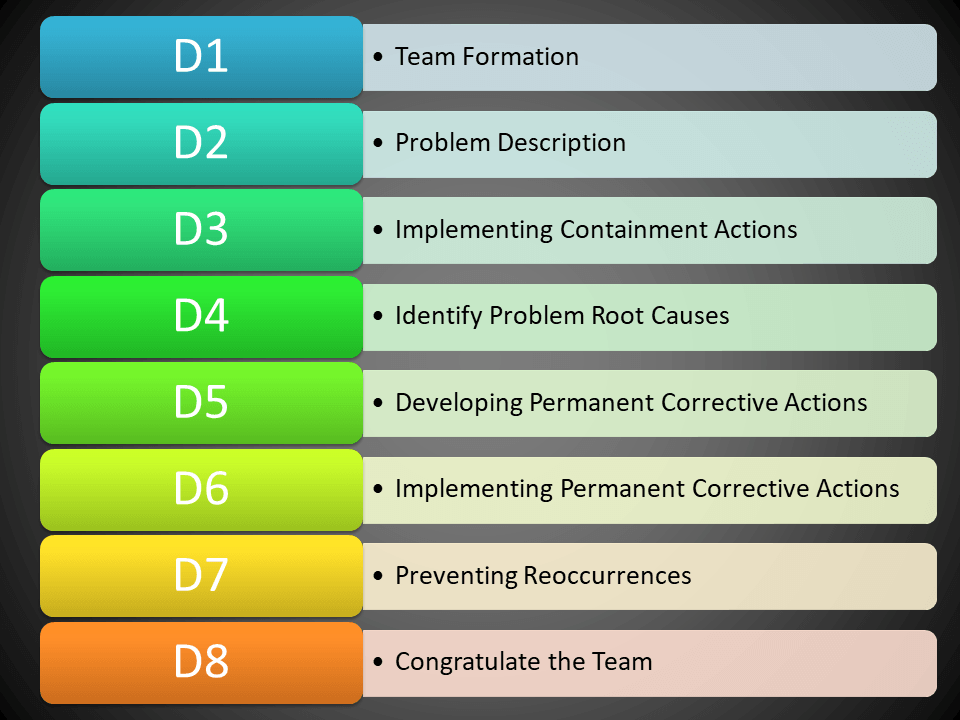
Eight
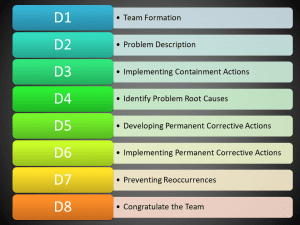
Steps of 8D Report:
Team
Formation
Problem
Description
Implementing
Containment Actions
Identify
Problem Root Causes
Developing
Permanent Corrective Actions
Implementing
Permanent Corrective Actions
Preventing Re-occurrences
Congratulating the Team
D1:- Team formation
A Cross-Functional team with multi-skilled Members needs to be selected.
D2:- Problem
Description
Describe the Problem in the form of 5W 2H as Who, What When, Where, Why, How, and how much.
D3:- Containment
actions
Temporary Action needs to be implemented until a permanent solution is implemented.
D4:- Identify Problem
Root Cause
After the implementation of Containment Action, We have to do the Root Cause Analysisto find out the Root Cause for the implementation of the permanent solution. The common tool used for RCA is Why-Why Analysis.
D5:- Developing
permanent corrective actions
After getting the Root Cause of a Problem, we have to prepare an Action plan for the Possible solution. From there Permanent Corrective actions need to be selected.
D6:- Implementing
permanent corrective actions
As soon as possible, Developed Permanent Corrective Actions need to be implemented. Implementation Plan / Activity Plan / Milestone Plan will help you better monitor and track the status of Activities.
D7:- Preventive Re-occurrences
Here Preventive Action needs to be taken to minimize the Reoccurrences. In doing so, a review of the Management system, SOP, Control plan, FMEA, and Risk Management, so that it will prevent the Reoccurrence.
D8:- Congratulating
the team
Now, it’s time to congratulate the Recognize your team for the joint effort. It is the most important step among All steps, which will help you to improve the moral part of people’s engagement.
Example-1 Customer asked 8D report for casting pin-hole issue.
D-1: Supplier team member name: Organization is supposed to form a team with a Team leader and Champion.
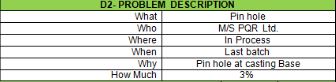
D-2: Problem Description: You may describe the problem in a 5W1H manner or 5W2H.
D-3: Implementing Containment action:
Immediate action needs to be taken so that the defective product will not be dispatched to the customer.
and also segregate the pinhole casting.
D-4: RCA: You can find out the Root cause by why-why analysis, hypothesis testing, etc.
D-5: Corrective Action:
Action to eliminate the root cause of the problem.
D-6: Implement CA: here in this stage we have to implement the action of the corrective action plan.
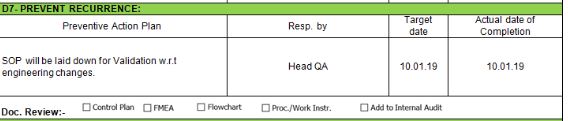
D-7: Preventive action:
Action to eliminate the potential cause of the problem. according to the new ISO 9001:2015 standard requirement, Risk analysis is there. but in the above example we have mentioned the PA as;
Example-2:
We have discussed here another practical manufacturing example for your better understanding, For Example, At the customer end, 80% of the last consignment material found a machining problem, so the customer asked their supplier to submit the 8D report. That 8D report has been described below, kindly go through it to know the details.
Illustration of above example-2:
D-1- SUPPLIER TEAM MEMBER NAMES: There should be a team member, leader, and champion. so choose team members smartly covering the several functions as CFT, so that your team’s technical strength will be enhanced.
D-2- PROBLEM DESCRIPTION:
This is the vital step where you have to confirm the problem and similarly need to describe it.
D-3- IMPLEMENTING CONTAINMENT ACTIONS: Take immediate action so that your customer will not receive a non-conforming product/ material /item. In the above example, the supplier has stopped the consignment of the mix-up item ( Good and NG material) to the customer.
D-4- IDENTIFY THE PROBLEM ROOT CAUSE:
You can use several techniques or tools to find out theroot cause, the commonly used technique is the why-why analysis.
D-5- PERMANENT CORRECTIVE ACTIONS: An action to eliminate the root cause of a problem, so whatever the RC will be found by root cause analysis then you have to take action on it. SO here covering the CAPA part is the important part.
D-8- TEAM AND INDIVIDUAL RECOGNITION: Congratulations to your team members.
FAQ:
What are the 8D steps?
The 8D is [1] Team Formation [2] Problem Description [3] Implementing Containment Action [4] Identify Problem Root Cause [5] Developing Permanent Corrective Action [6] Implementing Permanent Corrective Action [7] Preventing Reoccurrence [8] Congratulate the Team.
What is the difference between CAPA and 8D?
The CAPA and 8D are problem-solving approaches. During the RCA (Root cause analysis) of the problem, we generally develop the Action plan and represent it in different and different formats/templates like CAPA, 8D, G10, etc. The main objective or purpose of both methods is to develop the action plan, implement the action plan, and measure the effectiveness of the action plan. I meant to say that both are problem-solving approaches/ methods.
Our Author is an experienced professional in Quality Management Systems, Quality Assurance, Operations, and Business Excellence, with cross-industry expertise in Automotive, AMR, Robotics, Battery Manufacturing, Foundry, and Sheet Metal industries. He has strong expertise in international standards including IATF 16949, ISO 9001, ISO 14001, ISO 45001, and ISO 17025, along with methodologies such as TQM, TPM, and Six Sigma. He holds a degree in Mechanical Engineering along with an MBA, combining strong technical acumen with strategic business insight, he is a Certified Internal Auditor, Lead Auditor, and Six Sigma Black Belt, with a proven track record in driving quality transformation and operational excellence.
Through TECHIEQUALITY, he shares practical insights, quality tools, and industry best practices to help professionals improve processes and achieve operational excellence.
Pareto Chart Excel Template | Step by Step guide of template usages:-
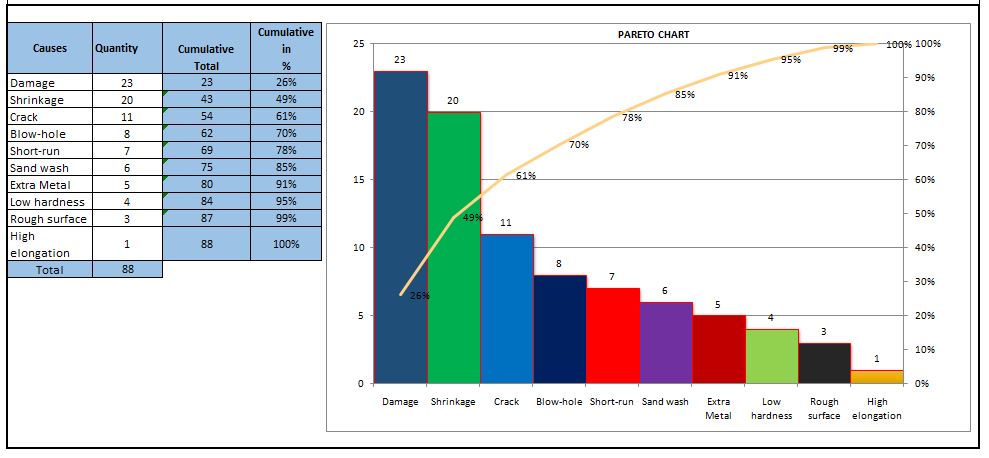
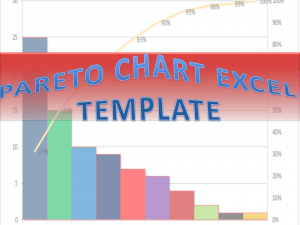
Hi Readers! In this article, we have discussed on Pareto Chart Excel Template with a manufacturing example. and also you can learn here, the Pareto chart principle (80/20 rule). if you would like to download our excel template or format then, go through the below link.
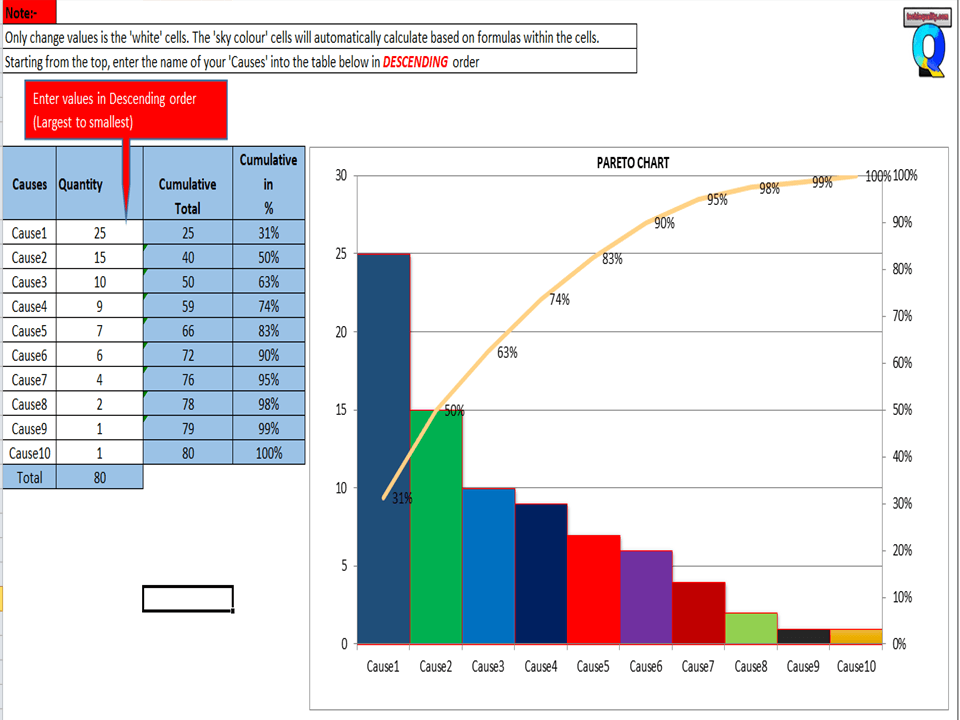
After downloading, the above Pareto Chart Excel Template Carefully read the Note and red highlighted box marked in excel.
Note 1:- White cells are only changed values. The sky colour cells will automatically calculate based on the formula within the cells.
Note 2:- Starting from the top, enter the name of causes into the table below in descending order (Largest to Smallest Values)
Example of Pareto chart:
Let us have ten causes as Damage, Crack, Shrinkage, Short-run, Blowhole, Pin-hole, Extra Metal, Sand-wash, Rough Surface, Low hardness, and High elongation.
Causes
Rejection
Quantity
Damage
23
Shrinkage
20
Crack
11
Short-run
7
Blow-hole
8
Extra Metal
5
Sand wash
6
Rough surface
3
Low hardness
4
High elongation
1
Now you have to do the sorting of Rejection Quantity in
Descending order (Largest to smallest value)
Descending order of Rejection Quantity of above causes are,-
Causes
Rejection Quantity
Damage
23
Shrinkage
20
Crack
11
Blow-hole
8
Short-run
7
Sand wash
6
Extra Metal
5
Low hardness
4
Rough surface
3
High elongation
1
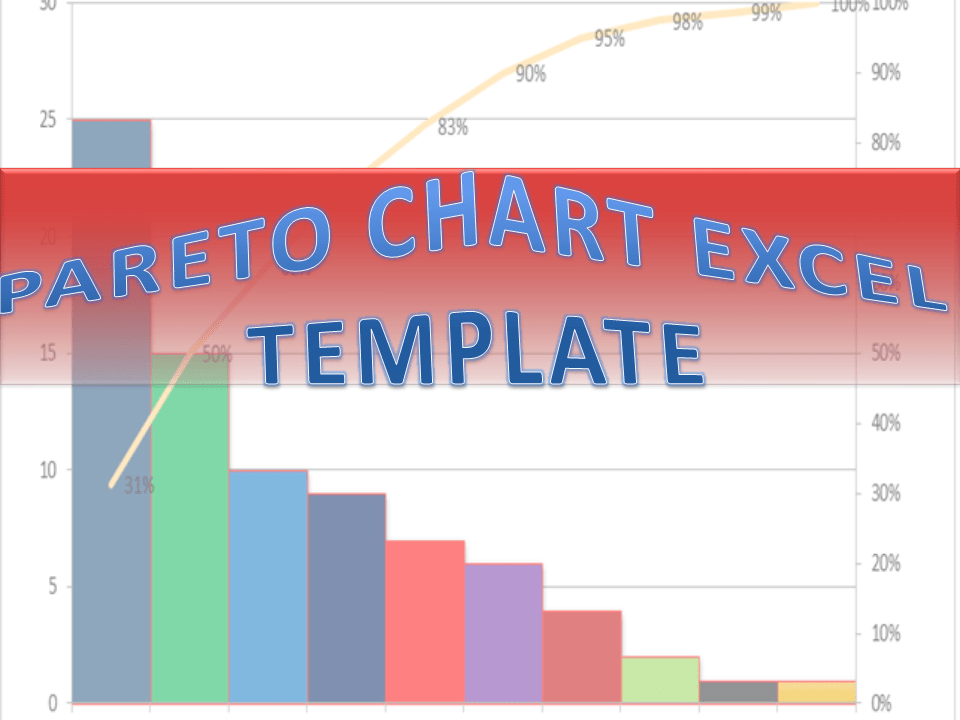
Now directly we have to enter the name of causes and Rejection quantity (After sorting the value in descending order) into white cells of the Excel template sheet. After entering the values the Pareto chart will look like as below.
The 80/20 Rule or Pareto Principle is the most important part of Pareto Analysis. The rule 80/20 says that 80% of the effects come from 20% of the causes.
In Italy, Vilfredo Pareto has originally observed that 20% of people were owned 80% of the land. This principle was applied to quality control and favoured the use of the statement of phrase, which is “The Vital few and useful many” to define the 80/20 rule in the 20th century by Dr. Joseph M. Juran. Nowadays this principle is so popular and very useful in describing the contribution of the causes.
Understanding of Principle:-
Let’s get started with this principle, and how it is applicable in different sectors like manufacturing and non-manufacturing unit or service sectors. This principle is not limited to any particular sector or unit’s problems or defects to identify the contribution. It will help you to resolve 80% of problems/causes/defects among the 100% of problems.
How this principle is related to the
different fields: – (Example)-
Filed failure (for example (a)-80% of the field failure comes from 20% of the Causes. (b)-80% of the field failure comes from 20% of the Customer).
80% of the results come from 20% of the Team.
Risk Management (e.g. 80% of the Risk comes from 20% of the Causes).
Let us have ten types of Causes and individual causes having a number of defects. Now we need to work on merely an 80% contribution to resolve the problem. But the things are how to identify the causes those are coming under the 80% contribution. So to identify the contribution we need to use the Pareto chart for knowing the contribution. So I would recommend you to download the above Pareto Chart Excel Template then, follow the steps and identify the contribution.
Advantages of Pareto Chart:
1. Production Optimisation.
2. Rejection Reduction.
3. Cost of Poor Quality Reduction.
4. Quality level Improvement.
5. Product Performance Improvement
6. Customer satisfaction Enhancement.
7. Rework cost reduction.
Etc.
The Pareto chart is the most commonly used tool in manufacturing industries, I remember when I was working in the quality department, how frequently I used this tool in our daily quality issue analysis. I used this tool on a daily line rejection analysis, as well as in different types of QA or QC projects like quality circle projects, SGA projects, Six Sigma projects, etc. With the help of the Pareto chart, you can easily visualize the defect’s contribution and accordingly, you can do an analysis of the majority contribution for improvement.
FAQ:
The Pareto chart is one of the commonly used 7 QC tools in manufacturing industries.
Our Author is an experienced professional in Quality Management Systems, Quality Assurance, Operations, and Business Excellence, with cross-industry expertise in Automotive, AMR, Robotics, Battery Manufacturing, Foundry, and Sheet Metal industries. He has strong expertise in international standards including IATF 16949, ISO 9001, ISO 14001, ISO 45001, and ISO 17025, along with methodologies such as TQM, TPM, and Six Sigma. He holds a degree in Mechanical Engineering along with an MBA, combining strong technical acumen with strategic business insight, he is a Certified Internal Auditor, Lead Auditor, and Six Sigma Black Belt, with a proven track record in driving quality transformation and operational excellence.
Through TECHIEQUALITY, he shares practical insights, quality tools, and industry best practices to help professionals improve processes and achieve operational excellence.
Fishbone Diagram Template With Example | Download Template
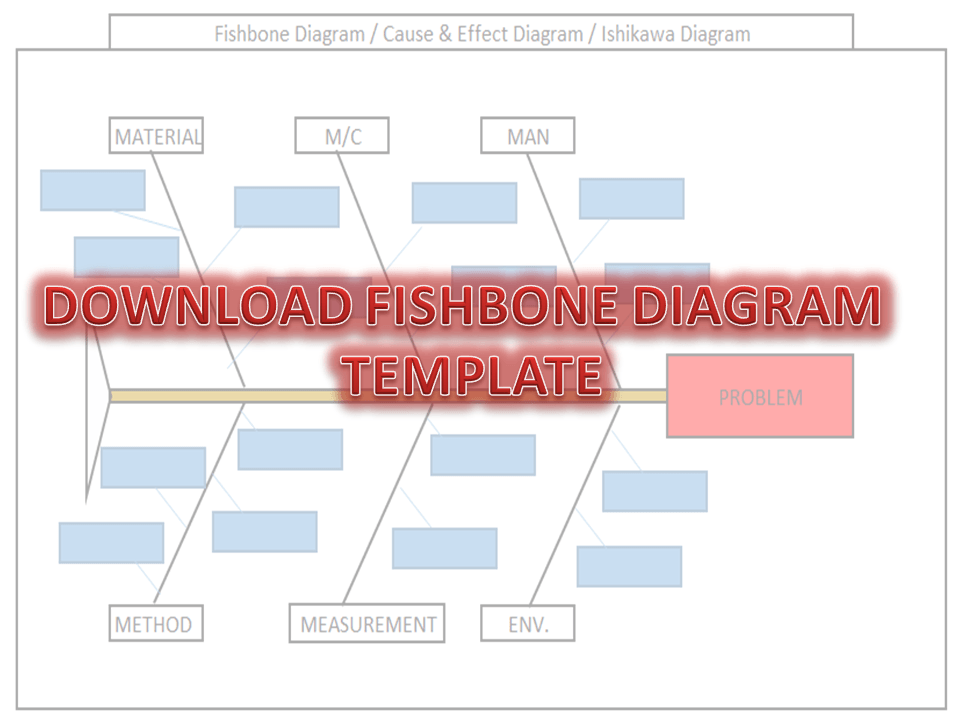
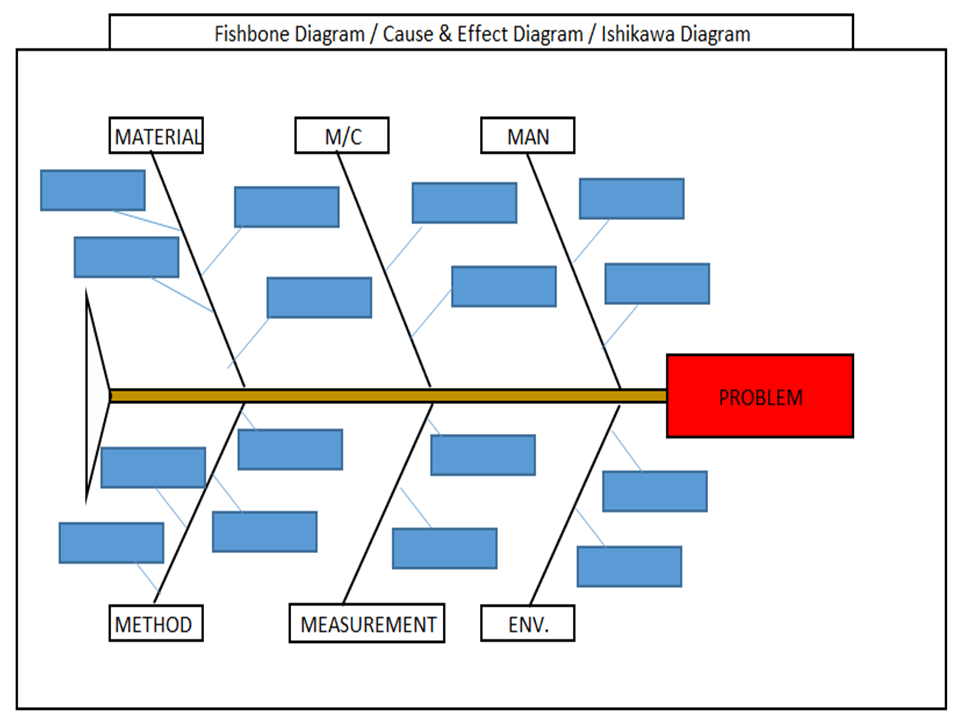
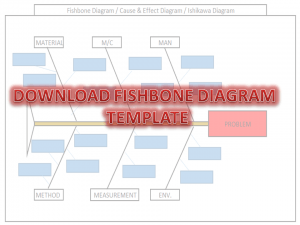
Download the Fishbone Diagram Template by clicking on the below link. Fishbone Diagram will help you to represent the Potential Causes of a Problem.
DOWNLOAD the Cause & Effect Diagram / Fishbone Diagram.
How to Use Fishbone
Diagram Template:
[Figure-1]
Step-1: Download the Fishbone Diagram Template (Link is given at the top)
Step-2: Enter the Name of the Problem in the Red Highlighted Box, marked in the Excel template (e.g. refer to the above Figure-1 for easy understanding)
Step-3: Identify and then enter the Potential causes in the Sky color box in the Excel template under Man, Machines, Material, Method, Measurement, and Environment.
How to Identify the
Potential Causes of a Problem:
Step-1: To make a CFT Team (Cross-Functional team). Members of CFT should be from different and different processes/areas or departments. E.g. someone from production, Quality, technical, R&D, Maintenance, etc.
Step-2: Individually identify the Causes through
Brainstorming.
Step-3: Before you identify the causes by all team members, you have to list up all causes without any repetition. Next, all members of the team should sit together to identify the new causes through Brainstorming. And finally, do the list up of all causes identify by individual and team.
Step-4: Represent all potential causes in the Cause and Effect Diagram Template or Fishbone Diagram Template or Ishikawa Diagram Template.
Step-5: Identify the Significant Causes with the help of Hypothesis testing.
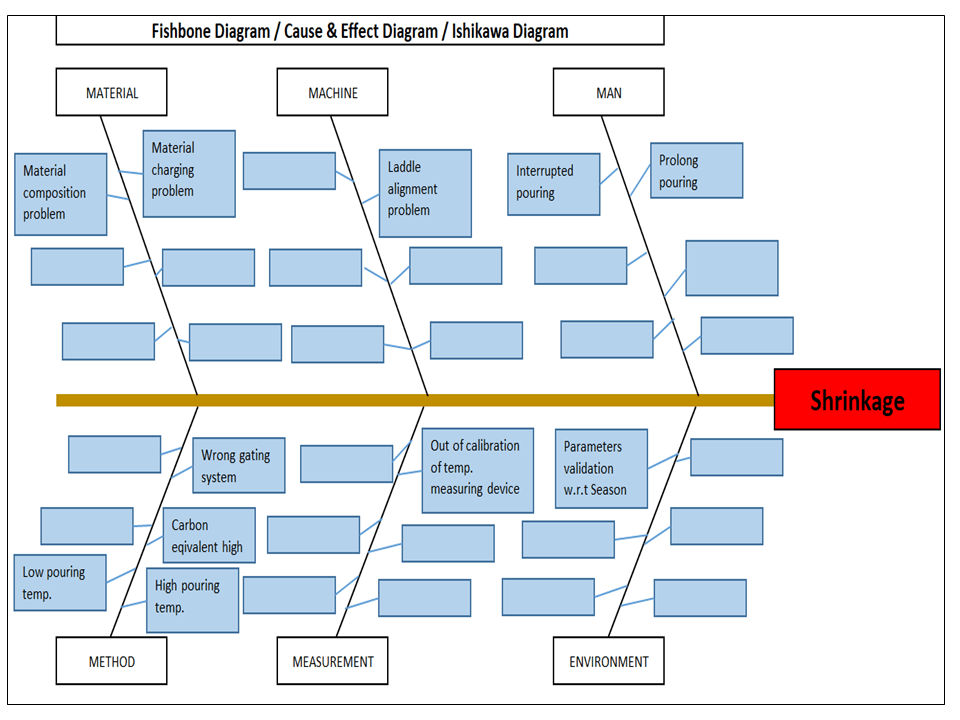
I have taken a Problem from the Iron casting Process as Shrinkage. Here I need to represent the Potential causes of Shrinkage in the Fishbone Diagram Template or Cause and Effect Diagram Template or the Ishikawa Diagram template. First of all, I made a CFT team considering the members from the production process, quality, Development, and Maintenance Department.
Instructed all members to identify the Potential cause relevant to their work function in individually through Brainstorming. Next, collect all Potential causes. And then call a meeting for further identification of Causes together with all members through Brainstorming. List up all Causes and represent those in the Fishbone Diagram Template, just like the below figure.
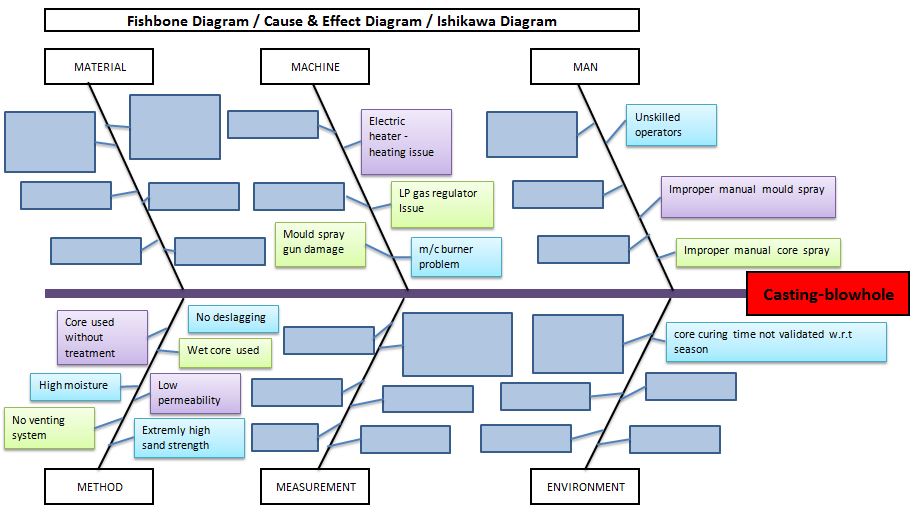
Example-2: Casting Blow-hole Problem:
Below are the potential causes that may cause the blow-hole problem in raw casting products;
Improper manual core spray.
Improper manual mould spray.
Unskilled operators.
Core curing time is not validated w.r.t season.
Core curing m/c burner problem.
LP gas regulator issue.
Electric heater -heating issue.
Mould spray gun damage.
No deslagging.
Wet core used.
Low permeability.
Extremely high sand strength.
No venting system.
High moisture.
Core used without treatment.
Benefits
of Fishbone Diagram:
It represents and displays the relationship of potential causes w.r.t Problem: – All Possible causes will represent them under which category among the man, machines, method, measurement, material, and environment.
Accumulate the possible Reasons in a single diagram: – It will be very difficult to resolve the problem without any idea of the Possible or Potential causes of any problem. So this diagram will show you all the causes simultaneously.
Involvement in Brainstorming: – It will help you to boost and structure the brainstorming to identify the possible causes or reasons.
It will help you to maintain the team focus to achieve the common goal: – As you know the team mission is to achieve the common goal means to identify the possible causes or reasons. All team members will identify the Causes or Reasons individually and together in a team to list-up the possible causes.
How to plot Ishikawa or cause and effect diagram of customer complaint:
first of all, download the cause and effect diagram template or Ishikawa diagram template from the given above link (at the top) and then follow the below steps. As per my own experience regarding the preparation of cause and effect diagrams related to customer complaints. at first, when I received a customer complaint, I just tried to understand the nature and type of problem and immediately called for a meeting for initial problem understanding with team members. Once it’s understood by all the team members, then we form a special team for 8D or CAPA formation.
Before doing the why-why analysis we have to identify the potential causes by using popular tools i.e. fishbone or cause & effect or Ishikawa diagram. To do so, the individual team members should identify the potential cause w.r.t customer complaints, Once you collect the all identified potential causes by individual members, then you have to plot the final fishbone diagram to keep in your mind with the repeated potential causes. when you choose to form the team at that time members should be in CFT of that process where the customer problem is related.
Our Author is an experienced professional in Quality Management Systems, Quality Assurance, Operations, and Business Excellence, with cross-industry expertise in Automotive, AMR, Robotics, Battery Manufacturing, Foundry, and Sheet Metal industries. He has strong expertise in international standards including IATF 16949, ISO 9001, ISO 14001, ISO 45001, and ISO 17025, along with methodologies such as TQM, TPM, and Six Sigma. He holds a degree in Mechanical Engineering along with an MBA, combining strong technical acumen with strategic business insight, he is a Certified Internal Auditor, Lead Auditor, and Six Sigma Black Belt, with a proven track record in driving quality transformation and operational excellence.
Through TECHIEQUALITY, he shares practical insights, quality tools, and industry best practices to help professionals improve processes and achieve operational excellence.
How to calculate z-score in excel with a manufacturing example:
Hi Readers! Here, we are going to learn today how to calculate z-score in excel with manufacturing examples. And also we will understand the standard deviation calculation based on the sample and population. You can download the sample example excel template of z-score calculation from the below link as well.
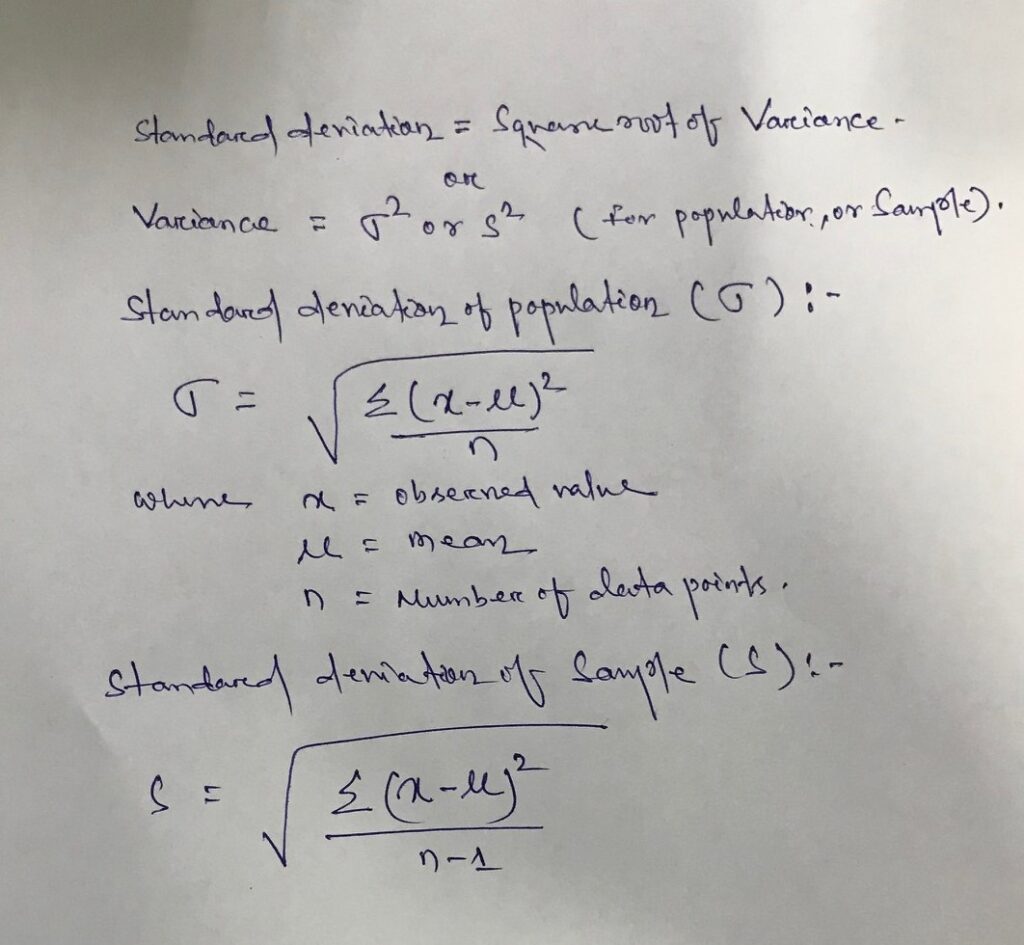
Before starting the calculation, we have to understand the variance and standard deviation of the sample and population, so that very easily we can calculate the value of Z-Score.
Relation between variance and standard deviation:
Standard Deviation is equal to the square root of the variance
σ or s = Square root of the variance
Variance = σ2 or s2
How to calculate z-score in excel with manufacturing example
For example, there is a 5 nos total data set that we have observed and these are given below as
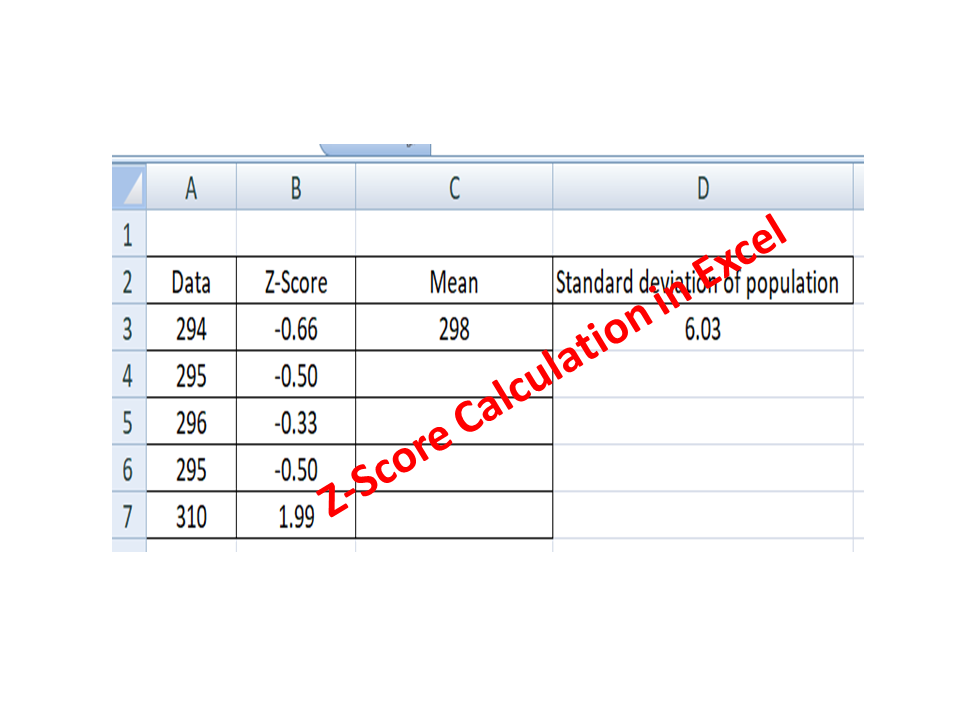
Data set = [294, 295, 296, 295, 310], and the company has set the range of -1 to 1 as “not an outlier”. The individual data value which is greater than 1 or less than -1 is the outlier value from the data set.
By using the above formula we are going to calculate the Z-score manually and then by Excel sheet.
Manual calculation of Z-Score:
Data set- = 294, 295, 296, 295, 310.
Z-Score = [xi-Mean]/ σ
Where, X1=294, X2=295, X3=296, X4=295, X5=310
Total number of data points (n) = 5
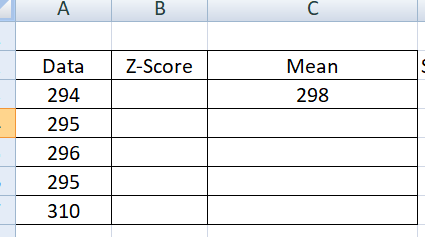
Mean of data set = (294 + 295 + 296 + 295 + 310)/5 = 298
Data
x-µ
(x-µ)2
Sum of (x-µ)2/n
Square root of (Sum of (x-µ)2/n)
294
-4
16
36.4
6.03
295
-3
9
296
-2
4
295
-3
9
310
12
144
Sum =
182
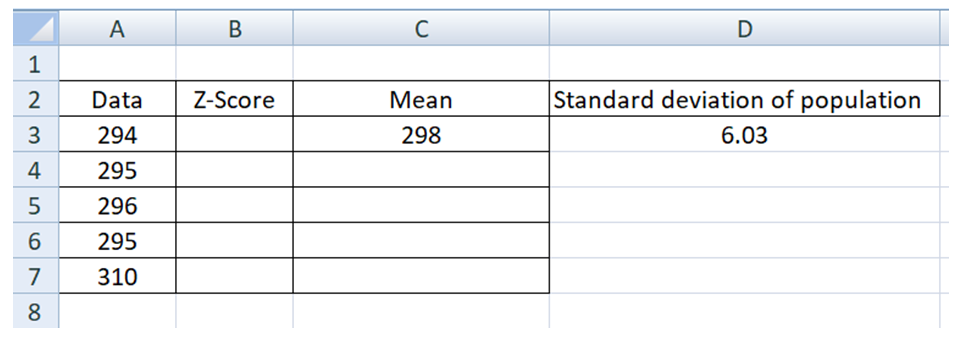
Mean, µ = 298, Standard deviation of population = 6.03, so Z-score is equal =
Z-Score = [xi-Mean]/ σ
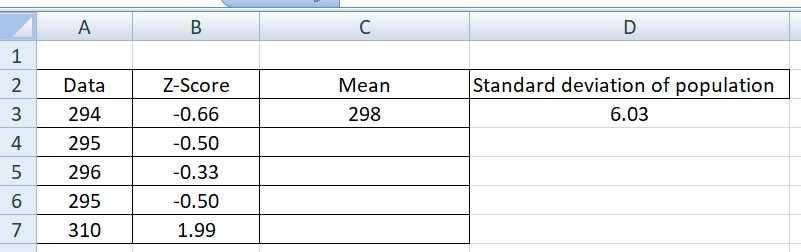
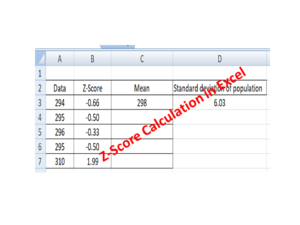
For data value “294” Z-score equal to = (294-298)/6.03 = -0.66, similarly we have calculated the z-score for data set.
Data
Z-Score
294
-0.66
295
-0.50
296
-0.33
295
-0.50
310
1.99
Excel Calculation Methods:
Step-1: Open the excel sheet
Step-2: Type the data value like below in the Excel sheet
Data
294
295
296
295
310
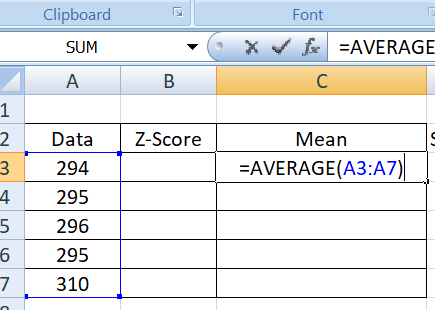
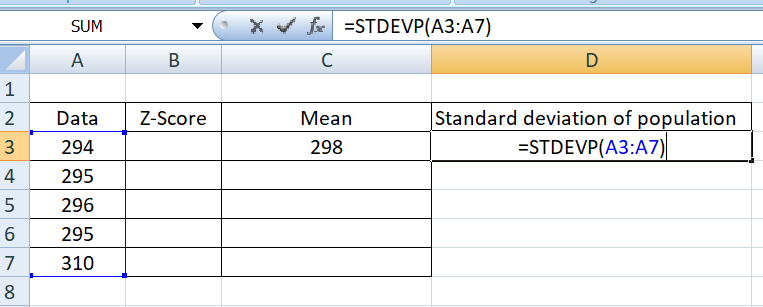
Step-3: Use the below Excel function formula to calculate the mean
Step-4: Use below excel function formula to calculate the standard deviation of the data set.
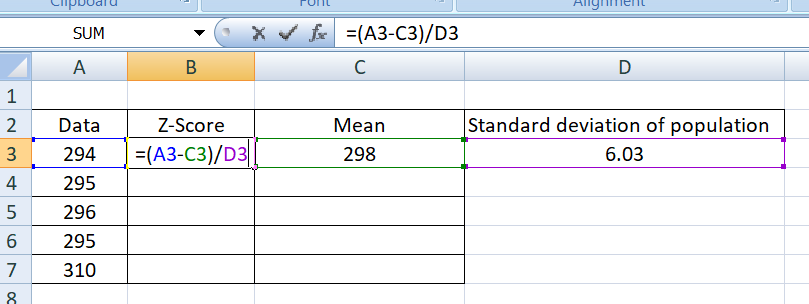
Step-5: Use the below function formula to calculate the individual Z-score of all data value
Conclusion and data interpretation: As per the organization outlier criteria, the data value 310 is the outlier data among the above data set because the Z-score is 1.99 which is greater than the value of 1
Free Templates / Formats of QM: we have published some free templates or formats related to Quality Management with manufacturing / industrial practical examples for better understanding and learning. if you have not yet read these free template articles/posts then, you could visit our “Template/Format” section. Thanks for reading…keep visiting techiequality.com
Our Author is an experienced professional in Quality Management Systems, Quality Assurance, Operations, and Business Excellence, with cross-industry expertise in Automotive, AMR, Robotics, Battery Manufacturing, Foundry, and Sheet Metal industries. He has strong expertise in international standards including IATF 16949, ISO 9001, ISO 14001, ISO 45001, and ISO 17025, along with methodologies such as TQM, TPM, and Six Sigma. He holds a degree in Mechanical Engineering along with an MBA, combining strong technical acumen with strategic business insight, he is a Certified Internal Auditor, Lead Auditor, and Six Sigma Black Belt, with a proven track record in driving quality transformation and operational excellence.
Through TECHIEQUALITY, he shares practical insights, quality tools, and industry best practices to help professionals improve processes and achieve operational excellence.
Corrective and Preventive Action Format | Download CAPA Format:
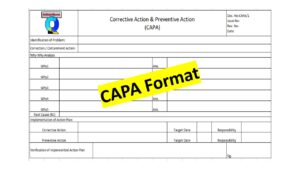
Corrective and Preventive Action Format with an example is illustrated below. CAPA has generally eliminated the causes of nonconformity. It is usually a set of actions i.e corrective action and preventive action, An Action to eliminate the Root cause of Non-conformity is called corrective action, and an action to eliminate the potential cause of non-conformity is called Preventive action.
After knowing the symptom of the Problems why-why analysis plays a major part in identifying the root cause of the symptom of the problem.
In Industry CAPA is used to bring about improvement in process operation and to eliminate the causes of Problems. Corrective and preventive action is also a part of the Quality management system. CAPA is fully followed by the PDCA cycle for the implementation of the action plan and for monitoring the effectiveness of the action plan.
Corrective action implemented w.r.t the Customer Return, field failure, Manufacturing Process defects, warranty failure, Product design failure, server failure, etc.
Preventive action is implemented in reaction to identifying the potential cause of nonconformity. Common preventive actions in industries are given below, but are not limited to:
Process/ potential failure Mode and Effects Analysis.
Design Failure mode and effects analysis
Quality Assurance Plan/ Control Plan
Standard Operating Procedure / Work Instruction.
Error Proofing/ Poka-yoke/ Mistake Proofing
Reaction plan
Risk mitigation plan
Alarms System
Process Validation
Product validation
Process layout.
Process feasibility study
Education and Training (Class Room / On-job-Training)
Preventive maintenance.
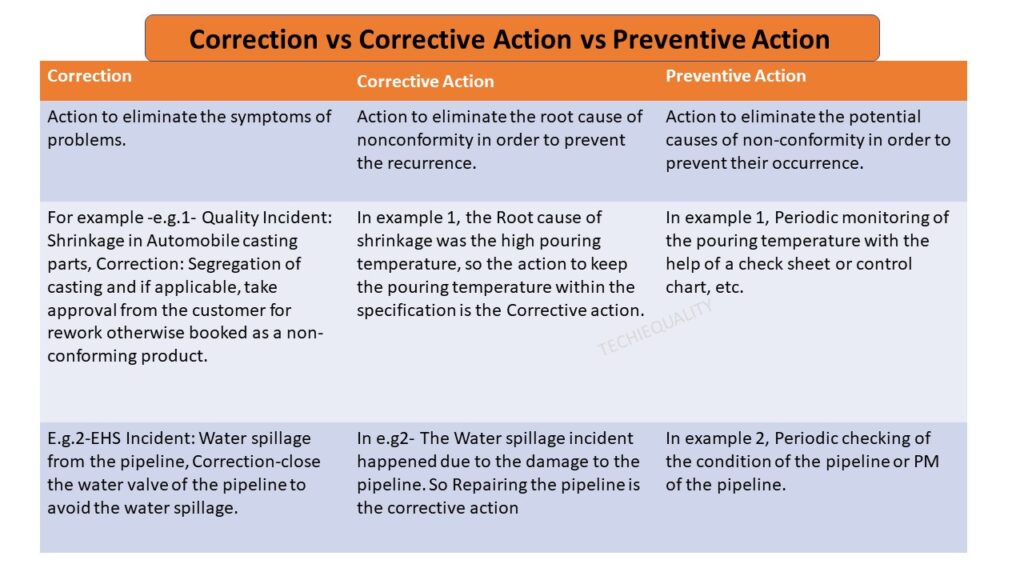
Corrective Action vs Preventive Action:
Correction
Corrective Action
Preventive Action
Action to eliminate the symptoms of problems.
Action to eliminate the root cause of nonconformity in order to prevent the recurrence. The action to be taken in order to eliminate the root cause.
Action to eliminate the potential causes of non-conformity in order to prevent their occurrence. To eliminate the potential cause of problems. The action to be taken in order to avoid root cause recurrence.
For example -e.g.1- Quality Incident: Shrinkage in Automobile casting parts, Correction: Segregation of casting and if applicable, take approval from the customer for rework otherwise booked as a non-conforming product.
In example 1, the Root cause of shrinkage was the high pouring temperature, so the action to keep the pouring temperature within the specification is the Corrective action.
In example 1, Periodic monitoring of the pouring temperature with the help of a check sheet or control chart, etc.
E.g.2-EHS Incident: Water spillage from the pipeline, Correction-close the water valve of the pipeline to avoid the water spillage.
In e.g2- The Water spillage incident happened due to the damage to the pipeline. So Repairing the pipeline is the corrective action
In example 2, Periodic checking of the condition of the pipeline or PM of pipeline.
Correction vs Corrective action vs Preventive action
Corrective Action vs Preventive Action
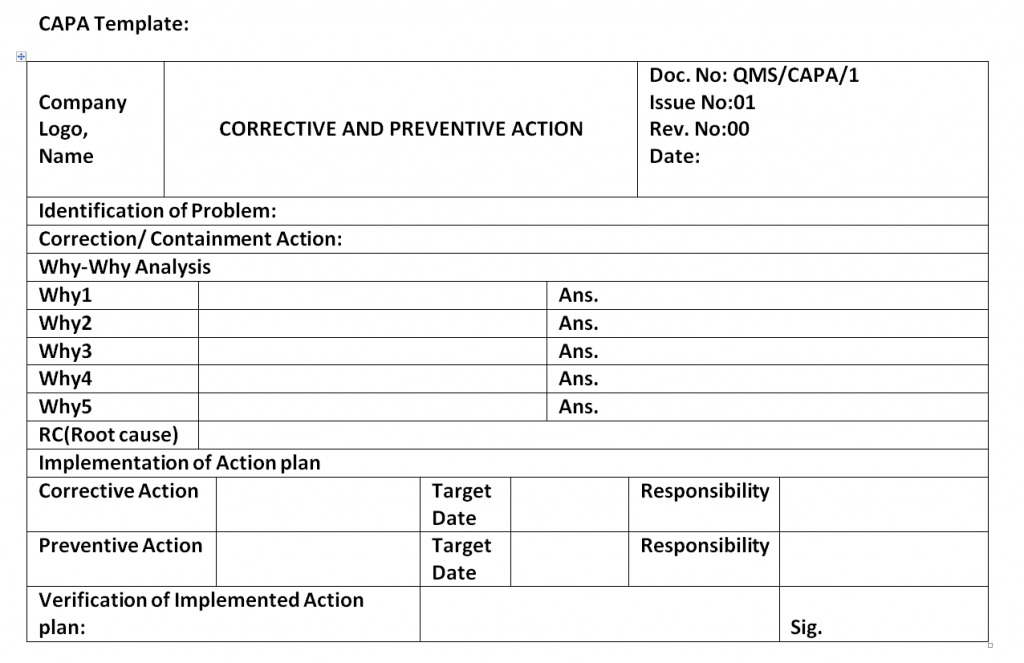
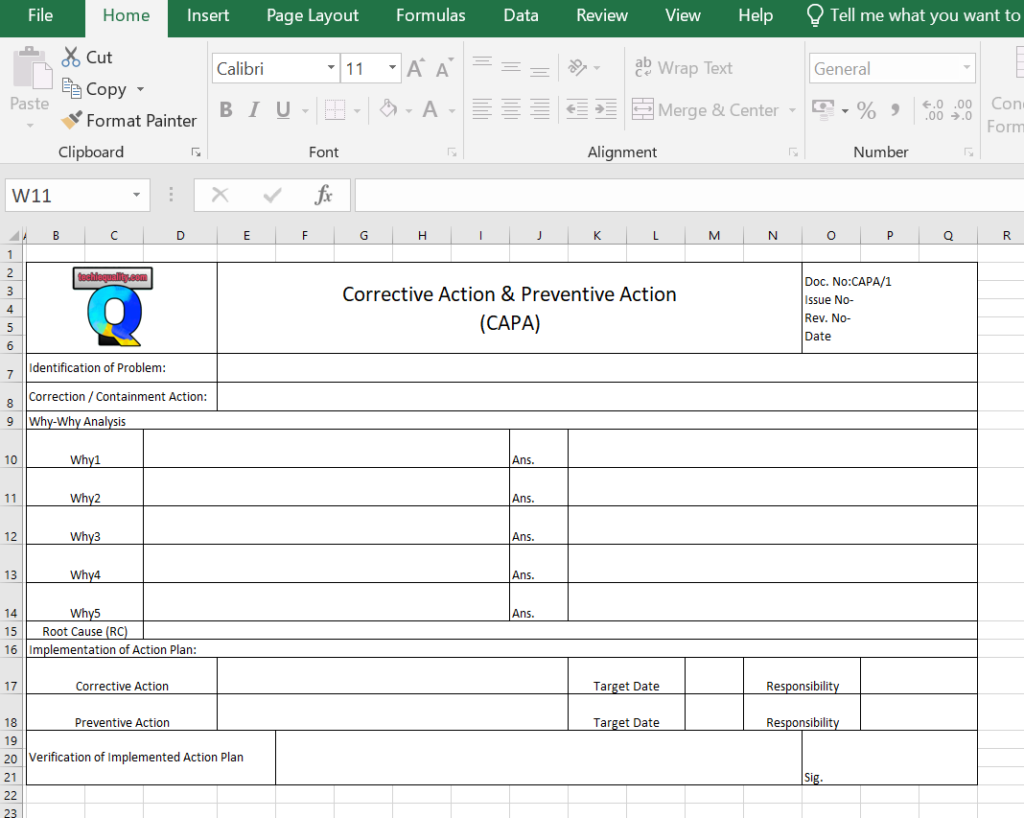
Corrective and Preventive Action Format / CAPA Format / CAPA Template in Word
Use our approved simple & best formats or templates in your organization/ manufacturing units and provide us with your valuable feedback. DOWNLOAD-Template/ Format of 7QC tools, Cp & Cpk Calculation Sheet, FTA, 5W2H, 5W1H, SWOT Analysis format, Run Chart, 8D Format, Control Chart, OEE calculation excel sheet, CAPA Word format /Template, etc.
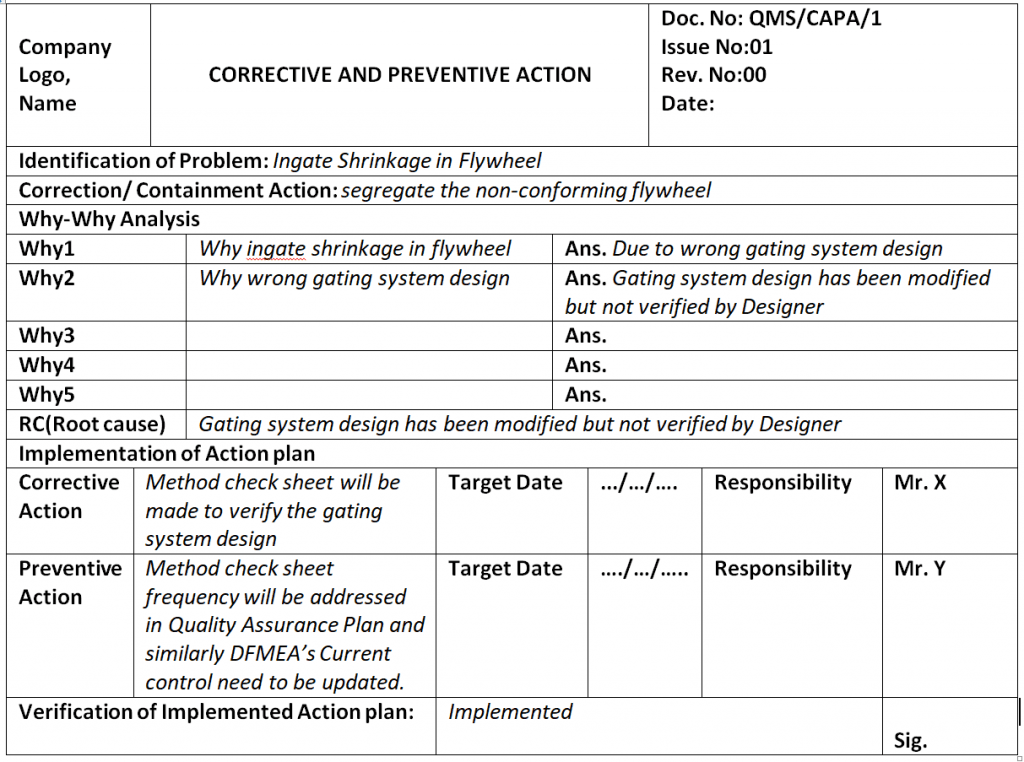
Ans. The gating system design has been modified but not verified by the Designer
Why-Why Analysis.
RC(Root cause): The gating system design has been modified but not verified by the Designer
Root Cause.
Implementation of the Action plan:
Corrective Action
A method check sheet will be made to verify the gating system design
Target Date
xx/yy/2020
Responsibility
Mr.Z
Preventive Action
Method check sheet frequency will be addressed in the Quality Assurance Plan and similarly, DFMEA’s Current control needs to be updated.
Target Date
xx/yy/2020
Responsibility
Mr.Z
Action Plan Example.
Verification of Implemented Action Plan: Implemented.
[Verification]
EXAMPLE-2:
Details description of Example-2 (CAPA of Fire Incidents):
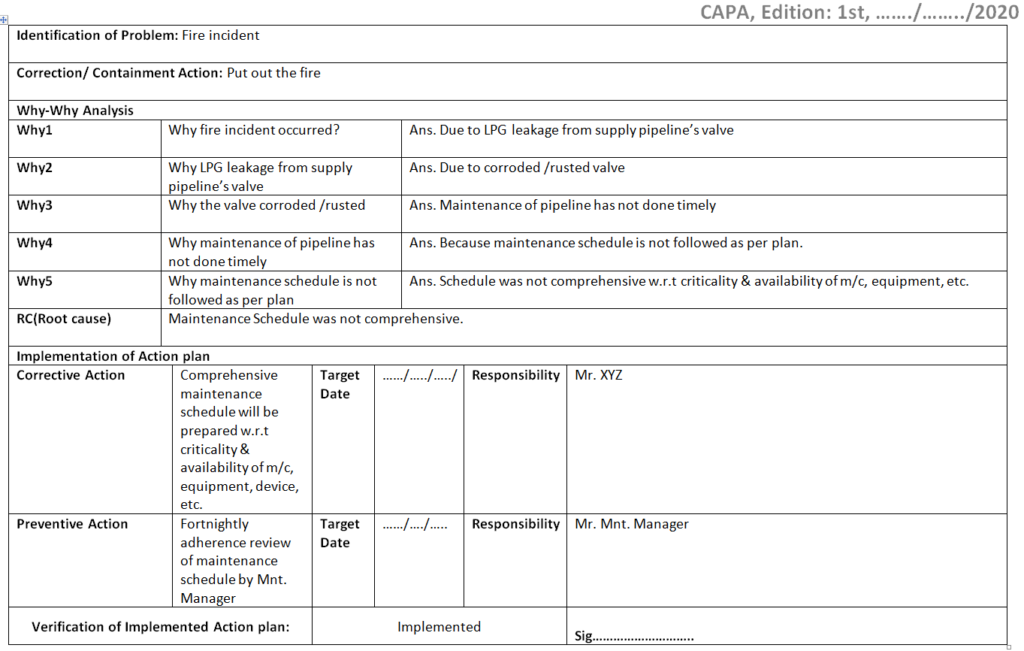
Identification of Problem: Fire incident.
Correction/ Containment Action: Put out the fire.
Why-Why Analysis of Fire Incident.
Why-1
Why fire incidents occurred?
Ans. Due to LPG leakage from the supply pipeline’s valve
Why-2
Why LPG leakage from the supply pipeline’s valve?
Ans. Due to a corroded /rusted valve
Why-3
Why is the valve corroded /rusted?
Ans. Maintenance of the pipeline has not been done timely
Why-4
Why maintenance of the pipeline has not been done timely?
Ans. Because the maintenance schedule is not followed as per plan.
Why-5
Why maintenance schedule is not followed as per the plan?
Ans. The schedule was not comprehensive w.r.t criticality & availability of m/c, equipment, etc.
5-W Analysis
RC (Root cause): The maintenance Schedule was not comprehensive.
Implementation of the Action Plan:
Corrective Action: A comprehensive maintenance schedule will be prepared w.r.t criticality & availability of m/c, equipment, device, etc.
Responsibility: Mr. XYZ (Maintenance Engineer)
Preventive Action: Fortnightly adherence review of maintenance schedule by Mnt. Manager.
Responsibility: Mr. PQR (Maintenance Manager)
Action Plan Example
Verification of Implemented Action plan: Implemented
Filled up CAPA Format in Word:
CAPA format filled up with examples of fire incidents
EXAMPLE-3:
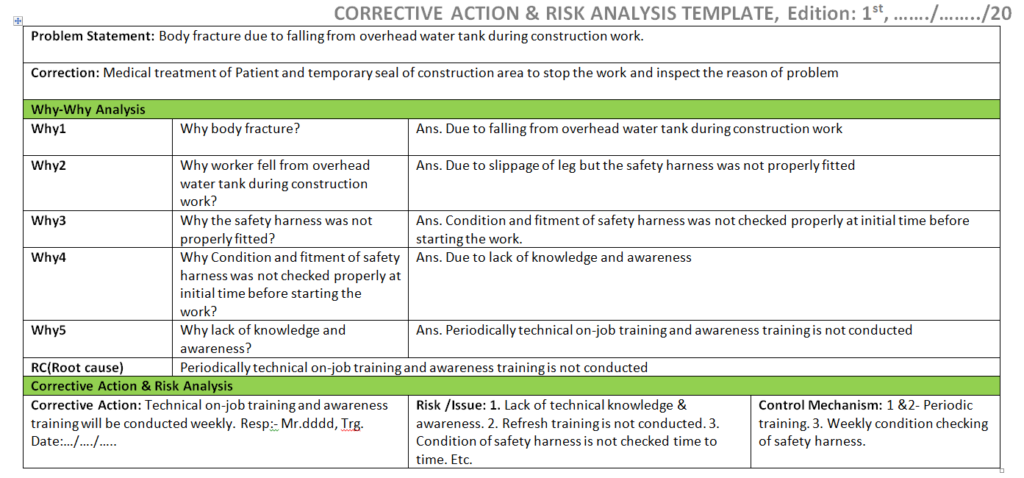
In this example-3, we will discuss the latest type of format or template of CAPA, as you know the preventive action part does not exist in ISO 9001:2015 standard, and the same was replaced by Risk, so we have to analyze the risk instead of preventive action. Hence considering with new ISO 9001:2015 standard we have prepared a new format/template called the Corrective action & risk analysis template and illustrated the same with simple examples.
CORRECTIVE ACTION & RISK ANALYSIS TEMPLATE
How to fill up the CARA Template /Format? (Illustrated with example):
Problem Statement: Body fracture due to falling from an overhead water tank during construction work.
Correction: Medical treatment of the Patient and temporary seal of the construction area to stop the work and inspect the reason for the problem.
Ans. Due to falling from an overhead water tank during construction work
Why-2
Why worker fell from an overhead water tank during construction work?
Ans. Due to slippage of the leg but the safety harness was not properly fitted
Why-3
Why the safety harness was not properly fitted?
Ans. The condition and fitment of the safety harness were not checked properly at an initial time before starting the work.
Why-4
Why Condition and fitment of the safety harness were not checked properly at the initial time before starting the work?
Ans. Due to a lack of knowledge and awareness
Why-5
Why lack of knowledge and awareness?
Ans. Periodically technical on-job training and awareness training is not conducted
5-Why Analysis
RC (Root cause): Periodically technical on-job training and awareness training are not conducted
Corrective Action & Risk Analysis:
Corrective Action: Technical on-job training and awareness training will be conducted weekly. Resp: – Mr.dddd, Trg. Date:…/…./…..
Risk /Issue: 1. Lack of technical knowledge & awareness. 2. Refresh training is not conducted. 3. The Condition of the safety harness is not checked from time to time. Etc.
Control Mechanism: 1 &2- Periodic training. 3. Weekly condition checking of safety harnesses.
CARA Report
CARA format
Example-4:
Here, we are going to discuss one example related to an accident and consider the same scenario for CAPA analysis. let’s say an accident occurred at a manufacturing unit while a man operating a machine. A CFT has been formed to analyze the accident and they prepared the CAPA report, which is mentioned below;
Correction: Medical treatment was provided to the patient and temporarily barricade the zone and machine for inspection purposes.
Root Cause: Lack of awareness
Corrective Action: Awareness training shall be provided to operators/workers
Preventive Action: Periodically awareness training needs shall be identified and the same to be imparted to concerned personnel.
FAQ1:
What ISO 9001:2015 Said about CAPA?
Ans: As you know the new ISO 9001:2015 standard asked about Correction, Corrective Action, and Risk & its mitigation plan. but not asked for preventive action. same mentioned in clause no.10.2 Nonconformity and corrective action in ISO 9001:2015 Standard. and for retained documented information, ISO 9001 asked for mandatory requirements as evidence of 1] the nature of the nonconformity and any subsequent actions taken. 2] the results of any corrective action.
What IATF 16949:2016 Said about CAPA?
Ans: The new IATF 16949 standard asked for Corrective action, Preventive action, and risk. In clause no 6.1.2.1, it’s said about Risk analysis, In 6.1.2.2-Preventive action and clause no. 10.2-Nonconformity & Corrective Action. After the incorporation of risk analysis in the IATF 16949 standard, still preventive action exists there.
FAQ2:
What is CAPA?
Ans: The full form of CAPA is Corrective Action & Preventive Action. corrective action eliminates the root cause of a non-conformity and PA eliminates the cause of potential non-conformity.
How to write corrective and preventive action reports?
Ans: We have already described at the top of this post with an example, simply go through it. Anyway, the most important part is the Root cause analysis and Why-Why analysis. Once you follow the right step to complete the RCA then, it will be very easy to write the CAPA in CAPA format /report, but in the new ISO 9001:2015 standard the preventive action has been replaced by Risk analysis, so when you write the CAPA, you have to cover the correction /containment action, corrective action then, you are supposed to identify the risk.
How to fill up the CAPA format quickly?
follow the below steps to fill up the CAPA format/template quickly;
Identify the problem.
Take containment action
Do the RCA.
Implement the CA & PA.
Do the document changes
Monitor the effectiveness
Corrective and Preventive action as per ISO 9001:2015 & IATF 16949:2016
Our Author is an experienced professional in Quality Management Systems, Quality Assurance, Operations, and Business Excellence, with cross-industry expertise in Automotive, AMR, Robotics, Battery Manufacturing, Foundry, and Sheet Metal industries. He has strong expertise in international standards including IATF 16949, ISO 9001, ISO 14001, ISO 45001, and ISO 17025, along with methodologies such as TQM, TPM, and Six Sigma. He holds a degree in Mechanical Engineering along with an MBA, combining strong technical acumen with strategic business insight, he is a Certified Internal Auditor, Lead Auditor, and Six Sigma Black Belt, with a proven track record in driving quality transformation and operational excellence.
Through TECHIEQUALITY, he shares practical insights, quality tools, and industry best practices to help professionals improve processes and achieve operational excellence.
Implementation of KAIZEN in Industry is the most important key to the Industry for Continuous Improvement in any type of Loss or Waste. But the sustaining of any type of kaizen is the question mark for the industry. Many industries try their best to implement the kaizen at the initial stage is become successful. but sustaining the continuous improvement program is very difficult. Kaizen is the Key Input to all types of Business system standards. We will discuss here details about the comprehensive steps of the KAIZEN implementation program and its Sustainability.
Step-1: Identify the Big Losses or Wastage in process or Areas
Based on the Historical data you have to select the higher contribution losses among the sets of different types of Losses in a particular process where you would like to Improve. Basically, the Pareto chart you can use to identify the Loss contribution among the sets of losses.
Step-2 Formation of Team
It is the same as what generally all types of project teams are made. The Process or Section In-charge will be the leader of the Kaizen Project. and other team members should be from different functions such as production, quality, development, maintenance, etc. Now leader will give contributions to clarify the individual roles and responsibilities of each and every member. Responsibility and Activity Matrix need to be prepared before going to the next step. Here is one example of an Activity matrix.
Before collecting data, you have to identify the potential cause of the problem. Data need to be collected for a better understanding of the correlation between potential causes and problems.
Step-4 Analysis
This step is the most important step for action. Here you have to do a why-why analysis. And need to follow the narrow steps of Brainstorming to identify the Root cause through the involvement of each individual member of the team.
Step-5 Implementation of Project
Here aforesaid Kaizen Activity Matrix needs to be executed for the successful implementation of the Project or you can also be laid down the milestone chart or Gantt chart for the implementation of the project. During the Project implementation budget needs to be considered.
Step-6 Achievement of Kaizen Goal
Check up on the result of kaizen and also effectiveness. Address the Tangible and Intangible benefits.
Step-7 Standardization
The job is not over yet. here you have to prepare the SOP, Fill up the Kaizen template, need to impart awareness about Kaizen’s benefits, etc. This will call for making those a working system. Horizontal deployment over a similar area will give you the strength of the organization as cumulative tangible and intangible benefits.
Step-8 Sustenance
In step Sustenance, Sustainability Kaizen audit on a minimum monthly basis needs to be carried out.
Kaizen Examples:
as you know Kaizen is the best practice in the manufacturing industries for continuous improvement. I am sharing here my own experience that how I was identifying the kaizen idea in several operational areas.
when I was involved in shop floor manufacturing activities, every day on the morning shift I was analyzing the line rejection with details cause, and periodically did the Q component inspection. after doing the analysis and several types of Gemba auditing, finally, I was preparing problems identified report w.r.t man, machine, methods, material, and other factors for kaizen idea / continuous improvement purpose. discussed all problems related to the concerns department and collected their suggestions/improvement points. Given below is the kaizen methodology that you can follow to implement kaizen in your work zone.
List out the current problems, and issues in your work areas.
Find out the opportunities.
Categories the problems and find out which one is fit for Kaizen.
Do the Why-Why analysis.
Find out the Root causes
Take the Action Plan (CAPA).
Implement the action plan
Monitor the effectiveness.
Standardize the document
Visualize the data, SOP, OPL, etc.
Calculate the cost savings.
Do the periodic Kaizen sustenance audit to know the actual status or function of Kaizen.
Objectives
Helping tools/techniques/methods for kaizen
Kaizen
To eliminate waste, optimize productivity, and achieve continuous improvement.
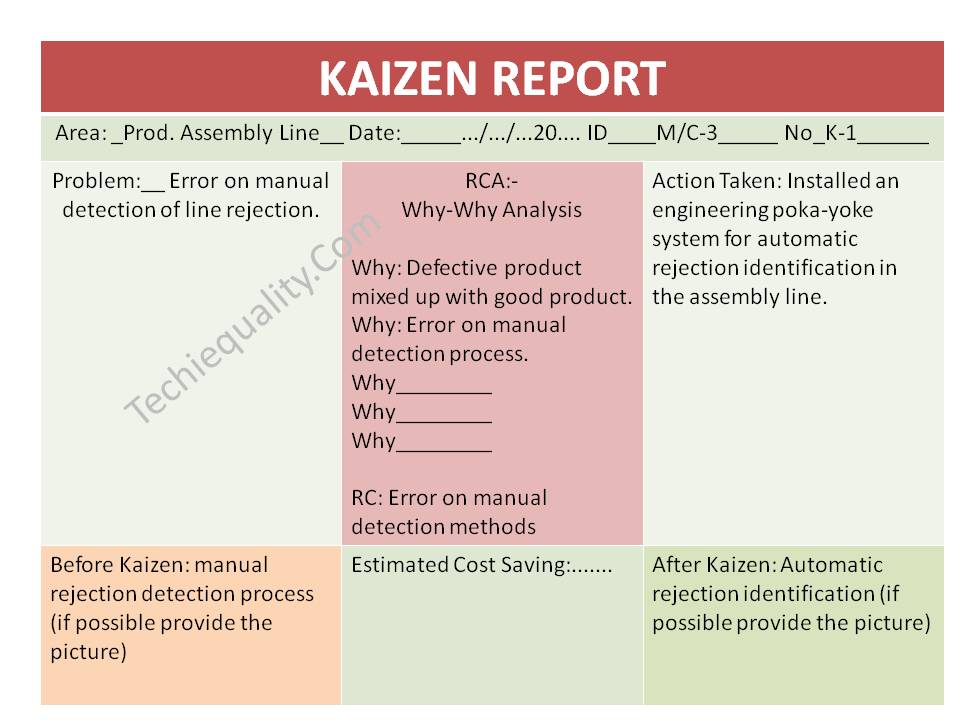
For kaizen examples, let’s say a company has a manual process for line rejection identification in the product assembly line, The engineering team developed a Kaizen idean and installed an engineering poka-yoke system for automatic rejection identification in the assembly line. we have prepared the same in the kaizen report, which is given below;
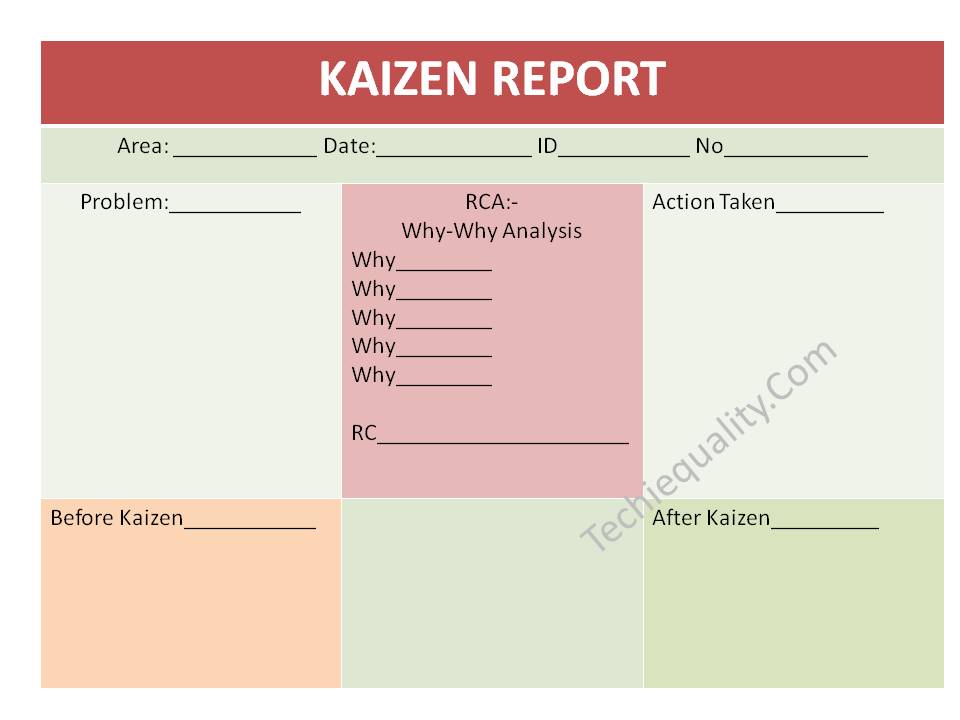
Kaizen Template:
Below kaizen template is very simple to understand and easy to implement. this kaizen sheet has very simple nomenclature, those are normally used in manufacturing industries. for a better understanding, you can refer to the above filled-up kaizen sheet/ report.
Kaizen Sustenance Checking Methods:
Implementation of kaizen is important but sustenance of the kaizen is very important, so you can follow the below steps to check the sustenance of kaizen.
List out the monthly kaizen for your work zone.
create a Team.
Do at least half yearly kaizen sustenance audit
If possible then, link the kaizen with the daily manufacturing operation check sheet.
Incorporate the kaizen-poka yoke in the control plan and do the periodic test.
Our Author is an experienced professional in Quality Management Systems, Quality Assurance, Operations, and Business Excellence, with cross-industry expertise in Automotive, AMR, Robotics, Battery Manufacturing, Foundry, and Sheet Metal industries. He has strong expertise in international standards including IATF 16949, ISO 9001, ISO 14001, ISO 45001, and ISO 17025, along with methodologies such as TQM, TPM, and Six Sigma. He holds a degree in Mechanical Engineering along with an MBA, combining strong technical acumen with strategic business insight, he is a Certified Internal Auditor, Lead Auditor, and Six Sigma Black Belt, with a proven track record in driving quality transformation and operational excellence.
Through TECHIEQUALITY, he shares practical insights, quality tools, and industry best practices to help professionals improve processes and achieve operational excellence.