DMAIC Tools | DMAIC Template | Six Sigma Methodologies | 30+ Free Tools

DMAIC Tools

DMAIC Tools | DMAIC Template | Six Sigma Methodologies | 20+ Free Tools

Hello readers! Today we are going to discuss an important topic on various DMAIC tools, Six Sigma methodologies, and the DMAIC template and its usage. Six Sigma is a very popular methodology that has been using in manufacturing industries for continuous improvement. A set of methodologies and various tools are used to improve the processes by optimizing efficiency, eliminating waste, reducing defects, minimizing variation, reducing errors, and increasing quality, etc.  The main objectives of Six Sigma projects are to enhance the Sigma level and to reduce or minimize the DPMO (Defects per million opportunities).

 What are the Six Sigma Belt Levels?

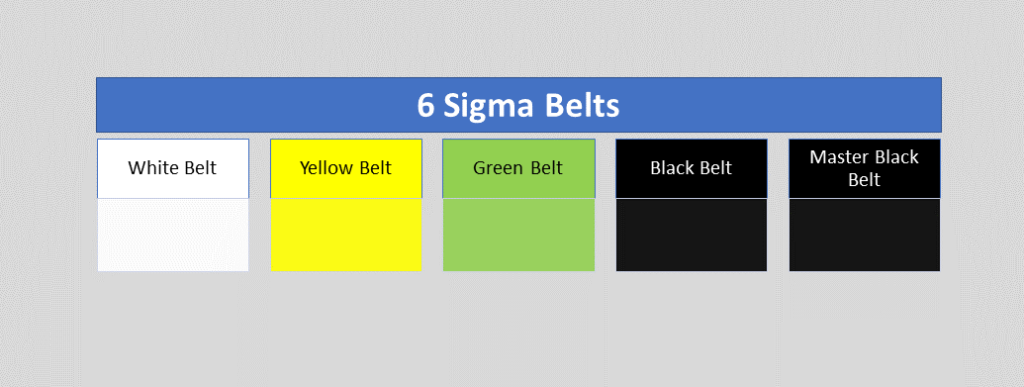
As we know that there are various belts in Six Sigma certifications, for example, master black belts, black belts, green belts, yellow belts, white belts, etc. Let’s understand the details of all belts;

six sigma belts level
Six Sigma Belts Level

White Belt:

 This is the first level of six sigma certification. During white belt certification, you can learn the overview of the entire six sigma course. This six sigma course mainly emphasizes the basic concept of six sigma, fundamental methodology, terminology, etc. the course time periods may depend on the course providers once you are certified in the course you can easily understand the basic of Six Sigma and can work as problem-solving team that supports the overall projects teams. Many times people are confused about choosing the six sigma certification belt level. But I hope after reading all the Six Sigma belt levels, you can easily choose the course for yourself.

Yellow Belt:

Don’t confuse yourself when hearing about different types of belts. Different types of belts are classified according to the different levels of course like basic to advanced, roles of the certificate holder, level of project, knowledge level, etc. so according to your understanding of Six Sigma you can choose the certification course. The yellow belt is the second level of the certification course. The yellow belt certificate holder can participate as a project team member. And can review the process improvement that supports the project and review the six sigma process. However, the yellow belt is not adequate to empower certificate holders to lead a six sigma project. 

Green Belt:

Through the Green Belt, a GB-certified holder may have with proper knowledge and understanding of Six Sigma methodology, application of tools, etc. As a GB certified holder, you can lead the GB Six Sigma project or teams. In the GB project, you can take part as a team leader or member of the GB six sigma project with strategy implementation, methodology application, problem-solving, decision-making, etc. You can help with the black belt project for data collection and analysis.

Black Belt:

The black belt certified holder’s primary roles are process improvement, variation reduction, quality enhancement, DPMO reduction, and Sigma level enhancement by applying the six sigma methodology and concept. This is the advanced level, of course, compared to the green belt. BB certificate holder leads the project, trains and coaches the project teams as well.

Master Black Belt:

MBB is the high point of the six sigma course. A master black belt certificate holder trains and coaches the black belt and green belt holder. Your role is to make a six sigma strategy and implement an advanced level. Act as a six sigma technologist and give the strategic direction to the next level in your organization. You play a vital role as an expert in providing leadership, facilitation, methodology application, and strategic direction.  

Now, we will discuss on some common numerical terminology of Six Sigma which is frequently used in projects like DPU, DPO, DPMO, DPPM, Cp, Cpk, RPN, PN, Gauge R&R, Sigma level, P value, etc. sigma level you can choose from the sigma level table w.r.t DPMO value or you can calculate the value on excel as well.

DPMO, DPU, DPO, DPPM:

DPMO (Defects per million opportunities):

Before starting the DPMO calculation and concept, we will be understanding what is defects and defective items with the manufacturing practical example. Let’s consider a process control inspector doing the inspection in the production line and he booked some non-conforming items. He has recorded 5 non-conforming items and rejected those due to finding the following defects in items

ItemsDefects
Item-1Defect-1, defect-2, defect-3
Item-2defect-3
Item-3defect-2, defect-3
Item-4Defect-1, defect-2
Item-5Defect-4

Now, you can see in the above table we have recorded the 5 items and their defects. Every 5 items have a defect, so all 5 items are defective items or non-conforming items. If you look closely at the above table then you can find one thing that each item has one or more than one defect in a single unit. So, for example, item-1 is a defective product and having 3 defects. I hope the concept of defective vs defects is now understood. So, let’s arrange the above data table for easy understanding.

ItemsDefect-1Defect-2Defect-3Defect-4
Item-1xxx 
Item-2  x 
Item-3 xx 
Item-4xx  
Item-5   x
Total Defects =2331

The total defects of the 5 items are 9. (2+3+3+1). And the total number of defective items is 5.

Now we will calculate the value of DPU, DPO, DPMO, and DPPM.

In the above table, we found the following data as;

Total Defects = 9
Total Defective unit = 5
Defects opportunity per unit = 4
Total Units (for example) = 100 nos.
Total defects opportunities = 400 (4 x 100)

DPU (Defects per unit):

DPU Formula = Total number of Defects / Total units

DPU Calculation: DPU = 9/100 = 0.09

Defects Per Opportunity- DPO:

DPO Formula = Total number of defects/ (number of units x defects opportunity per unit)

= Total number of defects/ Total defects opportunities

= 9/ 400 = 0.0225 = 0.023

(Defects per million opportunities) DPMO:

DPMO Formula =

{Total number of defects/ (number of units x defects opportunity per unit)} x 1000000

= (Total number of defects/ Total defects opportunities) x 1000000

DPMO Calculation:

= (9/400) x 1000000

= 22500

(Defective Parts Per Million) DPPM:

DPPM Formula = (Total Defective parts / Total parts) x 1000000

DPPM calculation: (5 / 100) x 1000000

 = 50000

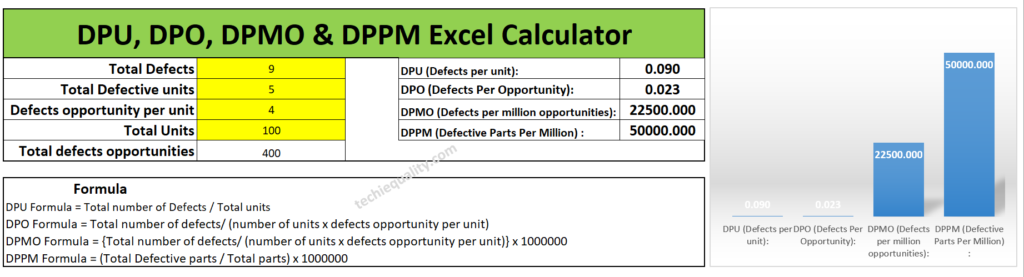
According to the above data set the DPU, DPO, DPMO, and DPPM calculated values are given below table.

Date Set:
Total Defects = 9
Total Defective unit = 5
Defects opportunity per unit = 4
Total Units (for example) = 100 nos.
Total defects opportunities = 400 (4 x 100)
Values:
DPU (Defects per unit): 0.09
DPO (Defects Per Opportunity): 0.023
DPMO (Defects per million opportunities):22500
DPPM (Defective Parts Per Million) : 50000

Excel calculator:

If you are interested to download the Excel DPMO calculator and DPPM calculator then download them from the below link.

Download Excel DPMO & DPPM Calculator

DMAIC Tools

How to use Excel DPMO & DPPM Calculator?

It’s very simple to use our excel template just download the excel calculator and then follow the below steps.

Step-1: Download the excel DPMO and DPPM calculator from the above given link.

Step-2: Enter the value only on the yellow highlighted box.

Step-3: The DPU, DPO, DPMO, and DPPM values will be calculated automatically.

Manufacturing Example:

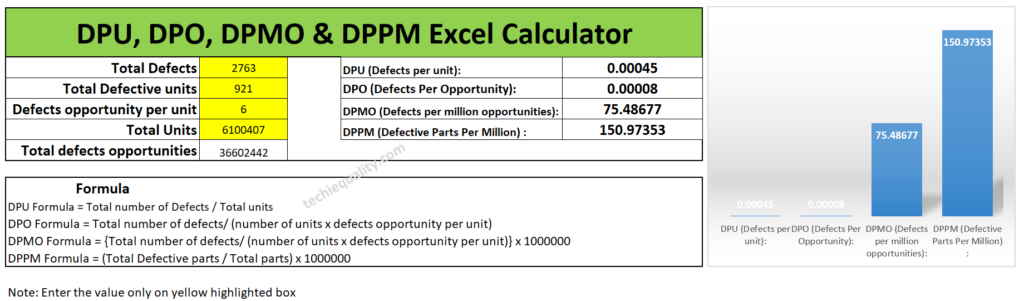
Let’s consider a company manufacturing automobile parts. And they are producing x nos of parts on a monthly basis but facing a huge rejection in the production line at the blanking and piercing operation process. so, it has been decided in the quality meetings for improvement projects to reduce the rejection% and improve the variation. So, for the improvement project, the Line QA engineer collected the following data for the calculation of DPU, DPO, DPMO, and DPPM for project input. Data are given in below table;

Total Defects = 2763
Total Defective unit = 921
Defects opportunity per unit = 6
Total parts produced = 6100407
Total defects opportunities = 3,66,02,442 (6100407 x 6)

Without wasting my time, I’m going to calculate the value by using the above excel template. And the calculated value is given below.

DMAIC Tools, DPMO calculator

I would request to all my readers, who are currently reading this article try to calculate the DPMO and DPPM values manually by apply the above formula and match with the excel calculator value.

Regarding the process capability calculation we have already uploaded the article you can read our article on How to measure process capability (Cp & Cpk)? Download Excel Template.

Process Capability Analysis |Cp & Cpk Calculation Excel Sheet with Example

Defectives vs Defects:

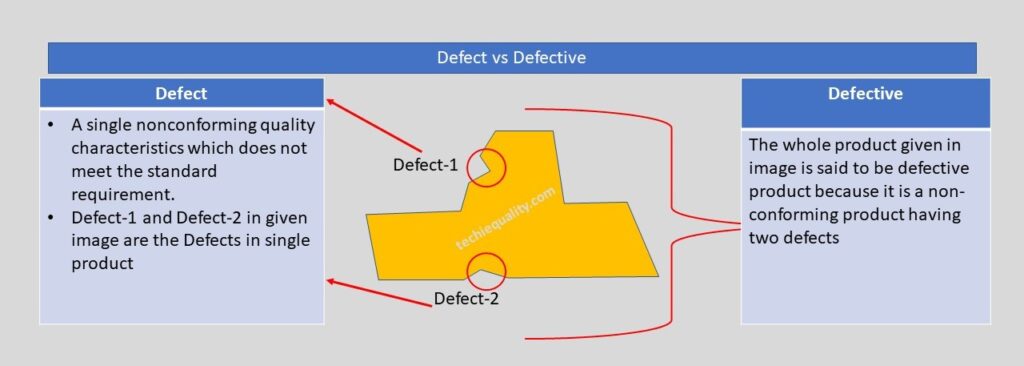
Defect vs Defective

 Let us understand the difference between Defect and Defective with the help of the above example. As you can see in the above image one product having two nonconforming quality characteristics which do not meet the standard or customer requirement, which is called a defect, and the whole product is called a defective product because having two defects. If you would like to know the total defective product and total defects in the above example, then we can easily say that the total defective product is 1 and the total defects are 2. Now I hope you understand the difference between defective and defects.

Six Sigma Methodologies:

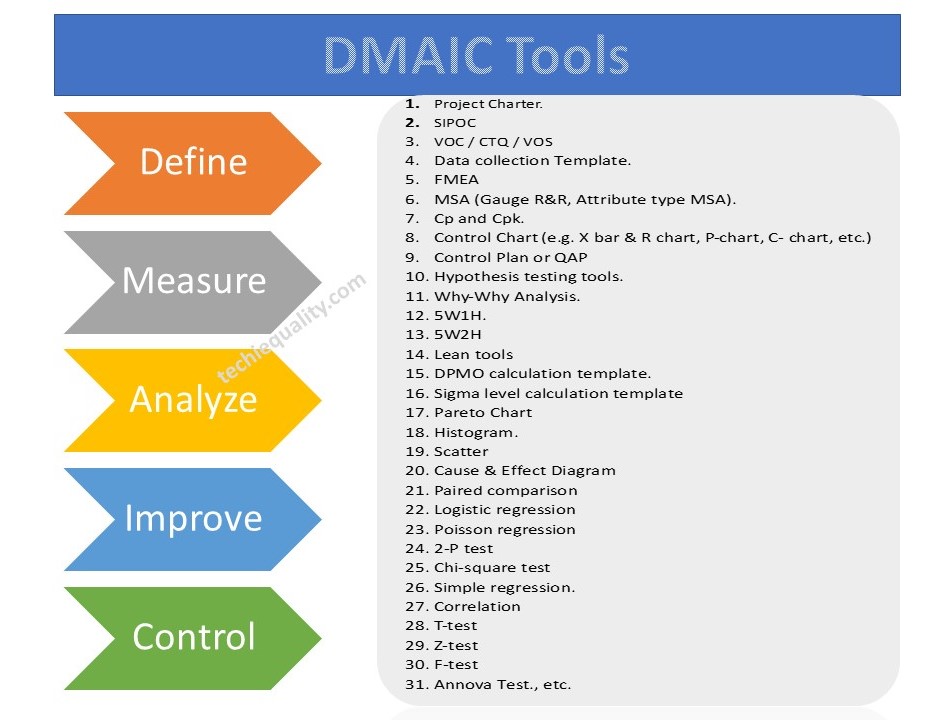
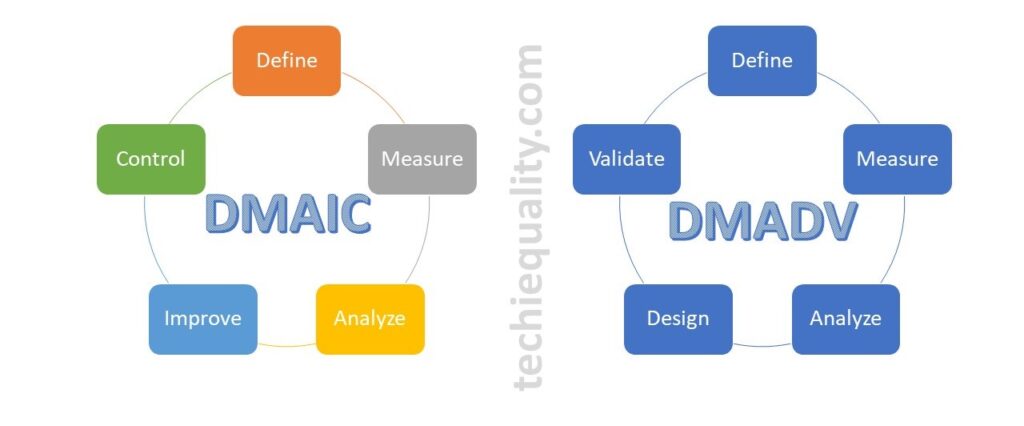
There are many methodologies used in six sigma projects but the popular methodology is DMAIC (Define, Measure, Analyze, Improve and Control). Similarly, in the design of the Six Sigma project, the popular methodology is used as DMADV (Define, Measure, Analyze, Design, and Validate). However in Lean Six Sigma, both lean tools and DMAIC methodology are used.

DMAIC vs DMADV

DMAIC Tools & DMAIC Template

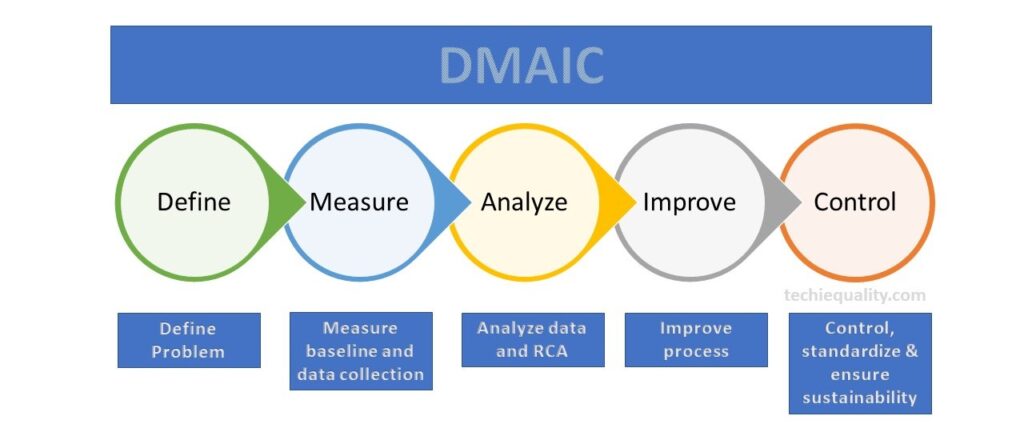
DMAIC methodology

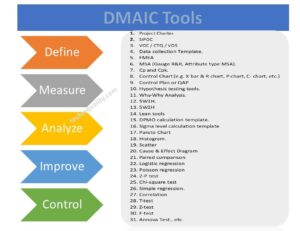
DMAIC methodology is a very popular mythology that is used in six sigma projects. The DMAIC methodology consists of 5 phases i.e. Define Phase, Measure Phase, analyze Phase, Improve Phase, and Control Phase. We have already published common and popular DMAIC tools, DMAIC templates, and formats. But following DMAIC tools are listed below;

DMAIC Tools, Template, and Format:

  1. Project Charter.
  2. SIPOC
  3. VOC / CTQ / VOS
  4. Data Collection Template.
  5. FMEA
  6. MSA (Gauge R&R, Attribute type MSA).
  7. Cp and Cpk.
  8. Control Chart (e.g. X bar & R chart, P-chart, C- chart, etc.)
  9. Control Plan or QAP
  10. Hypothesis testing tools.
  11. Why-Why Analysis.
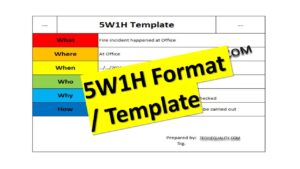
  12. 5W1H.
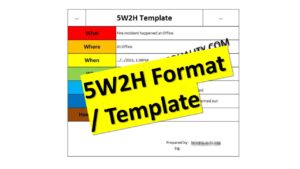
  13. 5W2H
  14. Lean tools
  15. DPMO calculation template.
  16. Sigma-level calculation template
  17. Pareto Chart
  18. Histogram.
  19. Scatter
  20. Cause & Effect Diagram
  21. Paired comparison
  22. Logistic regression
  23. Poisson regression
  24. 2-P test
  25. Chi-square test
  26. Simple regression.
  27. Correlation
  28. T-test
  29. Z-test
  30. F-test
  31. Annova Test., etc.
DMAIC Tools
DMAIC Tools

If you would like to download the free templates and formats then click on DOWNLOAD Free Templates.

QA/QC/TQM/Lean/Six Sigma Templates or Format:

More on Techiequality

Six Sigma Project Charter Template

Six Sigma Project Charter Template

Six Sigma Project Charter Template

Hello readers! Today we will discuss on a specific topic, which is related to the Six Sigma project charter. How effectively you can prepare the Six Sigma project charter so that each and everything will be in a single template for making the decision on the project for approval and next further project work. There are several methodologies and tools used in Six Sigma projects, but the popular methodologies are DMAIC and DMADV and similarly, so many tools are used in the project as well. We have already published the main important topic covering DMAIC Tools and some six sigma project examples in manufacturing industries. I hope both topics will be very helpful before preparing the Project charter. So, let’s read these topics first and then prepare the project charter. Without wasting your time you can download the Six Sigma Project Charter Template from the below-given link.

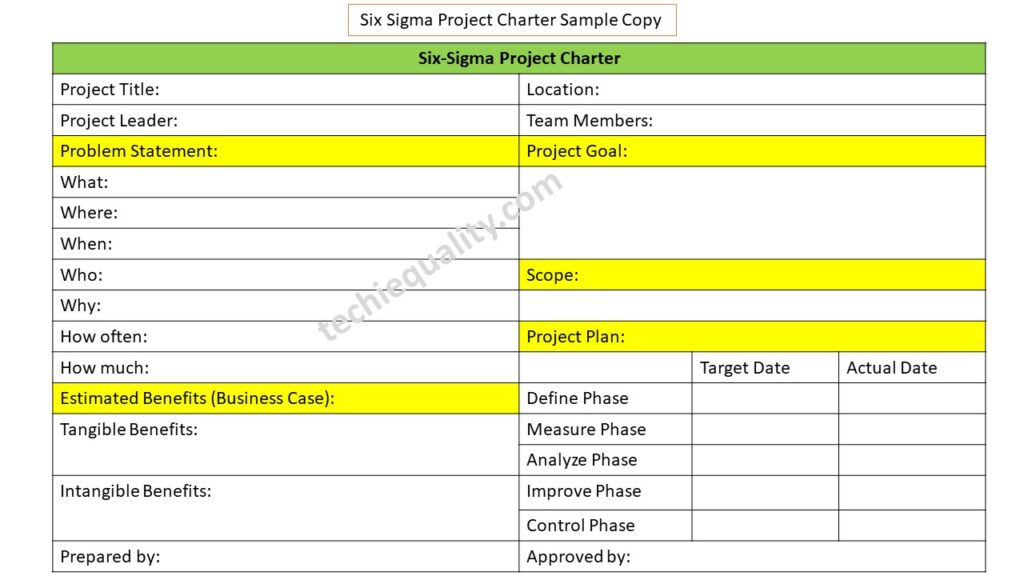
Download the Six Sigma Project Charter Template sample copy.

Six Sigma Project Charter Template

Before preparing the Six Sigma project charter you have to understand the methodology, project types, and 6-sigma belts, which will help you to make your project successful. The popular 6-sigma bets are yellow, green, black, and master black belts, and similarly, the Six-sigma project, lean Six-sigma, and design of Six-sigma project generally followed the different and different types of methodology like, DMAIC (Define, Measure, Analyze, Improve & Control), DMADV (Define, Measure, Analyze, Design and Validate).

Once you list out the problem set, you can start preparing the Six Sigma project charter to represent the project details and for getting approval. First of all, keep the past data of a minimum of 3 months, or for better results, you can consider 18 months of past data for representing the problem statement, problem/defects contribution, DPMO /DPPM calculation, and also for sigma level calculation.

Step by Step guide of Project Charter preparation with Manufacturing Example:

Let’s consider a company manufacturing a part PT-1 at process PRS-1. The rejection quantity of that part PT-1 is 2347 and the production quantity is 76000. The number of opportunities per unit is 5.

First of all, we are going to calculate the DPMO.

DPMO = Total Rejection quantities x 1000000/ (Total units x opportunities per unit)

= 2347 x 1000000/ (76000 x5)

= 6176

Now, I am going to prepare the Six Sigma project charter.

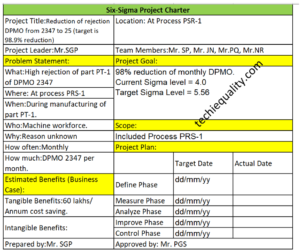
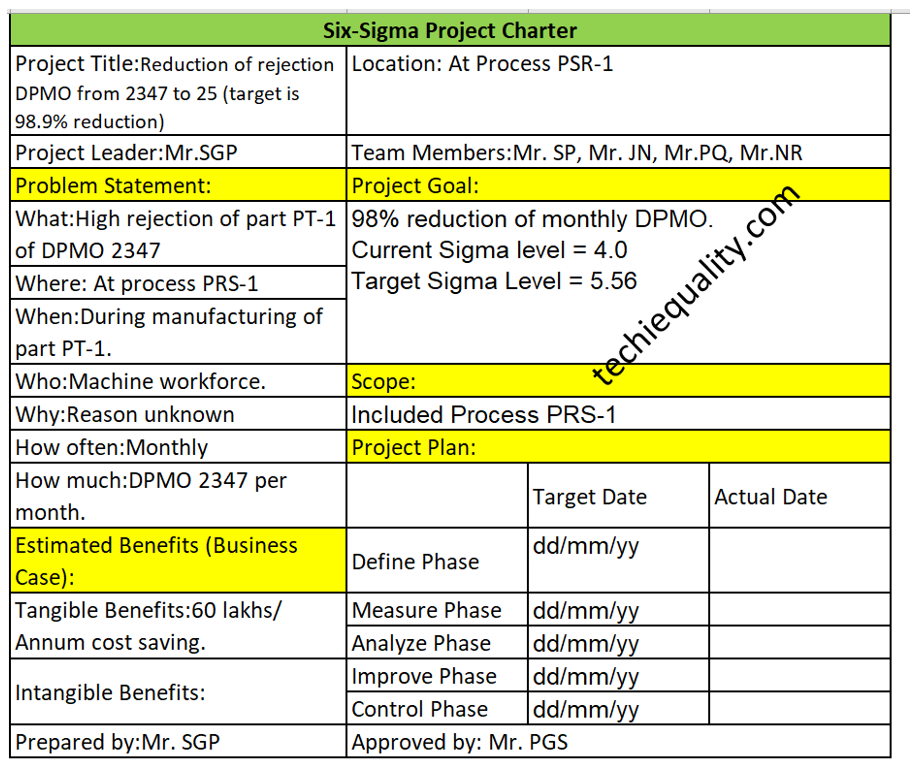
Project title: Reduction of rejection DPMO from 2347 to 25 (target is 98.9% reduction)

Problem Statement:

What: High rejection of part PT-1 of DPMO 2347

Where: At process PRS-1

When: During manufacturing of part PT-1.

Who: Machine workforce.

Why: Reason unknown

How often: Monthly

How much: DPMO 2347 per month.

Project goal: 98% reduction of monthly DPMO

Scope: Included Process PRS-1

Tangible Benefits: 60 lakhs/ Annum cost saving.

Six Sigma Project Charter Template
Six Sigma Project Charter Template Example

What are the key elements of a charter?

As you can see in the above project charter sample template, we have already highlighted the key elements of the Six Sigma project charter in yellow colour and these are the list below as;

  • Problem statement.
  • Project goals
  • Scope of the project
  • Estimated benefits/business case
  • Project plan. Etc.

What is the purpose of the project charter?

The main purpose of the project charter is to write down the key elements of the project and to get approval from the approver. And from time to time you have to update the Project plan status as well. It’s a synopsis of your Six Sigma project.

Useful Post:

Process Flow Diagram Template | Examples |Symbols |PFD

SIPOC Template | SIPOC Diagram Example of Manufacturing & Service Industry 

4M Change Management | How to implement in Manufacturing unit | Template | Format

C Chart Excel Template | Formula | Example | Calculation

More on TECHIEQUALITY


DPMO Calculation, Formula, Template & Manufacturing Example

DPMO Calculation

DPMO Calculation, Formula, Manufacturing Example & DPMO Excel Template

Hello readers! Today we will be discussing on DPMO calculation with manufacturing examples. The full form of DPMO is defects per million opportunities. Similarly, dpmo there are 3 more popular terms used in quality for the calculation of defect level and these are [1] DPPM, [2] DPO, [3] DPU. These terms are also frequently used in six sigma project work. If you would like to download the sample template of all 4 calculations in a single sheet then download it from below given link.

DPMO Calculation Excel TemplateDOWNLOAD

Formula of DPMO, DPPM, DPO, DPU:

DPU (Defects per unit):

DPU Formula = Total number of Defects / Total units

DPO (Defects Per Opportunity):

DPO Formula = Total number of defects/ (number of units x defects opportunity per unit)

DPMO (Defects per million opportunities):

DPMO Formula = {Total number of defects/ (number of units x defects opportunity per unit)} x 1000000

DPPM (Defective Parts Per Million):

DPPM Formula = (Total Defective parts / Total parts) x 1000000

First of all, below example-1 is one of the scenarios that are given for calculating the DPMO, DPPM, DPO, and DPU for all my article readers. So, this is the task for you my readers for your better understanding. Similarly, we are also going to solve one of the scenario-based questions for calculating the DPMO, DPPM, DPU, and DPO.

 Example-1 (Task for the reader):

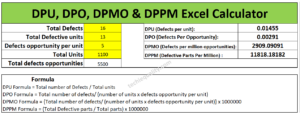
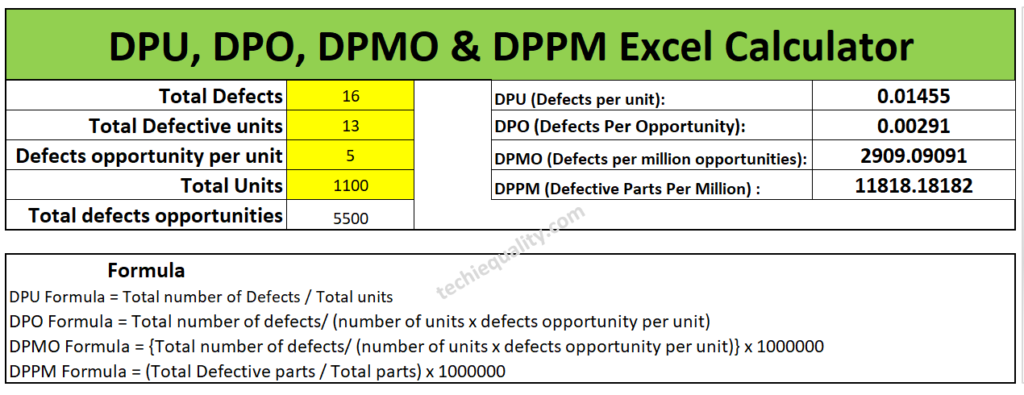
Suppose a sheet metal automobile manufacturing company, produces an automobile part. In the press shop, we found that 4 parts had been rejected at press machine-1 & 9 parts at press machine-2. When a QA engineer had analyzed, he found that the total defective product has 16 defects. And defects opportunity per parts is 5 and total 1100 parts had been produced. Calculate the DPMO, DPPM, DPU and DPO?    

Have you completed the calculation of above example-1 or not? If not yet then, we are going to help to calculate the same. First of all, note down the data, i.e. Total defects, Total defective parts, defects opportunity per part, total parts produced and total defects opportunity. I know that it will take more time for manual calculation of all calculations, that is why we are recommending you to download our excel automatic calculation template for easy and time-saving calculation. Downloading link is given at top of the articles just try to download the format or template. I would request you all my readers, you just calculate the DPMO and DPPM manually and try to match your value with Excel calculation, which is given below;

DPMO Calculation

I hope you have completed the matching of the value calculated by the automatic excel template and your manual calculation. Now we will be discussing the different types of examples and will calculate the value by both manually and by using an automatic excel format. So, let’s get started.

Example-2:

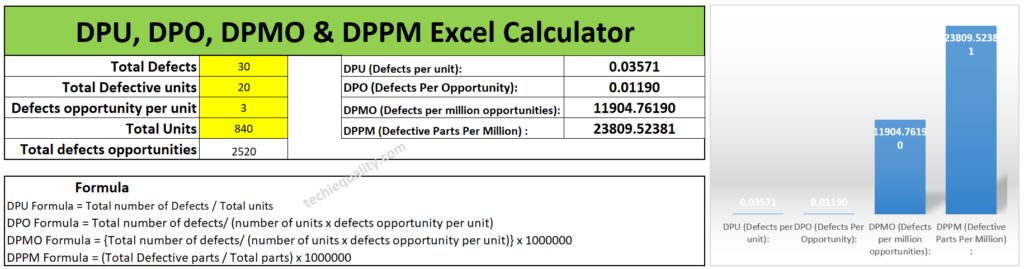
Lets a company manufacturing a toy product and below are the data given in several processes. so, calculate the DPMO, DPPM, DPO and DPU of individual processes and overall process by manually and by using the excel template. And also try to compare both solutions.

Process-1 Data Table:

Total Defects30 nos
Total Defective parts20 nos
Defects opportunity per part3
Total parts produced840 nos

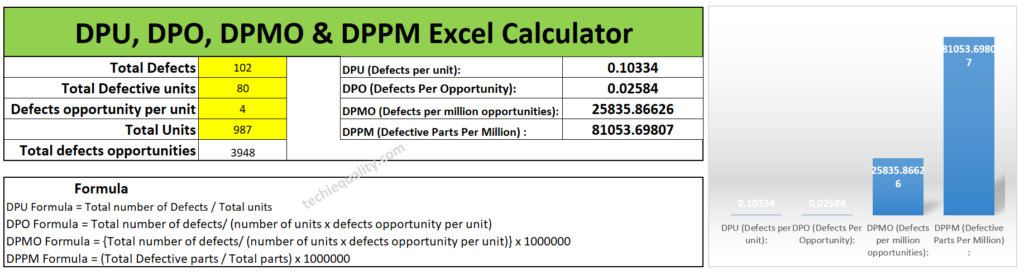
Process-2 Data Table:

Total Defects102 nos
Total Defective parts80 nos
Defects opportunity per part4
Total parts produced987 nos

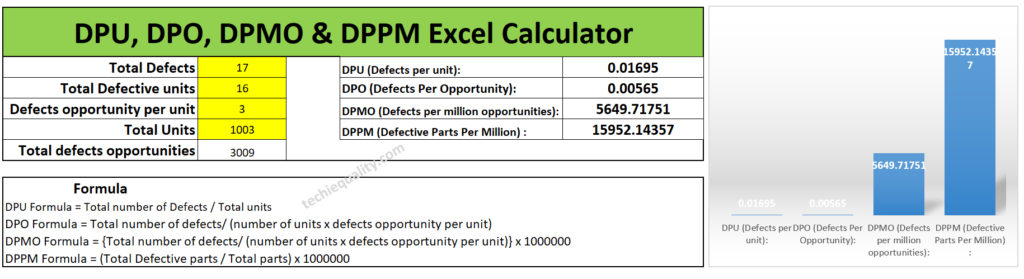
Process-3 Data Table:

Total Defects17 nos
Total Defective parts16 nos
Defects opportunity per part3
Total parts produced1003 nos

Calculate the DPMO, DPPM, DPO and DPU of individual processes and overall processes by manually and by using the excel template?

Solution of Process-1:

DPU Formula = Total number of Defects / Total units

= 30/840

=0.0357

DPO (Defects Per Opportunity):

DPO Formula = Total number of defects/ (number of units x defects opportunity per unit)

= 30/(840×3)

= 0.0119

DPMO (Defects per million opportunities):

DPMO Formula = {Total number of defects/ (number of units x defects opportunity per unit)} x 1000000

= [30/(840×3)]x1000000

=11904.7

DPPM (Defective Parts Per Million):

DPPM Formula = (Total Defective parts / Total parts) x 1000000

= (20/840) x1000000

=23809.5

Similarly, Excel template calculation is given below as;

excel formula

Solution of Process-2:

DPU (Defects per unit):

DPU Formula = Total number of Defects / Total units

= 102/987

= 0.1033

DPO (Defects Per Opportunity):

DPO Formula = Total number of defects/ (number of units x defects opportunity per unit)

= 102/(987×4)

= 0.0258

DPMO (Defects per million opportunities):

DPMO Formula = {Total number of defects/ (number of units x defects opportunity per unit)} x 1000000

= [102/(987×4)]x1000000

= 25835.86

DPPM (Defective Parts Per Million):

DPPM Formula = (Total Defective parts / Total parts) x 1000000

= (80/987) x1000000

= 81053.69

You can compare the answer with the below given Excel calculated value.

DPMO Calculation

Solution of Process-3:

DPU (Defects per unit):

DPU Formula = Total number of Defects / Total units

= 17/1003

= 0.0169

DPO (Defects Per Opportunity):

DPO Formula = Total number of defects/ (number of units x defects opportunity per unit)

= 17/1003×3

=0.0056

DPMO (Defects per million opportunities):

DPMO Formula = {Total number of defects/ (number of units x defects opportunity per unit)} x 1000000

= [17/1003×3]x1000000

= 5649.7

DPPM (Defective Parts Per Million):

DPPM Formula = (Total Defective parts / Total parts) x 1000000

= [16/1003]x1000000

= 15952.14

Below are the excel calculation of the above value, you can match the value;

DPMO Calculation

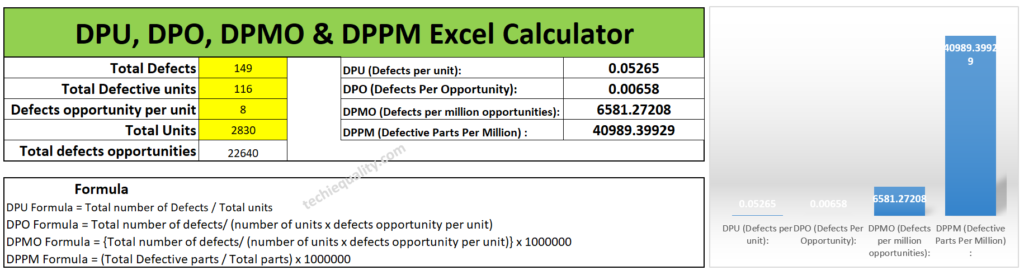
Overall Process DPMO Calculation:

For doing so we need a combined data table, so we have clubbed all the data of process-1,2 & 3 and given in below; the same part is produced in all 3 processes.

Total Defects149 nos
Total Defective parts116 nos
Defects opportunity per part8
Total parts produced2830 nos

DPU (Defects per unit):

DPU Formula = Total number of Defects / Total units

= 149/2830

= 0.0526

DPO (Defects Per Opportunity):

DPO Formula = Total number of defects/ (number of units x defects opportunity per unit)

= 149/2830×8

=0.00658

DPMO (Defects per million opportunities):

DPMO Formula = {Total number of defects/ (number of units x defects opportunity per unit)} x 1000000

= [149/8×2830]x1000000

= 6581.27

DPPM (Defective Parts Per Million):

DPPM Formula = (Total Defective parts / Total parts) x 1000000

= (116/2830) x1000000

= 40989.39

Overall

[Excel Calculation of DPMO]

Useful Post:

DMAIC Tools | DMAIC Template | Six Sigma Methodologies | 30+ Free Tools

What is Visual Management? | Visual Management Board Examples

Process Flow Diagram Template | Examples |Symbols |PFD

SIPOC Template | SIPOC Diagram Example of Manufacturing & Service Industry

More on TECHIEQUALITY

Process Flow Diagram Template | Examples |Symbols |PFD

Process Flow Diagram

Process Flow Diagram Template | Examples |Symbols |PFD

Hi Readers! Here, today we will be discussing the process flow diagram, its symbols, and practical examples. We have prepared a PFD template for sample and example basis, if you would like to download the free template or format of the PFD-process flow diagram then, go through the below-given link.

The process flow diagram template or format in excel-DOWNLOAD-PFD in Excel template or format.

What is a Process Flow Diagram- PFD?

The PFD or process flow diagram is a flow chart or process flow diagram or process mapping of a process. The PFD represents the process sequence and details (like a machine, activities, process sequence, relevant document, process control, decision, etc).

Symbols of Process flow diagram – PFD:

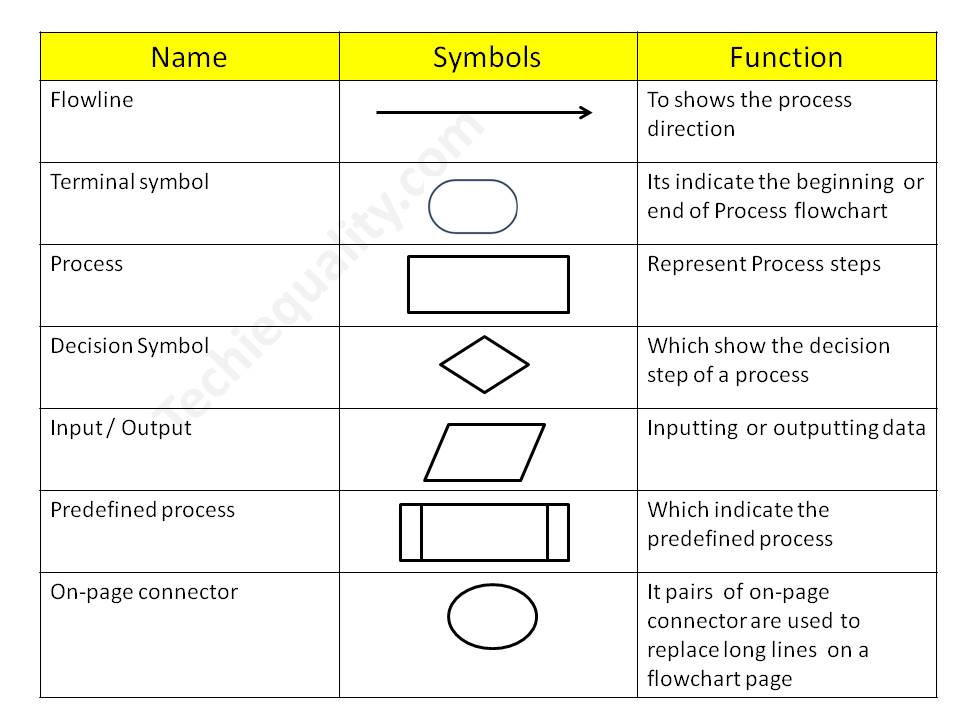
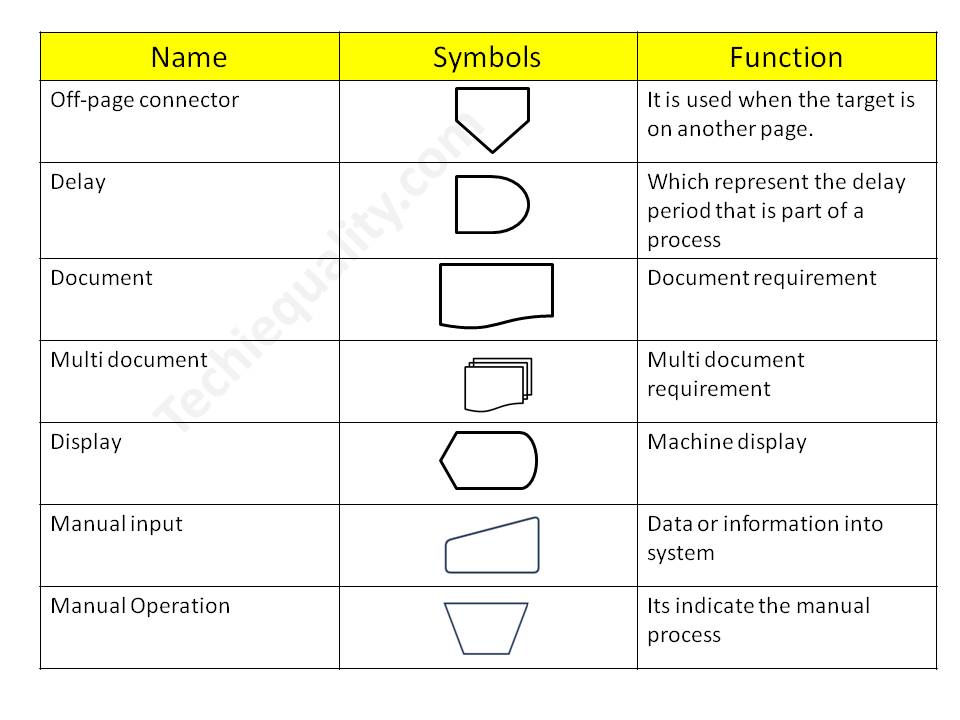
PFD/PFC has many symbols but we will discuss only common symbols. Details are given below;

Symbol NameFunction
FlowlineTo show the process direction
Terminal symbolIt indicates the beginning  or end of the Process flowchart
ProcessRepresent Process steps
Decision SymbolWhich shows the decision step of a process
Input / OutputInputting  or outputting data
Predefined processWhich indicates the predefined process
On-page connectorPairs of on-page connectors are used to replace long lines  on a flowchart page
Off-page connectorIt is used when the target is on another page.
DelayWhich represents the delay period that is part of a process
DocumentDocument requirement
Multi-documentMulti-document requirement
DisplayMachine display
Manual inputData or information in the system
Manual OperationIt indicates the manual process

Process Flow Chart symbols / PFD

Process Flow Diagram

4 Steps to create a PFD-Process flow Diagram:

Step-1:

CFT team formation including the process owner.

Step-2:

List out the process, activities, decision, machine, control mechanism, etc

Step-3:

Sequentially write down the process, activities, and decisions of the process

Step-4:

Plot the diagram by using the PFD symbols.

Process Flow Diagram Example:

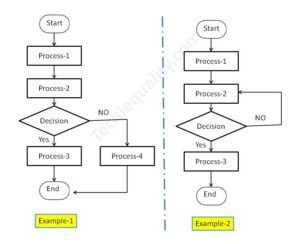
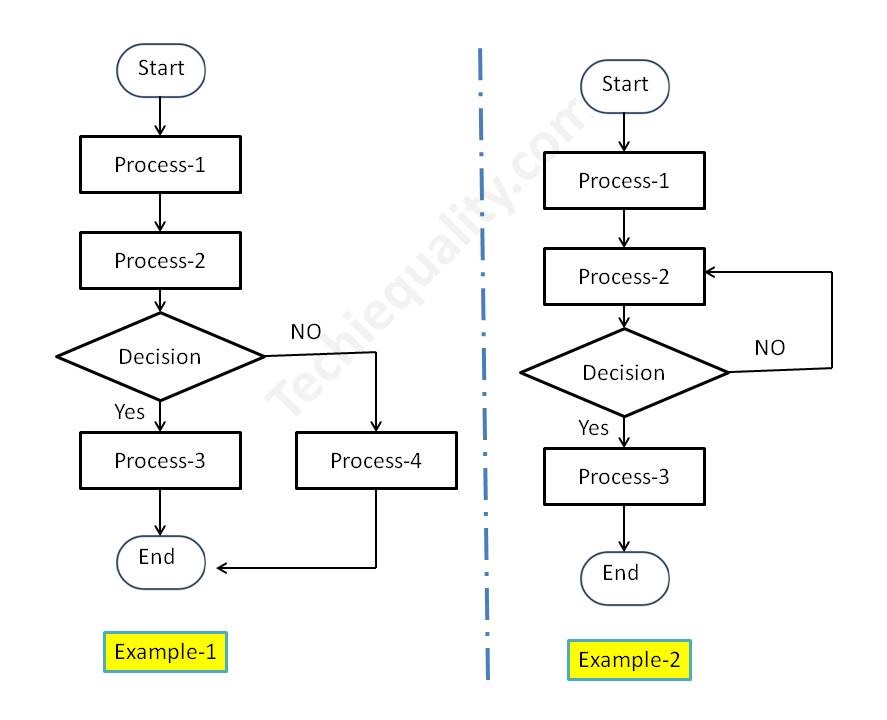
We have created two process flow diagrams, i.e. [1] without repetition of the process after the decision and [2] with repetition of the process after the decision. Both two types of PDF are given below;

Process Flow Diagram
PFD/PFC-process flow chart example

Industrial Example:

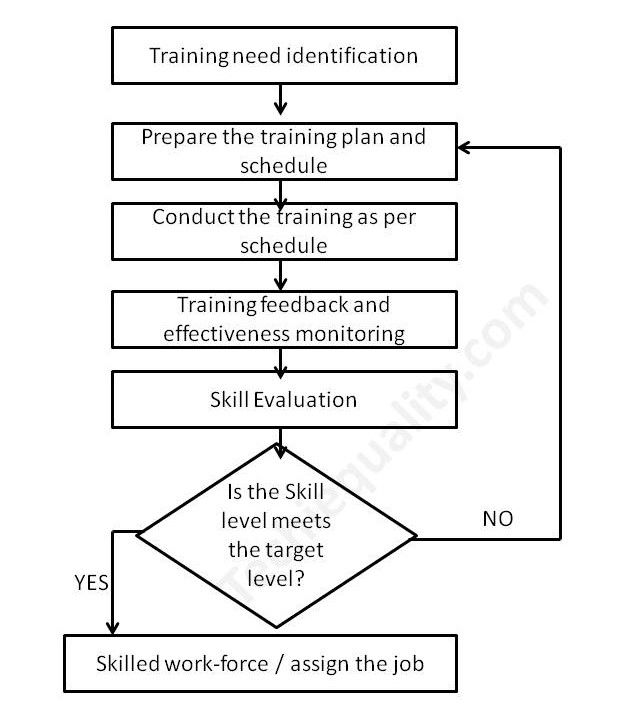
Here we have taken the process flow diagram example of Training, which is one of the most powerful things to competent the workforce and enhance the skill of employees. So that optimum knowledge can be utilized for effective output from operation by employees at an organization. Hence if you would like to create a process flow chart of education and training operations then the below example will be helpful to prepare the same. This is only for reference and learning purposes.

We have prepared the PFD followed by the above steps:

Step-1:

We have formed a team including the HRD member.

Step-2:

Identified the activities below

  • Training needs identification
  • Prepare the training plan and schedule
  • Conduct the training as per schedule
  • Training feedback and effectiveness monitoring
  • Skill evaluation.

Step-3:

We have arranged the activities sequentially as given below of education and training operations.

Activities-1Training needs identification
Activities-2Prepare the training plan and schedule
Activities-3Conduct the training as per schedule
Activities-4Training feedback and effectiveness monitoring
Activities-5Skill evaluation

Step-4:

We have prepared the PFD – process flow chart for education and training operations and details are given below;

process mapping

FAQ:

What is the process flow?

The process flow is the flow chart that represents the process sequences or process mapping including machine details, control data, document reference, etc.

What is the difference between SIPOC and PFD?

The SIPOC diagram consists of 5 elements i.e. Supplier, Input, Process, Output, and Customer. the PDF is the process mapping that represents the process sequences.

What is flowchart?

The FC is a flow diagram or mapping of activities.

What are the 3 types of PFD?

[1] System PFD, [2] General PFD, [3] Detailed PFD

Free Templates / Formats of QM: we have published some free templates or formats related to Quality Management with manufacturing / industrial practical examples for better understanding and learning. if you have not yet read these free template articles/posts then, you could visit our “Template/Format” section. Thanks for reading…keep visiting techiequality.com

Useful Post:

4M Change Management | How to implement in Manufacturing unit | Template | Format

C Chart Excel Template | Formula | Example | Calculation

P Chart Excel Template | Formula |Example |Control Chart | Calculation

ABC Analysis of Inventory with Industrial Example

How to calculate z-score in excel with manufacturing example

P Chart Excel Template | Formula |Example | Control Chart | Calculation

P Chart Excel Template

P Chart Excel Template | Formula | Example | Control Chart | Calculation

Hi Readers! Here, we are going to discuss on attribute type control chart, especially on the P chart. Also, you can learn the formula, and calculation part with industrial or manufacturing examples. You can download the P chart excel template from below given link.

Sample P chart excel template with industrial example-Download Here

Attribute type Control chart (P Chart):

The P chart, attribute type control chart, or proportion nonconforming chart is generally used to identify the common or special causes present in the process and also used for monitoring and detecting process variation over time. It helps to determine whether the process is in a state of statistical stable or not. Overall, it indicates that special causes are present in the process or not, whether the process is under control or not, and process variability.

How to select proportion nonconforming (P chart):

Step-1: Data Types?

Ans.:- Discrete type data (Attribute type data)

Step-2: Is the interest in nonconforming units or one defect per unit?

Ans.:- yes, one defect per unit

Step-3.:- Is the sample size constant?

Ans.:- Yes or No, then use P chart.

Note; for both the cases, if the sample size is constant or if not, in this scenario you can select p chart.

Data Type:——Discrete type data (Attribute type data)
Is the interest in nonconforming units or one defect per unit?—-Yes
Is the sample size constant?Yes or No
Select Chart type:P Chart

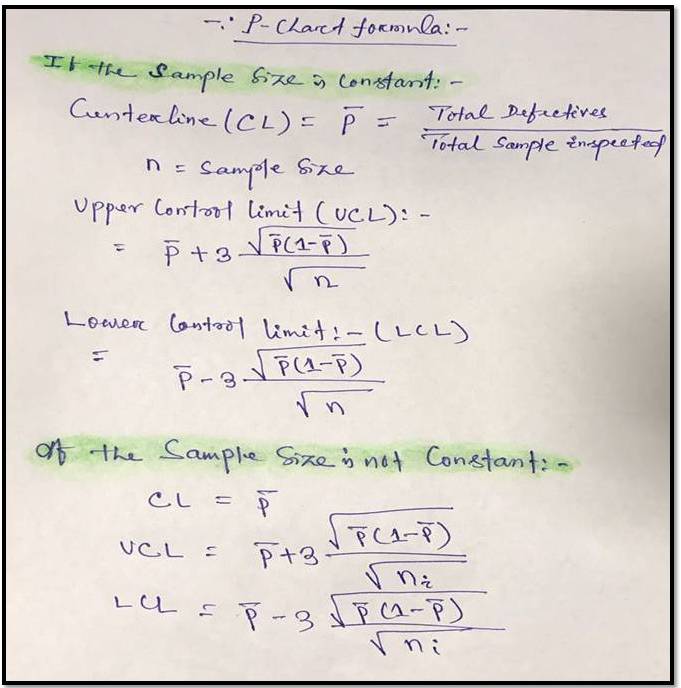
P Chart Formula:

For plotting the P chart in excel we have to calculate the three important things i.e. [1] Center line, [2] Upper control limit, & [3] lower control limit.

P Chart Excel Template
[P Chart Formula]

P chart example & Calculation for constant sample size:

In a manufacturing unit producing the auto part products, a process quality engineer would like to monitor the process control, so he started to collect the data for 30 days and daily inspected 250 products & recorded the defectives or nonconforming parts (Defects-blow hole, shrinkage, pinhole, etc.). 30 days data is given in below table.

DateConstant sample size (n)Defective/
Nonconforming
12501
22502
32502
42501
52502
62501
72500
82501
92504
102502
112503
122501
132500
142503
1525010
162501
172504
182503
192502
202501
212503
222502
232501
242503
252502
262502
272501
282502
292503
302501

With the help of the above data, we are going to calculate and plot the P chart. As we know that we have to calculate the 3 important things, Center line, upper control limit & lower control limit.

Center Line (CL)-P bar: – Total Defectives/ Total sample Inspected

= 64/ (30*250)

= 0.0085

=0.009

Upper Control limit (UCL):-

= P bar+3*square root of (p bar*(1-p bar)/sample size)

= 0.009+3* square root of (0.009*(1-0.009)/250)

=0.009+3*0.005972

=0.026

Lower Control Limit (LCL):-

= P bar-3*square root of (p bar*(1-p bar)/sample size)

= 0.009-3* square root of (0.009*(1-0.009)/250)

=0.009-3*0.005972

= -0.0089

= -0.009

0 (Note: The LCL value is negative, so the final value of LCL is zero)

Now, you have to calculate the proportion defective or nonconforming

Proportion defective:

Here, I’m calculating the proportion defective of day-1, so similarly you can calculate for next day onwards

= Day-2 Defects/Sample size

= 1/250 = 0.004

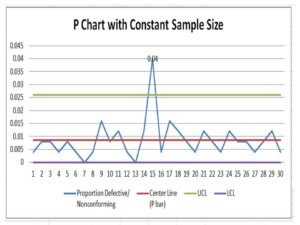
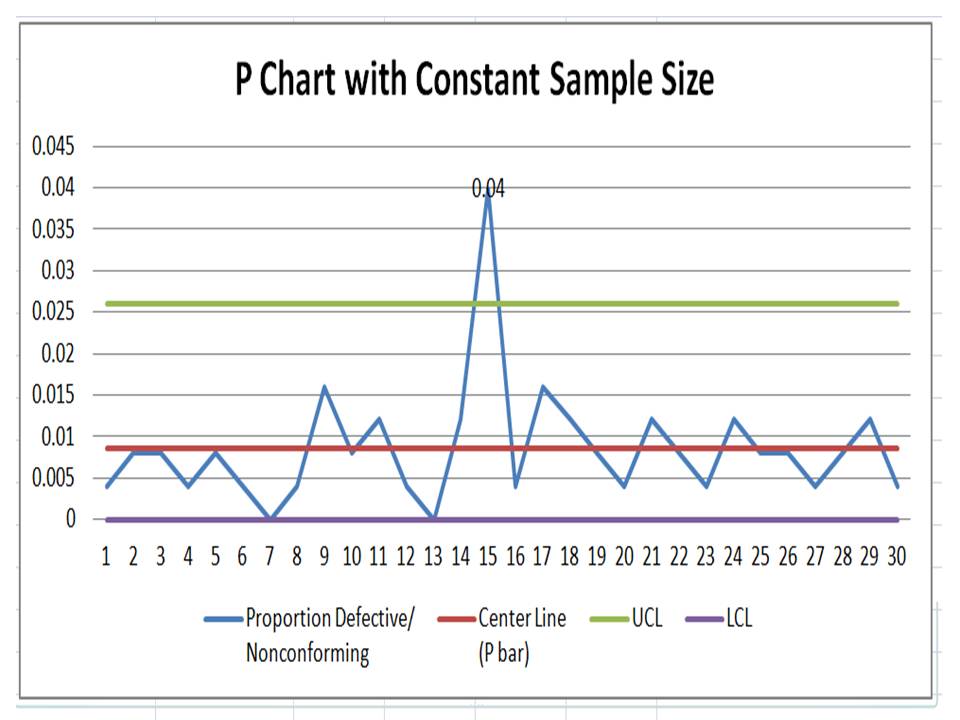
Now, Based on the above data i.e. proportion defects, center line, upper control limit, and lower control limit, we have plotted the P chart in Excel. If you would like to download the p chart excel template with the same calculation then, download it from the above given link and similarly you can download the other template or format by Click Here

P Chart Excel Template
Interpretation of P Chart:

In the above p chart, we have seen that one proportion defect value is beyond the upper control limit. It means on day-15 special cause is present so, we have to take the action on it to control the process.

Free Templates / Formats of QM: we have published some free templates or formats related to Quality Management with manufacturing / industrial practical examples for better understanding and learning. if you have not yet read these free template articles/posts then, you could visit our “Template/Format” section. Thanks for reading…keep visiting techiequality.com

More on TECHIEQUALITY

Popular Post

C Chart Excel Template | Formula | Example | Calculation

C Chart Excel Template

C Chart Excel Template| Formula |Example |Calculation:

Hi Readers! Today, we will be discussing here on attribute type SPC chart i.e. C chart. Its formula, calculation, and industrial example. The C chart is also called the number of nonconformities chart. Where the sample size is constant. Read the below description to learn about its selection and application in industries. If you are interested in downloading the sample C Chart Excel Template then, click on the given below link.

Sample C Chart Excel Template with industrial example-Download.

Number of nonconformities chart (C Chart):

The C chart, attribute type SPC control chart, or the number of nonconformities chart is generally used to identify the common or special causes present in the process and is also used for monitoring and detecting process variation over time. It helps to determine whether the process is in a state of statistical stable or not. Overall, it indicates that special causes are present in the process or not, whether the process is under control or not, and process variability. This C chart is selected when there is a constant sample size and multiple defects per unit are present.

Selection of Attribute type SPC Control chart (C Chart):

Step-1: Data Types?

Condition: – Discrete type data (Attribute type data)

Step-2: Is the interest in nonconformities or multiple defects per unit?

Condition: – yes, multiple defects per unit

Step-3.:- Is the sample size constant?

Condition: – Yes, then use the C chart.

DescriptionCondition
Data Type:Discrete type data (Attribute type data)
Is the interest in nonconformities or multiple defects per unit?Yes, Multiple defects per unit present
Is the sample size constant?Yes
Chart type:C Chart

C Chart Formula:

The three important things need to be calculated before plotting the C chart i.e. [1] Centerline, [2] Upper control limit, & [3] lower control limit.

Centerline (CL) or C bar = Total number of nonconformities or defects / Number of samples

Upper control limit (UCL) = C-bar + 3 x Square root of C-bar

Lower control limit (LCL) = C-bar – 3 x Square root of C-bar

 The formula of C chart
CL or C- bar =Total number of nonconformities or defects / Number of samples
UCL =C-bar + 3 x Square root of C-bar
LCL =C-bar – 3 x Square root of C-bar

How to plot a c chart in excel?

Here, I’m going to share my own industrial experience regarding the application and usage of a c chart in the manufacturing industry by providing a sample example for your quick learning and implementation in your organization. I have considered 50 sample sizes, and three different defects and collected the data for 30 days. Details of data are given below table.   

DateConstant sample size (n)Defect-1Defect-2Defect-3Total Defects
15011 2
2501124
3502215
45011 2
5501124
65011 2
7501113
8502226
9502237
10501124
11501135
12501113
135055717
145011 2
15501113
16502215
175011 2
18501113
19501135
205011 2
215022 4
225011 2
23502226
24501135
25501113
265022 4
27501113
285011 2
29501113
30501113

All the above three defects are attribute type defects. Before plotting the c chart in excel we have to calculate the three important things first, one is CL, UCL & LCL.

Calculation:

Centerline (CL) or C-bar:

Formula = Total number of nonconformities or defects / Number of samples

CL = 121 / 30 =4.033

UCL (Upper control limit):

Formula = C-bar + 3 x Square root of C-bar

UCL = 4.033 + 3* Square root of 4.033

UCL = 4.033+3*2.008

UCL = 10.0577

UCL = 10.058

LCL (Lower control limit):

LCL = C-bar – 3 x Square root of C-bar

LCL = 4.033 – 3* Square root of 4.033

LCL = 4.033-3*2.008

LCL = 4.033-6.024

LCL = -1.991 (the value is negative so LCL is Zero)

LCL = 0.00

 Calculation value
CL =4.033
UCL =10.058
LCL =0
Follow the below step to plot the c chart in excel:

Step-1: open the excel sheet.

Step-2: Do the data entry on the Excel sheet.

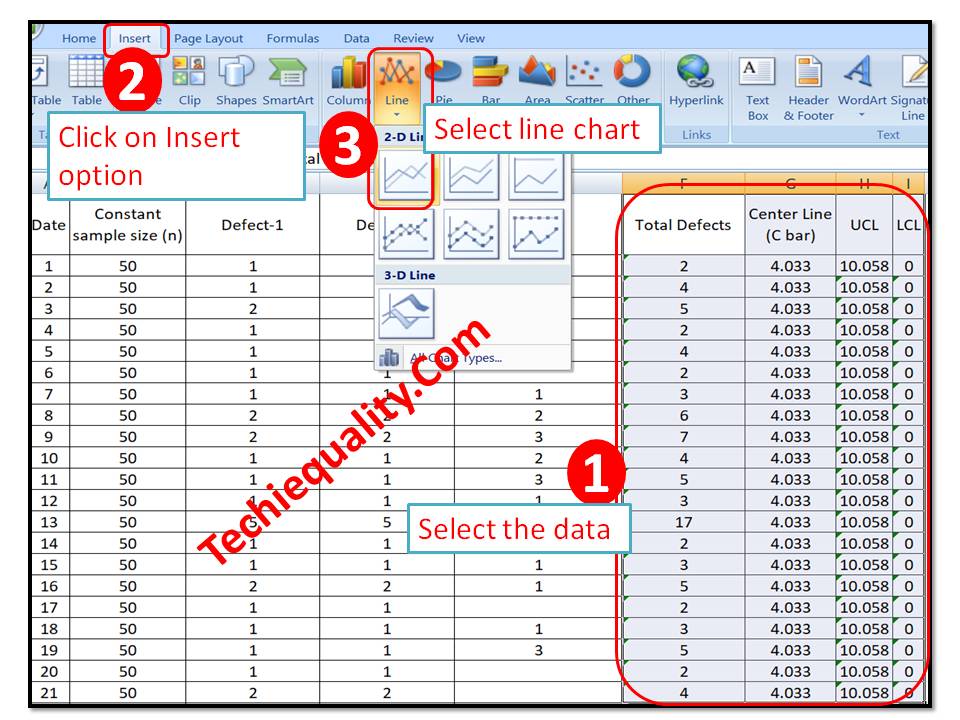
Step-3: Select the data and then go to the insert option in the main menu and next to select line chart. The detail is mentioned in the below image.

C Chart Excel Template
C Chart:

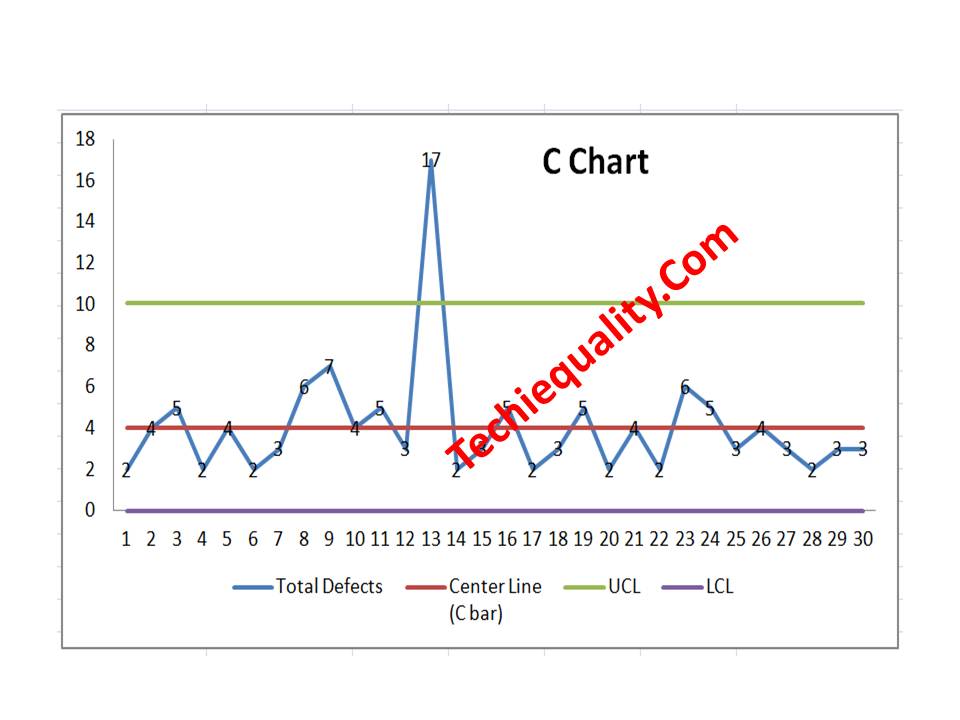
With the help of the above data, we have plotted the c chart, which is given below. if you would like to download the C Chart Excel Template then, click here.

C Chart Excel Template
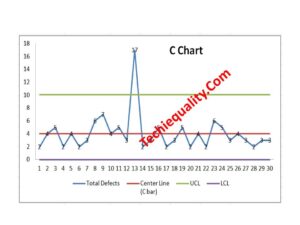
Interpretation of the above C Chart:

In the above C chart, we have seen that one defect value is beyond the upper control limit. It means on day-13 special cause was present in the process, so we have to take the action on it to control the process.

Free Templates / Formats of QM: we have published some free templates or formats related to Quality Management with manufacturing / industrial practical examples for better understanding and learning. if you have not yet read these free template articles/posts then, you could visit our “Template/Format” section. Thanks for reading…keep visiting techiequality.com

Useful Post:

What is Preventive Maintenance? | Predictive Maintenance |Types & Example

Plan Do Check Act Cycle | PDCA Cycle Manufacturing Example | Implementation

Attribute MSA |How to do Attribute type MSA Study| Example |Acceptance Criteria

Gage R and R |Attribute type MSA |How to do MSA Study | Acceptance Criteria

More on TECHIEQUALITY

SIPOC Template | SIPOC Diagram Example of Manufacturing & Service Industry

SIPOC Template

SIPOC Template | SIPOC Diagram Example of Manufacturing & Service Industry

Hi Readers! Today here, we will be discussing on SIPOC template and examples of sipoc diagrams of manufacturing and service industries. As you know that SIPOC is one of the most useful diagrams which is generally used for a better understanding of the process. In both the manufacturing and service industries are commonly used the two types of process mapping diagrams are. I.e. [1] PFD- Process flow diagram and another [2] SIPOC diagram. If you would like to download the free SIPOC excel template then, click on the given below download link.  

Download the SIPOC template in excel format-SIPOC Excel format-DOWNLOAD Link

What is SIPOC Diagram?

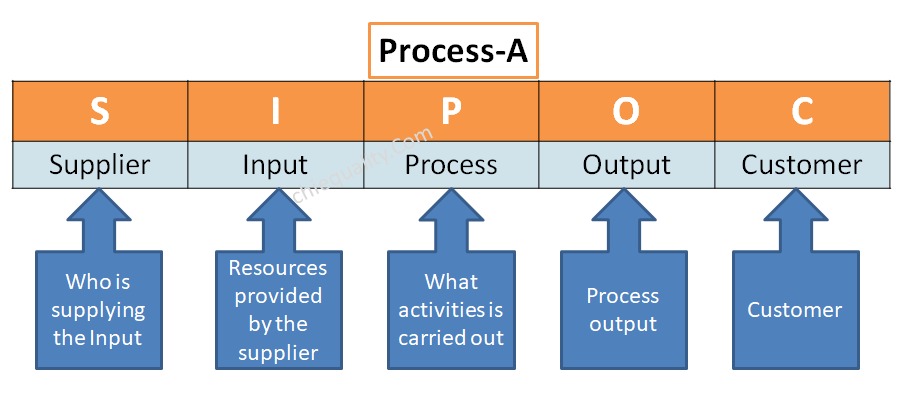
The SIPOC diagram consists of 5 elements i.e. [1] Suppliers, [2] Inputs, [3] Processes, [4] Outputs, [5] Customers. The diagram is generally used for process mapping. It helps to understand the overview of the process in detail.

5 Steps to create a SIPOC Diagram:

Step-1:

Create a CFT team including the process owner of a particular process, which you are trying to draw.

Step-2:

Define the process, for example, let’s consider a process namely called Process-A and you are trying to draw an SIPOC diagram, so first of all you are supposed to list out the details activities of process-A in sequence with the help of the CFT team.

Step-3:

After listing out the details process sequence, find out the internal and external suppliers. Details are mentioned below example.

Step-4:

List out and identify the inputs, process, process output and then customers

Step-5:

 Draw the Diagram by entering the above points in the appropriate places.

SIPOC Template

[SIPOC Template / Format]

SIPOC Diagram vs PFD – process flow diagram:

Both the SIPOC diagram and process flow diagram are used to represent the process mapping but the difference between the two is the elements that are used to represent the process details. In SIPOC, we use the 4 elements like supplier, input, process, output, and customer but in PFD, we use flow chart symbols, like the terminator, process, flow line (arrow connector), decision, document, connector, data, preparation, off-page connector, etc.

SIPOC Diagram Example of Manufacturing & Service Industry:

Manufacturing Industry Example:

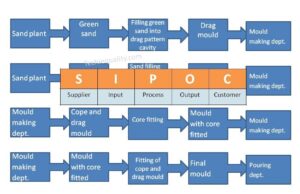
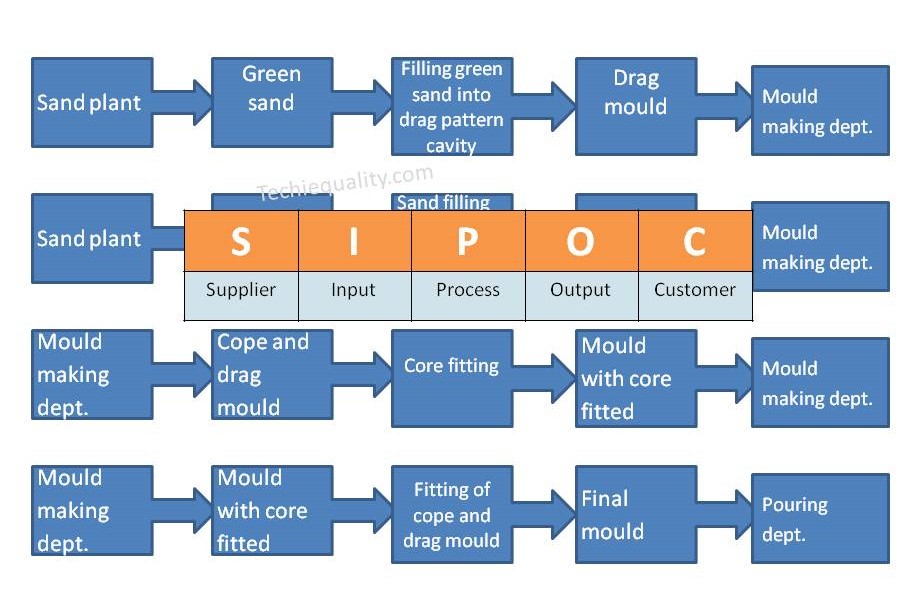
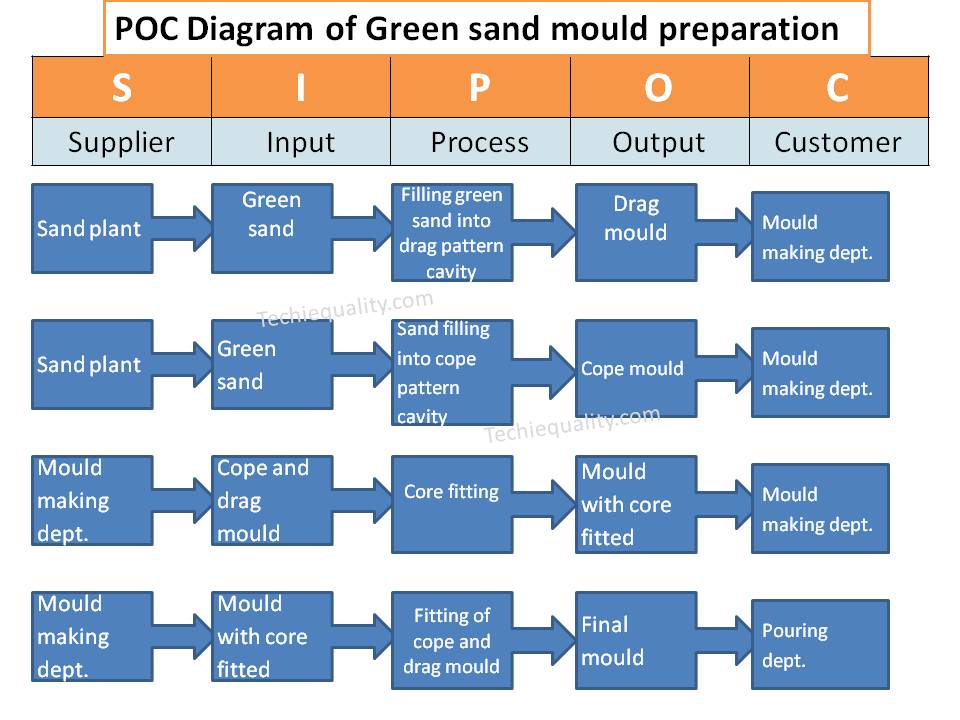
Suppose a company manufactures automobile parts through foundry technology and they have planned to prepare a SIPOC diagram of one of the processes called green sand mould preparation.

SupplierInputProcessOutputCustomer
Sand plantGreen sandFilling green sand into drag pattern cavityDrag mouldMould making dept.
Sand plantGreen sandFilling green sand into cope pattern cavityCope mouldMould making dept.
Mould making dept.Cope and drag mouldCore fittingMould with core fittedMould making dept.
Mould making deptMould with core fittedFitting of cope and drag mouldFinal mouldPouring dept.
SIPOC Template
Service Industry Example:

Let’s consider one of the service sectors of finance as an example bank, and we are going to draw a SIPOC diagram of an offline saving bank account opening process, which is given below;

SupplierInputProcessOutputCustomer
…..Application filled-up formOffline checking and verification of documents deposited by the customerVerified documentDocument verification document
Document verification dept.Verified documentAccount creationNew saving bank account numberAccount creation dept
Account creation deptNew saving accountPassbook issuingNew passbookMr. XYZ
FAQ:

What does sipoc stand for in Six Sigma?

Ans.: The SIPOC stands for Supplier, Input, Process, Output and Customer.

What is a SIPOC template?

The SIPOC template is a diagram which consists of suppliers, inputs, processes, outputs and customers. With the help of the SIPOC diagram, you can prepare the details process flow from start to end.

Free Templates / Formats of QM: we have published some free templates or formats related to Quality Management with manufacturing / industrial practical examples for better understanding and learning. if you have not yet read these free template articles/posts then, you could visit our “Template/Format” section. Thanks for reading…keep visiting techiequality.com

Useful Post:

How to Choose the Best Forecasting Method| Marketing & Sales Example

Variation Calculation in Excel | Types of Variation |Manufacturing Example

Plan Do Check Act Cycle | PDCA Cycle Manufacturing Example | Implementation

Turtle Diagram Example | QMS Standard Requirement |Free Template |Format.

More on TECHIEQUALITY

Scatter Diagram Template | Industrial Example | Download Excel Format

Scatter Diagram Template

 Industrial Example of Scatter Diagram | Interpretation of result | Scatter Diagram Template:

Hi readers! Today we will discuss on Scatter diagram Example with the interpretation of its results. The scatter diagram is one of the popular tools of 7QC tools. It’s a type of diagram to displays the value for typically two continuous variables for a set of data. One variable can be positioned on the X-axis and another variable can be positioned on the Y-axis. This diagram will help you to find out the significant causes among the total collection of potential causes. When you have variable types of data collection of potential causes and you do not know the positive or negative relationship that time you can plot the scatter diagram to know the relationship among them. You can download our simple Excel Scatter Diagram Template from the below link.  

DOWNLOAD– Sample Scatter Diagram Excel Template/ Format.

Example:

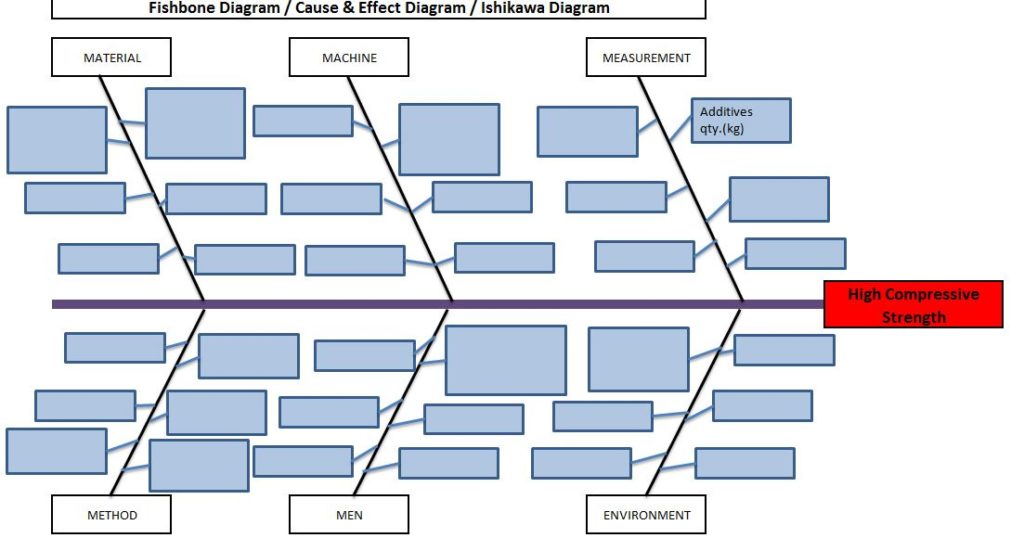
An organization has tried to know the significant causes for the high compressive strength of “X” quantity sand, so initially quality engineer drew the cause& effect diagram with the help of CFT team members and then he started the validation of each potential cause. The same C&F diagram is mentioned below.

Scatter Diagram Template

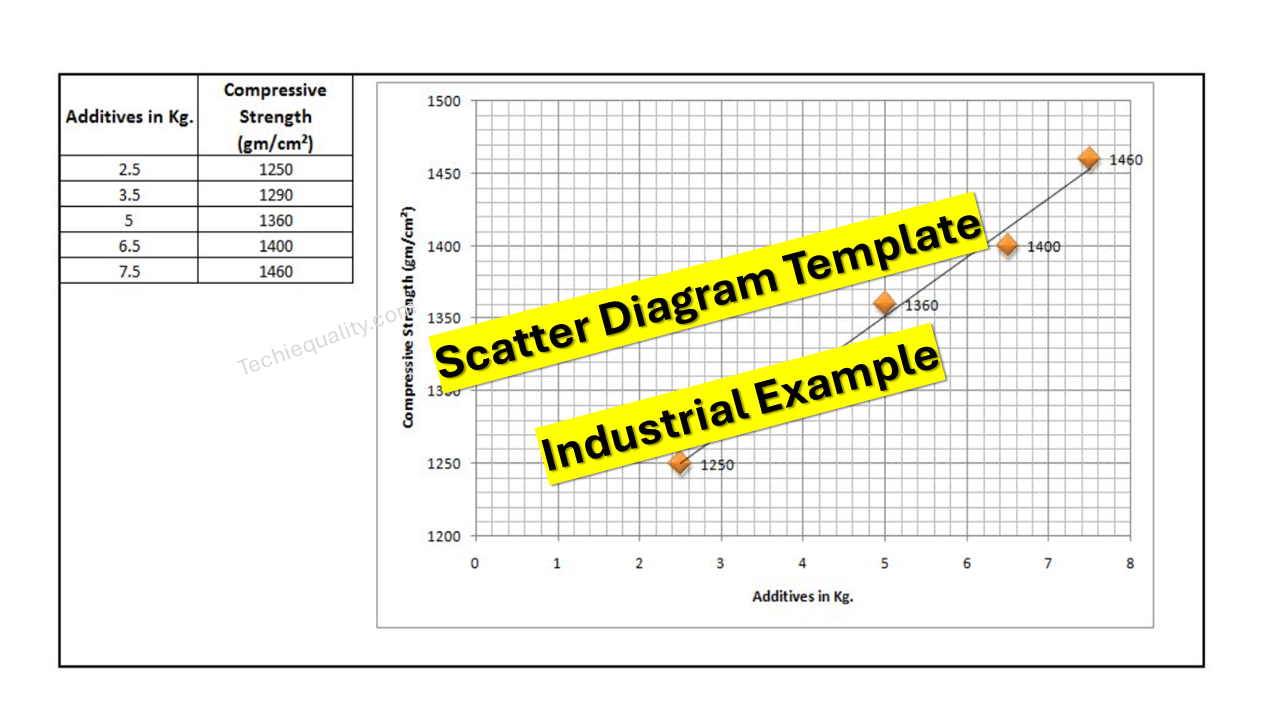
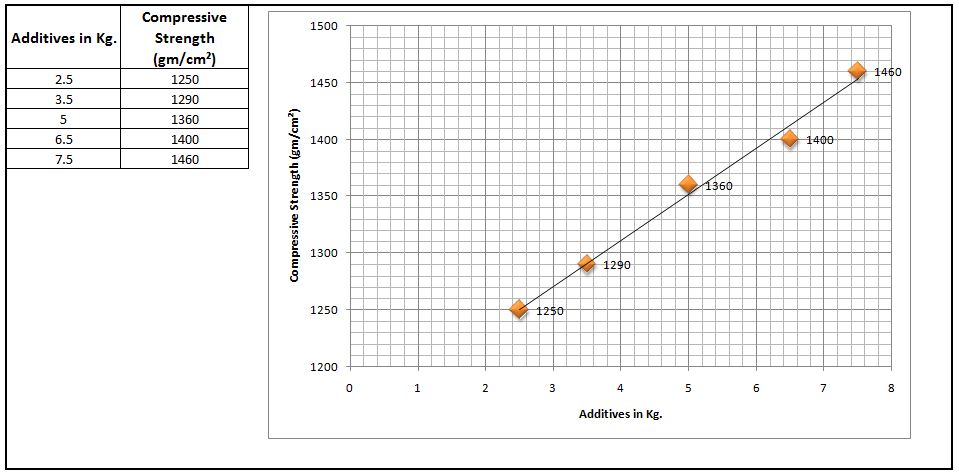
Here, we have not mentioned the other potential causes like mixing time, water%, etc. because these are already validated but now we have to know the relationship among the two variables as additive quantity v/s compressive strength through a scatter diagram. To do so data has to be collected and then a scatter diagram needs to be drawn.

Data table:

Additives in Kg. Compressive Strength (gm/cm²)
2.5 1245
3.5 1290
5 1330
6.5 1395
7.5 1435

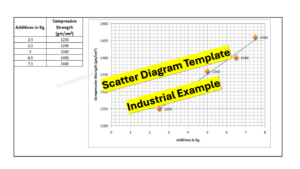
 Scatter Diagram:

Scatter Diagram Template

Interpretation of result:

The above scatter diagram indicates us there is a perfect positive correlation between two variables i.e. Additives in Kg. vs. Compressive Strength (gm/cm²). So we can conclude that more the additive addition can result in high compressive strength.

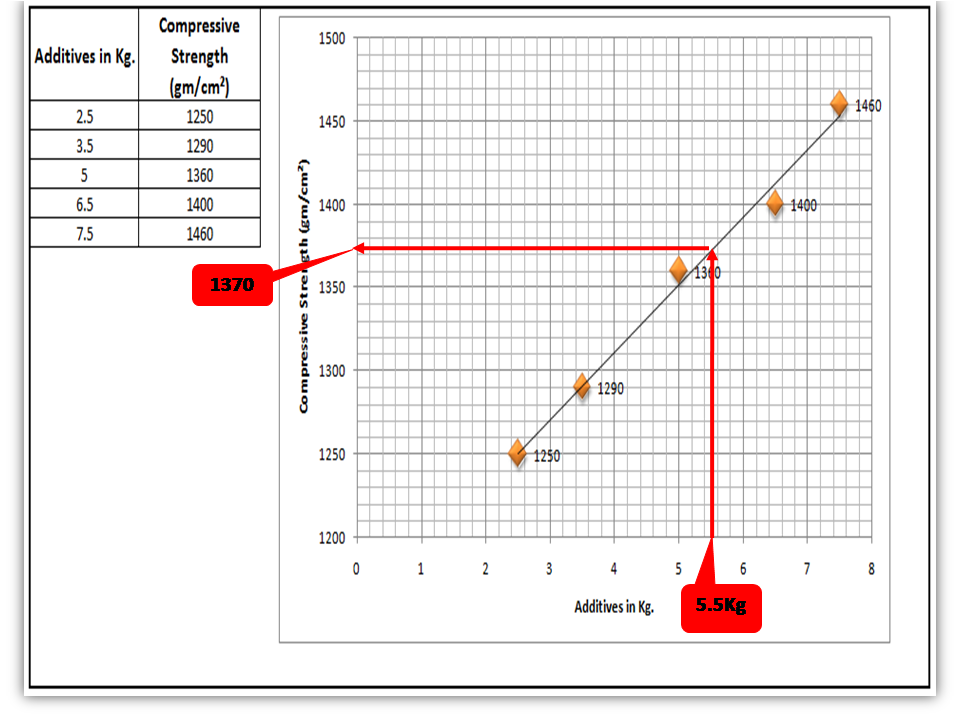
 Interpolation: you can guess the value from the set of data points. From the above graph, I would like to know the compressive strength if I will add 5.5 Kg additives in “X” Kg of Sand.

Scatter Diagram Template

FAQ:

Q1: What are the common possibilities of correlation between two variables of the scatter diagram?

 Ans.: There are so many possibilities but three common correlations are positive, negative, and no correlation. Positive and Negative correlations are further categorized into three types as.

Positive Correlation:

  • Low positive correlation
  • High positive correlation
  • Perfect positive correlation

Negative Correlation:

  • Low negative correlation
  • High negative correlation
  • Perfect negative correlation

Q2: What types of data are used to plot the scatter diagram?

Ans.: Continuous variable type data.

Useful Articles:

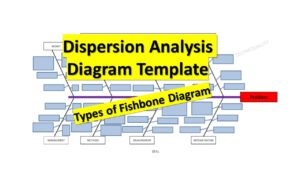
Types of Fishbone Diagram |Dispersion Analysis |Enumeration |Process Classification

7 QC Tools Template.

Repeatability vs Reproducibility | Discussion of Key difference.
Free Templates / Formats of QM: we have published some free templates or formats related to Quality Management with manufacturing / industrial practical examples for better understanding and learning. if you have not yet read these free template articles/posts then, you could visit our “Template/Format” section. Thanks for reading…keep visiting techiequality.com

Popular Post

4M Checklist Template | Free Download Format

4M Checklist Template

 4M Checklist Template |Free Download Format:

Hi Readers! Today we will discuss here on 4M Checklist Template. Generally, the 4M concept is used in several methodologies, In the Cause and effect diagram it represents the potential causes and similarly, it is also used as a checklist for Kaizen. In the kaizen approach, there are some checklists used as [1] 5MUs checklist [2] 5W1H checklist [3] 4M Checklist. But here we will only explain on the 4M checklist. We have prepared the 4M checklist for your ready reference. You can easily download this checklist/check sheet from the below link.
DOWNLOAD-4M Checklist/Check-sheet / 4m analysis template excel

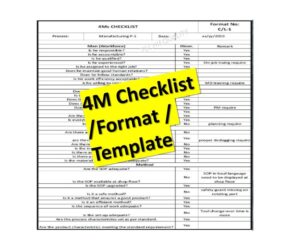
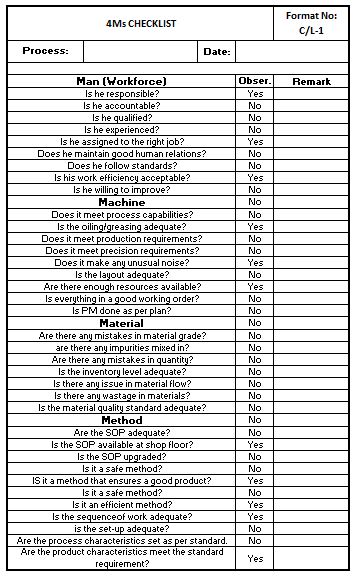
Sample 4M Checklist Copy:

4M Checklist Template
4M Checklist Template:

4M i.e. Men, Machines, Materials & Methods are the common aspects and important for quality improvement and KAIZEN. Questions to be asked related to 4M to implement kaizen activities effectively are;

Man (Workforce)
Is he responsible?
Is he accountable?
Is he qualified?
Is he experienced?
Is he assigned to the right job?
Is everything in a good working order?
Does he follow standards?
Is his work efficiency acceptable?
Is he willing to improve?
Machine
Does it meet process capabilities?
Is the oiling/greasing adequate?
Does it meet production requirements?
Does it meet precision requirements?
Does it make any unusual noise?
Is the layout adequate?
Are there enough resources available?
Are there any mistakes in the material grade?
Is PM done as per plan?
Material
Is there any issue with material flow?
Are there any impurities mixed in?
Are there any mistakes in quantity?
Is the inventory level adequate?
Is there any wastage of materials?
Is the material quality standard adequate?
IS it a method that ensures a good product?
Method
Is the SOP adequate?
Is the SOP available on the shop floor?
Is the SOP upgraded?
Is it a safe method?
Is the setup adequate?
Is it a safe method?
Is it an efficient method?
Is the sequence of work adequate?
Are there any mistakes in the material grade?
Are the process characteristics set as per standard?
Are the product characteristics meeting the standard requirement?
Template
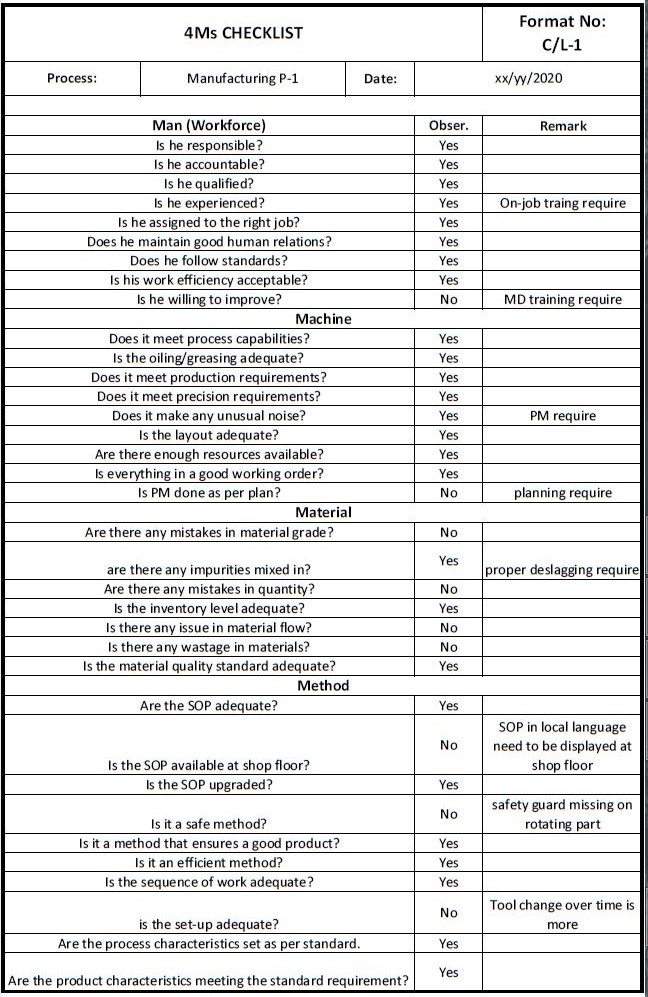
Example: We had audited the manufacturing process and got the below observations;
4M Checklist Template

During the process audit through the 4M checklist, we have observed so many improvement points, these are mentioned in the above checklist remark column. In this way, you can easily find out the process improvement points. Download the above 4M Checklist and try to customize it according to your manufacturing process.

How to Implement the 4M checklist /Check sheet in Manufacturing Industries?

I always try to share my own industrial experience so that my readers can easily understand, learn, and implement the skill-based concept in their operational process.

Posts/articles on this website are skilled base, you can read our articles for your personal learning, for training purposes, and for practical implementation in the industry as well.

Generally, we use the 4M, and 6M check sheets to audit /investigate and to check the condition and lacking points of 4M factors (Men, Machine, Method, and Material). Some industries plan the checking schedule on a weekly and some on a monthly basis as per the production plan. By doing so we can easily maintain the machine condition, reduce the B/D, Increase the machine run time, we can identify the on-job training of operators /workers, maintain the material inventory, monitor the effectiveness of the Method, we can further improve our process, etc.

Below are the steps for implementation of 4M checklist/ check sheet:
  • Prepare the 4M checklist /Check sheet as per your Process in detail considering with past 6 months’ quality defect causes, B/D nature causes, customer complaints, etc.
  • Define the Checking plan (e.g. weekly, monthly, etc.)
  • Check 4M factors by using the 4M check sheet as per your plan,
  • Write the observations.
  • Discuss with the concerned department and formulate the Action plan / CAPA.
  • Implement the CAPA /Action Plan.
  • Monitor the implementation of the action plan (For example, verify it in the next checking).
4M Change Management:

After doing the 4M Audit you can easily identify the 4M-related changes. the above 4m checklists is mentioned for your reference but the checking points are not limited. you can customize the above checklist as per your manufacturing process.

You can identify and monitor the 4M changes in the 4M change Record sheet as per below.

Sl. No.ProcessType of ChangeNature of ChangeDetails of ChangeAction TakenSet-up ApprovalRetroactive checkContainment Action
4M Change record

Example:

Type of Change: Man, Machine, Method, and Material.

Nature of Change: Plan change, Unplan change, Abnormal change

FAQ (Frequently Asked Question):
What is 4M in Manufacturing Industries?

Ans.: In Industries the term 4M is generally used as [1] Man [2] Machine [3] Material & [4] Method.

What is 4M method?

Ans.: The 4M method is generally used in manufacturing industries for problem-solving /analysis. These terms are generally represented in 4M change management and also in the Cause and effect diagram or Fishbone diagram. The potential causes are basically represented under the category of 4M- Cause and effect diagram for further processing like causes/problem analysis and validation of causes, etc.

More on TECHIEQUALITY

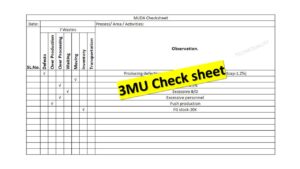
3MU Check sheet | Details of MURA, MURI & MUDA | Download

3MU Check sheet

3MU Check sheet | Details of MURA, MURI & MUDA:

Hi Readers! Today we will discuss here details on MURA, MURI & MUDA. you can download our free template of the 3MU check sheet from the below links. The 3MU’s are MURA (Discrepancy), MURI (Strain), MUDA Waste).

DOWNLOAD-3MU Check Sheet. (MUDA).

3MU Check sheet
3MU Check sheet- download

The 3MU can be applied in the below fields;

  • Method of operation.
  • Manpower.
  • Process involved.
  • Technique.
  • Facilities.
  • Time.
  • Jigs & Tools.
  • Materials.
  • Inventory.
  • Production Volume.
  • Place.
  • Way of thinking.

Details of MURA, MURI & MUDA:

MURA MURI MUDA
Unevenness, Discrepancy, Irregular Unreasonableness, Strain, Overdoing, Overburdened Unusefulness, Waste.
Any variation leading to unbalanced situations. A system, facility, or process designed beyond the physical capacities of equipment/ workforce Activities which does not add value.

MUDA: Waste, Unusefulness;

An any activities that do not add value w.r.t the customer perspective, presently in industry; elimination of waste (MUDA) is the big challenge. Many lean tools are there that you can implement it to deduce the MUDA. Value stream mapping is the one of the popular tools that basically used in many industries. But the identification of waste is a big job. The common 7 wastes are;

  1. Defects: The Defective product is total waste.
  2. Overproduction: Production more than demand or less than demand is a loss.
  3. Over Processing: Rework, Repair, Rechecking is a waste of time and money.
  4. Waiting: Waste of time, and money.
  5. Moving: The movement of goods within or outside is waste.
  6. Inventory: Unfinished goods, R/M, BOP add no value.
  7. Transportation: Unnecessary transfer of goods is waste.

Considering with above points we have prepared a sample MUDA Checklist for your ready reference. DOWNLOAD the MUDA Check sheet.

MURA: Unevenness, Discrepancy, Irregular;

MURA can exist when the workflow is out of balance.

MURI: Unreasonableness, Strain, Overdoing, Overburdened;

A system, facility, or process designed beyond the physical capacities of equipment/ workforces.

How to eliminate 3MUs?

The MURA (Unbalanced Process) can lead to an overburden on the workforce or equipment which may cause later on all kinds of non-value-added activities (MUDA). So to eliminate the 3MUs you have to give more focus on Value stream mapping, Process layout design, and 5’S, Visual standard, Kaizen, Process feasibility analysis, and Process variation.

Example:

You can audit your respective area by using our 3MU-MUDA Check Sheet, Similarly, we have done this in the manufacturing unit and found some observations, same mentioned in below for your easy understanding.

3MU Check sheet
3MU Check sheetdownload

We have taken some initiatives against the above findings (Observation) to eliminate the MUDA in the process as;

Observations Management Initiative
Producing defective product TQM, QA
The Nonsmooth flow of materials KANBAN, JIT, PPC
Rework-0.5% TQM, QA
Excessive B/D TPM
Excess Production Pull Production, PPC
FG Stock-High Inventory Management, World class Supply chain Management
Useful Articles:

4M Checklist Template |Free Download Format

SPC Format |DOWNLOAD Excel Template of SPC Study

why why analysis methodology | 5-why analysis step by step guide

How to measure process capability (Cp & Cpk)? Download Excel Template

Error Proofing Understanding & Implementation of IATF 16949 Clauses 10.2.4

Pareto Chart Example of Manufacturing Units

Thank you for reading…keep visiting Techiequality.Com

Popular Post: