Process Performance (Pp) & Ppk Excel Template |DOWNLOAD

Process Performance Excel Template

Process Performance Excel Template (Pp & Ppk Format) | DOWNLOAD

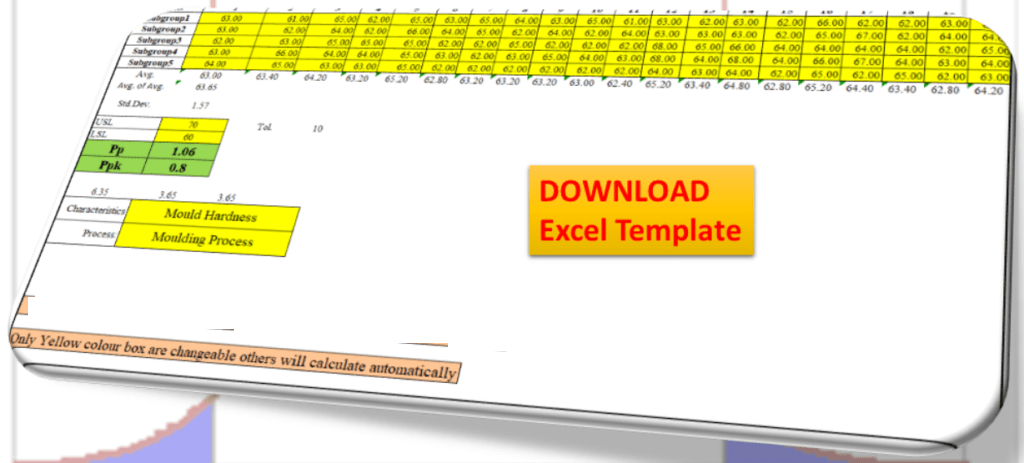
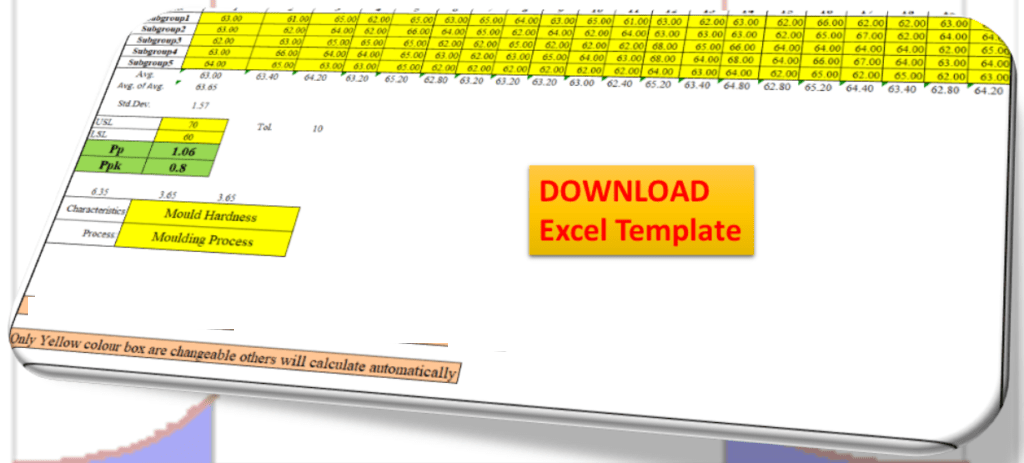
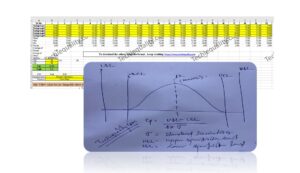
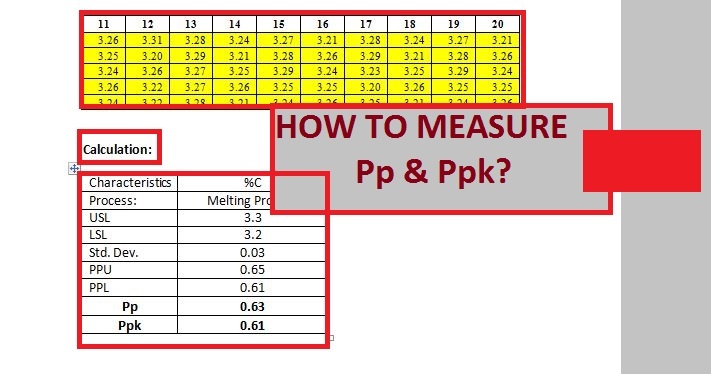
Process Performance Excel Template: According to the SPC (Statistical Process Control Manual), the process Performance (Pp) compares the process performance of the process to the maximum allowable variation as indicated by the tolerance. The Pp (Process Performance) provides a measure of how well the process will satisfy the variability requirements. And the Index of process performance is termed as Ppk. It takes the process location as well as the performance into account. Download the Excel Template /Format of Pp & Ppk from the below link.

DOWNLOAD Excel Template/Format of Pp & Ppk calculation with Example.

Process Performance Excel Template

How to use the Pp & Ppk Excel Format in your process to calculate the index value?

1: Download the Template/ Format from the above links.

2: Read the note mentioned in the Excel template.

3: Only the yellow colour box (mentioned in format) is changeable and other values will calculate automatically.

 The formula of Pp (Process Performance):

Pp = ((USL-LSL)/ (6 X S))

[Where USL=Upper specification limit, LSL=Lower specification limit and S= Standard Deviation]
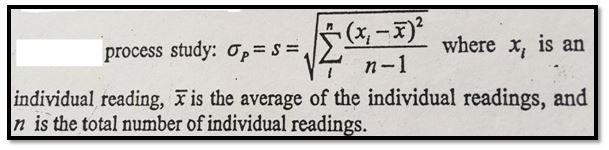
The formula of Ppk (Process Performance Index):

Ppk = Minimum of PPU or PPL

PPU= ((USL-Average of average)/ (3 X S))

PPL= ((Average of average-LSL)/ (3 X S))

Note: Pp ≥ Ppk.

Example:

Company XYZ pvt ltd is interested to know the process performance of moulding process that, how well the process is performing and satisfies the variability requirements of mould hardness. The process engineer has collected the total 100 numbers of readings considering with subgroup size 5. Readings are given below;

Sl.No. 1 2 3 4 5 6 7 8 9 10
Subgroup1 63.00 61.00 65.00 62.00 65.00 63.00 65.00 64.00 63.00 65.00
Subgroup2 63.00 62.00 64.00 62.00 66.00 64.00 65.00 62.00 64.00 62.00
Subgroup3 62.00 63.00 65.00 65.00 65.00 62.00 62.00 65.00 62.00 62.00
Subgroup4 63.00 66.00 64.00 64.00 65.00 63.00 62.00 63.00 65.00 64.00
Subgroup5 64.00 65.00 63.00 63.00 65.00 62.00 62.00 62.00 62.00 62.00
11 12 13 14 15 16 17 18 19 20
61.00 63.00 62.00 63.00 62.00 66.00 62.00 62.00 63.00 65.00
64.00 63.00 63.00 63.00 62.00 65.00 67.00 62.00 64.00 64.00
62.00 68.00 65.00 66.00 64.00 64.00 64.00 64.00 62.00 65.00
63.00 68.00 64.00 68.00 64.00 66.00 67.00 64.00 63.00 64.00
62.00 64.00 63.00 64.00 62.00 65.00 62.00 65.00 62.00 63.00
Characteristics Mould Hardness
Process: Moulding Process
USL 70
LSL 60
Pp 1.06
Ppk 0.8

In the above example, the value of Ppk (0.8) is indicating that the process needs further improvement. The start-up process requires at least 1.33 and next to 1.67 and 2 onward.

Useful Articles:

Quality at the source | Steps to Implement It

Jidoka Autonomation, Bakayoke & Yo-I-don |Concept in TPS

Pull Production System | Concept

Download QA & QC useful template/ format in free

More on TECHIEQUALITY

Thank you for reading… Keep visiting Techiequality.Com

Popular Post

Error Proofing Understanding & Implementation of IATF 16949 Clauses 10.2.4

Error Proofing

Error Proofing Understanding & Implementation of IATF 16949 Clauses 10.2.4

Error Proofing/ Poka-Yoke is a Japanese word that means ‘mistake-proofing’. Its main goal is to eliminate Process defects by preventing, correcting, or drawing attention to human errors. This concept was implemented during the TPS (Toyota Production System). The actual term used in TPS is Bakayoke but in later it was changed to Poka-Yoke.

DOWNLOAD the Risk identification Format/ Template and its Procedure as per IATF 16949 & ISO 9001 with example.

Error Proofing

In the 1960s, Shigeo Shingo had applied the term poka-yoke in the industry to prevent human error. The error-proofing is also called as poka-yoke, mistake-proofing, and bakayoke. But the term used in IATF 16949 standards is Error-Proofing in clause no. 10.2.4. Detail has described the standard requirement in below. purpose of poka-yokel the good product to subsequent process and block the defective product without any human interference.
How to select and install Error Proofing devices :

  • Study the process.
  • Identify the “Q” component and decision-making points
  • You can make a special automation device w.r.t your process and machine layout.
  • Install the poke-yoke or automatic defect control devices.

Benefits:

  • Less time spent on On-Job training.
  • Elimination of manual defect control.
  • The unburdening of the QA person.
  • Enhance customer satisfaction.
  • 100% defect control.
  • Eliminating defects before they occur.
Understanding and Implementation of requirements of Error-Proofing / Poka-Yoke / Mistake-Proofing according to IATF 16949 (Clause no 10.2.4):
  1. An organization needs to prepare a Procedure to determine the use of mistake-proofing And the same Poka-yoke methods are supposed to address in FMEA.
  2. Now test frequency shall be defined and the same link to be given in the Control Plan or QAP (Quality Assurance Plan).
  3. Records of such tests of poka-yoke need to be retained by the organization.
  4. If any poka-yoke fails to work, then the organization should have a reaction plan for the failure of Error-proofing/ Poka-yoke.

To fulfill the mandatory requirements of clause 10.2.4 (IATF 16949), we have to implement the above four points in practice.

How to Identify Error-proofing opportunities in a process or operation?

Now, we are going to discuss a very interesting topic that is more practical in manufacturing, as we know that error proofing is also called Poka-yoke or mistake proofing which is used to prevent the mistake during a process or operation. Below is the step-by-step process to identify the mistake-proofing opportunities in an operation or process.

Understand the Process or Operation:

First of all, you have to understand the entire process or operation before going to identify the mistake-proofing opportunities. For better understanding try to involve and talk to the operators, employees, supervisors, etc. of that process and review the PFD and documentation.

Identify the potential failures.

Just interact with shop floor people and try to go through the Gemba audit to identify the points in the operation where mistakes are likely to occur. And note down these points for further analysis.

Analyze the opportunity points

Review the opportunity points and discuss with the engineering teams to find out the mistake-proofing resolution. For example, camera installation, device, automation, sense installation, gauge, etc for pokayoke the operation or measurement.

  • Evaluate the feasibility and cost of the error-proofing solution.
  • Pilot Test: Try to conduct the pilot test of poka-yoke measurement before implementation in the entire process or operation.
  • Full-phase implementation of poka-yoke measurement or device after getting the desired result from pilot testing.
  • Document the error proofing and establish the periodic testing
  • Provide training to operators related to error-proofing usages and handling and if possible, you can display the feature points on the shop floor for quick reference.
Useful Articles:

Pareto Chart Example of Manufacturing Units

SWOT Analysis Formats

Verification vs Validation | What is the difference between verification and validation?

QC Formats

QA Format/ Templates

Thank you for Reading… Keep visiting Techiequality.Com

If you require any further information, feel free to contact us.

Popular Post:

Toyota Production System Tools & Technique

Toyota Production System Tools

Toyota Production System Tools & Technique

Toyota Production System Tools: Mr. Taiichii Ohno of Toyota Motor Company had developed the Toyota production system. It is a type of JIT (Just-In-Time) Production system using the “KANBAN” pull system of production. It is also known as a lean production system. The Prototype of TPS systems is JIT and Lean Production.

DOWNLOAD [QA Tools, QMS Template in Excel and Word form]

Toyota Production System Tools

In the 1950s, Eiji Toyoda and Taiichii Ohno of Toyota Motor Company adopted a lean Production system based on JIT (Just-In-Time). Eiji Toyoda had visited Ford Motors to study the mass production system of the Ford Plant with the purpose of establishing the same system in his Toyota Motor Company. However, after visiting of ford motor company, he was not influenced by the suitability of the mass production system for his plant he asked his production engineer Taiichii Ohno to design a must suitable system for his plant. The system developed by Taiichii Ohno was later termed as Toyota Production System.

Several elements of JIT production system are:

  1. Small lot production
  2. Level Production
  3. TPM (Total Productive Maintenance)
  4. Pull production system
  5. Quality
  6. Flexible Resources
  7. Cellular Layouts
  8. Kanban System
  9. Quick set-up
  10. Supplier networks

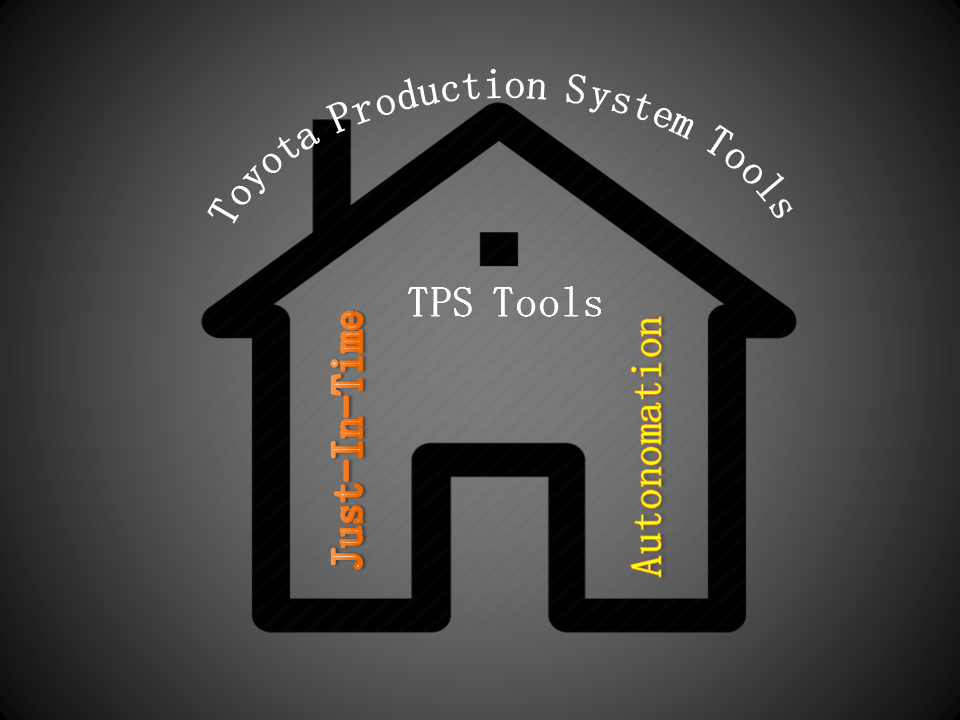
Two Major concepts of the Toyota production system are;

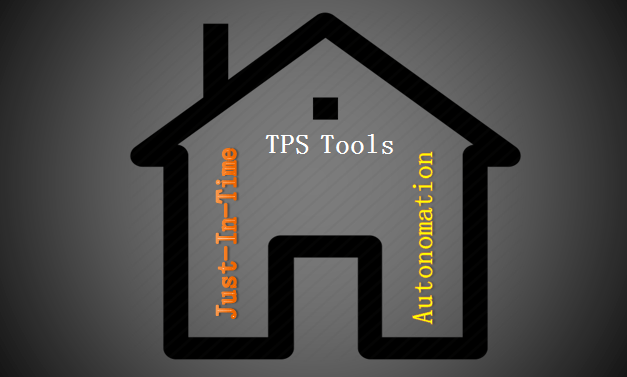
  • JIT (Just-In-Time)
  • Autonomation

The principles of Toyota’s production system include;

  1. Quality at the source
  2. Pull production
  3. Supplier Involvement
  4. Cellular Layouts
  5. Flexible resources
  6. Reduced set-up time
  7. Small lot production
  8. Employee involvement & Empowerment
  9. Equipment Maintenance
  10. Uniform production levels

The above elements and principles were the most important input to enhance mass production with zero defects. Rather than this one more concept also was important there to success the effective functioning of the TPS system was “Autonomation”.

Autonomation:

Autonomous defect control which depends on both automatic stop devices. It ensures that 100% good units flow to the subsequent operations.

Below are some mechanisms used for Autonomation such as?

  1. Baka-yoke/ Poka-yoke
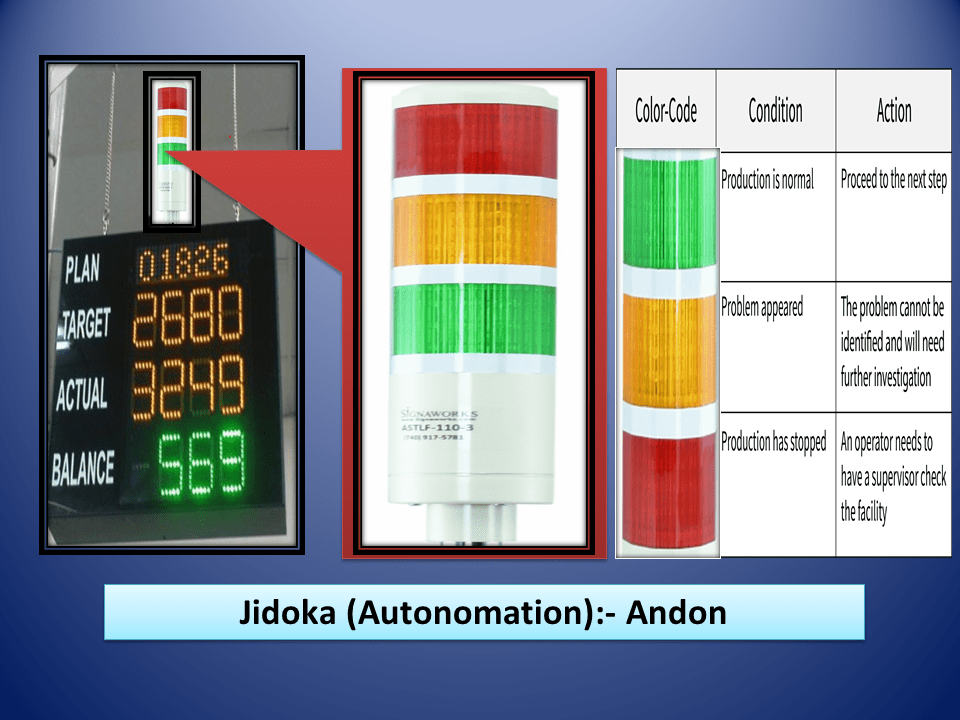
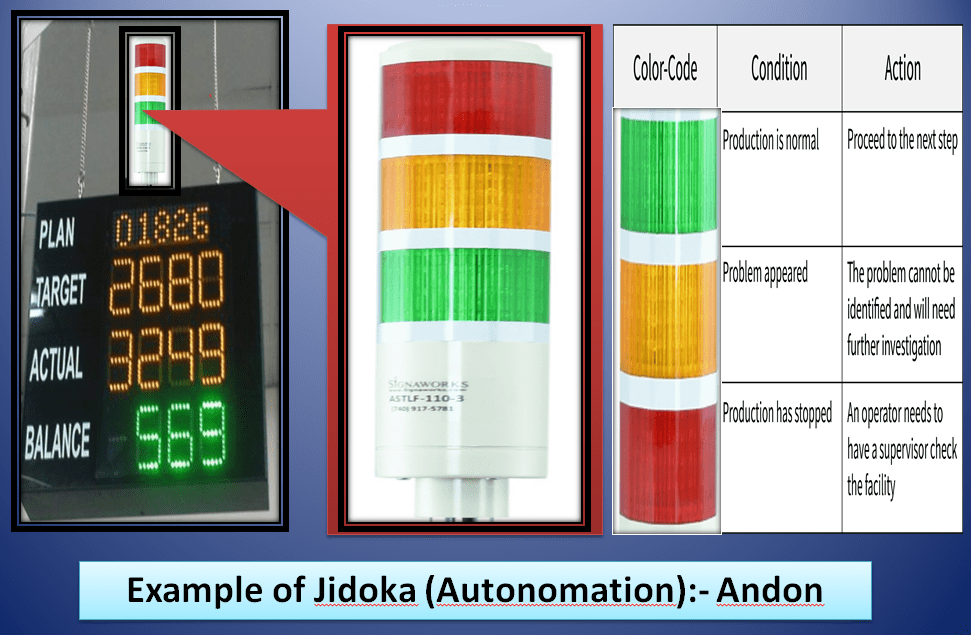
  2. Andons
  3. Yo-i-don system.

Useful Articles:

Error Proofing Understanding & Implementation of IATF 16949 Clauses 10.2.4

Swot Analysis of a Company Challenges

Pareto Chart Example of Manufacturing Units

Histogram Example | Foundry Industries Examples.

Rework vs Repair |IATF Requirement for Control of Reworked/ Repaired Product.

Thank you for ReadingKeep visiting Techiequality.Com

Popular Post:

Toyota Production System History

Toyota Production System History

Toyota Production System History

Toyota Production System History: In the 1800s, the Toyoda family has started the first business as a textile firm but later in 1935, they began producing cars. Initially, the quality of the cars was very poor. In 1950, Eiji Toyoda visited the Ford Motor Company to learn and establish the methods of mass production in their Toyota car manufacturing plant. After months of studying the plant, Toyoda concluded that Ford’s production system was not suitable in Japan. In the US, only one type of car was produced in a plant. Toyoda would like to produce a variety of cars in just one plant. Also, Toyota Company has so many other problems as a short supply of capital that prevented him from investing heavily in modern equipment and technology and the strong Japanese company labours unions, Because of which he could not readily hire workers.

Toyota Production System Tools & Technique

Toyota Production System History

Finally, Toyoda has decided that Ford production system would not be suitable for their car manufacturing company and called production engineer Taiichii Ohno to aid him in developing a workable system taking into consideration the restrictions of his company. Because of the restrictions Taiichii Ohno had to design a system that would be more efficient, less costly, and more flexible, would be less wasteful than traditional mass-production methods. The system developed by taiichii Ohno and Toyoda was later termed as “Toyota Production System”.

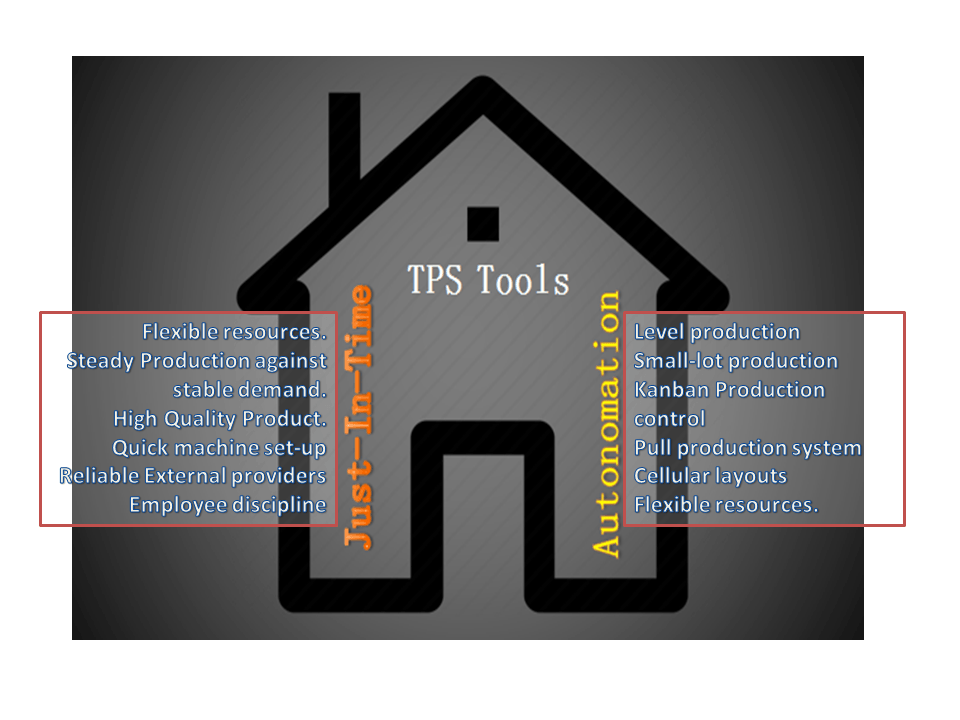
The Prototypes of the TPS (Toyota Production System” is the JIT (Just-In-Time) & Autonomation. The Objective of the JIT was to produce the necessary units in the quantities needed at the time they were needed. Just-in-time is a popular name but some companies call it as Continuous-flow manufacturing, Stockless production, management by sight, short-cycle manufacturing and time-based competition, etc.

The major elements of Just-In-Time are;

  1. No machine breakdowns
  2. Flexible resources
  3. Steady Production against stable demand.
  4. High-Quality Product.
  5. Quick machine set-up
  6. Reliable External providers
  7. Employee discipline

The word Autonomation means automation with human touch or autonomous defect control.

The Principles used in TPS (Toyota Production System are;

Toyota Principles

  1. Supplier network
  2. Quality at the source
  3. TPM
  4. Quick set-up
  5. Level production
  6. Small-lot production
  7. Kanban Production control
  8. Pull production system
  9. Cellular layouts
  10. Flexible resources.
  11. Autonomation

Useful Articles:

Error Proofing Understanding & Implementation of IATF 16949 Clauses 10.2.4

Swot Analysis of a Company Challenges

Pareto Chart Example of Manufacturing Units

Histogram Example | Foundry Industries Examples

QA & QC Tools Template

Thank you for reading…Keep visiting Techiequality.Com

I hope the above articles “Toyota Production System History” is useful to you…

Popular Post:

Histogram Example | Foundry Industries Examples

Histogram Example

Histogram Example | Foundry Industries Examples

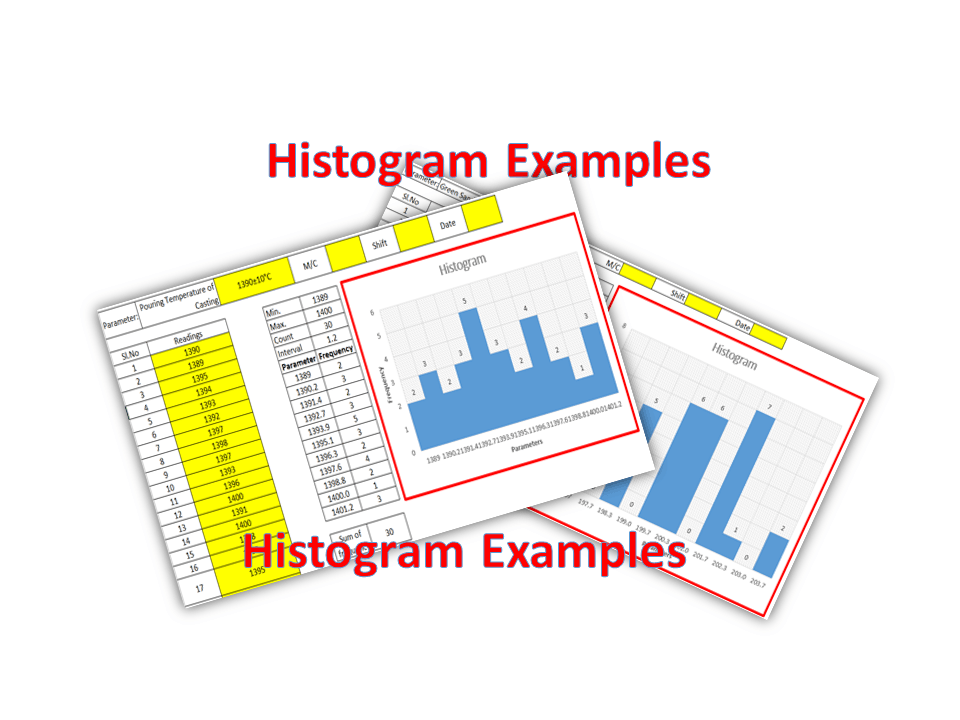
Histogram Example: Hello, Readers! Here we will discuss two important industrial examples to prepare a Histogram and its interpretation. If you are interested in downloading the Excel template/format, then go through the beneath links.

DOWNLOAD [Histogram Template in Excel format].

How to Prepare Histogram in Excel?

Histogram Example
Histogram Example

Example-1:

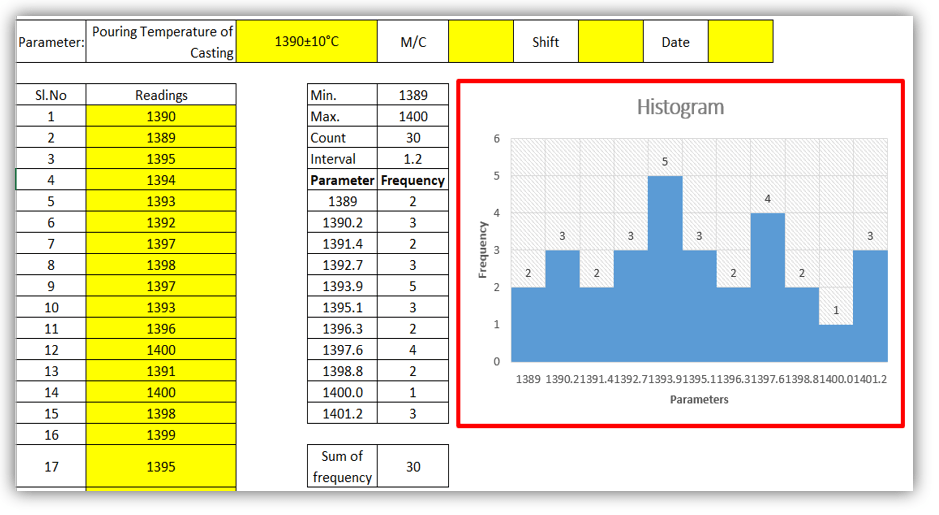
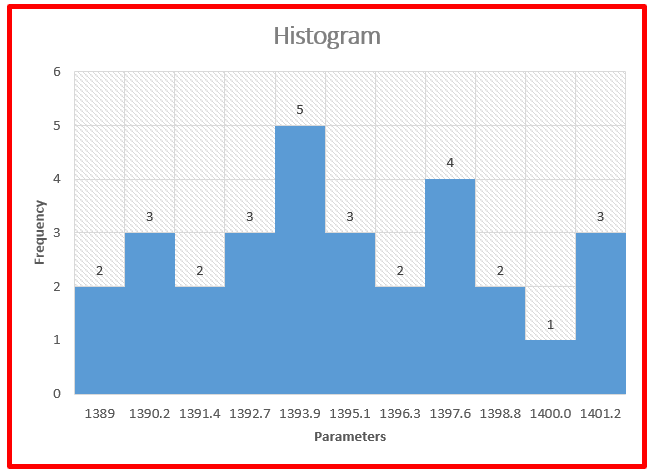
A Process engineer of an organization (XYZ Ltd) had decided to know the bins range [frequency distribution] of pouring temperature of casting and he has started collecting the data of 30 number readings and analyzing that data distribution that histogram graph is normal or non-normal. Illustrations of the same readings are given below,

Histogram Example
Histogram Example

DOWNLOAD Example-1’s Histogram Excel Template.

Parameter: Pouring Temperature of Casting 1390±10°C M/C   Shift   Date  
Sl. No Readings Sl. No Readings
 1 1390 16 1399
2 1389 17 1395
3 1395 18 1397
4 1394 19 1396
5 1393 20 1392
6 1392 21 1393
7 1397 22 1393
8 1398 23 1400
9 1397 24 1389
10 1393 25 1390
11 1396 26 1390
12 1400 27 1391
13 1391 28 1392
14 1400 29 1393
15 1398 30 1397
Min. 1389
Max. 1400
Count 30
Interval 1.2
Parameter Frequency
1389 2
1390.2 3
1391.4 2
1392.7 3
1393.9 5
1395.1 3
1396.3 2
1397.6 4
1398.8 2
1400.0 1
1401.2 3
Sum of frequency 30
 Exmp. of frequency distribution
Example-1

Interpretation of Result: Non-normal data distribution.

Example-2:

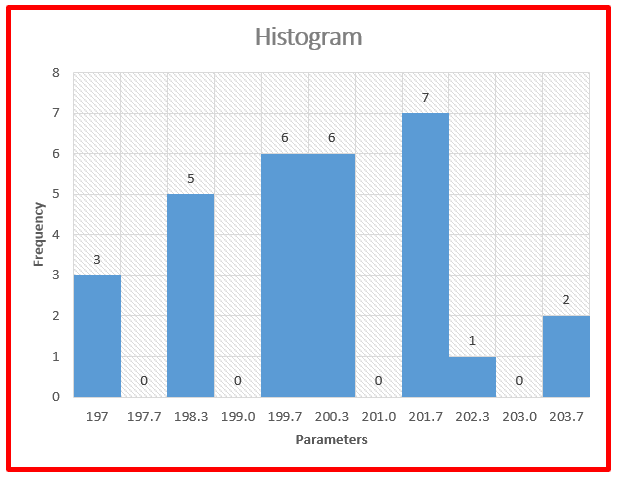
We have collected the 30 readings of green sand permeability, details are given below and also, and we have plotted a histogram to know the data frequency distribution.

DOWNLOAD Exanple-2’s Histogram Excel Format.

Parameter: Green sand Permeability 200±10 M/C   Shift   Date  
Sl. No Readings Sl. No Readings
1 201 16 200
2 200 17 201
3 202 18 201
4 201 19 203
5 200 20 201
6 199 21 198
7 199 22 199
8 198 23 197
9 201 24 197
10 200 25 198
11 199 26 199
12 198 27 200
13 197 28 201
14 199 29 203
15 198 30 200
Min. 197
Max. 203
Count 30
Interval 0.7
Parameter Frequency
197 3
197.7 0
198.3 5
199.0 0
199.7 6
200.3 6
201.0 0
201.7 7
202.3 1
203.0 0
203.7 2
Sum of frequency 30
Histogram Example
Example-2
Interpretation of Result: Non-Normal data distribution.

Useful Links:

How to Plot Pareto Chart in Excel ( with example)

OEE Calculation-How To Calculate OEE (Overall Equipment Effectiveness) with Example

Implementation of KAIZEN in Industry

CAPA Process

Thank you for reading…. Keep visiting Techiequality.Com

Let us know if you have any questions…

Popular Post:

Pareto Chart Example of Manufacturing Units

Pareto Chart Example

Pareto Chart Example of Manufacturing Units

Pareto Chart Example: Hello Readers! Today we will discuss about the pareto chart principle (80/20 Rule) with manufacturing examples.

DOWNLOAD the Below Example Pareto chart in Excel format.

Pareto Principle (80/20 Rule): –

The 80/20 Rule or Pareto Principle is the most important part of Pareto Analysis. The rule 80/20 says that 80% of the effects come from 20% of the causes.

History of 80/20 Rule: In Italy, Vilfredo Pareto has originally observed that 20% of people were owned 80% of the land. This principle was applied to quality control and favoured the use of the statement of the phrase, which is “The Vital few and useful many” to define the 80/20 rule in the 20th century by Dr. Joseph M. Juran.

Understanding of Principle with Manufacturing Example:

 We have taken the major defects related to the Metal fabrication and casting Process. We will analyze the contribution of defects among all with the help of the Pareto principle 980/20 Rule). So, let’s get started with two important examples, details are given below.

Example:
Defects Quantity
Fatigue 41
High temp. defect 37
Mechanical Property degradation 32
Creep 28
Env. Interaction 23
Microstructural changes 19
Wear 16
Abbrasive Wear 12
fretting 9
Erosion 5

Now, we are supposed to calculate the Cumulative total and Cumulative percentage

Defects Quantity Cumulative
Total
Cumulative in
%
Fatigue 41 41 18%
High temp. defect 37 78 35%
Mechanical Property degradation 32 110 50%
Creep 28 138 62%
Env. Interaction 23 161 73%
Microstructural changes 19 180 81%
Wear 16 196 88%
Abbrasive Wear 12 208 94%
fretting 9 217 98%
Erosion 5 222 100%

Now, we will plot the Pareto chart and will apply the 80/20 rule to know the 80% contribution among all defects.

Pareto Chart Example

Application of 80/20 rule on the above example: kindly go through the above example and Pareto chart as well, in the aforesaid Pareto chart we have marked by the red color arrow and it is indicating the 80% contribution on a line graph, which means whatever defects are coming under the arrow are contributing the 80% contribution. If you are able to resolve these defects means, your 80% contribution will be solved out of 100%.

I hope the above articles are useful and you people are understood well.

Useful Links:

Histogram Example | Foundry Industries Examples

Histogram Template with example | Download

Repeatability vs Reproducibility | Discussion of Key difference.
Histogram Template with example | Download

More on TECHIEQUALITY

Thank you for reading…. Keep visiting Techiequality.Com

Let us know if you have any questions…

Popular Post:

Swot Analysis of a Company Challenges

Company Challenges

Swot Analysis of a Company Challenges:

Hello Readers! Today, we will discuss the top challenges of a small company these are often facing. Same we will analyze here through SWOT Analysis. As you know SWOT analysis is a very popular tool and a strategic planning technique, which is generally used to identify strengths, weaknesses, opportunities, and threats. So with the help of that, we will identify the top business challenge’s Weaknesses, threats, and opportunities.  

DOWNLOAD the SWOT analysis report of the top challenges of a company in an Excel file.
Full-form & Basic Information about SWOT Analysis:

Strength: Advantages of Business Characteristics.
Weakness: Disadvantage of Business Characteristics.

Opportunity: Business Element that could be exploited to its advantage.

Threat: The Business element that could cause trouble for the business.

When to use SWOT Analysis:

You can use the SWOT analysis process in the below field but not limited to;

  • To overcome the Business concern types problem.
  • To explore a new opportunity in NPD, Process Defects, Design defects, Manufacturing defects, R/M Defects, Customer End defects, technology up-gradation, etc.

Top 8 Challenges of a Company:

  1. Technology up-gradation
  2. Investment Business Plan
  3. Timely NPD
  4. Manufacturing Process Control
  5. Legal challenges
  6. Raw material crisis
  7. Business Competition
  8. IR

SWOT Analysis:

Company Challenges
Company Challenges
I/PStrengthWeaknessOpportunityThreat
Technology up-gradation not in timelyThe Investment cost is low1. Low Productivity.
2. High COPQ.
3. High conversion cost.
4. Non-fulfillment of customer requirement w.r.t market value.
Re-engineering, value engineering, and NPD with a high-capacity automation system.1. Low sales value
2. Customer Dissatisfaction
3. Business losses.
Investment business PlanLimited products required less time to produce1. Raw material crisis
2. Low Production Volume
3. Non-fulfillment of the statutory and regulatory requirements.
4. IR problem
Comprehensive business plan with contingency plan/ emergency planCompany shut-down
Legal challenges1. Raw material crisis
2. Low Production Volume
3. Non-fulfillment of the statutory and regulatory requirements.
4. IR problem
Fulfillment of statutory and regulatory requirementsCompany shut-down
SWOT Analysis Example

Top 6 Marketing Issues:

  1. Sales Issue.
  2. Reputation Issue.
  3. Operations Issue.
  4. Price Issue.
  5. Demand Issue.
  6. Brand Issue.

For Top 6 Marketing Issues, we have separately written articles, if you are interested in reading then CLICK-HERE.

Useful Articles:

SWOT Analysis Formats

SWOT Analysis Word Template

Histogram Template with example | Download

Histogram Example | Foundry Industries Examples

Pareto Chart Example of Manufacturing Units

Thank you for reading…..Keep visiting Techiequality.com

Please let me know if you have any questions.

Popular Post:

SWOT Analysis Formats

SWOT Analysis Formats

SWOT Analysis Formats:

SWOT Analysis Formats are very useful tools for the identification of Risks in several operations. As you know the SWOT Analysis is a strategic planning technique, which is generally used to identify the strengths, weaknesses, opportunities, and threats related to the context of the organization. So here we have uploaded several customized SWOT Analysis Formats or templates. Just go through the below links and download the Formats.

DOWNLOAD [ SWOT Analysis Template in Excel]

SWOT Analysis Formats [DOWNLOAD Below]

SWOT Analysis Formats
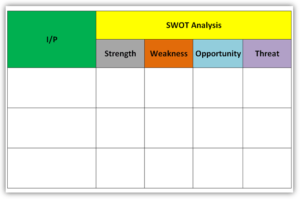
  • I/P: This is the input points that you would like to do the SWOT analysis. For example, several factors and business issues (Internal and External).
  • Internal issues example: policy, Standards, business strategy, labour strikes, Major accidents, Raw material Crisis, etc.
  • External Issues Example: Legal, Customer Contract, Profit loss, loss in share market, etc.
  • Strength: Advantages of Business Characteristics.
  • Weakness: Disadvantage of Business Characteristics.
  • Opportunity: Business Element that could be exploited to its advantage.
  • Threat: The Business element that could cause trouble for the business.

When to use SWOT Analysis:

You can use the SWOT analysis process in the below field but not limited to…;

  • To overcome the Business concern types problem.
  • To explore the new opportunities in NPD, Process Defects, Design defects, Manufacturing defects, R/M Defects, Customer End defectss, technology up-gradation, Socio-political issues, Internal factors, Issues to business strategy, etc.

Note: The SWOT Analysis tool is the best one to use for identifying the Risk and Opportunity of several Business system standards like IATF 16949, ISO 9001, ISO 14001, ISO 45001, ISO 31000, etc.

SWOT Analysis Examples in several Activities:

Swot Analysis of Marketing Operation

Detailed SWOT Analysis Examples

Useful Links:

Repeatability vs Reproducibility | Discussion of Key difference.

5’S Concept | what are 5’S?

Rework vs Repair |IATF Requirement for Control of Reworked/ Repaired Product

How to calculate Cp and Cpk? |Practical Case Study | Process Capability Example

How to plot the Run Chart in Excel | Run Chart Excel Template

Thank you for reading…. Keep visiting Techiequality.Com

Let us know if you have any questions…

Popular Post:

Sales vs Marketing |Top-5 Marketing Issue SWOT Analysis

Sales vs Marketing

Sales vs Marketing:

Hello Readers! Here, we will discuss the key difference between Sales vs Marketing operations. Sales and marketing are interrelated operations. Day by day digital marketing is becoming more effective than traditional marketing. Before doing digital marketing, we are supposed to know the basic difference between sales and marketing.

Top 5 Marketing Issue’s SWOT Analysis Report. [CLICK-HERE]

Sales vs Marketing:

Sales vs Marketing
Sales vs Marketing

MARKETING: It’s the strategic planning and execution of an effort to develop and support a brand name and broadcast offering to a defined audience. Several approaches should be adopted to promote the brand name and products through advertising, web, mail, etc.

  • Protect the brand reputation.
  • Understand customer-specific requirements and create products or services to fulfill their needs.
  • Target on massive population.
  • Marketing always gives focuses on customer needs and expectations.
  • To Promote the brand name, product, and service up to the relevant end users.
  • Long-term strategy on market value.
  • Comprehensive plan for becoming a world no.1 Brand in the market.
  • Marketing has a strong strategy to pull customers towards a company.

SALES: The number of Products or services that a company sells within a stipulated time period. The Best approach for sales operations is client relationship management.

  • Protect the Brand’s Customers.
  • Convince the customer that the product or service fulfills his needs and expectations.
  • Target on an individual traffic.
  • The sales strategy is to push out of the door.
  • Sales itself is an image of the brand.
  • It’s the one-to-one communication path.
  • Price is the most influential parameter w.r.t competitions.
  • The Sales aim is to persuade someone to buy it.

Useful Links:

SWOT Analysis Formats

SWOT Analysis Word Template

Detailed SWOT Analysis Examples

Control Chart in Minitab | How to plot a Control Chart in Minitab 18

8D Report Example | Download Case Study Report:

Thank you for reading…. Keep visiting Techiequality.Com

Let us know if you have any questions…

Popular Post:

Histogram Template with example | Download

Histogram Template

Histogram Template with example | Download

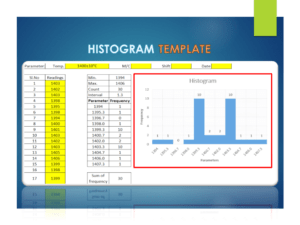
The Histogram Template is prepared in a simple format with an industrial example. We have described the example in below, just go through this article and Download the Template / Format. It’s a very useful tool and is frequently used in manufacturing industries. The main function is to know the frequency distribution, symmetry, and skewness, and it also helps to determine the normality of data by drawing the bell curve.

DOWNLOAD [Histogram Template in Excel format].

Histogram Template
Histogram Template

Basic Information on Histogram:

A histogram is one of the 7QC tools and commonly used graph to show frequency distribution. Helps summarize data from a process that has been collected over a period of time.

A histogram is a representation of the frequency distribution of numerical data. it was first familiarized by Karl Pearson. A histogram is related to merely one type of variable data. You should calculate the interval value to represent the bins. Bins shall give an idea about the how much data falls within the selected data range’s width. Histogram gives the indication about data distribution as normal, skewed, or bi-modal.

How to use our Histogram Template:

Step-1: Download the Histogram Template from the above link.

Step-2: Carefully read the “Note” mentioned in the Excel template.

Step-3: Enter the reading only in the yellow color box. Then other values will calculate automatically and your histogram will be ready for interpretation.

Note:

1. Only yellow colour boxes are changeable

2. Make sure that the sum of frequency is equal to the total count, e.g. sum of frequency in a given example [example is given in histogram excel format, just download and see the example] is 30 and the count is also 30, if not then you have to adjust the parameters and frequency table in frequency distribution format for doing so click on the link given “How to adjust parameters and frequency table in Histogram Template?”.

Useful Links:

How to Plot Pareto Chart in Excel ( with example)

What is SPC | SPC Tools?

Corrective and Preventive Action Format | CAPA with Example.

OEE Calculation-How To Calculate OEE (Overall Equipment Effectiveness) with Example

Implementation of KAIZEN in Industry

Thank you for reading…. Keep visiting Techiequality.Com

Let us know if you have any questions…and drop your comments below.

Popular Post: