DPMO Calculation, Formula, Template & Manufacturing Example

DPMO Calculation

DPMO Calculation, Formula, Manufacturing Example & DPMO Excel Template

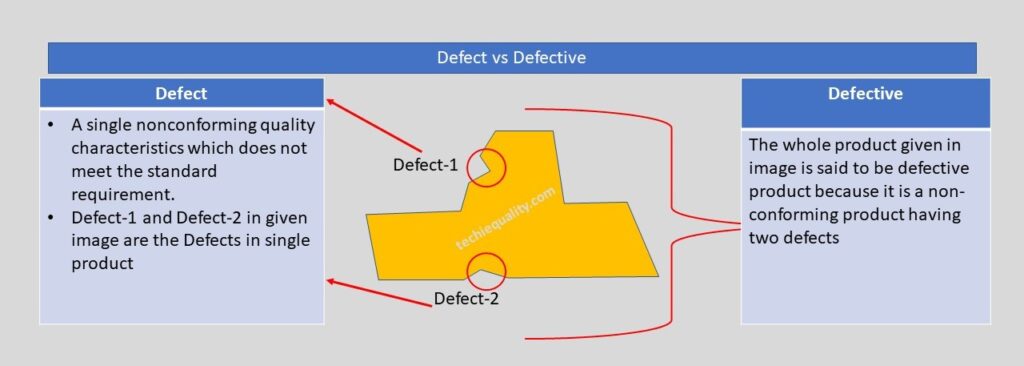
Hello readers! Today we will be discussing on DPMO calculation with manufacturing examples. The full form of DPMO is defects per million opportunities. Similarly, dpmo there are 3 more popular terms used in quality for the calculation of defect level and these are [1] DPPM, [2] DPO, [3] DPU. These terms are also frequently used in six sigma project work. If you would like to download the sample template of all 4 calculations in a single sheet then download it from below given link.

DPMO Calculation Excel TemplateDOWNLOAD

Formula of DPMO, DPPM, DPO, DPU:

DPU (Defects per unit):

DPU Formula = Total number of Defects / Total units

DPO (Defects Per Opportunity):

DPO Formula = Total number of defects/ (number of units x defects opportunity per unit)

DPMO (Defects per million opportunities):

DPMO Formula = {Total number of defects/ (number of units x defects opportunity per unit)} x 1000000

DPPM (Defective Parts Per Million):

DPPM Formula = (Total Defective parts / Total parts) x 1000000

First of all, below example-1 is one of the scenarios that are given for calculating the DPMO, DPPM, DPO, and DPU for all my article readers. So, this is the task for you my readers for your better understanding. Similarly, we are also going to solve one of the scenario-based questions for calculating the DPMO, DPPM, DPU, and DPO.

 Example-1 (Task for the reader):

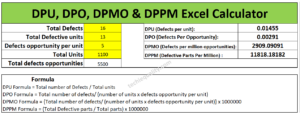
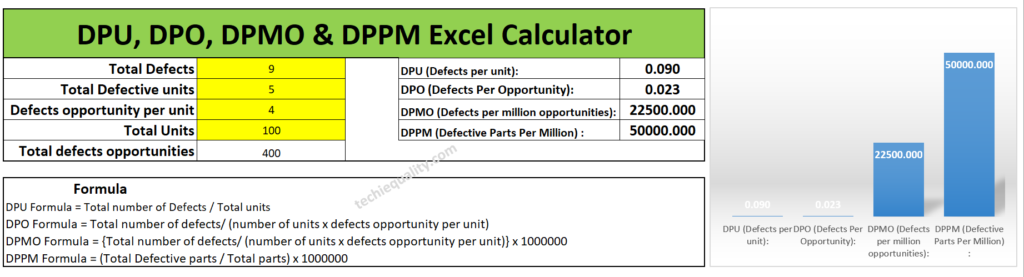
Suppose a sheet metal automobile manufacturing company, produces an automobile part. In the press shop, we found that 4 parts had been rejected at press machine-1 & 9 parts at press machine-2. When a QA engineer had analyzed, he found that the total defective product has 16 defects. And defects opportunity per parts is 5 and total 1100 parts had been produced. Calculate the DPMO, DPPM, DPU and DPO?    

Have you completed the calculation of above example-1 or not? If not yet then, we are going to help to calculate the same. First of all, note down the data, i.e. Total defects, Total defective parts, defects opportunity per part, total parts produced and total defects opportunity. I know that it will take more time for manual calculation of all calculations, that is why we are recommending you to download our excel automatic calculation template for easy and time-saving calculation. Downloading link is given at top of the articles just try to download the format or template. I would request you all my readers, you just calculate the DPMO and DPPM manually and try to match your value with Excel calculation, which is given below;

DPMO Calculation

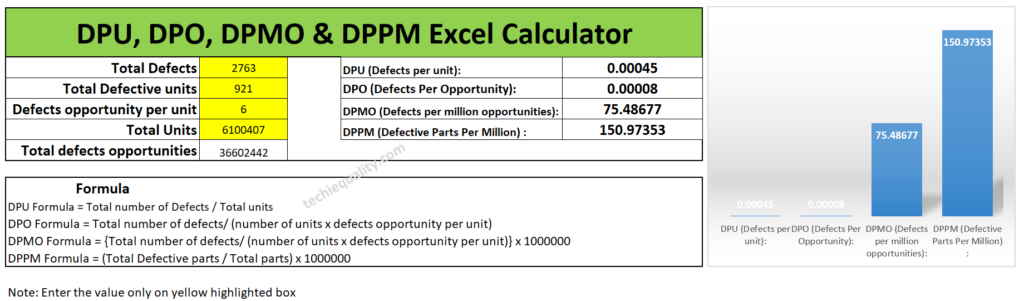
I hope you have completed the matching of the value calculated by the automatic excel template and your manual calculation. Now we will be discussing the different types of examples and will calculate the value by both manually and by using an automatic excel format. So, let’s get started.

Example-2:

Lets a company manufacturing a toy product and below are the data given in several processes. so, calculate the DPMO, DPPM, DPO and DPU of individual processes and overall process by manually and by using the excel template. And also try to compare both solutions.

Process-1 Data Table:

Total Defects30 nos
Total Defective parts20 nos
Defects opportunity per part3
Total parts produced840 nos

Process-2 Data Table:

Total Defects102 nos
Total Defective parts80 nos
Defects opportunity per part4
Total parts produced987 nos

Process-3 Data Table:

Total Defects17 nos
Total Defective parts16 nos
Defects opportunity per part3
Total parts produced1003 nos

Calculate the DPMO, DPPM, DPO and DPU of individual processes and overall processes by manually and by using the excel template?

Solution of Process-1:

DPU Formula = Total number of Defects / Total units

= 30/840

=0.0357

DPO (Defects Per Opportunity):

DPO Formula = Total number of defects/ (number of units x defects opportunity per unit)

= 30/(840×3)

= 0.0119

DPMO (Defects per million opportunities):

DPMO Formula = {Total number of defects/ (number of units x defects opportunity per unit)} x 1000000

= [30/(840×3)]x1000000

=11904.7

DPPM (Defective Parts Per Million):

DPPM Formula = (Total Defective parts / Total parts) x 1000000

= (20/840) x1000000

=23809.5

Similarly, Excel template calculation is given below as;

excel formula

Solution of Process-2:

DPU (Defects per unit):

DPU Formula = Total number of Defects / Total units

= 102/987

= 0.1033

DPO (Defects Per Opportunity):

DPO Formula = Total number of defects/ (number of units x defects opportunity per unit)

= 102/(987×4)

= 0.0258

DPMO (Defects per million opportunities):

DPMO Formula = {Total number of defects/ (number of units x defects opportunity per unit)} x 1000000

= [102/(987×4)]x1000000

= 25835.86

DPPM (Defective Parts Per Million):

DPPM Formula = (Total Defective parts / Total parts) x 1000000

= (80/987) x1000000

= 81053.69

You can compare the answer with the below given Excel calculated value.

DPMO Calculation

Solution of Process-3:

DPU (Defects per unit):

DPU Formula = Total number of Defects / Total units

= 17/1003

= 0.0169

DPO (Defects Per Opportunity):

DPO Formula = Total number of defects/ (number of units x defects opportunity per unit)

= 17/1003×3

=0.0056

DPMO (Defects per million opportunities):

DPMO Formula = {Total number of defects/ (number of units x defects opportunity per unit)} x 1000000

= [17/1003×3]x1000000

= 5649.7

DPPM (Defective Parts Per Million):

DPPM Formula = (Total Defective parts / Total parts) x 1000000

= [16/1003]x1000000

= 15952.14

Below are the excel calculation of the above value, you can match the value;

DPMO Calculation

Overall Process DPMO Calculation:

For doing so we need a combined data table, so we have clubbed all the data of process-1,2 & 3 and given in below; the same part is produced in all 3 processes.

Total Defects149 nos
Total Defective parts116 nos
Defects opportunity per part8
Total parts produced2830 nos

DPU (Defects per unit):

DPU Formula = Total number of Defects / Total units

= 149/2830

= 0.0526

DPO (Defects Per Opportunity):

DPO Formula = Total number of defects/ (number of units x defects opportunity per unit)

= 149/2830×8

=0.00658

DPMO (Defects per million opportunities):

DPMO Formula = {Total number of defects/ (number of units x defects opportunity per unit)} x 1000000

= [149/8×2830]x1000000

= 6581.27

DPPM (Defective Parts Per Million):

DPPM Formula = (Total Defective parts / Total parts) x 1000000

= (116/2830) x1000000

= 40989.39

Overall

[Excel Calculation of DPMO]

Useful Post:

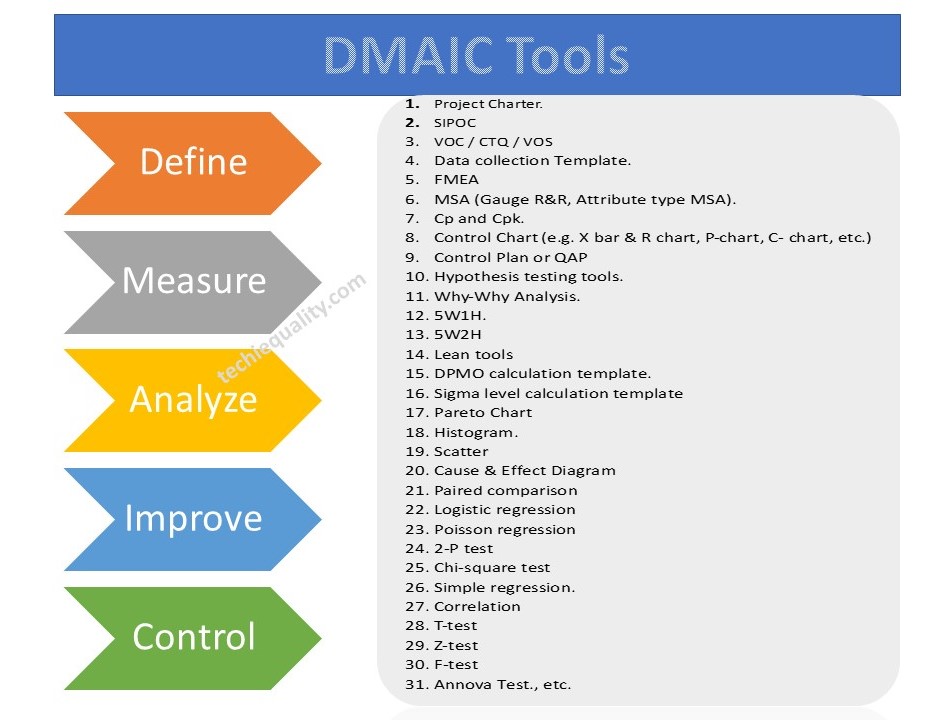
DMAIC Tools | DMAIC Template | Six Sigma Methodologies | 30+ Free Tools

What is Visual Management? | Visual Management Board Examples

Process Flow Diagram Template | Examples |Symbols |PFD

SIPOC Template | SIPOC Diagram Example of Manufacturing & Service Industry

More on TECHIEQUALITY

Process Flow Diagram Template | Examples |Symbols |PFD

Process Flow Diagram

Process Flow Diagram Template | Examples |Symbols |PFD

Hi Readers! Here, today we will be discussing the process flow diagram, its symbols, and practical examples. We have prepared a PFD template for sample and example basis, if you would like to download the free template or format of the PFD-process flow diagram then, go through the below-given link.

The process flow diagram template or format in excel-DOWNLOAD-PFD in Excel template or format.

What is a Process Flow Diagram- PFD?

The PFD or process flow diagram is a flow chart or process flow diagram or process mapping of a process. The PFD represents the process sequence and details (like a machine, activities, process sequence, relevant document, process control, decision, etc).

Symbols of Process flow diagram – PFD:

PFD/PFC has many symbols but we will discuss only common symbols. Details are given below;

Symbol NameFunction
FlowlineTo show the process direction
Terminal symbolIt indicates the beginning  or end of the Process flowchart
ProcessRepresent Process steps
Decision SymbolWhich shows the decision step of a process
Input / OutputInputting  or outputting data
Predefined processWhich indicates the predefined process
On-page connectorPairs of on-page connectors are used to replace long lines  on a flowchart page
Off-page connectorIt is used when the target is on another page.
DelayWhich represents the delay period that is part of a process
DocumentDocument requirement
Multi-documentMulti-document requirement
DisplayMachine display
Manual inputData or information in the system
Manual OperationIt indicates the manual process

Process Flow Chart symbols / PFD

Process Flow Diagram

4 Steps to create a PFD-Process flow Diagram:

Step-1:

CFT team formation including the process owner.

Step-2:

List out the process, activities, decision, machine, control mechanism, etc

Step-3:

Sequentially write down the process, activities, and decisions of the process

Step-4:

Plot the diagram by using the PFD symbols.

Process Flow Diagram Example:

We have created two process flow diagrams, i.e. [1] without repetition of the process after the decision and [2] with repetition of the process after the decision. Both two types of PDF are given below;

Process Flow Diagram
PFD/PFC-process flow chart example

Industrial Example:

Here we have taken the process flow diagram example of Training, which is one of the most powerful things to competent the workforce and enhance the skill of employees. So that optimum knowledge can be utilized for effective output from operation by employees at an organization. Hence if you would like to create a process flow chart of education and training operations then the below example will be helpful to prepare the same. This is only for reference and learning purposes.

We have prepared the PFD followed by the above steps:

Step-1:

We have formed a team including the HRD member.

Step-2:

Identified the activities below

  • Training needs identification
  • Prepare the training plan and schedule
  • Conduct the training as per schedule
  • Training feedback and effectiveness monitoring
  • Skill evaluation.

Step-3:

We have arranged the activities sequentially as given below of education and training operations.

Activities-1Training needs identification
Activities-2Prepare the training plan and schedule
Activities-3Conduct the training as per schedule
Activities-4Training feedback and effectiveness monitoring
Activities-5Skill evaluation

Step-4:

We have prepared the PFD – process flow chart for education and training operations and details are given below;

process mapping

FAQ:

What is the process flow?

The process flow is the flow chart that represents the process sequences or process mapping including machine details, control data, document reference, etc.

What is the difference between SIPOC and PFD?

The SIPOC diagram consists of 5 elements i.e. Supplier, Input, Process, Output, and Customer. the PDF is the process mapping that represents the process sequences.

What is flowchart?

The FC is a flow diagram or mapping of activities.

What are the 3 types of PFD?

[1] System PFD, [2] General PFD, [3] Detailed PFD

Free Templates / Formats of QM: we have published some free templates or formats related to Quality Management with manufacturing / industrial practical examples for better understanding and learning. if you have not yet read these free template articles/posts then, you could visit our “Template/Format” section. Thanks for reading…keep visiting techiequality.com

Useful Post:

4M Change Management | How to implement in Manufacturing unit | Template | Format

C Chart Excel Template | Formula | Example | Calculation

P Chart Excel Template | Formula |Example |Control Chart | Calculation

ABC Analysis of Inventory with Industrial Example

How to calculate z-score in excel with manufacturing example

What is Visual Management? | Visual Management Board Examples

What is Visual Management

What is Visual Management?| Visual Management Board Examples

Hi Readers! Here, today we are going to discuss on what is visual management. Its examples and tools. The Visual management is a method to visualize the performance, standards, and signs in operation or any activities. This visual standard is widely used in a manufacturing operation to enhance operation excellence, performance and optimize the output from the operation or activities. The main purpose of the visual management is to communicate the important criteria to the shop floor workforce in visual forms.

Benefits of Visual Management

  • Cost reduction
  • Easy understanding of performance
  • Quick reference of critical parameters and one-step process.
  • Waste reduction
  • Reduced dependency for understanding the critical operation standard
  • Status of objectives
  • Information sharing
  • Improve productivity, rate of quality, cost, delivery, morale, and product & operator safety.
  • Promote values
  • Raise awareness
  • Improve accountability, etc.

What are the common tools used in industries to implement visual management? As we all know that we can easily understand and remember the visual sign rather than information in other forms. So it’s an effective method to control your operation process and optimize the output. The common tools and methods used in industries are given below;

  1. FIFO (First in First Out): This is a very helpful tool that you can control your material flows in systematic ways. In this process, you can easily manage your material storage and movement.
  2. 5’S: the 5’S stand for Sort, set in Order, Shine, Standardize, and Sustain.
  3. Display: Display board, Sign, labels, and marking.
  4. OPL, OK and Not OK process sample display, colour code, level, Visual poka yoke, do & don’t, and Andon system.
  5. Digital display

Example of visual management

FIFO:

Visual management is one of the best techniques in an organization by which very easily and quickly, you can understand critical information in visual ways. I think visual information is very easy to understand and helps to enhance the optimize the output and minimize the waste/ errors. FIFO is the one of the visual management systems which means First-In-First-Out. For inventory management, FIFO is the one of the best techniques to help for systematic storage and handling of materials/products/elements, etc. Some common FIFO systems are –colour code systems, numbering, bin cards, digital FIFO systems, IOT-based FIFO, etc.

What is Visual Management

Example: suppose an organization is being planned to implement the FIFO visual management system at raw material store room.  So the store manager decided to store the material in month-wise material received in the different racks with month-wise colour codes. So that the first incoming raw material can be used first in the production area. Accordingly, to the colour code, the store manager issued the material to the user department.  In the below image, you can easily understand that how the material is stored with month-wise colour code. As you can see in the below image, production is for the month of April, and the store manager issuing the material available in the month of January instead of month April. This is the material issuing and handling followed by the FIFO system.

5’S:

The 5’S is the base pillar of visual management or visual control. The terms 5’S are the [1] Sort, [2] Set in order [3] Shine, [4] Standardize and [5] Sustain. From the office to the manufacturing shop floor, you can easily implement the 5’S concept. We have taken an example as a tool board for a better understanding of the 5’S concept for easy implementation in the manufacturing industry. As you can see in the tool board image below that how the different sizes and types of tools are placed in a systematic manner followed by the5’S concept.

What is Visual Management

Match Marking:

Match marking refers to the process in which a pictorial view is provided to place the pieces in the position of the marked point by identifying the final output image. E.g. In the image attached below an object is placed between the nut and the bolt. Now by looking at the final image, we can understand that the nut has to be rotated in such a way that the object placed in between the nut and bolt gets tightened or fixed. To do this one will need to rotate the nut to an extent that it matches with the yellow mark as shown in the output image.

What is Visual Management

Pipeline colour code on shop floor:

Pipeline colour coding is done to help one identify the contents flowing through the pipe. Also, additional details would be required to be provided if any hazardous material is flowing through the pipe to avoid any mishap. Thus pipeline colour coding helps in obtaining crucial information about the pipes contents. E.g. Now in the image provided below we can see the Pipeline visual display has been provided in four colours:-

The yellow coloured pipeline represents gas.

The green coloured pipeline represents water.

The red coloured pipeline represents components required for fire services.

The Light blue coloured pipeline represents air element present.

pipe line colour code

Tag System:

The Tag system helps in the easy identification of the segment of a product with the help of just the tag. Now let’s understand how? When any kind of production takes place in a factory it’s quite understood that on production you do get some wastage or rejections. Suppose a factory does the production of garments. Now in the process of production, there are certain items that get rejected for several reasons. Again there are several garments that need to be recertified before being sent out to the market.

Through the below presented image, we can easily understand that the garments which are tagged in Red are the rejected ones and cannot be sent out to the market. Green Tags represent the ones that are perfect to be sent out to the buyers. White tags are the ones that have been kept on hold for further verification due to the possibility of thread cutting or needs stitching before it’s sent out to the market.

What is Visual Management

Visual Management Board:

Shop floor display helps in streamline the process of work. The visual display helps in improving the workplace functioning by ensuring that the important information is clearly presented in a professional manner. Shop floor display works as a fundamental to any well communicated working environment. It helps in managing the operations of the manufacturing unit for effective planning and productivity. In the image provided below following information is provided for better understanding:-

What is Visual Management

Quality is presented with the help of a graph which helps one in identifying and comparing whether the quality is improving or deteriorating by merely looking at the graph. Similarly, different charts are displayed related to production performance to know the status, and understand the present position. In the shop-floor visual management board, you can display the critical information related documents, OPL, master sample, instruction, etc.

Andon System:

The Andon system is one of the strong visual management tools or visual control systems which promptly alerts about the status or problem of the operation line. In the below image, we have considered three colours Andon alert system as an example. Where different colours indicate different meanings. [1] Green colour light –There is no problem in the operation line. [2] yellow colour light- problem detected in line, [3] red colour light- problem exists, production stopped / operation stopped.

andon system

Useful Post:

Variation Calculation in Excel | Types of Variation |Manufacturing Example

Equipment Ranking Process | A B C Ranking of Machine with Manufacturing Example

What is Preventive Maintenance? | Predictive Maintenance |Types & Example

Plan Do Check Act Cycle | PDCA Cycle Manufacturing Example | Implementation

Thank you for reading…Keep visiting Techiequality.Com

Popular Post

ABC Analysis of Inventory with Industrial Example

ABC Analysis of Inventory

ABC Analysis of Inventory with Industrial Example:

Hi Readers! Here, we are going to discuss one of the popular inventory management systems, which is nothing namely called ABC Analysis of Inventory. As you know that in the industry managing stock of raw materials, bop, WIP, semi-finished products, and the finished product is a matter, if you don’t have any control over inventory then a huge amount of product or material stock, Space consumption, and money consumption for a certain period will be there. That-why proper inventory control or management should be there in place so that you can get the benefit from low inventory costs.

Free Download of Quality Template / Format

Benefits of Inventory management or control:

  • Low Inventory Cots
  • Preventing stock issues
  • Better space control
  • Eliminates duplication in ordering
  • Better utilization of stocks
  • Reduces stock holding costs

To achieve maximum benefits with minimum efforts, it is essential to manage inventory control, so here, we are going to discuss the step-by-step process of abc analysis of inventory control.

ABC Analysis of Inventory with Industrial Example:

ABC analysis classifies a large number of items in inventory into three categories- A-class, B-class, and C-class items. The classification is based on annual usage in value. ABC analysis aims to reduce the cost of managing inventory by controlling the inventory of a few high-value items. The abc analysis technique is based on the Pareto chart law. A higher contribution of annual usage is because of low items. These high annual usage inventory values should be paid more attention.

Class or CategoryAnnual Usage (Not limited to)
A-Category70-80%
B-Category15-25%
C-Category5%

ABC Analysis Example:

For example, the Maintenance department of ABC Limited has recorded the annual usage unit of machine maintenance parts as below for doing the ABC analysis and categorizes the items into A, B & C for better inventory control and minimizing the inventory carrying costs.

ItemAnnual Usage UnitUnit Cost in $
MCP-15000200
MCP-280025
MCP-31500150
MCP-4250060
MCP-5300030
MCP-690018
MCP-7200020
MCP-8120050
MCP-9100040
MCP-10130019
MCP-11600100
MCP-12200040

ABC Analysis of Inventory Steps by Steps Calculation:

Step-1: Calculate the annual usage cost by multiplying the quantity of each item with their respective price.
ItemAnnual Usage UnitUnit Cost in $Annual Usage Cost ($)
MCP-150002001000000
MCP-28002520000
MCP-31500150225000
MCP-4250060150000
MCP-530003090000
MCP-69001816200
MCP-720002040000
MCP-812005060000
MCP-910004040000
MCP-1013001924700
MCP-1160010060000
MCP-1220004080000

Step-2: Rearrange the above items in descending order (largest to smallest).

ItemAnnual Usage UnitUnit Cost in $Annual Usage Cost (xK$)
MCP-150002001000
MCP-31500150225
MCP-4250060150
MCP-530003090
MCP-1220004080
MCP-812005060
MCP-1160010060
MCP-720002040
MCP-910004040
MCP-1013001924.7
MCP-28002520
MCP-69001816.2
Step-3: Calculate the cumulative annual usage cost:
ItemAnnual Usage UnitUnit Cost in $Annual Usage Cost (xK$)Cum. Annual Usage Cost (xK$)
MCP-1500020010001000
MCP-315001502251225
MCP-42500601501375
MCP-5300030901465
MCP-12200040801545
MCP-8120050601605
MCP-11600100601665
MCP-7200020401705
MCP-9100040401745
MCP-1013001924.71769.7
MCP-280025201789.7
MCP-69001816.21805.9

Step-4: Calculate the cumulative percentage

ItemAnnual Usage UnitUnit Cost in $Annual Usage Cost (xK$)Cum. Annual Usage Cost (xK$)Cum. Percentage %
MCP-150002001000100055.37
MCP-31500150225122567.83
MCP-4250060150137576.14
MCP-530003090146581.12
MCP-1220004080154585.55
MCP-812005060160588.88
MCP-1160010060166592.20
MCP-720002040170594.41
MCP-910004040174596.63
MCP-1013001924.71769.798.00
MCP-280025201789.799.10
MCP-69001816.21805.9100.00
Step-5: Select the category by “A” by max. 80% contribution, “B” by 25% and “C” by 5%
ItemAnnual Usage UnitUnit Cost in $Annual Usage Cost (xK$)Cum. Annual Usage Cost (xK$)Cum. Percentage %Class/Category
MCP-150002001000100055.37A
MCP-31500150225122567.83A
MCP-4250060150137576.14A
MCP-530003090146581.12B
MCP-1220004080154585.55B
MCP-812005060160588.88B
MCP-1160010060166592.20B
MCP-720002040170594.41B
MCP-910004040174596.63C
MCP-1013001924.71769.798.00C
MCP-280025201789.799.10C
MCP-69001816.21805.9100.00C

Note: Based in Cumulative percentage we have selected  “A” category up to 80% contribution, “B” category from 80% to 95%, and “C” category from 95% to 100% contribution.

ABC Analysis of Inventory
Class / CategoryItem
AMCP-1, MCP-3, MCP-4
BMCP-5, MCP-12, MCP-8, MCP-11, MCP-7
CMCP-9, MCP-10, MCP-2, MCP-6

Free Templates / Formats of QM: we have published some free templates or formats related to Quality Management with manufacturing / industrial practical examples for better understanding and learning. if you have not yet read these free template articles/posts then, you could visit our “Template/Format” section. Thanks for reading…keep visiting techiequality.com

Popular Post

P Chart Excel Template | Formula |Example | Control Chart | Calculation

P Chart Excel Template

P Chart Excel Template | Formula | Example | Control Chart | Calculation

Hi Readers! Here, we are going to discuss on attribute type control chart, especially on the P chart. Also, you can learn the formula, and calculation part with industrial or manufacturing examples. You can download the P chart excel template from below given link.

Sample P chart excel template with industrial example-Download Here

Attribute type Control chart (P Chart):

The P chart, attribute type control chart, or proportion nonconforming chart is generally used to identify the common or special causes present in the process and also used for monitoring and detecting process variation over time. It helps to determine whether the process is in a state of statistical stable or not. Overall, it indicates that special causes are present in the process or not, whether the process is under control or not, and process variability.
How to select proportion nonconforming (P chart):

Step-1: Data Types?

Ans.:- Discrete type data (Attribute type data)

Step-2: Is the interest in nonconforming units or one defect per unit?

Ans.:- yes, one defect per unit

Step-3.:- Is the sample size constant?

Ans.:- Yes or No, then use P chart.

Note; for both the cases, if the sample size is constant or if not, in this scenario you can select p chart.

Data Type:——Discrete type data (Attribute type data)
Is the interest in nonconforming units or one defect per unit?—-Yes
Is the sample size constant?Yes or No
Select Chart type:P Chart

P Chart Formula:

For plotting the P chart in excel we have to calculate the three important things i.e. [1] Center line, [2] Upper control limit, & [3] lower control limit.

P Chart Excel Template
[P Chart Formula]

P chart example & Calculation for constant sample size:

In a manufacturing unit producing the auto part products, a process quality engineer would like to monitor the process control, so he started to collect the data for 30 days and daily inspected 250 products & recorded the defectives or nonconforming parts (Defects-blow hole, shrinkage, pinhole, etc.). 30 days data is given in below table.

DateConstant sample size (n)Defective/
Nonconforming
12501
22502
32502
42501
52502
62501
72500
82501
92504
102502
112503
122501
132500
142503
1525010
162501
172504
182503
192502
202501
212503
222502
232501
242503
252502
262502
272501
282502
292503
302501

With the help of the above data, we are going to calculate and plot the P chart. As we know that we have to calculate the 3 important things, Center line, upper control limit & lower control limit.

Center Line (CL)-P bar: – Total Defectives/ Total sample Inspected

= 64/ (30*250)

= 0.0085

=0.009

Upper Control limit (UCL):-

= P bar+3*square root of (p bar*(1-p bar)/sample size)

= 0.009+3* square root of (0.009*(1-0.009)/250)

=0.009+3*0.005972

=0.026

Lower Control Limit (LCL):-

= P bar-3*square root of (p bar*(1-p bar)/sample size)

= 0.009-3* square root of (0.009*(1-0.009)/250)

=0.009-3*0.005972

= -0.0089

= -0.009

0 (Note: The LCL value is negative, so the final value of LCL is zero)

Now, you have to calculate the proportion defective or nonconforming

Proportion defective:

Here, I’m calculating the proportion defective of day-1, so similarly you can calculate for next day onwards

= Day-2 Defects/Sample size

= 1/250 = 0.004

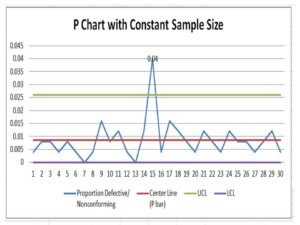
Now, Based on the above data i.e. proportion defects, center line, upper control limit, and lower control limit, we have plotted the P chart in Excel. If you would like to download the p chart excel template with the same calculation then, download it from the above given link and similarly you can download the other template or format by Click Here

P Chart Excel Template
Interpretation of P Chart:

In the above p chart, we have seen that one proportion defect value is beyond the upper control limit. It means on day-15 special cause is present so, we have to take the action on it to control the process.

Free Templates / Formats of QM: we have published some free templates or formats related to Quality Management with manufacturing / industrial practical examples for better understanding and learning. if you have not yet read these free template articles/posts then, you could visit our “Template/Format” section. Thanks for reading…keep visiting techiequality.com

More on TECHIEQUALITY

Popular Post

C Chart Excel Template | Formula | Example | Calculation

C Chart Excel Template

C Chart Excel Template| Formula |Example |Calculation:

Hi Readers! Today, we will be discussing here on attribute type SPC chart i.e. C chart. Its formula, calculation, and industrial example. The C chart is also called the number of nonconformities chart. Where the sample size is constant. Read the below description to learn about its selection and application in industries. If you are interested in downloading the sample C Chart Excel Template then, click on the given below link.

Sample C Chart Excel Template with industrial example-Download.

Number of nonconformities chart (C Chart):

The C chart, attribute type SPC control chart, or the number of nonconformities chart is generally used to identify the common or special causes present in the process and is also used for monitoring and detecting process variation over time. It helps to determine whether the process is in a state of statistical stable or not. Overall, it indicates that special causes are present in the process or not, whether the process is under control or not, and process variability. This C chart is selected when there is a constant sample size and multiple defects per unit are present.

Selection of Attribute type SPC Control chart (C Chart):

Step-1: Data Types?

Condition: – Discrete type data (Attribute type data)

Step-2: Is the interest in nonconformities or multiple defects per unit?

Condition: – yes, multiple defects per unit

Step-3.:- Is the sample size constant?

Condition: – Yes, then use the C chart.

DescriptionCondition
Data Type:Discrete type data (Attribute type data)
Is the interest in nonconformities or multiple defects per unit?Yes, Multiple defects per unit present
Is the sample size constant?Yes
Chart type:C Chart

C Chart Formula:

The three important things need to be calculated before plotting the C chart i.e. [1] Centerline, [2] Upper control limit, & [3] lower control limit.

Centerline (CL) or C bar = Total number of nonconformities or defects / Number of samples

Upper control limit (UCL) = C-bar + 3 x Square root of C-bar

Lower control limit (LCL) = C-bar – 3 x Square root of C-bar

 The formula of C chart
CL or C- bar =Total number of nonconformities or defects / Number of samples
UCL =C-bar + 3 x Square root of C-bar
LCL =C-bar – 3 x Square root of C-bar

How to plot a c chart in excel?

Here, I’m going to share my own industrial experience regarding the application and usage of a c chart in the manufacturing industry by providing a sample example for your quick learning and implementation in your organization. I have considered 50 sample sizes, and three different defects and collected the data for 30 days. Details of data are given below table.   

DateConstant sample size (n)Defect-1Defect-2Defect-3Total Defects
15011 2
2501124
3502215
45011 2
5501124
65011 2
7501113
8502226
9502237
10501124
11501135
12501113
135055717
145011 2
15501113
16502215
175011 2
18501113
19501135
205011 2
215022 4
225011 2
23502226
24501135
25501113
265022 4
27501113
285011 2
29501113
30501113

All the above three defects are attribute type defects. Before plotting the c chart in excel we have to calculate the three important things first, one is CL, UCL & LCL.

Calculation:

Centerline (CL) or C-bar:

Formula = Total number of nonconformities or defects / Number of samples

CL = 121 / 30 =4.033

UCL (Upper control limit):

Formula = C-bar + 3 x Square root of C-bar

UCL = 4.033 + 3* Square root of 4.033

UCL = 4.033+3*2.008

UCL = 10.0577

UCL = 10.058

LCL (Lower control limit):

LCL = C-bar – 3 x Square root of C-bar

LCL = 4.033 – 3* Square root of 4.033

LCL = 4.033-3*2.008

LCL = 4.033-6.024

LCL = -1.991 (the value is negative so LCL is Zero)

LCL = 0.00

 Calculation value
CL =4.033
UCL =10.058
LCL =0
Follow the below step to plot the c chart in excel:

Step-1: open the excel sheet.

Step-2: Do the data entry on the Excel sheet.

Step-3: Select the data and then go to the insert option in the main menu and next to select line chart. The detail is mentioned in the below image.

C Chart Excel Template
C Chart:

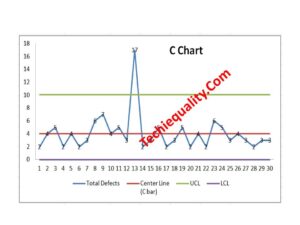
With the help of the above data, we have plotted the c chart, which is given below. if you would like to download the C Chart Excel Template then, click here.

C Chart Excel Template
Interpretation of the above C Chart:

In the above C chart, we have seen that one defect value is beyond the upper control limit. It means on day-13 special cause was present in the process, so we have to take the action on it to control the process.

Free Templates / Formats of QM: we have published some free templates or formats related to Quality Management with manufacturing / industrial practical examples for better understanding and learning. if you have not yet read these free template articles/posts then, you could visit our “Template/Format” section. Thanks for reading…keep visiting techiequality.com

Useful Post:

What is Preventive Maintenance? | Predictive Maintenance |Types & Example

Plan Do Check Act Cycle | PDCA Cycle Manufacturing Example | Implementation

Attribute MSA |How to do Attribute type MSA Study| Example |Acceptance Criteria

Gage R and R |Attribute type MSA |How to do MSA Study | Acceptance Criteria

More on TECHIEQUALITY

4M Change Management | How to implement in Manufacturing unit | Template | Format

4M Change Management

4M Change Management| How to implement in Manufacturing unit |Template | Format

Hi Readers! Today here, we are going to discuss 4M Change management related to manufacturing industries with an illustration. You can learn many more things from this article like 4M change concepts, planned and unplanned changes, implementation of concepts in your organization, etc. The concept of 4M change management is generally used to record 4M (man, machine, method & material) related to planned and unplanned changes. This can apply to all internal process changes.

Download the 4M checklist for gap analysis.-4M Checklist-DOWNLOAD

4M Change Management

As we already discussed 4M changes i.e. Man, Machine, Method & Material related planned and unplanned changes. so here, first of all, we have to understand, what planned and unplanned changes are. The plan changes that occur with the advanced information to the pertinent personnel. Similarly, the un-plan change that occurs without prior information to the pertinent person. If once the planned and unplanned changes occurred then a defined action which is mentioned in SOP/Procedure is required to control the occurrence of nonconformity at the shop floor change area.

Illustration / Example (How to implement 4M change management in manufacturing Unit?):

Example of plan change:

Let’s say an organization has planned for preventive maintenance of machine-1 in shift –A, dated xx/1/20xx, and executed the same as per plan. If so then how to record the same 4M change and control the process after PM.

Before implementing 4M change management, personally, I would recommend that try to prepare the procedure /SOP as per your organization’s nature of production, like the 4M procedure, change tracking record, list of trained operators, list of machines, material list, etc.

According to the above example scenario, we are going to record the 4M change in the below template (this template is only for reference)
DateMachineShiftType of changeDetails of changeAction taken
xx/1/20xxmachine-1APlanned / machinePreventive maintenanceSet up approval checking

 In this way, you can maintain the change record. For your better understanding and more clarification, we have given below another example related to the unplanned 4M change.

Example of un-plan change:

 For example, an operator on leave without prior information to the pertinent supervisor and you as a supervisor planned for running the machine-1 with the help of other operators. In that scenario, how to record the 4M change, and what action is to be taken?

Similarly, we are going to record the un-plan change as per the above 4M change template or format.

DateMachineShiftType of changeDetails of changeAction taken
xx/1/20xxmachine-1AUn-planned /ManThe operator is on leave without intimationA similar skilled operator will run the machine/machine setup approval to be done

The 4M change record can be helpful for analysis in the future if there will be any issues with the product. And the action you have taken at the time of the 4M change can control the process as proactively.

I hope the above example is meaningful for your better learning and understanding related to 4m change management implementation in your organization.

Example of Abnormality ( Abnormal situation handling):

It is very important to understand all three situations/changes i.e. [1] plan change, [2] un-plan change, [3] abnormality. now here we are going to discuss the 4M change management of abnormal situation handling (abnormality). Suppose in a production line, a machine-1 on a sudden breakdown, for this situation we are going to record the 4M change, and the same is given below.

DateMachineShiftType of changeDetails of changeAction taken
dd/mm/yymachine-1B-shiftAbnormality /MachineMachine-1 on sudden breakdown1) Run a backup machine, if available.
2) Do the setup approval & Retroactive inspection
3) Containment action.

Free Templates / Formats of QM: we have published some free templates or formats related to Quality Management with manufacturing / industrial practical examples for better understanding and learning. if you have not yet read these free template articles/posts then, you could visit our “Template/Format” section. Thanks for reading…keep visiting techiequality.com

Useful Post:

C Chart Excel Template | Formula | Example | Calculation

P Chart Excel Template | Formula |Example |Control Chart | Calculation

Variation Calculation in Excel | Types of Variation |Manufacturing Example

Equipment Ranking Process | A B C Ranking of Machine with Manufacturing Example

More on TECHIEQUALITY

SIPOC Template | SIPOC Diagram Example of Manufacturing & Service Industry

SIPOC Template

SIPOC Template | SIPOC Diagram Example of Manufacturing & Service Industry

Hi Readers! Today here, we will be discussing on SIPOC template and examples of sipoc diagrams of manufacturing and service industries. As you know that SIPOC is one of the most useful diagrams which is generally used for a better understanding of the process. In both the manufacturing and service industries are commonly used the two types of process mapping diagrams are. I.e. [1] PFD- Process flow diagram and another [2] SIPOC diagram. If you would like to download the free SIPOC excel template then, click on the given below download link.  

Download the SIPOC template in excel format-SIPOC Excel format-DOWNLOAD Link

What is SIPOC Diagram?

The SIPOC diagram consists of 5 elements i.e. [1] Suppliers, [2] Inputs, [3] Processes, [4] Outputs, [5] Customers. The diagram is generally used for process mapping. It helps to understand the overview of the process in detail.

5 Steps to create a SIPOC Diagram:

Step-1:

Create a CFT team including the process owner of a particular process, which you are trying to draw.

Step-2:

Define the process, for example, let’s consider a process namely called Process-A and you are trying to draw an SIPOC diagram, so first of all you are supposed to list out the details activities of process-A in sequence with the help of the CFT team.

Step-3:

After listing out the details process sequence, find out the internal and external suppliers. Details are mentioned below example.

Step-4:

List out and identify the inputs, process, process output and then customers

Step-5:

 Draw the Diagram by entering the above points in the appropriate places.

SIPOC Template

[SIPOC Template / Format]

SIPOC Diagram vs PFD – process flow diagram:

Both the SIPOC diagram and process flow diagram are used to represent the process mapping but the difference between the two is the elements that are used to represent the process details. In SIPOC, we use the 4 elements like supplier, input, process, output, and customer but in PFD, we use flow chart symbols, like the terminator, process, flow line (arrow connector), decision, document, connector, data, preparation, off-page connector, etc.

SIPOC Diagram Example of Manufacturing & Service Industry:

Manufacturing Industry Example:

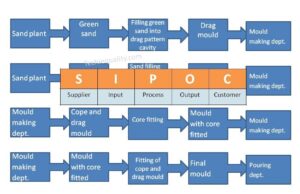
Suppose a company manufactures automobile parts through foundry technology and they have planned to prepare a SIPOC diagram of one of the processes called green sand mould preparation.

SupplierInputProcessOutputCustomer
Sand plantGreen sandFilling green sand into drag pattern cavityDrag mouldMould making dept.
Sand plantGreen sandFilling green sand into cope pattern cavityCope mouldMould making dept.
Mould making dept.Cope and drag mouldCore fittingMould with core fittedMould making dept.
Mould making deptMould with core fittedFitting of cope and drag mouldFinal mouldPouring dept.
SIPOC Template
Service Industry Example:

Let’s consider one of the service sectors of finance as an example bank, and we are going to draw a SIPOC diagram of an offline saving bank account opening process, which is given below;

SupplierInputProcessOutputCustomer
…..Application filled-up formOffline checking and verification of documents deposited by the customerVerified documentDocument verification document
Document verification dept.Verified documentAccount creationNew saving bank account numberAccount creation dept
Account creation deptNew saving accountPassbook issuingNew passbookMr. XYZ
FAQ:

What does sipoc stand for in Six Sigma?

Ans.: The SIPOC stands for Supplier, Input, Process, Output and Customer.

What is a SIPOC template?

The SIPOC template is a diagram which consists of suppliers, inputs, processes, outputs and customers. With the help of the SIPOC diagram, you can prepare the details process flow from start to end.

Free Templates / Formats of QM: we have published some free templates or formats related to Quality Management with manufacturing / industrial practical examples for better understanding and learning. if you have not yet read these free template articles/posts then, you could visit our “Template/Format” section. Thanks for reading…keep visiting techiequality.com

Useful Post:

How to Choose the Best Forecasting Method| Marketing & Sales Example

Variation Calculation in Excel | Types of Variation |Manufacturing Example

Plan Do Check Act Cycle | PDCA Cycle Manufacturing Example | Implementation

Turtle Diagram Example | QMS Standard Requirement |Free Template |Format.

More on TECHIEQUALITY

Equipment Ranking Process | A B C Ranking of Machine with Manufacturing Example

Equipment Ranking Process

Equipment Ranking Process | A B C Ranking of Machine with Manufacturing Example:

Hi readers! Today we are going to discuss on equipment ranking process, it is an important part of the maintenance process, where machines/equipment/ parts will be ranked and based on the rank category, and you can easily set up the maintenance principle. The organization will get benefits in terms of productivity, quality, cost, safety, etc., and also it will help you to select the type of maintenance applicable / applied on which machine.

Equipment Ranking Process:

Equipment Ranking Process

If first time, you are going to implement it in your organization then you have to formalize many more things like SOP, Check-sheet, list of equipment/ machine, machine /equipment ranking criteria, data, etc. so here, we will help you for easy implementation of this process.

Step by step process has been defined below to implement the machine /equipment ranking process in your manufacturing organization;

Step-1: Prepare the SOP, List of equipment, and equipment/machine ranking criteria procedure.

In the ranking criteria, you can consider the PQCDS means Production, Quality, Cost, delivery, and safety as weightage for factors in categorization, but some industry also considers other factors like Maintenance / Maintainability, Operability, etc.

All the above factors are not equally important and they vary from industry to industry based on the application, material used, quality, safety, etc. For example, equipment is being used for chemical handling, safety factors get a high weightage for rating calculation. And similarly, imported machines may come under high weightage on maintainability if spare parts are mostly imported procurement may take more time and the cost of repair could be high.

Step-2: Form a CF-Team, including Production, quality, maintenance, and safety personnel for best weightage consideration.

For example, let’s say we are having total of 16 machines, and according to their criticality w.r.t PQCDSM and consultation with CF-Team, finally, we have broadly done the weightage of factors of individual machines or similar types of machines.

Machine-1
P-Production100
Q-Quality100
C-Cost50
D-Delivery50
S-Safety20
M-Maintainability20
Total =340
[M/C-1 Data Table-1]

Machine-2

P-Production100
Q-Quality90
C-Cost50
D-Delivery40
S-Safety40
M-Maintainability40
Total =360
[M/C-2 Data Table-2]
Machine-16
Production-P100
Quality-Q80
Cost-C50
Delivery-D40
Safety-S40
Maintainability-M40
Total =350
[M/C-16 Data Table-3]

Similarly, you can do the weightage of factors of all machines or you can prepare the common criteria sheet for similar types of Machines.

Step-3: Prepare the final ranking criteria sheet.

For example, we have prepared the below-ranking criteria sheet for reference only, you can prepare according to your organization’s decision and machine’s factors, operations, etc. but here we have made the generic criteria rules is given below.

Let’s say “Quality” factors have 100 marks and we have divided them into four degrees of factors.

Mark=100806040
Always being required to work to a very fine tolerance or Equipment failure mode has a major effect on quality, the product produced out of Specification.Produce quality variations, some of the products may get rejected but the operator’s intervention requires less time to correct it.The Product can be reworked and used, meets the specification and drawing, machine is sufficiently accurate for required tolerance.No quality problems, no effect on quality, and no product defects.
[Ranking Criteria Matrix]
 Accordingly, you can prepare the ranking criteria matrix for Production, cost, safety, delivery, and maintainability, etc.

Let’s consider the machine-1, factors given in above i.e.

P-Production100
Q-Quality100
C-Cost50
D-Delivery50
S-Safety20
M-Maintainability20
Total =340

The total mark of the entire above factor (PQCDSM) is 340.  Based on the organization’s decision and degree of factors mark, an organization can decide the range for the category of machine, e.g.

Up to 130 marks ——-C Rank / Category

131 to 190 marks ——-B Rank / Category

191 to 340 marks ——- A Rank / Category

As you know that we have considered 16 machines, so our CF-team members have collected and gathered the machine history records, data and with the help of the ranking criteria matrix, they have evaluated the entire machine, and the same is mentioned below the table.
MachineRank / Category
M/C-1A
M/C-2B
Machine-3C
M/C-4C
M/C-5A
Machine-6B
M/C-7A
Machine-8B
M/C-9B
Machine-10B
M/C-11A
Machine-12B
M/C-13B
Machine-14A
M/C-15C
Machine-16C
[A B C Ranking Table]

According to the machine’s rank, you have to prepare the maintenance plan, e.g. our maintenance engineer has decided that M/C-1 will be covered under preventive and predictive maintenance twice a month and similarly M/C-8 will be covered under preventive maintenance twice a month. And M/C-16 may be covered under preventive maintenance once a month or only BM. So, in this way, you can prioritize the machine maintenance period w.r.t m/c or equipment category or ranking.

Free Templates / Formats of QM: we have published some free templates or formats related to Quality Management with manufacturing / industrial practical examples for better understanding and learning. if you have not yet read these free template articles/posts then, you could visit our “Template/Format” section. Thanks for reading…keep visiting techiequality.com

Useful Post:

What is Preventive Maintenance? | Predictive Maintenance |Types & Example

Plan Do Check Act Cycle | PDCA Cycle Manufacturing Example | Implementation

Attribute MSA |How to do Attribute type MSA Study| Example |Acceptance Criteria

Gage R and R |Attribute type MSA |How to do MSA Study | Acceptance Criteria

More on TECHIEQUALITY

Variation Calculation in Excel | Types of Variation | Manufacturing Example

Variation Calculation in Excel

Variation Calculation by Excel | Types of Variation | Manufacturing Example:

Hi readers! Today we are going to calculate the different types of Variation with the help of Excel. Here we will learn the complete calculation of variation with industrial examples. All the calculations related to variation are done here with the help of the excel-2007 version, the positioning and terminology may be varied w.r.t other versions of Excel. But anyway variation calculation in excel-2007 version will give you a complete idea so you can easily apply the concept in any version of Excel as well.

This topic will help you to enhance your knowledge so that you can easily solve the problem related to variation calculation and the important things that, if you are working in the manufacturing industry and if you would like to know the data variation of process or product characteristics then by using of excel sheet easily you can calculate the variation of the data set.

Variation Calculation in Excel:

First of all, we are supposed to know that what is Variation. I mean to say that Variation is nothing but a way to show how the data is spread out, which means how the data are spread over a wide area.

Types of Variation:

There are so many ways to measures the variation but some common measures of variation used in statistics are;

  1. Range.
  2. Variance (Population, Sample).
  3. Standard Deviation (σ, s).
  4. Coefficient of Variation ((Population, Sample).
  5. Mean Absolute Deviation.
  6. Z-score
  7. Quartiles.
  8. 5-Number Summary

We will be calculating all the above measures of variation with the manufacturing example so that you can easily understand and implement the concept in your manufacturing process to know the variation of the data set.

Manufacturing Example to Calculate the Different Measures of Variation:

Let’s a company m/s PQR manufacturing the product “X”. A Quality Engineer Mr. P monitoring the process parameter as per the QA plan, but one day during the shop floor visit, the QA head observed that the process parameter of temperature reading was on the higher side, so he immediately called to process QA engineer and asked to calculate the different measurement of the variation of last period data set. Accordingly, the Process QA engineer had started the calculation, details are given below;

Data: Specification of Temperature: 1400±10°C

Time/ShiftTemperature in °C
8AM/A1402
8.30AM/A1405
9AM/A1401
9.30AM/A1400
10.0AM/A1405
10.30AM/A1403
11.0AM/A1406
11.30AM/A1401
12.00Noon/A1404
12.30AM/A1400
[Temperature reading table]

Here, we are going to calculate the first Range of all the above data sets.

Range = (Maximum Value – Minimum Value)

How to Calculate Range in Excel?

Step-1: Open the Excel Sheet

Step-2: Type the Data.

Variation Calculation in Excel

Step-3: Use the “MAX” function to find out the maximum value, see the below picture to learn more

Variation Calculation in Excel

The Maximum value, we found from the above data set is 1406°C and similarly calculated the minimum value as per the below process as.

Variation Calculation in Excel

Found, the minimum value is 1400°C.

Range = (Maximum Value – Minimum Value)

=1406-1400=6°C

VARIANCE:

variance calculation

Excel-2007 function of Variance for population = VARP(data range)

The Variance of the above population data is 4.41, enter the same data in your excel sheet and calculate & check whether you are getting the same value or not.

Standard Deviation (σ):

standard deviation

Standard Deviation (σ)excel-2007 function=STDEVP(Data range)

(σ) The standard Deviation of the above data set is 2.1, check whether you found the same value in your excel sheet or not using the above data set.

Free Templates / Formats of QM: we have published some free templates or formats related to Quality Management with manufacturing / industrial practical examples for better understanding and learning. if you have not yet read these free template articles/posts then, you could visit our “Template/Format” section. Thanks for reading…keep visiting techiequality.com

Popular Post