P Chart Excel Template | Formula |Example | Control Chart | Calculation

P Chart Excel Template

P Chart Excel Template | Formula | Example | Control Chart | Calculation

Hi Readers! Here, we are going to discuss on attribute type control chart, especially on the P chart. Also, you can learn the formula, and calculation part with industrial or manufacturing examples. You can download the P chart excel template from below given link.

Sample P chart excel template with industrial example-Download Here

Attribute type Control chart (P Chart):

The P chart, attribute type control chart, or proportion nonconforming chart is generally used to identify the common or special causes present in the process and also used for monitoring and detecting process variation over time. It helps to determine whether the process is in a state of statistical stable or not. Overall, it indicates that special causes are present in the process or not, whether the process is under control or not, and process variability.

How to select proportion nonconforming (P chart):

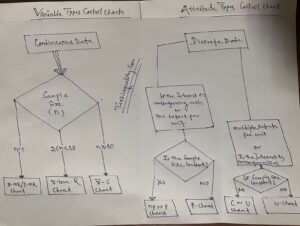
Step-1: Data Types?

Ans.:- Discrete type data (Attribute type data)

Step-2: Is the interest in nonconforming units or one defect per unit?

Ans.:- yes, one defect per unit

Step-3.:- Is the sample size constant?

Ans.:- Yes or No, then use P chart.

Note; for both the cases, if the sample size is constant or if not, in this scenario you can select p chart.

Data Type:——Discrete type data (Attribute type data)
Is the interest in nonconforming units or one defect per unit?—-Yes
Is the sample size constant?Yes or No
Select Chart type:P Chart

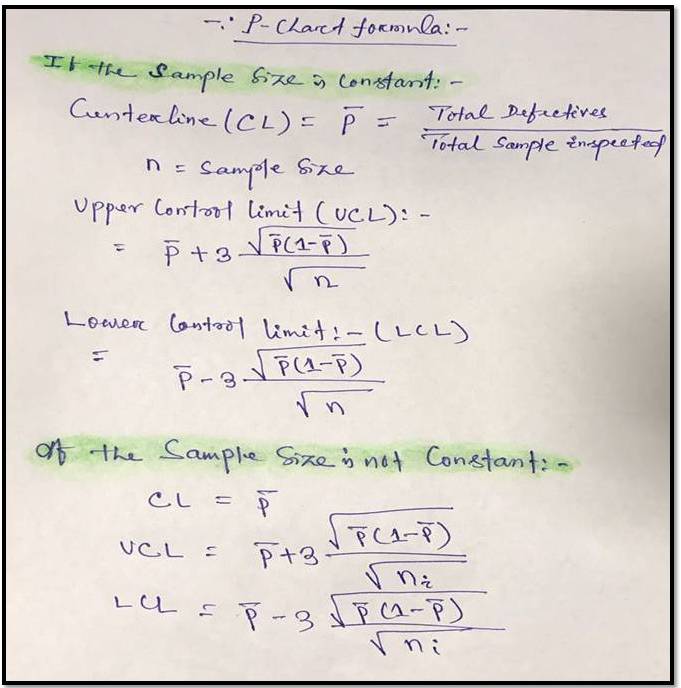
P Chart Formula:

For plotting the P chart in excel we have to calculate the three important things i.e. [1] Center line, [2] Upper control limit, & [3] lower control limit.
P Chart Excel Template
[P Chart Formula]

P chart example & Calculation for constant sample size:

In a manufacturing unit producing the auto part products, a process quality engineer would like to monitor the process control, so he started to collect the data for 30 days and daily inspected 250 products & recorded the defectives or nonconforming parts (Defects-blow hole, shrinkage, pinhole, etc.). 30 days data is given in below table.

DateConstant sample size (n)Defective/
Nonconforming
12501
22502
32502
42501
52502
62501
72500
82501
92504
102502
112503
122501
132500
142503
1525010
162501
172504
182503
192502
202501
212503
222502
232501
242503
252502
262502
272501
282502
292503
302501

With the help of the above data, we are going to calculate and plot the P chart. As we know that we have to calculate the 3 important things, Center line, upper control limit & lower control limit.

Center Line (CL)-P bar: – Total Defectives/ Total sample Inspected

= 64/ (30*250)

= 0.0085

=0.009

Upper Control limit (UCL):-

= P bar+3*square root of (p bar*(1-p bar)/sample size)

= 0.009+3* square root of (0.009*(1-0.009)/250)

=0.009+3*0.005972

=0.026

Lower Control Limit (LCL):-

= P bar-3*square root of (p bar*(1-p bar)/sample size)

= 0.009-3* square root of (0.009*(1-0.009)/250)

=0.009-3*0.005972

= -0.0089

= -0.009

0 (Note: The LCL value is negative, so the final value of LCL is zero)

Now, you have to calculate the proportion defective or nonconforming

Proportion defective:

Here, I’m calculating the proportion defective of day-1, so similarly you can calculate for next day onwards

= Day-2 Defects/Sample size

= 1/250 = 0.004

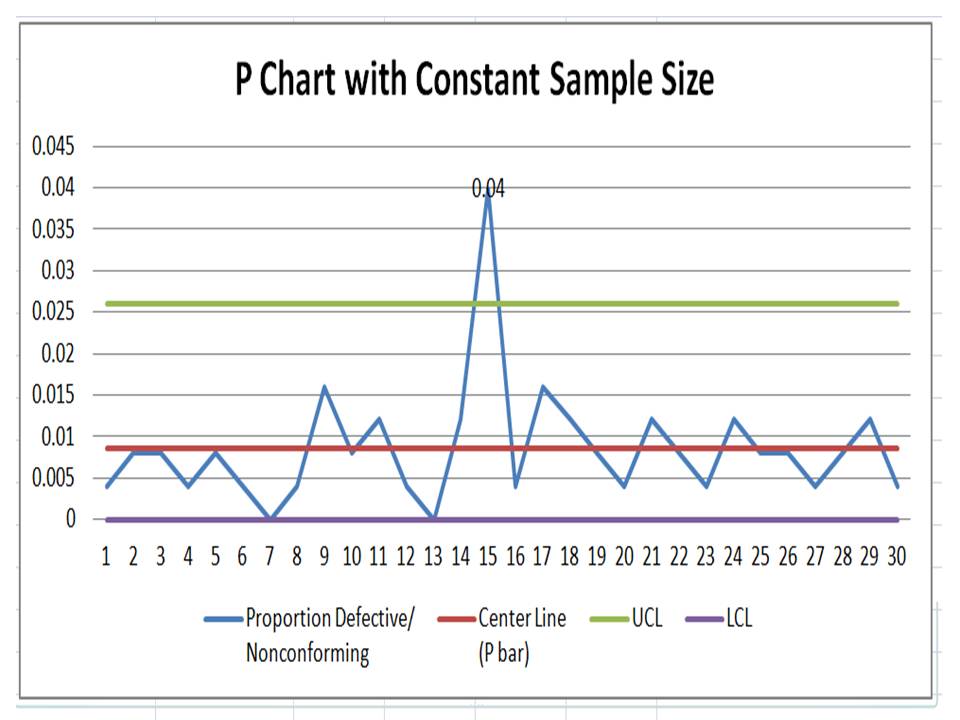
Now, Based on the above data i.e. proportion defects, center line, upper control limit, and lower control limit, we have plotted the P chart in Excel. If you would like to download the p chart excel template with the same calculation then, download it from the above given link and similarly you can download the other template or format by Click Here
P Chart Excel Template
Interpretation of P Chart:

In the above p chart, we have seen that one proportion defect value is beyond the upper control limit. It means on day-15 special cause is present so, we have to take the action on it to control the process.

Free Templates / Formats of QM: we have published some free templates or formats related to Quality Management with manufacturing / industrial practical examples for better understanding and learning. if you have not yet read these free template articles/posts then, you could visit our “Template/Format” section. Thanks for reading…keep visiting techiequality.com

More on TECHIEQUALITY

Popular Post

7QC Tools for Problem Solving | What are 7 QC Tools

7QC Tools for Problem Solving

7QC Tools for Problem Solving | What are 7 QC Tools

7QC Tools for Problem Solving techniques are generally used in manufacturing, Non-manufacturing industries, and service sectors to resolve problems.

Download 7-QC Tools Template/ Format

Definition and History:-

The 7QC Tools (Also Known as “Seven Basic Tools of Quality”) originated in Japan. First emphasized by Kaoru Ishikawa, a professor of engineering at Tokyo University and the father of “quality circles”. These tools are used to solve critical quality-related issues. You can use the 7 basic tools of quality to help understand and solve problems or defects in any industry. With the help of Excel, you can plot the graphs / Diagrams to resolve the daily quality problems. I will help you to understand the basic ideas and knowledge of 7QC Tools and their usage.

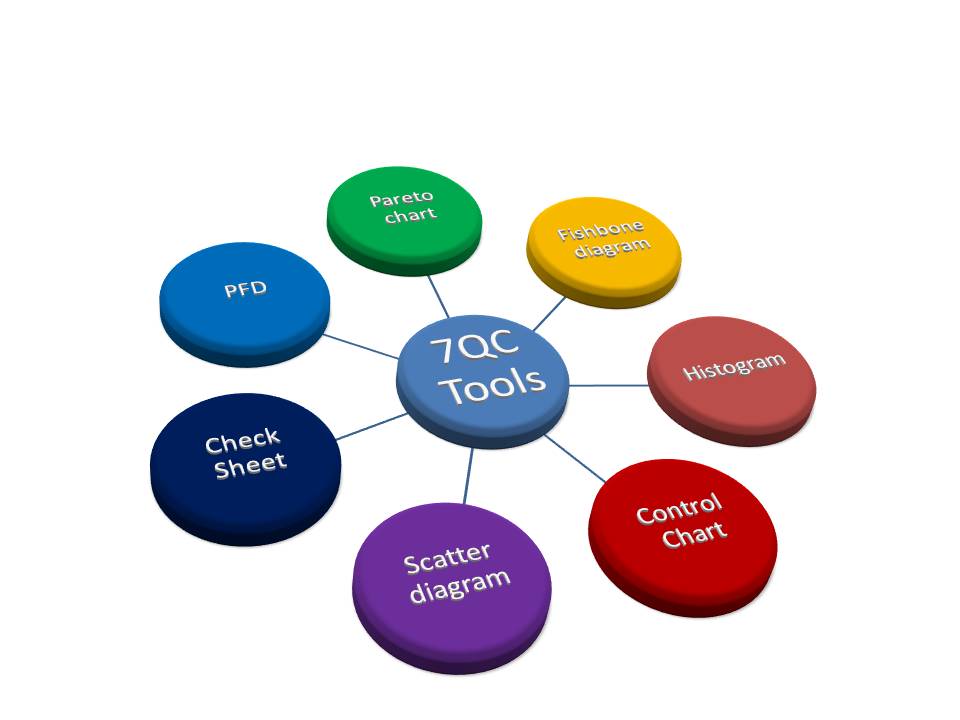
For solving problems seven QC tools are used Pareto Chart, Cause & Effect Diagram, Histogram, Control Charts, Scatter Diagrams, Graphs/Process Flow Diagram, and Check Sheets. All these tools are important tools used widely in the manufacturing field to monitor the overall operation and continuous process improvement. seven QC tools are used to find out the Root cause of the problem and implement the action plan to improve the process efficiency.

7QC tools are:-

  1. Pareto Chart
  2. Cause and effects diagram
  3. Histogram
  4. Scatter Diagram
  5. Control Chart
  6. Check Sheet
  7. PFD(Process Flow diagram)/Graphs
7QC Tools for Problem Solving

 Benefits of 7QC Tools:-

  • Improve management decisions.
  • Simple and easy for implementation
  • Continuous quality improvement
  • Quick results
  • Enhances customer satisfaction through improved quality product
  • Reduce cycle time and improve efficiency
  • Control cost of poor quality / Cost of quality
  • Reduce defects and optimize the production
  • Reduce variations and improve the quality of Products
  • Encouragement of teamwork and confidence
  • Enhancement of customer focus.

Pareto Chart:-

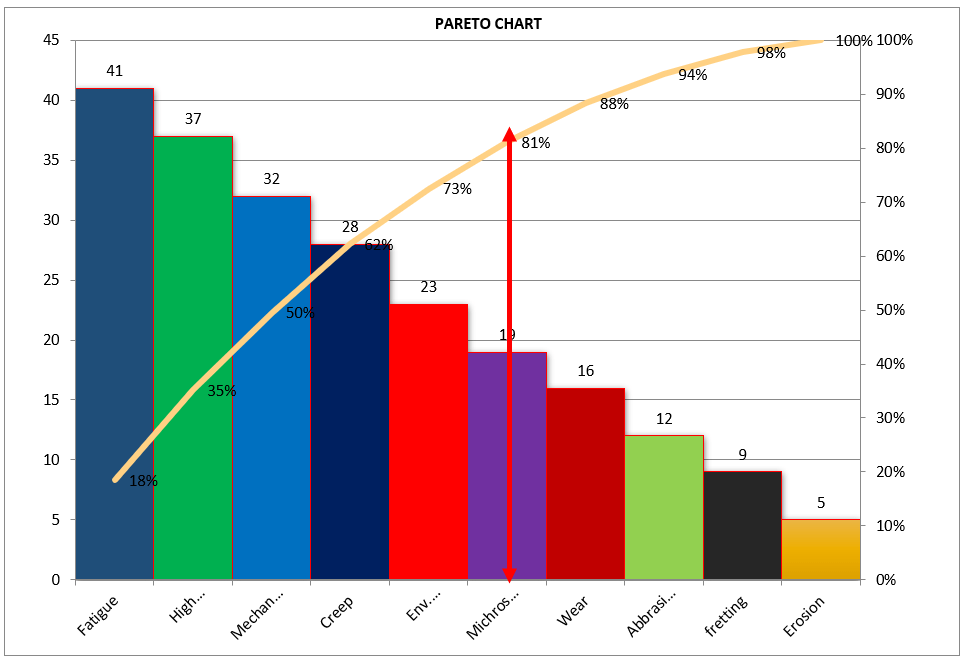
A Pareto Chart is named after the Italian Economist Vilfredo Pareto. It is a type of chart that contains both bars and a line graph, where the individual values are represented in the bar graph in descending order (largest to smallest value) and the cumulative percentage is represented in the line graph.

Click here to learn “How to Plot Pareto Chart In Excel”.

Understanding the Pareto Chart principle (The 80/20 rule): 

The Pareto principle is also known as the 80/20 rule derived from the Italian Economist Vilfredo,

The principle is understood as –

20% of the input creates 80% of the results

Or

80 % of the effects come from 20% of the causes.

Pareto Chart Example

[Figure-1]

In the above Pareto Chart[Figure-1], we can see the cumulative% in the line graph, According to the Pareto Chart principle 80/20 rule, the 80% cumulative in the line graph is filling under the low hardness, which means BH, Damage, SH and Low hardness defers are coving the 80% of contribution over total types of defects. And those 80 % of contributions were due to the 20% caused.

 Histogram:-

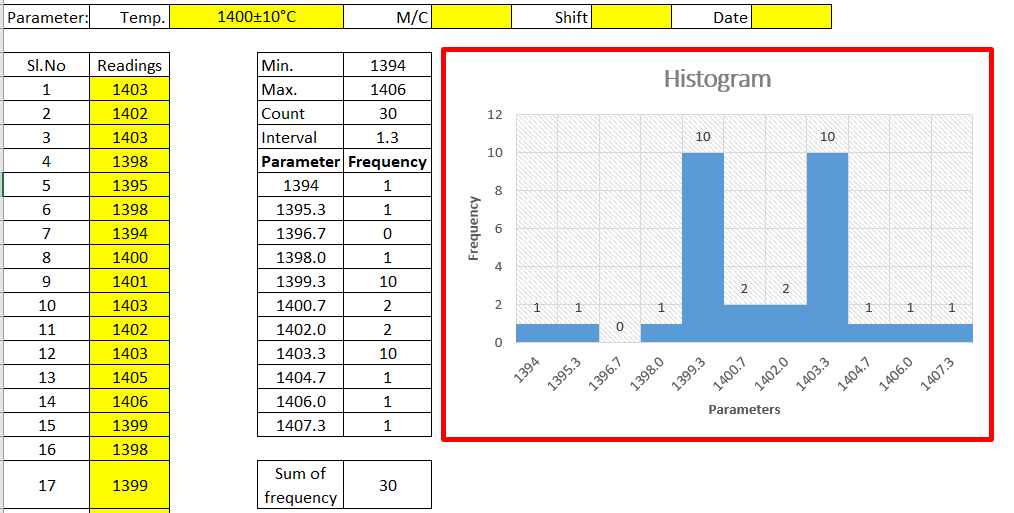
The histogram is one of the 7QC tools, which is the most commonly used graph to show frequency distribution.

Helps summarize data from a process that has been collected over a period of time.

Click here to know the “How to Plot Histogram in Excel:

Histogram Template
Histogram Template

[Figure-2]

Fish-bone Diagram/Cause and Effects /Ishikawa Diagram:-

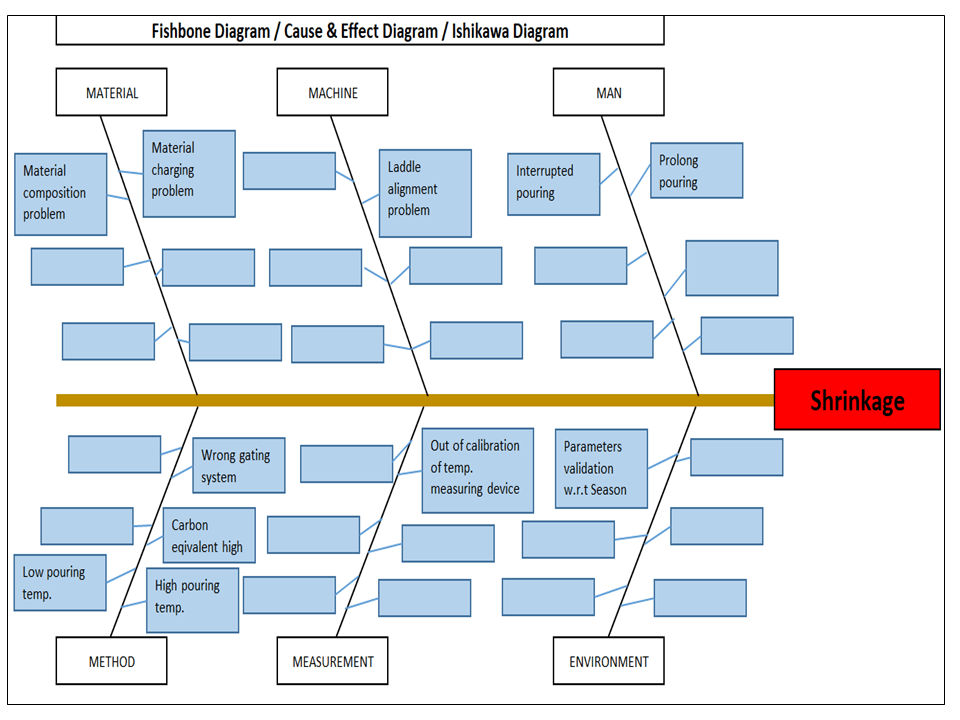
The cause and Effects Diagram looks like a fish that’s why it’s called Fish-bone Diagram, also called the Ishikawa diagram.

It’s a visualization tool for categorizing the potential causes of a problem in order to identify its root causes.

CFT members are identifying the potential cause through the Brainstorming process of individuals and together.

 The Potential cause is related w.r.t below as

  • Machine
  • Manpower
  • Environment
  • Method
  • Materials
  • Measurement
Fishbone Diagram Example

[Figure-3]

Scatter diagram:-

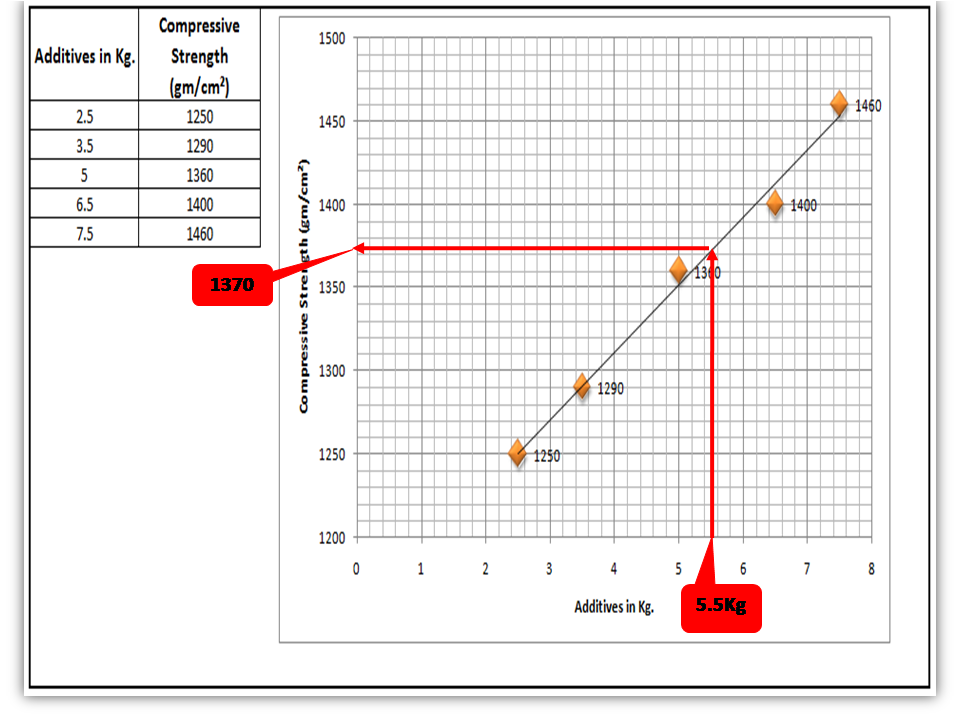
The scatter diagram graphs pairs of variable data, with one variable on each axis, to look for a relationship between them. If the variables correlate, the points will fall along a line or curve. The better the correlation, the more points will strongly cluster to the line. It generally gives the idea of the correlation between the variables.

Scatter Diagram Template

[Figure-4]

In the above figure-4, the positive and Negative correlation is only due to the direction, and in both the correlation, points are clustered to the line but in the last figure in figure-4, Points are not clustered to the line but spread over the X and Y-axis.  

Control Chart:-

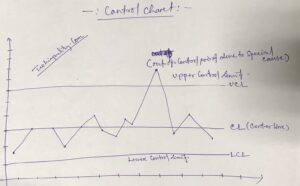
A line on a control chart is used as a basis for judging the stability of a process. If the observed points are beyond a control limit then it is evidence that special causes are affecting the process.

Control Charts can be used to monitor or evaluate a process.

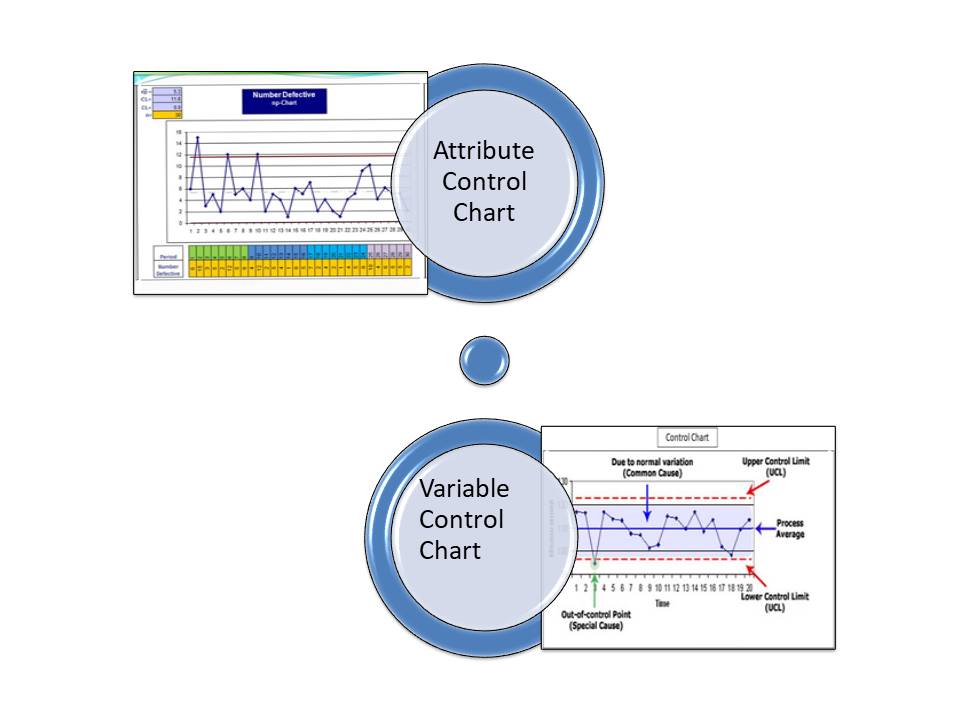
There are basically two types of control charts, those for variable data and those for attributes data.

Click here to learn more about the Control Chart and Statistical Process Control. 

Benefits:-Higher Quality, Lower Unit Cost, Higher effective Capability, etc.

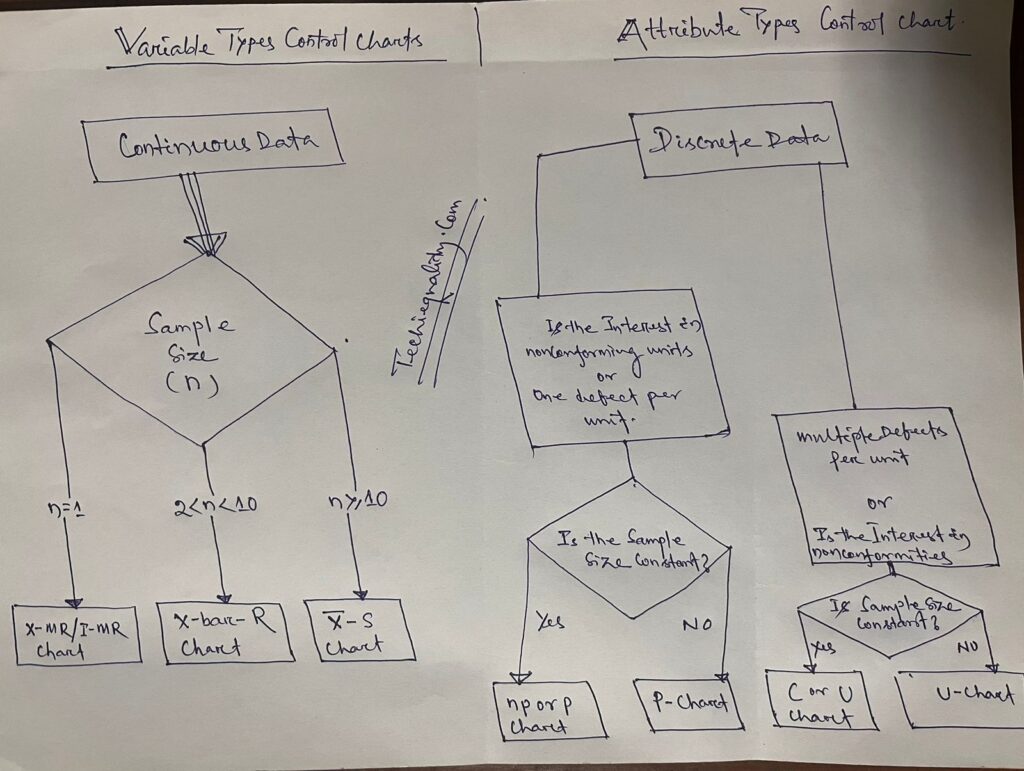
Selection of Control Charts based on Attribute / Variable Type Data:-

selection of control chart

Calculation of Average and Range Charts-

Click here to know the details.

The formula of the Attributes Control Chart:-

Click here to learn the formula and calculation.

Nomenclature of Control Chart:-

7QC tools for problem solving

Check Sheet:-

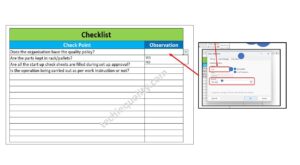
Check Sheet is a simple document used for collecting data in real time. Variable or Attribute type data is collected through a Check sheet. A check sheet generally helps to make the decision on the basis of a fact and to collect the data for analysis and evaluation.

Sample check Sheet:-

LogoTitle:-………Format No-

Issue no-…  rev. no-

Date-

ParametersSpecificationObservationsRemarks


           Checked by:-                                                                  Verified by:-

Process Flow diagram/Graphs:-

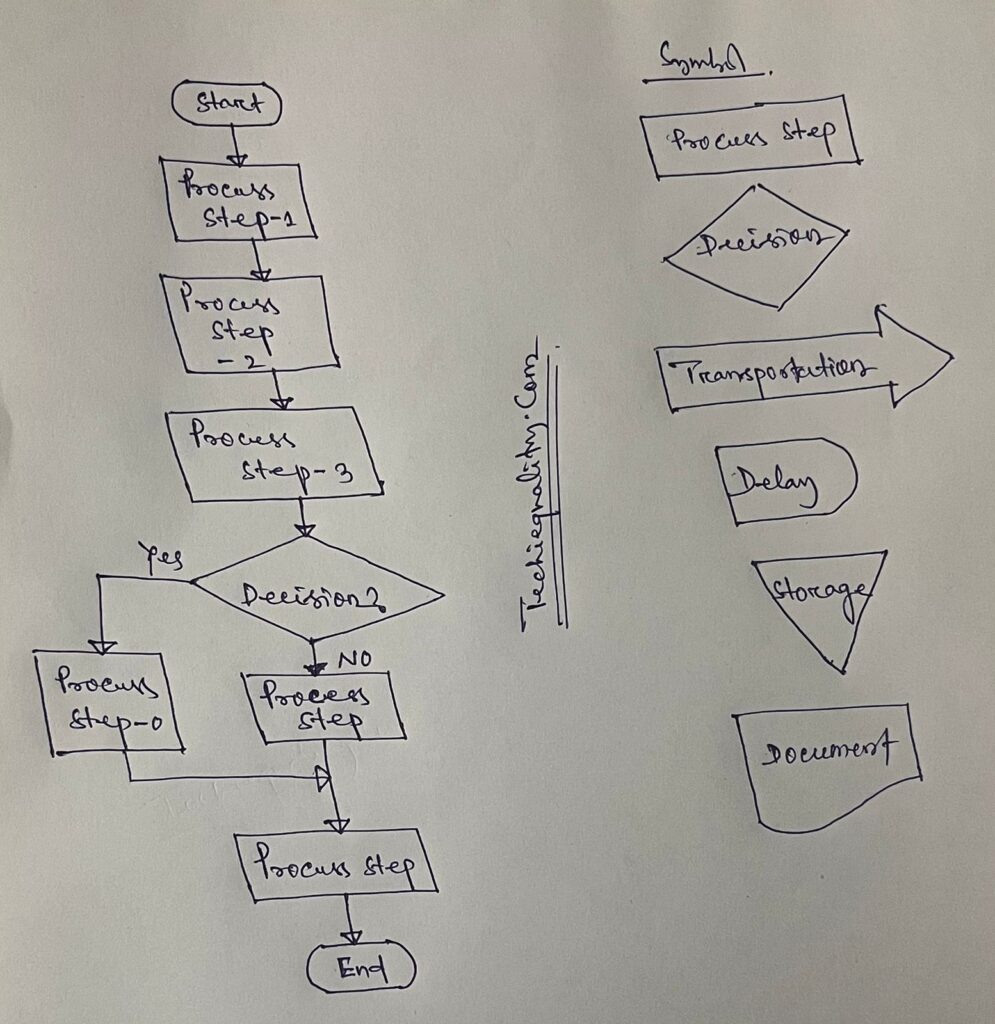
A process flow diagram is a diagram used to indicate the general flow of plant processes and equipment.

flow chart

The 7QC tools are the most commonly used tool in the industry for improvement, With the help of the 7QC tools you can understand the process/activities, analyze the data, and interpret the result/graph/output.

FAQ:

Which are the 7 QC tools?

The seven QC tools are

  1. Pareto Chart
  2. Fishbone diagram
  3. Histogram
  4. Scatter Diagram
  5. Control Chart
  6. Check Sheet
  7. PFD(Process Flow diagram)/Graphs /Stratification

Useful Article:

why why analysis methodology | 5-why analysis step by step guide

Rework vs Repair |IATF Requirement for Control of Reworked/ Repaired Product

How to plot the Run Chart in Minitab

Run Chart Example | Concept & Interpretation of Result with Case Study | Industrial Example:

Thank you for reading..keep visiting Techiequality.Com

I hope the above article “7QC Tools for Problem Solving” is useful to you…

Popular Post:

What is SPC | SPC Tools

What is SPC

What is SPC | SPC Tools

What is SPC ? SPC is the Statistical Process Control.

History and Definition:-

Statistical Process Control is a technique of quality control that services statistical methods to monitor and control processes. This ensures the process stability and consistency, producing more conforming products with less waste (Defects free). SPC helps us to indicate the common and special cause’s presence in the process. SPC is generally focused on continuous improvement.

Statistical Process Control was established by Walter A. Shewhart at Bell Laboratories in the year 1920 and he developed the control chart in 1924.

The control chart is the key tool for statistical process control. The control chart is used on both variable and attribute-type data.

Here is the full description of What is SPC?

Benefits of Statistical Process Control:-

  • Optimize the productivity
  • Reduced scrap, rework, warranty, and defects
  • Increased efficiency
  • Improved customer satisfaction
  • Improved the Process capability
  • Reduced COPQ.

Control Chart-

  • A line on a control chart is used as a basis for judging the stability of a process. If the Measure points are beyond a control limit(UCL, LCL) then it evidences that special causes are affecting the process.
  • Control Charts can be used to evaluate a process.
  • There are basically two types of control charts, for variable data and attribute data.

The use of statistical techniques such as control charts to analyze a process, so as to take appropriate actions to improve the process capability.

Nomenclature of Control chart:

7QC tools for problem solving

Selection of Control Charts based on Attribute / Variable Type Data-

selection of control chart

 Variables Control chart:

Average and Range Chart (X͞    and R):

Subgroup Average:

X͞   =(x1+x2+x3+…+xn)/n

n= number of samples in subgroup

Subgroup Range:

R= Xmax-Xmin (Within each subgroup)

Grand Average:

X͞͞ ͞  = (͞x1+x͞2+…+x͞k)/k

k=number of subgroups used to determine the grand average and average range.

Average Range:

R͞ =(R͞1+ R͞2+…R͞k)/k

Estimate of the standard deviation of X:

Standard Deviation =R͞ /d2

Estimate of the standard deviation of X͞:  =(R͞ /d2  )/√n

Centre line:

CLx͞ = X͞ ͞

Centerline of Range =R͞

Control Limits:

UCLx͞ = X͞ ͞ +A2R͞

Upper control limit of Range = D4R͞

Lower Control limits of X͞ = X͞ ͞ -A2R͞

Lower Control limit of Range=D3R͞.

(For Subgroup size 5, A2=0.577, d2=2.326, D4=2.114)


Attributes control Chart:

P chart (for proportions of units in a category)

Centre line = P͞

Control limits:

Samples not necessarily of constant size

Upper control limits: P͞ +3x √(p͞(1-p͞)/√n)

Lower Control limits: P͞ -3x √(p͞(1-p͞)/√n)

If the sample size is constant (n):

Upper control limits: P͞ +3x √(p͞(1-p͞)/√n)

Lower Control limits: P͞ -3x √(p͞(1-p͞)/√n)

Different types of Attributes type control chart:

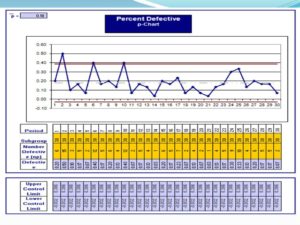
[P-Chart]

What is SPC

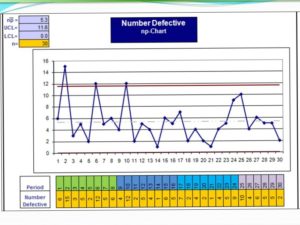
[np-Chart]

What is SPC

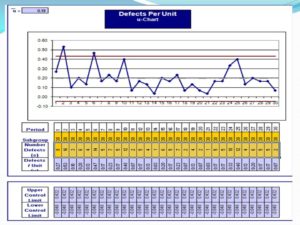
[u-chart]

What is SPC

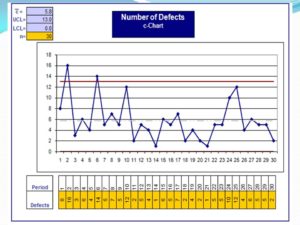
[c-chart]

In the Above c-types Control chart, two numbers observe points are fall outside of upper control limits, this means the control chart gives an alarm that the process has some special cause that we need to take immediate action to control the process in stable conditions.

Interpretation of Result (Both Attributes and Variable types Data Control chart):

The Control Charts would indicate that a process is out of Control if either one of these is true-

  1. One or More points fall outside the Control Limits
  2. When the Control Charts are divided into 3 sigma zones –
  1. Nine Consecutive points are on one side of the average
  2. There are six Consecutive points, increasing or decreasing.
  3. There are fourteen consecutive points that alternate up or down.

The SPC- Statistical process control is one of the best methodologies to control the process. It is commonly used in manufacturing industries for process control & improvement.

FAQ:

What is an SPC used for?

The SPC is a statistical process control that is used for process control by statistical techniques/methods/tools. (like a control chart, process capability, etc). 

Thank you for visiting the Website Techiequality.com.

Once again thank you so much……

Popular Post: