DMAIC Tools | DMAIC Template | Six Sigma Methodologies | 30+ Free Tools

DMAIC Tools

DMAIC Tools | DMAIC Template | Six Sigma Methodologies | 20+ Free Tools

Hello readers! Today we are going to discuss an important topic on various DMAIC tools, Six Sigma methodologies, and the DMAIC template and its usage. Six Sigma is a very popular methodology that has been using in manufacturing industries for continuous improvement. A set of methodologies and various tools are used to improve the processes by optimizing efficiency, eliminating waste, reducing defects, minimizing variation, reducing errors, and increasing quality, etc.  The main objectives of Six Sigma projects are to enhance the Sigma level and to reduce or minimize the DPMO (Defects per million opportunities).

 What are the Six Sigma Belt Levels?

As we know that there are various belts in Six Sigma certifications, for example, master black belts, black belts, green belts, yellow belts, white belts, etc. Let’s understand the details of all belts;
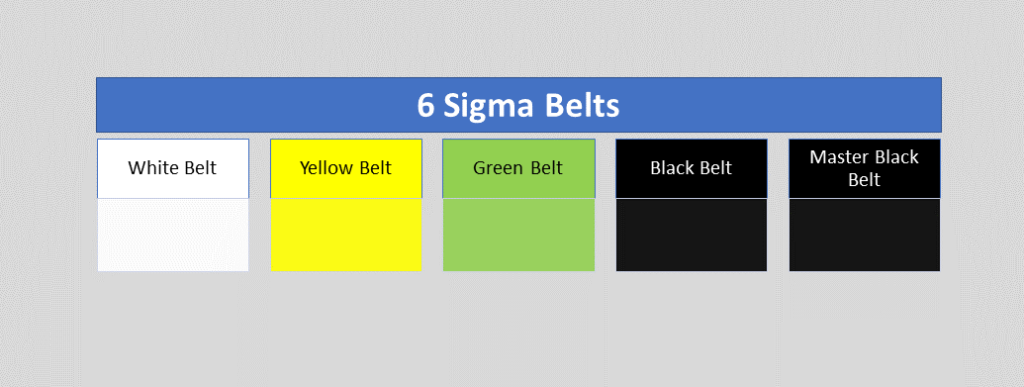
six sigma belts level
Six Sigma Belts Level

White Belt:

 This is the first level of six sigma certification. During white belt certification, you can learn the overview of the entire six sigma course. This six sigma course mainly emphasizes the basic concept of six sigma, fundamental methodology, terminology, etc. the course time periods may depend on the course providers once you are certified in the course you can easily understand the basic of Six Sigma and can work as problem-solving team that supports the overall projects teams. Many times people are confused about choosing the six sigma certification belt level. But I hope after reading all the Six Sigma belt levels, you can easily choose the course for yourself.

Yellow Belt:

Don’t confuse yourself when hearing about different types of belts. Different types of belts are classified according to the different levels of course like basic to advanced, roles of the certificate holder, level of project, knowledge level, etc. so according to your understanding of Six Sigma you can choose the certification course. The yellow belt is the second level of the certification course. The yellow belt certificate holder can participate as a project team member. And can review the process improvement that supports the project and review the six sigma process. However, the yellow belt is not adequate to empower certificate holders to lead a six sigma project. 

Green Belt:

Through the Green Belt, a GB-certified holder may have with proper knowledge and understanding of Six Sigma methodology, application of tools, etc. As a GB certified holder, you can lead the GB Six Sigma project or teams. In the GB project, you can take part as a team leader or member of the GB six sigma project with strategy implementation, methodology application, problem-solving, decision-making, etc. You can help with the black belt project for data collection and analysis.

Black Belt:

The black belt certified holder’s primary roles are process improvement, variation reduction, quality enhancement, DPMO reduction, and Sigma level enhancement by applying the six sigma methodology and concept. This is the advanced level, of course, compared to the green belt. BB certificate holder leads the project, trains and coaches the project teams as well.

Master Black Belt:

MBB is the high point of the six sigma course. A master black belt certificate holder trains and coaches the black belt and green belt holder. Your role is to make a six sigma strategy and implement an advanced level. Act as a six sigma technologist and give the strategic direction to the next level in your organization. You play a vital role as an expert in providing leadership, facilitation, methodology application, and strategic direction.  

Now, we will discuss on some common numerical terminology of Six Sigma which is frequently used in projects like DPU, DPO, DPMO, DPPM, Cp, Cpk, RPN, PN, Gauge R&R, Sigma level, P value, etc. sigma level you can choose from the sigma level table w.r.t DPMO value or you can calculate the value on excel as well.

DPMO, DPU, DPO, DPPM:

DPMO (Defects per million opportunities):

Before starting the DPMO calculation and concept, we will be understanding what is defects and defective items with the manufacturing practical example. Let’s consider a process control inspector doing the inspection in the production line and he booked some non-conforming items. He has recorded 5 non-conforming items and rejected those due to finding the following defects in items

ItemsDefects
Item-1Defect-1, defect-2, defect-3
Item-2defect-3
Item-3defect-2, defect-3
Item-4Defect-1, defect-2
Item-5Defect-4

Now, you can see in the above table we have recorded the 5 items and their defects. Every 5 items have a defect, so all 5 items are defective items or non-conforming items. If you look closely at the above table then you can find one thing that each item has one or more than one defect in a single unit. So, for example, item-1 is a defective product and having 3 defects. I hope the concept of defective vs defects is now understood. So, let’s arrange the above data table for easy understanding.

ItemsDefect-1Defect-2Defect-3Defect-4
Item-1xxx 
Item-2  x 
Item-3 xx 
Item-4xx  
Item-5   x
Total Defects =2331

The total defects of the 5 items are 9. (2+3+3+1). And the total number of defective items is 5.

Now we will calculate the value of DPU, DPO, DPMO, and DPPM.

In the above table, we found the following data as;

Total Defects = 9
Total Defective unit = 5
Defects opportunity per unit = 4
Total Units (for example) = 100 nos.
Total defects opportunities = 400 (4 x 100)

DPU (Defects per unit):

DPU Formula = Total number of Defects / Total units

DPU Calculation: DPU = 9/100 = 0.09

Defects Per Opportunity- DPO:

DPO Formula = Total number of defects/ (number of units x defects opportunity per unit)

= Total number of defects/ Total defects opportunities

= 9/ 400 = 0.0225 = 0.023

(Defects per million opportunities) DPMO:

DPMO Formula =

{Total number of defects/ (number of units x defects opportunity per unit)} x 1000000

= (Total number of defects/ Total defects opportunities) x 1000000

DPMO Calculation:

= (9/400) x 1000000

= 22500

(Defective Parts Per Million) DPPM:

DPPM Formula = (Total Defective parts / Total parts) x 1000000

DPPM calculation: (5 / 100) x 1000000

 = 50000

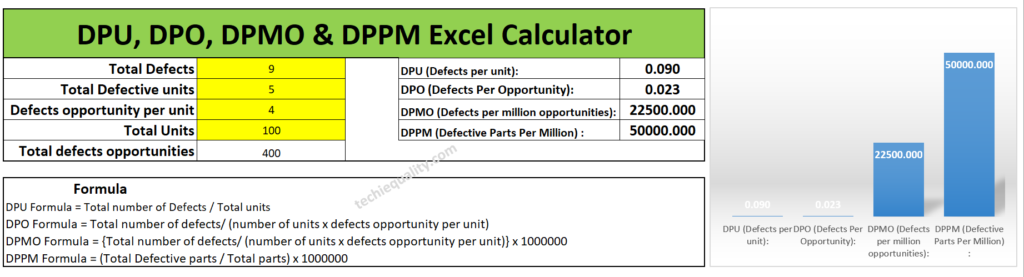
According to the above data set the DPU, DPO, DPMO, and DPPM calculated values are given below table.

Date Set:
Total Defects = 9
Total Defective unit = 5
Defects opportunity per unit = 4
Total Units (for example) = 100 nos.
Total defects opportunities = 400 (4 x 100)
Values:
DPU (Defects per unit): 0.09
DPO (Defects Per Opportunity): 0.023
DPMO (Defects per million opportunities):22500
DPPM (Defective Parts Per Million) : 50000

Excel calculator:

If you are interested to download the Excel DPMO calculator and DPPM calculator then download them from the below link.

Download Excel DPMO & DPPM Calculator
DMAIC Tools

How to use Excel DPMO & DPPM Calculator?

It’s very simple to use our excel template just download the excel calculator and then follow the below steps.

Step-1: Download the excel DPMO and DPPM calculator from the above given link.

Step-2: Enter the value only on the yellow highlighted box.

Step-3: The DPU, DPO, DPMO, and DPPM values will be calculated automatically.

Manufacturing Example:

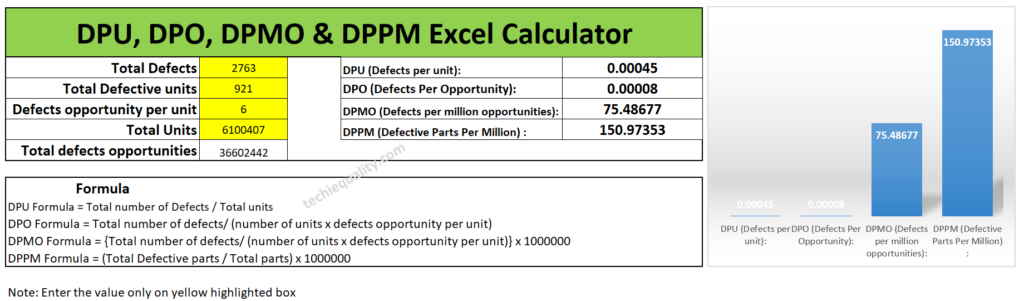
Let’s consider a company manufacturing automobile parts. And they are producing x nos of parts on a monthly basis but facing a huge rejection in the production line at the blanking and piercing operation process. so, it has been decided in the quality meetings for improvement projects to reduce the rejection% and improve the variation. So, for the improvement project, the Line QA engineer collected the following data for the calculation of DPU, DPO, DPMO, and DPPM for project input. Data are given in below table;

Total Defects = 2763
Total Defective unit = 921
Defects opportunity per unit = 6
Total parts produced = 6100407
Total defects opportunities = 3,66,02,442 (6100407 x 6)

Without wasting my time, I’m going to calculate the value by using the above excel template. And the calculated value is given below.
DMAIC Tools, DPMO calculator

I would request to all my readers, who are currently reading this article try to calculate the DPMO and DPPM values manually by apply the above formula and match with the excel calculator value.

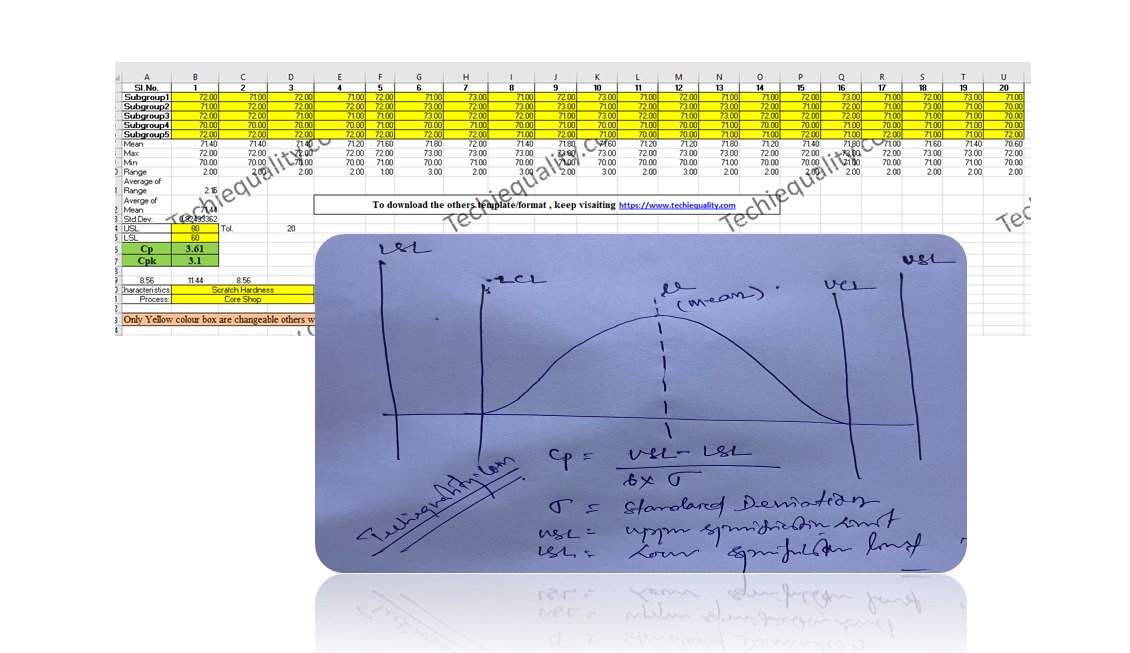
Regarding the process capability calculation we have already uploaded the article you can read our article on How to measure process capability (Cp & Cpk)? Download Excel Template.

Process Capability Analysis |Cp & Cpk Calculation Excel Sheet with Example

Defectives vs Defects:
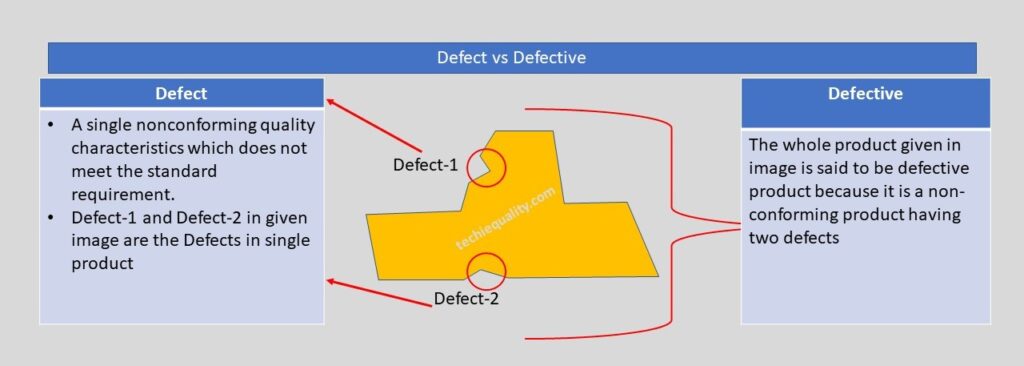
Defect vs Defective

 Let us understand the difference between Defect and Defective with the help of the above example. As you can see in the above image one product having two nonconforming quality characteristics which do not meet the standard or customer requirement, which is called a defect, and the whole product is called a defective product because having two defects. If you would like to know the total defective product and total defects in the above example, then we can easily say that the total defective product is 1 and the total defects are 2. Now I hope you understand the difference between defective and defects.

Six Sigma Methodologies:

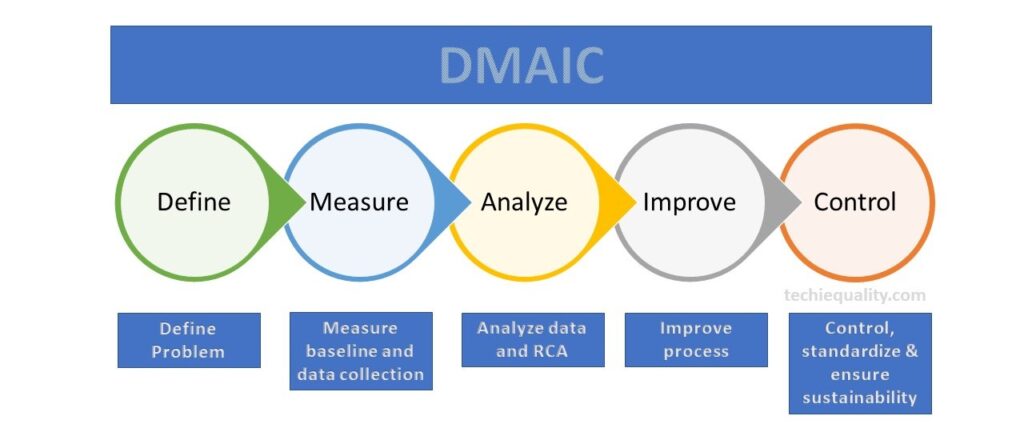
There are many methodologies used in six sigma projects but the popular methodology is DMAIC (Define, Measure, Analyze, Improve and Control). Similarly, in the design of the Six Sigma project, the popular methodology is used as DMADV (Define, Measure, Analyze, Design, and Validate). However in Lean Six Sigma, both lean tools and DMAIC methodology are used.
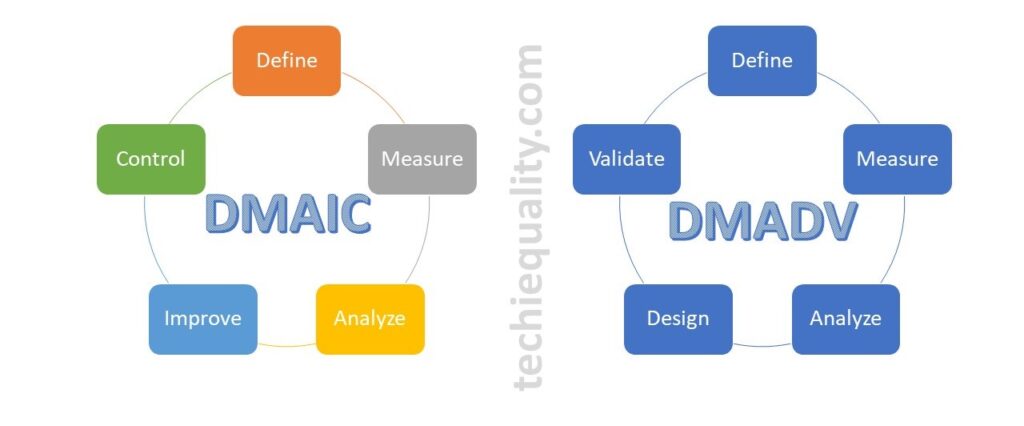
DMAIC vs DMADV

DMAIC Tools & DMAIC Template

DMAIC methodology

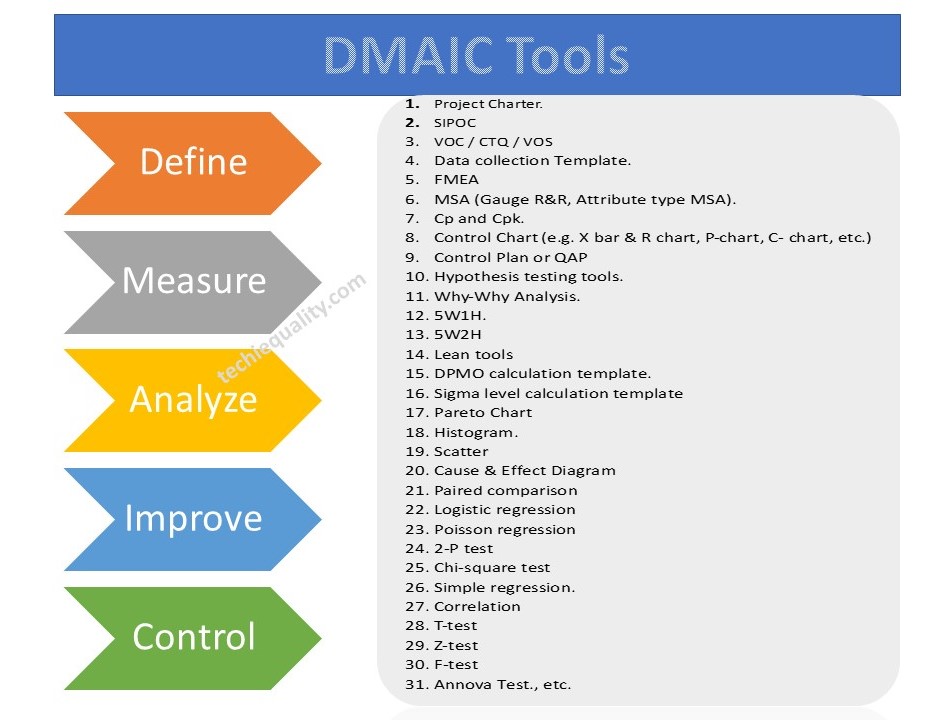
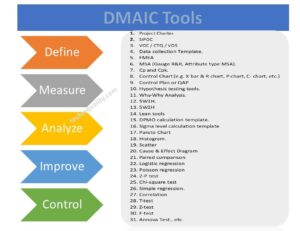
DMAIC methodology is a very popular mythology that is used in six sigma projects. The DMAIC methodology consists of 5 phases i.e. Define Phase, Measure Phase, analyze Phase, Improve Phase, and Control Phase. We have already published common and popular DMAIC tools, DMAIC templates, and formats. But following DMAIC tools are listed below;

DMAIC Tools, Template, and Format:

  1. Project Charter.
  2. SIPOC
  3. VOC / CTQ / VOS
  4. Data Collection Template.
  5. FMEA
  6. MSA (Gauge R&R, Attribute type MSA).
  7. Cp and Cpk.
  8. Control Chart (e.g. X bar & R chart, P-chart, C- chart, etc.)
  9. Control Plan or QAP
  10. Hypothesis testing tools.
  11. Why-Why Analysis.
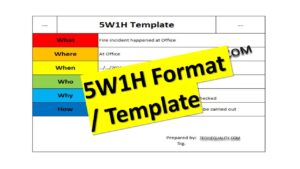
  12. 5W1H.
  13. 5W2H
  14. Lean tools
  15. DPMO calculation template.
  16. Sigma-level calculation template
  17. Pareto Chart
  18. Histogram.
  19. Scatter
  20. Cause & Effect Diagram
  21. Paired comparison
  22. Logistic regression
  23. Poisson regression
  24. 2-P test
  25. Chi-square test
  26. Simple regression.
  27. Correlation
  28. T-test
  29. Z-test
  30. F-test
  31. Annova Test., etc.
DMAIC Tools
DMAIC Tools

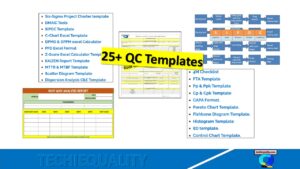
If you would like to download the free templates and formats then click on DOWNLOAD Free Templates.

QA/QC/TQM/Lean/Six Sigma Templates or Format:
More on Techiequality

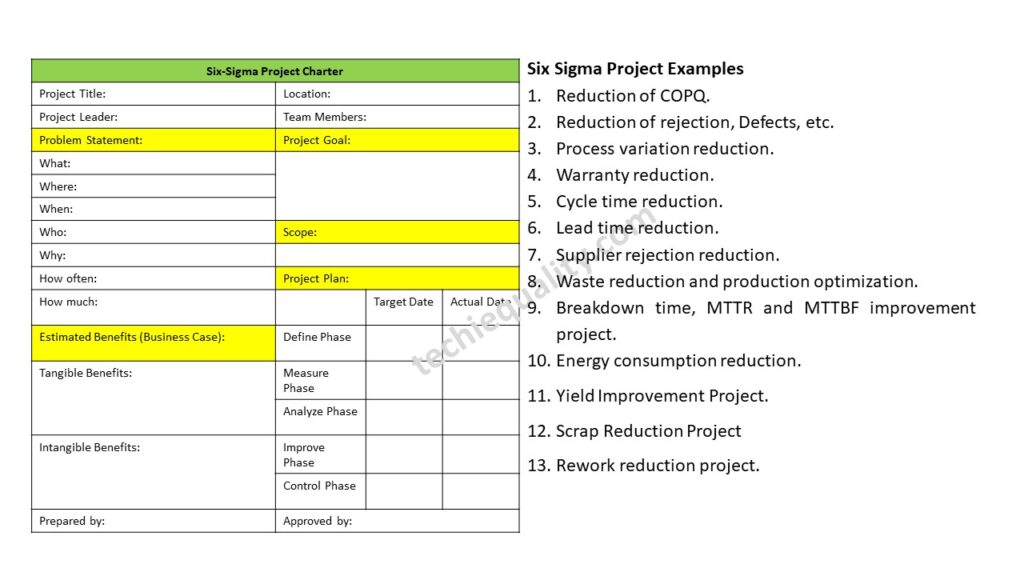
Six Sigma Project Examples | 15+ Project Examples

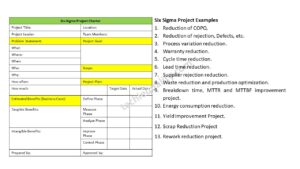
Six Sigma Project Examples

Six Sigma Project Examples | 15+ Project Examples

Hello readers! Today we will be discussing on different types of Six Sigma Project Examples in manufacturing industries. As we know that Six sigma projects are different types like yellow belt, green belt, black belt and master black belt projects. We have already published a post on different types of six sigma belts. Different types of methodologies used in six sigma projects like DMAIC or DMADV, etc. similarly six sigma projects also classified into several types like lean six sigma project, six sigma projects, design of six sigma project.

Download the Six Sigma DMAIC Tools.

How to Identify the Six Sigma Projects?

Here, sharing my own experience that how was I identifying the Six Sigma project in my work zone. I was simply following the below steps to identify the Six Sigma project.

  • Identify the current problems or issues, like defects issues, high process or product characteristics variation, high rejection, high warranty issues, customer complaints, high breakdowns, reduction of energy consumption, cycle time reduction, lead time reduction, etc.
  • Categories the problems like A types, B types, C types and K types.
Problem typesDescription
A typeQuality circle project problem
B typeSGA project problems
C typeSix Sigma project problem.
K typeKaizen problems

After categorization of problems you can select the C type problem for six sigma projects. Once you finalize the number of projects as per prioritize my six-sigma committee and top management, you can prepare the six-sigma project charter.

  •  Prepare the project charter.
  •  Follow the six-sigma methodology like DMAIC.
  • Define phase, Measure phase, analyze phase, improve phase and control phase.

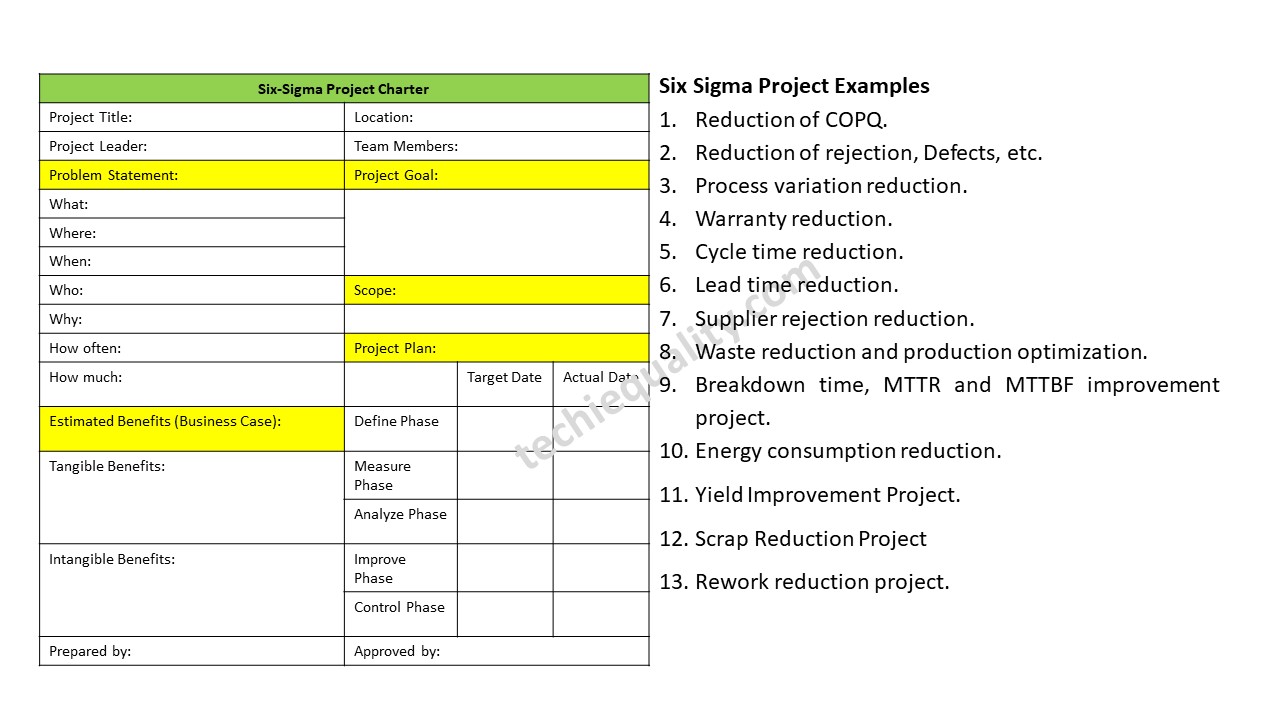
Six Sigma Project Examples:

Following are some example of six sigma project that you can consider to do but there are not limited to.

  1. Reduction of COPQ.
  2. Reduction of rejection, Defects, etc.
  3. Process variation reduction.
  4. Warranty reduction.
  5. Cycle time reduction.
  6. Lead time reduction.
  7. Supplier rejection reduction.
  8. Waste reduction and production optimization.
  9. Breakdown time, MTTR and MTTBF improvement project.
  10. Energy consumption reduction.
  11. Conversion cost reduction.
  12. Cost reduction project.
  13. Six sigma projects on customer complaint.
  14. Yield Improvement Project.
  15. Scrap Reduction Project
  16. Rework reduction project.
  17. Process and Product failure improvement project.
Six Sigma Project Examples

 How to write six sigma project charter?

The Six sigma project charter is the main part of the any type of 6-sigma project. Which is consist with some basic information about project, problem statement, scope, goal, tangible and intangible benefits, team members, and final the approval part. After getting the approval from concern personnel, you can start your project.  

Let’s consider an example here for preparing the six-sigma project charter, for doing so we are going to consider here an example of the manufacturing industry for better understanding, suppose the manufacturing unit is producing automobile parts and somehow rejection% at process P-1 is high. At process P-1, they are manufacturing Part-1. For reducing the high rejection percentage at process P-1, the six- sigma certified holder has taken a project on it and prepared the project charter.

Follow the below steps to prepare the six-sigma project charter:
  • Form a Six sigma team including designation, and roles & responsibility of all members.
  • Minimum, Keep the past 3 to 6 months data for calculation of sigma level, DPMO, and defects contribution. for better result and considering with all environmental impact you can consider 12 months to 18 months data. More data will provide you best result. You can manually calculate the DPMO or you can use the DPMO Calculator as well. After calculating the DPMO value, then easily from six sigma conversion table you can find the sigma level. For the knowing the defects contribution you can use the Pareto chart.
  • Next part is the Problem statement, here you can write the statement by using the 5W1H or 5W2H template.
  • Define the scope, project goal, estimated benefits and project objectives.

First of all, try to form a six sigma team and define their project roles & responsibility, once you done the same next write the problem statement, same we are going to write here considering with the above example. We have used the 5W2H template to describe the problem statement.

As you know, there is high process rejection of Part-1 at process P-1.

Problem Statement:

What: high rejection of Part-1

Where: In Process P-1

When: during manufacturing of parts in three shifts

Who: Machine operators/ workforces.

Why: reason unknown

How often: monthly / daily

How much: you can mention here rejection in percentage or in PPM or in DPMO.

Project Goal:

Mainly describe the project objectives & goal like [1] to reduce the rejection% from x% to y%. or [2] To reduce the rejection PPP by 90% from x to y. [3] improve the sigma level e.g. 4 to 5.5.

Scope of project:

Here, you just mention the project boundary like what is included and what is excluded. For example, Process P-1 is included and process p-2 is excluded.

Estimated Benefits:

  • Tangible Benefits: Improvement of sigma level e.g. 4.4 to 5.5, Reduction of rejection e.g. 1.1% to 0.02%, DPPM from 11300 to 150, DPMO from 1800 to 25, and for example estimated cost saving 50 lakhs/annum.
  • Intangible benefits: For example, Increase Customer Satisfaction, Knowledge about 6-Sigma tools, Improved Presentation skill, improved analytical Knowledge, Improved team work & self, Problem Solving Skill developed.

Project Plan:

In the project plan section, you should take the target date of all 5 phases and monitor the actual date and delay of project. So that you can manage your total project period.

For example;

5-PhasesTarget DateActual date
Define Phase  
Measure Phase  
Analyze Phase  
Improve Phase  
Control Phase  

Useful Post:

SIPOC Template | SIPOC Diagram Example of Manufacturing & Service Industry

4M Change Management | How to implement in Manufacturing unit | Template | Format

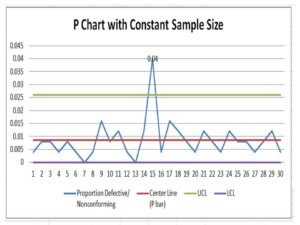
P Chart Excel Template | Formula |Example |Control Chart | Calculation

ABC Analysis of Inventory with Industrial Example

More on TECHIEQUALITY

Six Sigma Project Charter Template

Six Sigma Project Charter Template

Six Sigma Project Charter Template

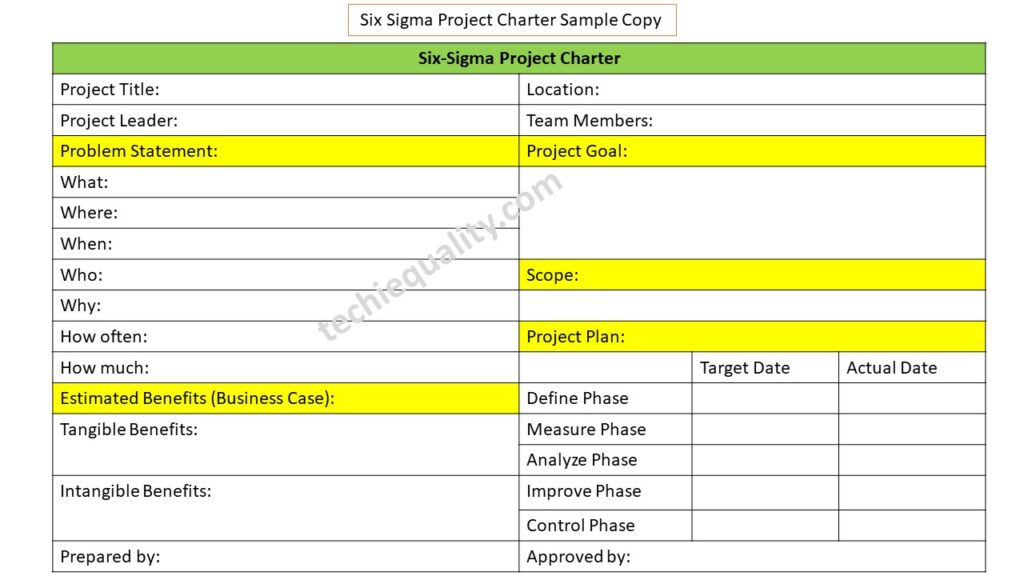
Hello readers! Today we will discuss on a specific topic, which is related to the Six Sigma project charter. How effectively you can prepare the Six Sigma project charter so that each and everything will be in a single template for making the decision on the project for approval and next further project work. There are several methodologies and tools used in Six Sigma projects, but the popular methodologies are DMAIC and DMADV and similarly, so many tools are used in the project as well. We have already published the main important topic covering DMAIC Tools and some six sigma project examples in manufacturing industries. I hope both topics will be very helpful before preparing the Project charter. So, let’s read these topics first and then prepare the project charter. Without wasting your time you can download the Six Sigma Project Charter Template from the below-given link.

Download the Six Sigma Project Charter Template sample copy.

Six Sigma Project Charter Template

Before preparing the Six Sigma project charter you have to understand the methodology, project types, and 6-sigma belts, which will help you to make your project successful. The popular 6-sigma bets are yellow, green, black, and master black belts, and similarly, the Six-sigma project, lean Six-sigma, and design of Six-sigma project generally followed the different and different types of methodology like, DMAIC (Define, Measure, Analyze, Improve & Control), DMADV (Define, Measure, Analyze, Design and Validate).

Once you list out the problem set, you can start preparing the Six Sigma project charter to represent the project details and for getting approval. First of all, keep the past data of a minimum of 3 months, or for better results, you can consider 18 months of past data for representing the problem statement, problem/defects contribution, DPMO /DPPM calculation, and also for sigma level calculation.

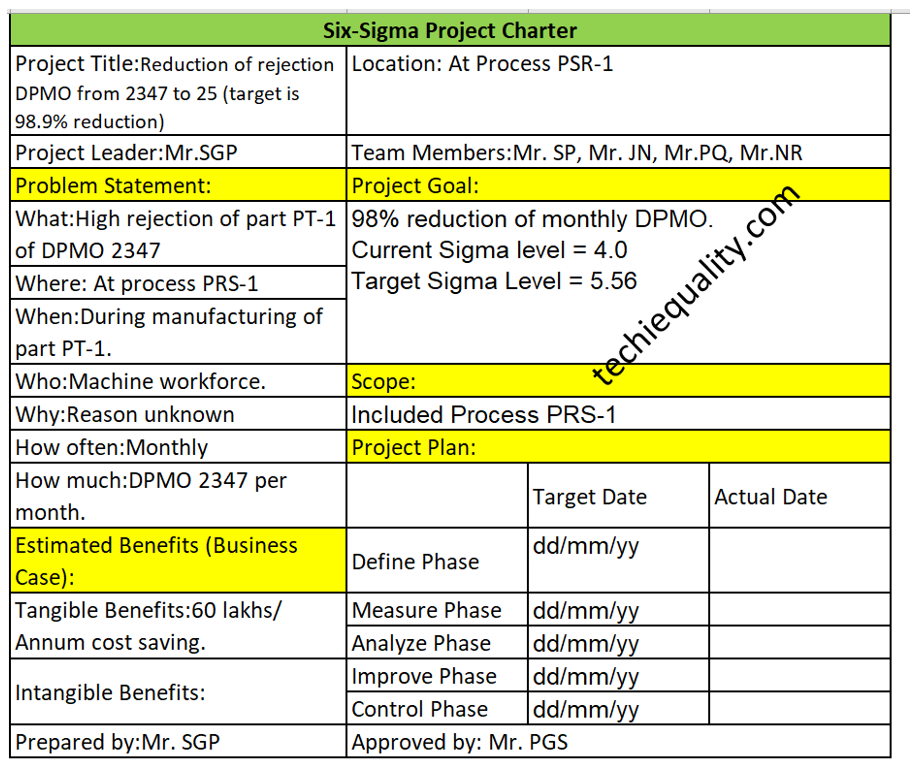
Step by Step guide of Project Charter preparation with Manufacturing Example:

Let’s consider a company manufacturing a part PT-1 at process PRS-1. The rejection quantity of that part PT-1 is 2347 and the production quantity is 76000. The number of opportunities per unit is 5.

First of all, we are going to calculate the DPMO.

DPMO = Total Rejection quantities x 1000000/ (Total units x opportunities per unit)

= 2347 x 1000000/ (76000 x5)

= 6176

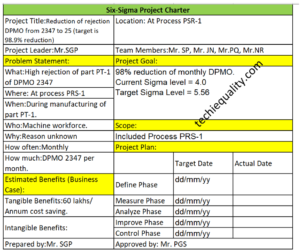
Now, I am going to prepare the Six Sigma project charter.

Project title: Reduction of rejection DPMO from 2347 to 25 (target is 98.9% reduction)

Problem Statement:

What: High rejection of part PT-1 of DPMO 2347

Where: At process PRS-1

When: During manufacturing of part PT-1.

Who: Machine workforce.

Why: Reason unknown

How often: Monthly

How much: DPMO 2347 per month.

Project goal: 98% reduction of monthly DPMO

Scope: Included Process PRS-1

Tangible Benefits: 60 lakhs/ Annum cost saving.

Six Sigma Project Charter Template
Six Sigma Project Charter Template Example

What are the key elements of a charter?

As you can see in the above project charter sample template, we have already highlighted the key elements of the Six Sigma project charter in yellow colour and these are the list below as;

  • Problem statement.
  • Project goals
  • Scope of the project
  • Estimated benefits/business case
  • Project plan. Etc.

What is the purpose of the project charter?

The main purpose of the project charter is to write down the key elements of the project and to get approval from the approver. And from time to time you have to update the Project plan status as well. It’s a synopsis of your Six Sigma project.

Useful Post:

Process Flow Diagram Template | Examples |Symbols |PFD

SIPOC Template | SIPOC Diagram Example of Manufacturing & Service Industry 

4M Change Management | How to implement in Manufacturing unit | Template | Format

C Chart Excel Template | Formula | Example | Calculation

More on TECHIEQUALITY


DPMO Calculation, Formula, Template & Manufacturing Example

DPMO Calculation

DPMO Calculation, Formula, Manufacturing Example & DPMO Excel Template

Hello readers! Today we will be discussing on DPMO calculation with manufacturing examples. The full form of DPMO is defects per million opportunities. Similarly, dpmo there are 3 more popular terms used in quality for the calculation of defect level and these are [1] DPPM, [2] DPO, [3] DPU. These terms are also frequently used in six sigma project work. If you would like to download the sample template of all 4 calculations in a single sheet then download it from below given link.

DPMO Calculation Excel TemplateDOWNLOAD

Formula of DPMO, DPPM, DPO, DPU:

DPU (Defects per unit):

DPU Formula = Total number of Defects / Total units

DPO (Defects Per Opportunity):

DPO Formula = Total number of defects/ (number of units x defects opportunity per unit)

DPMO (Defects per million opportunities):

DPMO Formula = {Total number of defects/ (number of units x defects opportunity per unit)} x 1000000

DPPM (Defective Parts Per Million):

DPPM Formula = (Total Defective parts / Total parts) x 1000000

First of all, below example-1 is one of the scenarios that are given for calculating the DPMO, DPPM, DPO, and DPU for all my article readers. So, this is the task for you my readers for your better understanding. Similarly, we are also going to solve one of the scenario-based questions for calculating the DPMO, DPPM, DPU, and DPO.

 Example-1 (Task for the reader):

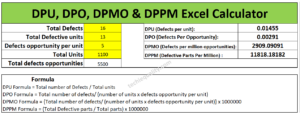
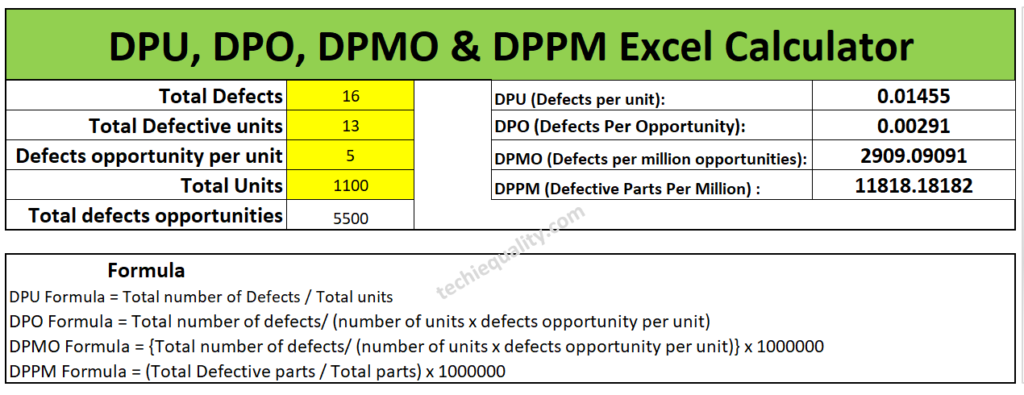
Suppose a sheet metal automobile manufacturing company, produces an automobile part. In the press shop, we found that 4 parts had been rejected at press machine-1 & 9 parts at press machine-2. When a QA engineer had analyzed, he found that the total defective product has 16 defects. And defects opportunity per parts is 5 and total 1100 parts had been produced. Calculate the DPMO, DPPM, DPU and DPO?    

Have you completed the calculation of above example-1 or not? If not yet then, we are going to help to calculate the same. First of all, note down the data, i.e. Total defects, Total defective parts, defects opportunity per part, total parts produced and total defects opportunity. I know that it will take more time for manual calculation of all calculations, that is why we are recommending you to download our excel automatic calculation template for easy and time-saving calculation. Downloading link is given at top of the articles just try to download the format or template. I would request you all my readers, you just calculate the DPMO and DPPM manually and try to match your value with Excel calculation, which is given below;

DPMO Calculation

I hope you have completed the matching of the value calculated by the automatic excel template and your manual calculation. Now we will be discussing the different types of examples and will calculate the value by both manually and by using an automatic excel format. So, let’s get started.

Example-2:

Lets a company manufacturing a toy product and below are the data given in several processes. so, calculate the DPMO, DPPM, DPO and DPU of individual processes and overall process by manually and by using the excel template. And also try to compare both solutions.

Process-1 Data Table:

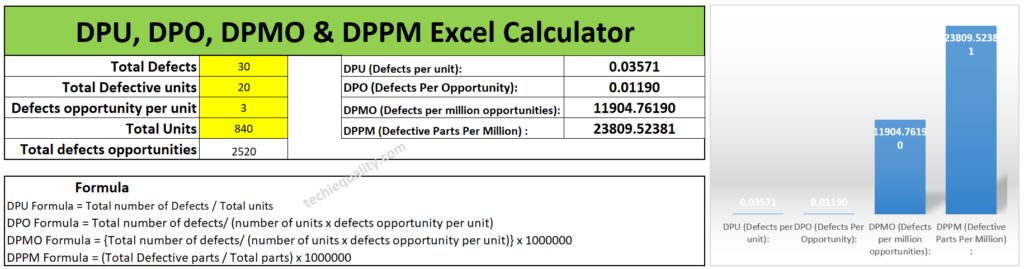
Total Defects30 nos
Total Defective parts20 nos
Defects opportunity per part3
Total parts produced840 nos

Process-2 Data Table:

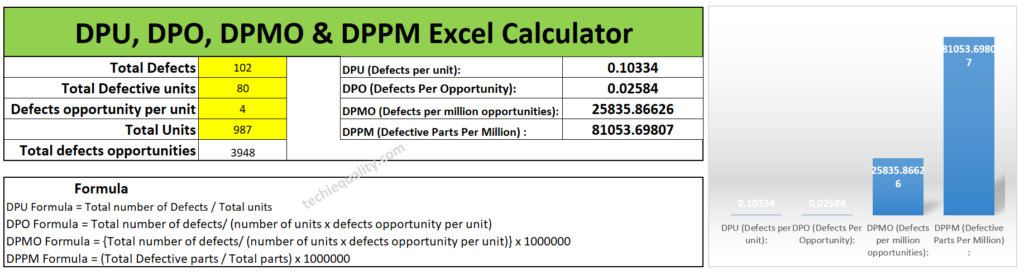
Total Defects102 nos
Total Defective parts80 nos
Defects opportunity per part4
Total parts produced987 nos

Process-3 Data Table:

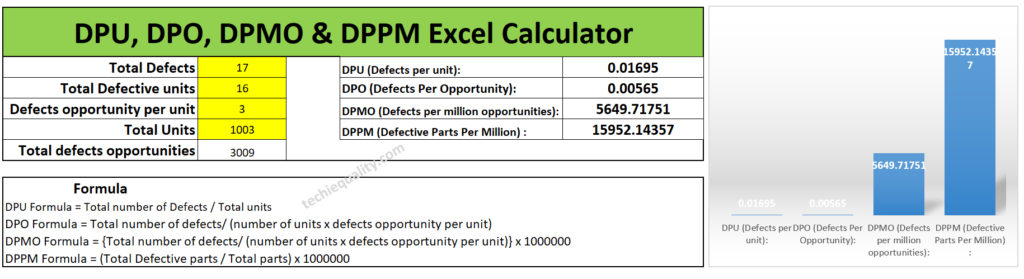
Total Defects17 nos
Total Defective parts16 nos
Defects opportunity per part3
Total parts produced1003 nos

Calculate the DPMO, DPPM, DPO and DPU of individual processes and overall processes by manually and by using the excel template?

Solution of Process-1:

DPU Formula = Total number of Defects / Total units

= 30/840

=0.0357

DPO (Defects Per Opportunity):

DPO Formula = Total number of defects/ (number of units x defects opportunity per unit)

= 30/(840×3)

= 0.0119

DPMO (Defects per million opportunities):

DPMO Formula = {Total number of defects/ (number of units x defects opportunity per unit)} x 1000000

= [30/(840×3)]x1000000

=11904.7

DPPM (Defective Parts Per Million):

DPPM Formula = (Total Defective parts / Total parts) x 1000000

= (20/840) x1000000

=23809.5

Similarly, Excel template calculation is given below as;

excel formula

Solution of Process-2:

DPU (Defects per unit):

DPU Formula = Total number of Defects / Total units

= 102/987

= 0.1033

DPO (Defects Per Opportunity):

DPO Formula = Total number of defects/ (number of units x defects opportunity per unit)

= 102/(987×4)

= 0.0258

DPMO (Defects per million opportunities):

DPMO Formula = {Total number of defects/ (number of units x defects opportunity per unit)} x 1000000

= [102/(987×4)]x1000000

= 25835.86

DPPM (Defective Parts Per Million):

DPPM Formula = (Total Defective parts / Total parts) x 1000000

= (80/987) x1000000

= 81053.69

You can compare the answer with the below given Excel calculated value.

DPMO Calculation

Solution of Process-3:

DPU (Defects per unit):

DPU Formula = Total number of Defects / Total units

= 17/1003

= 0.0169

DPO (Defects Per Opportunity):

DPO Formula = Total number of defects/ (number of units x defects opportunity per unit)

= 17/1003×3

=0.0056

DPMO (Defects per million opportunities):

DPMO Formula = {Total number of defects/ (number of units x defects opportunity per unit)} x 1000000

= [17/1003×3]x1000000

= 5649.7

DPPM (Defective Parts Per Million):

DPPM Formula = (Total Defective parts / Total parts) x 1000000

= [16/1003]x1000000

= 15952.14

Below are the excel calculation of the above value, you can match the value;

DPMO Calculation

Overall Process DPMO Calculation:

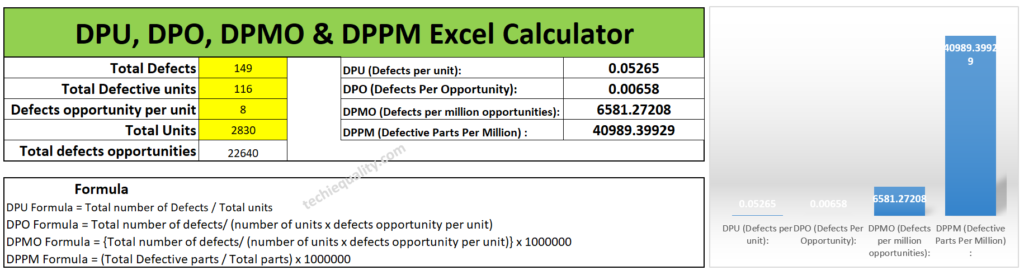
For doing so we need a combined data table, so we have clubbed all the data of process-1,2 & 3 and given in below; the same part is produced in all 3 processes.

Total Defects149 nos
Total Defective parts116 nos
Defects opportunity per part8
Total parts produced2830 nos

DPU (Defects per unit):

DPU Formula = Total number of Defects / Total units

= 149/2830

= 0.0526

DPO (Defects Per Opportunity):

DPO Formula = Total number of defects/ (number of units x defects opportunity per unit)

= 149/2830×8

=0.00658

DPMO (Defects per million opportunities):

DPMO Formula = {Total number of defects/ (number of units x defects opportunity per unit)} x 1000000

= [149/8×2830]x1000000

= 6581.27

DPPM (Defective Parts Per Million):

DPPM Formula = (Total Defective parts / Total parts) x 1000000

= (116/2830) x1000000

= 40989.39

Overall

[Excel Calculation of DPMO]

Useful Post:

DMAIC Tools | DMAIC Template | Six Sigma Methodologies | 30+ Free Tools

What is Visual Management? | Visual Management Board Examples

Process Flow Diagram Template | Examples |Symbols |PFD

SIPOC Template | SIPOC Diagram Example of Manufacturing & Service Industry

More on TECHIEQUALITY

Process Flow Diagram Template | Examples |Symbols |PFD

Process Flow Diagram

Process Flow Diagram Template | Examples |Symbols |PFD

Hi Readers! Here, today we will be discussing the process flow diagram, its symbols, and practical examples. We have prepared a PFD template for sample and example basis, if you would like to download the free template or format of the PFD-process flow diagram then, go through the below-given link.

The process flow diagram template or format in excel-DOWNLOAD-PFD in Excel template or format.

What is a Process Flow Diagram- PFD?

The PFD or process flow diagram is a flow chart or process flow diagram or process mapping of a process. The PFD represents the process sequence and details (like a machine, activities, process sequence, relevant document, process control, decision, etc).

Symbols of Process flow diagram – PFD:

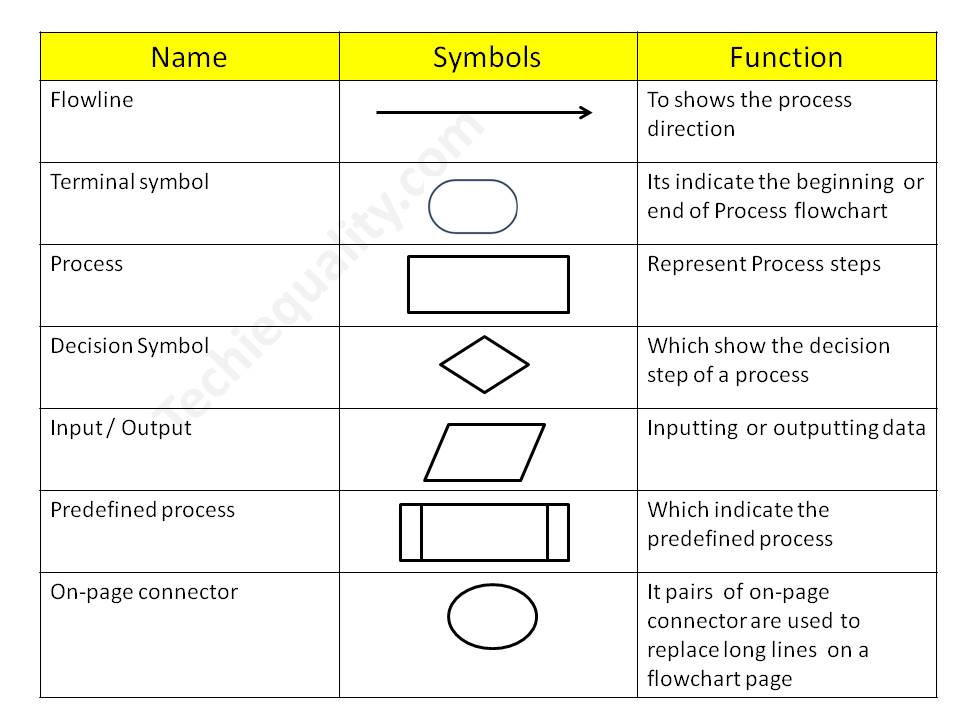
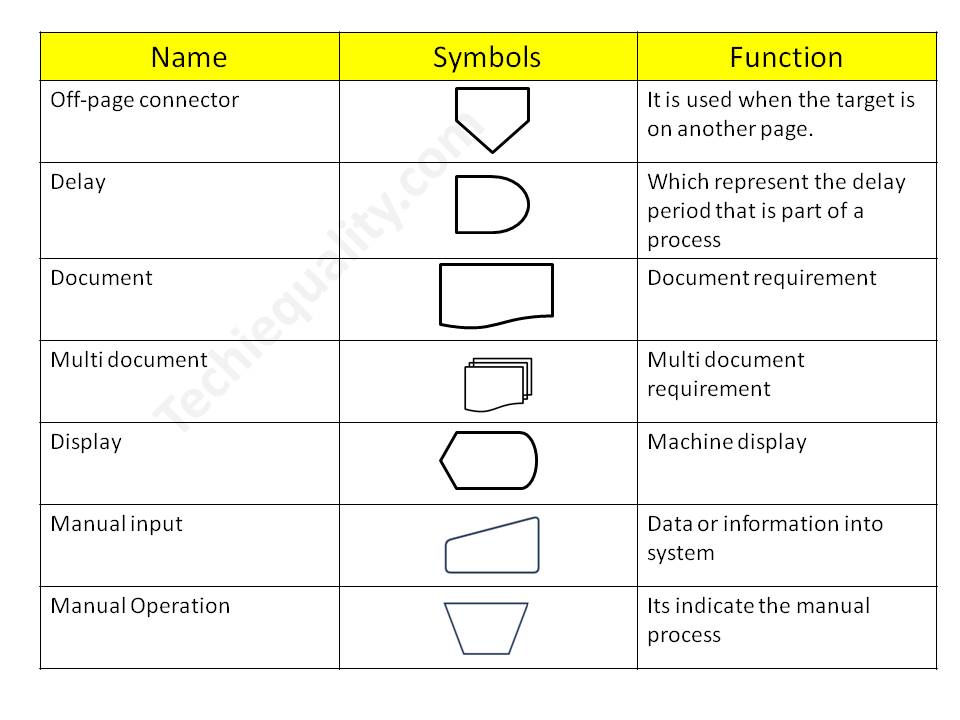
PFD/PFC has many symbols but we will discuss only common symbols. Details are given below;

Symbol NameFunction
FlowlineTo show the process direction
Terminal symbolIt indicates the beginning  or end of the Process flowchart
ProcessRepresent Process steps
Decision SymbolWhich shows the decision step of a process
Input / OutputInputting  or outputting data
Predefined processWhich indicates the predefined process
On-page connectorPairs of on-page connectors are used to replace long lines  on a flowchart page
Off-page connectorIt is used when the target is on another page.
DelayWhich represents the delay period that is part of a process
DocumentDocument requirement
Multi-documentMulti-document requirement
DisplayMachine display
Manual inputData or information in the system
Manual OperationIt indicates the manual process

Process Flow Chart symbols / PFD

Process Flow Diagram

4 Steps to create a PFD-Process flow Diagram:

Step-1:

CFT team formation including the process owner.

Step-2:

List out the process, activities, decision, machine, control mechanism, etc

Step-3:

Sequentially write down the process, activities, and decisions of the process

Step-4:

Plot the diagram by using the PFD symbols.

Process Flow Diagram Example:

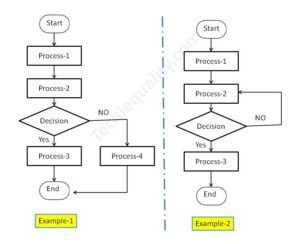
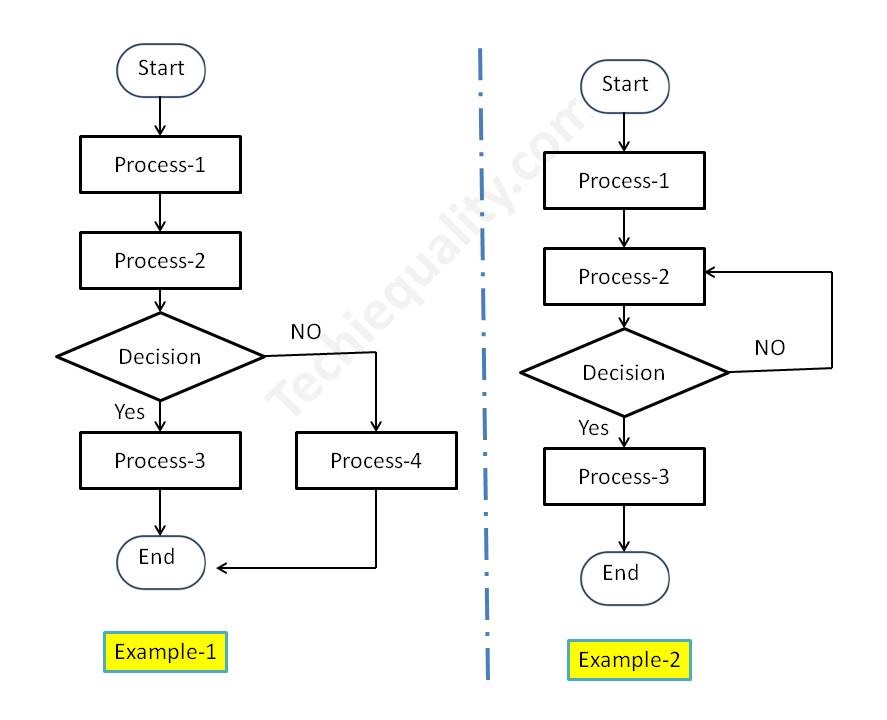
We have created two process flow diagrams, i.e. [1] without repetition of the process after the decision and [2] with repetition of the process after the decision. Both two types of PDF are given below;

Process Flow Diagram
PFD/PFC-process flow chart example

Industrial Example:

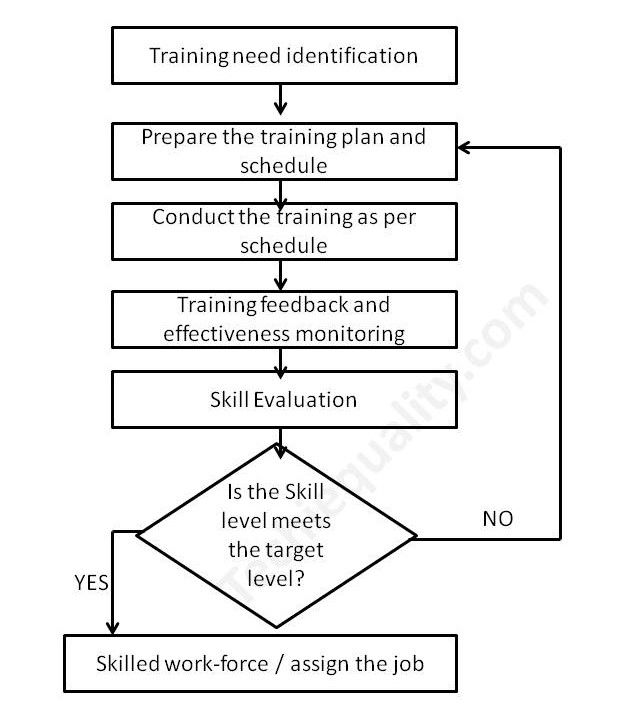
Here we have taken the process flow diagram example of Training, which is one of the most powerful things to competent the workforce and enhance the skill of employees. So that optimum knowledge can be utilized for effective output from operation by employees at an organization. Hence if you would like to create a process flow chart of education and training operations then the below example will be helpful to prepare the same. This is only for reference and learning purposes.

We have prepared the PFD followed by the above steps:

Step-1:

We have formed a team including the HRD member.

Step-2:

Identified the activities below

  • Training needs identification
  • Prepare the training plan and schedule
  • Conduct the training as per schedule
  • Training feedback and effectiveness monitoring
  • Skill evaluation.

Step-3:

We have arranged the activities sequentially as given below of education and training operations.

Activities-1Training needs identification
Activities-2Prepare the training plan and schedule
Activities-3Conduct the training as per schedule
Activities-4Training feedback and effectiveness monitoring
Activities-5Skill evaluation

Step-4:

We have prepared the PFD – process flow chart for education and training operations and details are given below;

process mapping

FAQ:

What is the process flow?

The process flow is the flow chart that represents the process sequences or process mapping including machine details, control data, document reference, etc.

What is the difference between SIPOC and PFD?

The SIPOC diagram consists of 5 elements i.e. Supplier, Input, Process, Output, and Customer. the PDF is the process mapping that represents the process sequences.

What is flowchart?

The FC is a flow diagram or mapping of activities.

What are the 3 types of PFD?

[1] System PFD, [2] General PFD, [3] Detailed PFD

Free Templates / Formats of QM: we have published some free templates or formats related to Quality Management with manufacturing / industrial practical examples for better understanding and learning. if you have not yet read these free template articles/posts then, you could visit our “Template/Format” section. Thanks for reading…keep visiting techiequality.com

Useful Post:

4M Change Management | How to implement in Manufacturing unit | Template | Format

C Chart Excel Template | Formula | Example | Calculation

P Chart Excel Template | Formula |Example |Control Chart | Calculation

ABC Analysis of Inventory with Industrial Example

How to calculate z-score in excel with manufacturing example

C Chart Excel Template | Formula | Example | Calculation

C Chart Excel Template

C Chart Excel Template| Formula |Example |Calculation:

Hi Readers! Today, we will be discussing here on attribute type SPC chart i.e. C chart. Its formula, calculation, and industrial example. The C chart is also called the number of nonconformities chart. Where the sample size is constant. Read the below description to learn about its selection and application in industries. If you are interested in downloading the sample C Chart Excel Template then, click on the given below link.

Sample C Chart Excel Template with industrial example-Download.

Number of nonconformities chart (C Chart):

The C chart, attribute type SPC control chart, or the number of nonconformities chart is generally used to identify the common or special causes present in the process and is also used for monitoring and detecting process variation over time. It helps to determine whether the process is in a state of statistical stable or not. Overall, it indicates that special causes are present in the process or not, whether the process is under control or not, and process variability. This C chart is selected when there is a constant sample size and multiple defects per unit are present.

Selection of Attribute type SPC Control chart (C Chart):

Step-1: Data Types?

Condition: – Discrete type data (Attribute type data)

Step-2: Is the interest in nonconformities or multiple defects per unit?

Condition: – yes, multiple defects per unit

Step-3.:- Is the sample size constant?

Condition: – Yes, then use the C chart.

DescriptionCondition
Data Type:Discrete type data (Attribute type data)
Is the interest in nonconformities or multiple defects per unit?Yes, Multiple defects per unit present
Is the sample size constant?Yes
Chart type:C Chart

C Chart Formula:

The three important things need to be calculated before plotting the C chart i.e. [1] Centerline, [2] Upper control limit, & [3] lower control limit.

Centerline (CL) or C bar = Total number of nonconformities or defects / Number of samples

Upper control limit (UCL) = C-bar + 3 x Square root of C-bar

Lower control limit (LCL) = C-bar – 3 x Square root of C-bar

 The formula of C chart
CL or C- bar =Total number of nonconformities or defects / Number of samples
UCL =C-bar + 3 x Square root of C-bar
LCL =C-bar – 3 x Square root of C-bar

How to plot a c chart in excel?

Here, I’m going to share my own industrial experience regarding the application and usage of a c chart in the manufacturing industry by providing a sample example for your quick learning and implementation in your organization. I have considered 50 sample sizes, and three different defects and collected the data for 30 days. Details of data are given below table.   

DateConstant sample size (n)Defect-1Defect-2Defect-3Total Defects
15011 2
2501124
3502215
45011 2
5501124
65011 2
7501113
8502226
9502237
10501124
11501135
12501113
135055717
145011 2
15501113
16502215
175011 2
18501113
19501135
205011 2
215022 4
225011 2
23502226
24501135
25501113
265022 4
27501113
285011 2
29501113
30501113

All the above three defects are attribute type defects. Before plotting the c chart in excel we have to calculate the three important things first, one is CL, UCL & LCL.

Calculation:

Centerline (CL) or C-bar:

Formula = Total number of nonconformities or defects / Number of samples

CL = 121 / 30 =4.033

UCL (Upper control limit):

Formula = C-bar + 3 x Square root of C-bar

UCL = 4.033 + 3* Square root of 4.033

UCL = 4.033+3*2.008

UCL = 10.0577

UCL = 10.058

LCL (Lower control limit):

LCL = C-bar – 3 x Square root of C-bar

LCL = 4.033 – 3* Square root of 4.033

LCL = 4.033-3*2.008

LCL = 4.033-6.024

LCL = -1.991 (the value is negative so LCL is Zero)

LCL = 0.00

 Calculation value
CL =4.033
UCL =10.058
LCL =0
Follow the below step to plot the c chart in excel:

Step-1: open the excel sheet.

Step-2: Do the data entry on the Excel sheet.

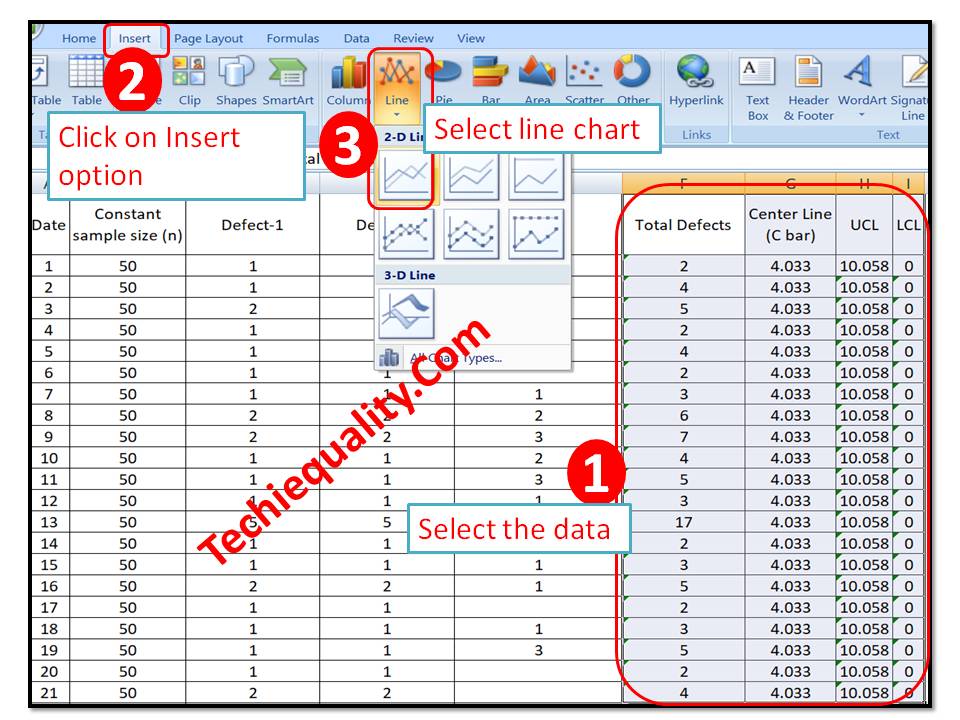
Step-3: Select the data and then go to the insert option in the main menu and next to select line chart. The detail is mentioned in the below image.

C Chart Excel Template
C Chart:

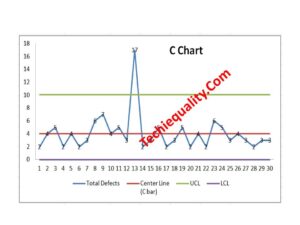
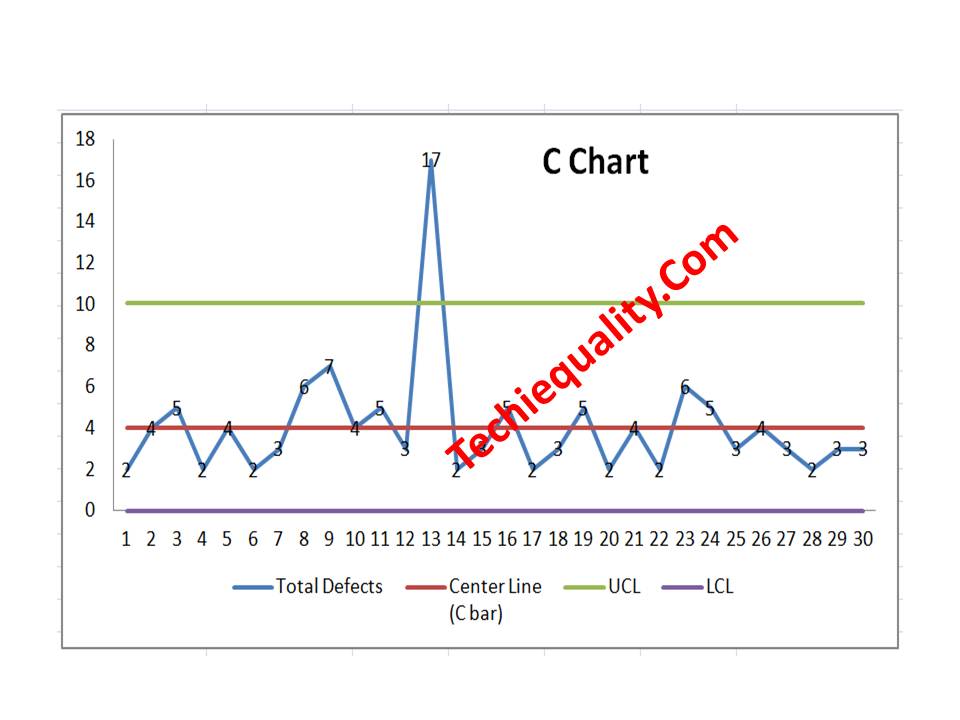
With the help of the above data, we have plotted the c chart, which is given below. if you would like to download the C Chart Excel Template then, click here.

C Chart Excel Template
Interpretation of the above C Chart:

In the above C chart, we have seen that one defect value is beyond the upper control limit. It means on day-13 special cause was present in the process, so we have to take the action on it to control the process.

Free Templates / Formats of QM: we have published some free templates or formats related to Quality Management with manufacturing / industrial practical examples for better understanding and learning. if you have not yet read these free template articles/posts then, you could visit our “Template/Format” section. Thanks for reading…keep visiting techiequality.com

Useful Post:

What is Preventive Maintenance? | Predictive Maintenance |Types & Example

Plan Do Check Act Cycle | PDCA Cycle Manufacturing Example | Implementation

Attribute MSA |How to do Attribute type MSA Study| Example |Acceptance Criteria

Gage R and R |Attribute type MSA |How to do MSA Study | Acceptance Criteria

More on TECHIEQUALITY

SIPOC Template | SIPOC Diagram Example of Manufacturing & Service Industry

SIPOC Template

SIPOC Template | SIPOC Diagram Example of Manufacturing & Service Industry

Hi Readers! Today here, we will be discussing on SIPOC template and examples of sipoc diagrams of manufacturing and service industries. As you know that SIPOC is one of the most useful diagrams which is generally used for a better understanding of the process. In both the manufacturing and service industries are commonly used the two types of process mapping diagrams are. I.e. [1] PFD- Process flow diagram and another [2] SIPOC diagram. If you would like to download the free SIPOC excel template then, click on the given below download link.  

Download the SIPOC template in excel format-SIPOC Excel format-DOWNLOAD Link

What is SIPOC Diagram?

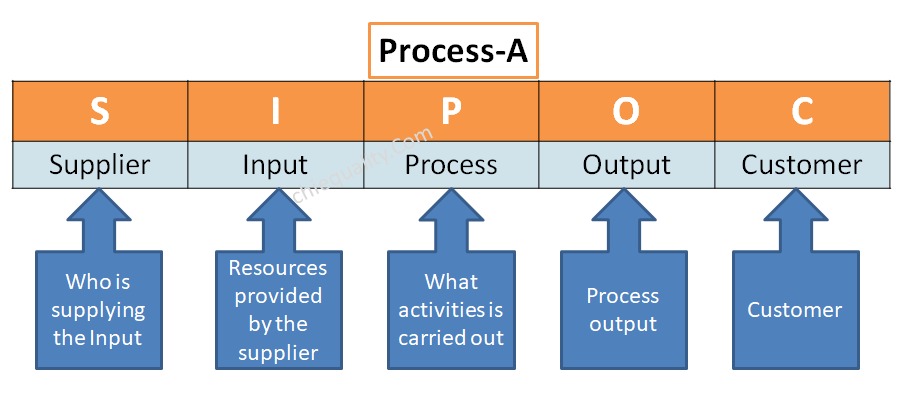
The SIPOC diagram consists of 5 elements i.e. [1] Suppliers, [2] Inputs, [3] Processes, [4] Outputs, [5] Customers. The diagram is generally used for process mapping. It helps to understand the overview of the process in detail.

5 Steps to create a SIPOC Diagram:

Step-1:

Create a CFT team including the process owner of a particular process, which you are trying to draw.

Step-2:

Define the process, for example, let’s consider a process namely called Process-A and you are trying to draw an SIPOC diagram, so first of all you are supposed to list out the details activities of process-A in sequence with the help of the CFT team.

Step-3:

After listing out the details process sequence, find out the internal and external suppliers. Details are mentioned below example.

Step-4:

List out and identify the inputs, process, process output and then customers

Step-5:

 Draw the Diagram by entering the above points in the appropriate places.

SIPOC Template

[SIPOC Template / Format]

SIPOC Diagram vs PFD – process flow diagram:

Both the SIPOC diagram and process flow diagram are used to represent the process mapping but the difference between the two is the elements that are used to represent the process details. In SIPOC, we use the 4 elements like supplier, input, process, output, and customer but in PFD, we use flow chart symbols, like the terminator, process, flow line (arrow connector), decision, document, connector, data, preparation, off-page connector, etc.

SIPOC Diagram Example of Manufacturing & Service Industry:

Manufacturing Industry Example:

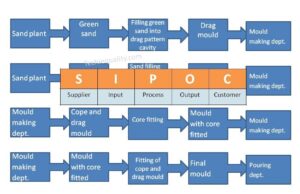
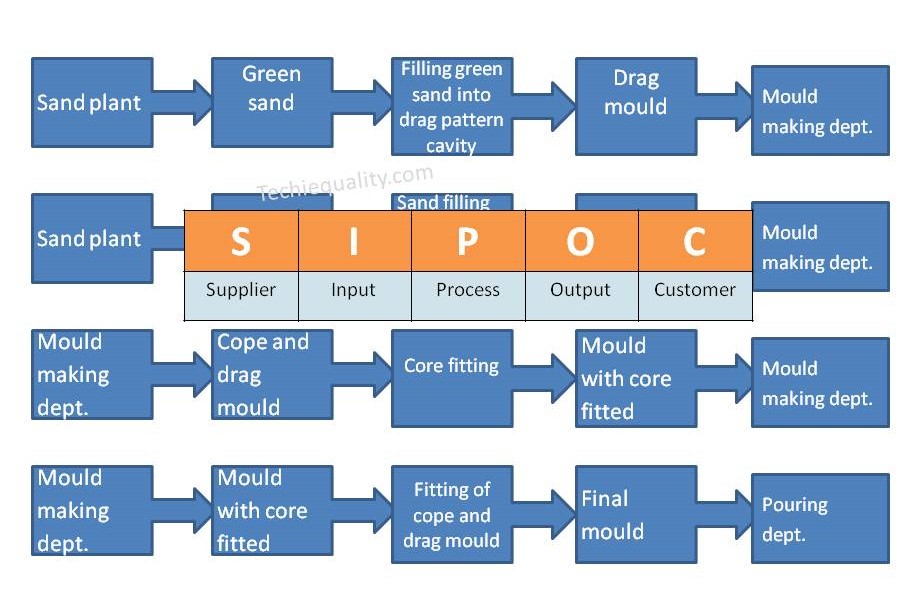
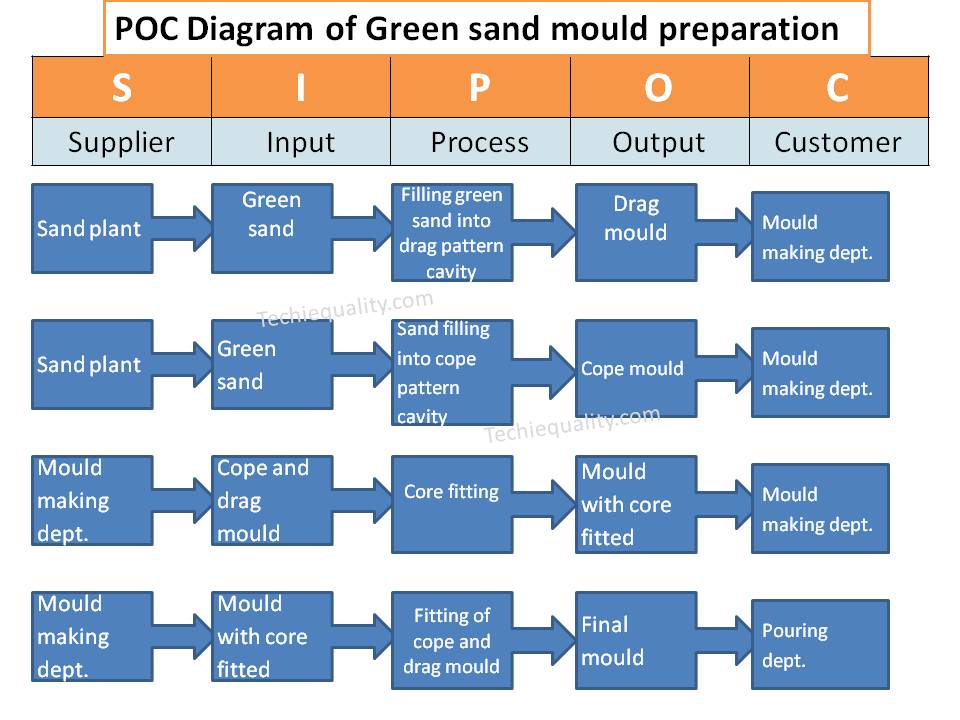
Suppose a company manufactures automobile parts through foundry technology and they have planned to prepare a SIPOC diagram of one of the processes called green sand mould preparation.

SupplierInputProcessOutputCustomer
Sand plantGreen sandFilling green sand into drag pattern cavityDrag mouldMould making dept.
Sand plantGreen sandFilling green sand into cope pattern cavityCope mouldMould making dept.
Mould making dept.Cope and drag mouldCore fittingMould with core fittedMould making dept.
Mould making deptMould with core fittedFitting of cope and drag mouldFinal mouldPouring dept.
SIPOC Template
Service Industry Example:

Let’s consider one of the service sectors of finance as an example bank, and we are going to draw a SIPOC diagram of an offline saving bank account opening process, which is given below;

SupplierInputProcessOutputCustomer
…..Application filled-up formOffline checking and verification of documents deposited by the customerVerified documentDocument verification document
Document verification dept.Verified documentAccount creationNew saving bank account numberAccount creation dept
Account creation deptNew saving accountPassbook issuingNew passbookMr. XYZ
FAQ:

What does sipoc stand for in Six Sigma?

Ans.: The SIPOC stands for Supplier, Input, Process, Output and Customer.

What is a SIPOC template?

The SIPOC template is a diagram which consists of suppliers, inputs, processes, outputs and customers. With the help of the SIPOC diagram, you can prepare the details process flow from start to end.

Free Templates / Formats of QM: we have published some free templates or formats related to Quality Management with manufacturing / industrial practical examples for better understanding and learning. if you have not yet read these free template articles/posts then, you could visit our “Template/Format” section. Thanks for reading…keep visiting techiequality.com

Useful Post:

How to Choose the Best Forecasting Method| Marketing & Sales Example

Variation Calculation in Excel | Types of Variation |Manufacturing Example

Plan Do Check Act Cycle | PDCA Cycle Manufacturing Example | Implementation

Turtle Diagram Example | QMS Standard Requirement |Free Template |Format.

More on TECHIEQUALITY

Dispersion Analysis Cause & Effect Diagram Template |Download Excel Format

Dispersion Analysis Cause & Effect Diagram Template

Dispersion Analysis & Process Classification Cause & Effect Diagram Template

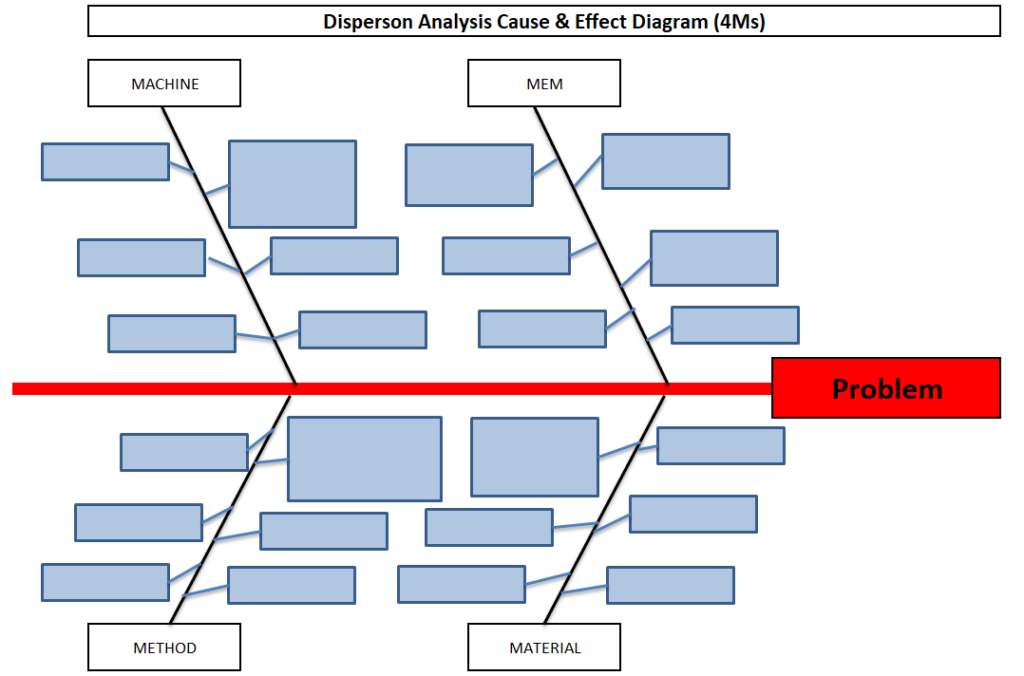
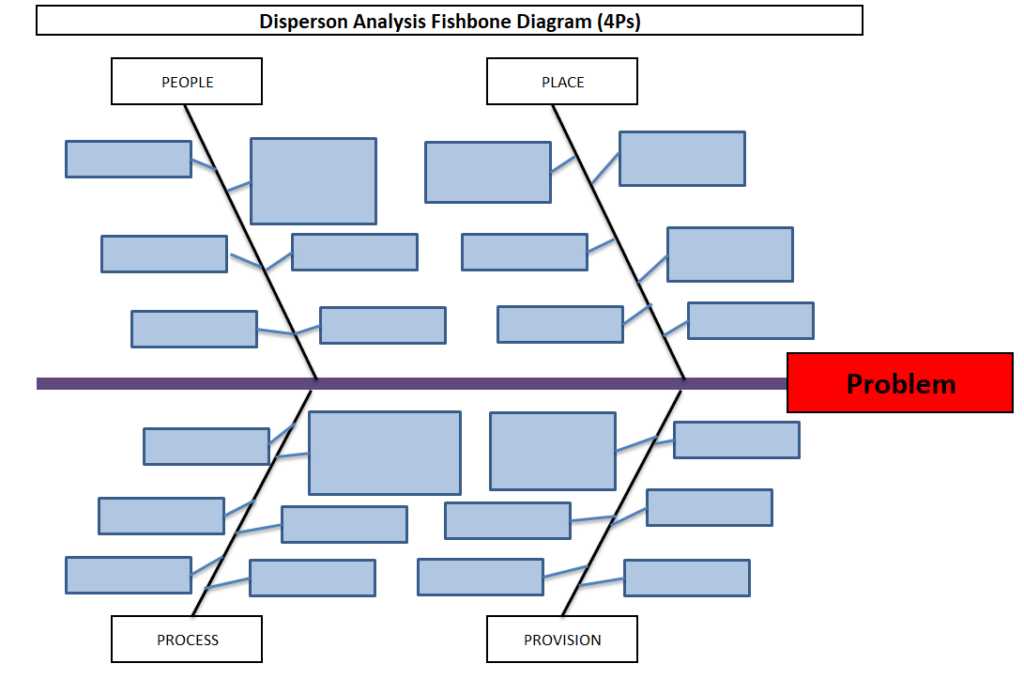
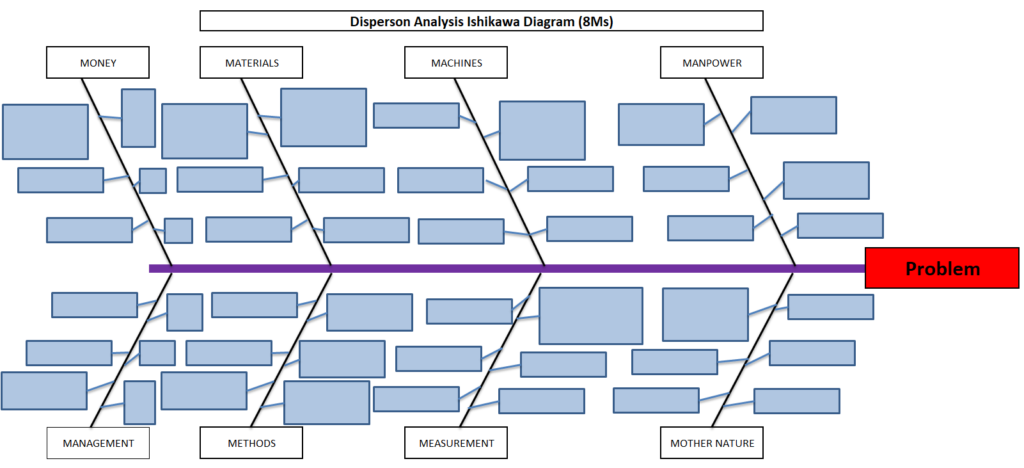
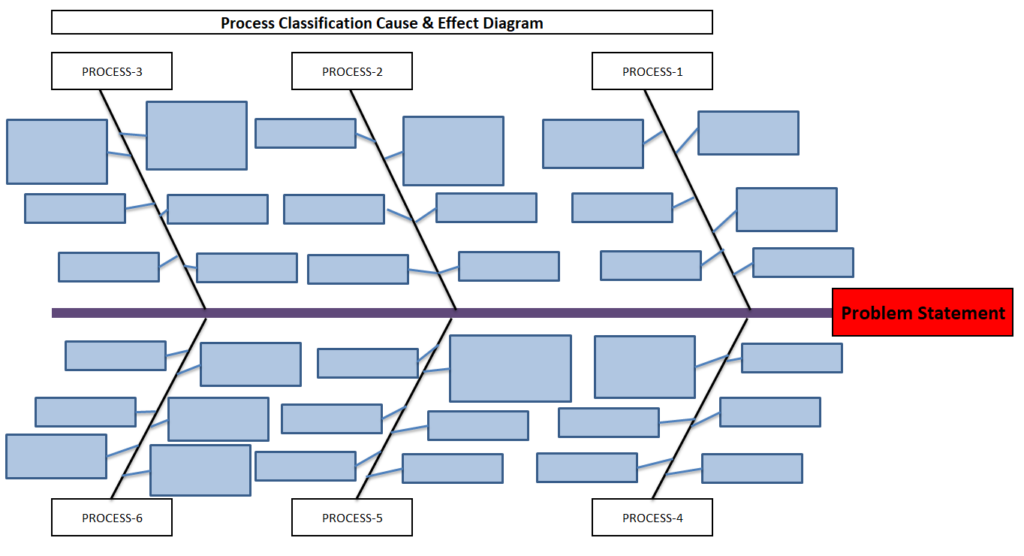
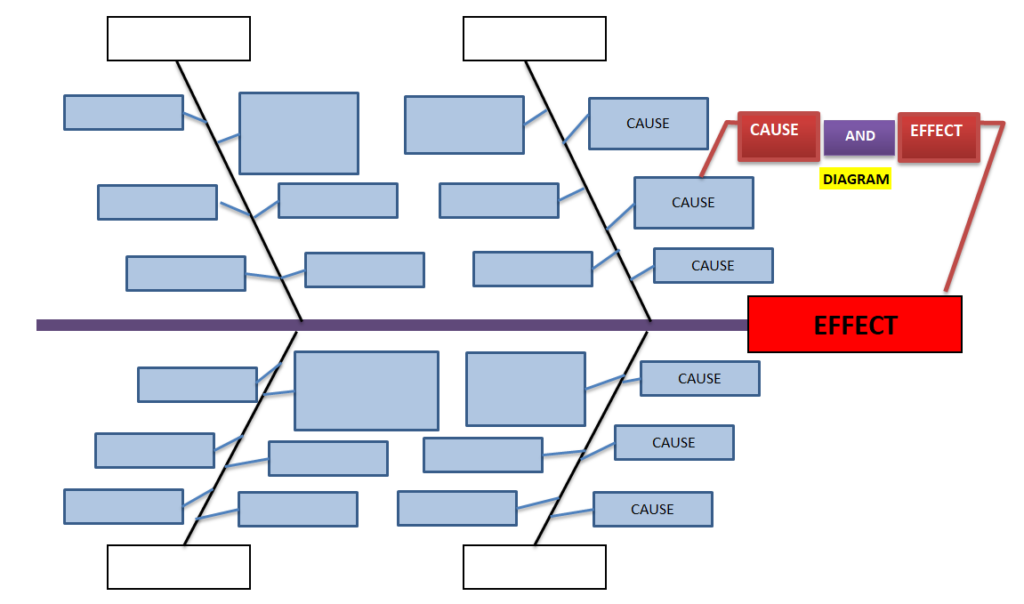
Hi readers! Today we will discuss on types of Cause & Effect Diagram/Fishbone diagram. The cause and effect diagram is the most popular and frequently used tool among the seven QC tools. Basically Fishbone diagram is classified into mainly two types as [1] Dispersion Analysis Cause and Effect diagram, and [2] Process Classification Fishbone diagram. The Dispersion analysis fishbone diagram involves identifying the potential cause for a specific quality problem. However, a Process classification cause & effect diagram involves establishing causes related to the Process. In the manufacturing industry, both types of diagrams are used but Dispersion types are most frequently used to identify the potential causes of the quality-related problems.  If you are interested in downloading the Dispersion Analysis Cause & Effect Diagram Template & Process Classification fishbone diagram, then click on the given below links.

DOWNLOAD– Dispersion analysis cause & effect diagram template. (4Ms).

Dispersion Analysis Cause & Effect Diagram Template
4Ms

Dispersion analysis Fishbone Diagram Excel Template. (4Ps)-DOWNLOAD.

Dispersion Analysis Cause & Effect Diagram Template
4Ps

DOWNLOAD– Dispersion analysis cause & effect diagram format. (8Ms).

Dispersion Analysis Cause & Effect Diagram Template
8Ms

Process Classification cause & effect diagram excel format-DOWNLOAD.

Dispersion Analysis Cause & Effect Diagram Template
Process Classification

Steps for construction of Cause & Effect Diagram:

  • Form a CFT- Team with a multifunctional experienced workforce.
  • The facilitator will listen carefully to the member’s potential causes to represent it in a diagram.
  • Draw a backbone line from left to right, terminating at the Head, and write the Problem statement.
  • Draw the small bone and write the potential cause.
Dispersion Analysis Cause & Effect Diagram Template

Advantages:

  • It helps to identify the potential cause to improve the process.
  • Helps in the root cause identification of the problem.
  • C&E diagram is easily constructed & understood.
  • It is an effective tool for the diagnosis of the various causes of the problem and helping to solve the problem.

Disadvantages:

  • Waste of time to identify the other causes that are not critical to the Problem.
  • It’s a time-consuming methodology.

Dispersion Analysis Cause & Effect diagram V/S Process Classification Fishbone diagram:

ishikawa Template
fishbone  Template

Useful Links:

Strategies for Manufacturing Process Improvement |11+ Strategies

7QC Tools for Problem Solving | What are 7 QC Tools

Fishbone Diagram Template With Example

Root Cause Analysis | 8 Steps of RCA

More on TECHIEQUALITY

Thanks for Reading…Keep visiting Techiequality.Com

Popular Post

Histogram Template with example | Download

Histogram Template

Histogram Template with example | Download

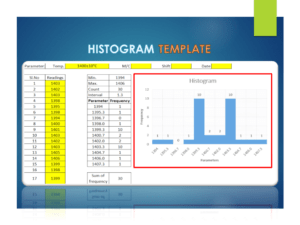
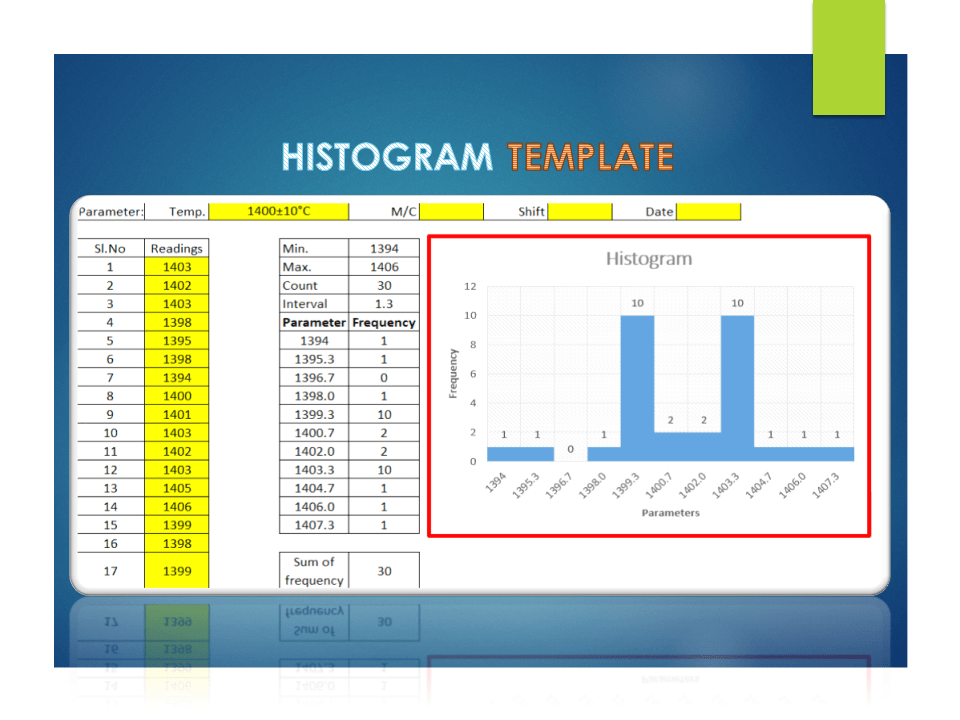
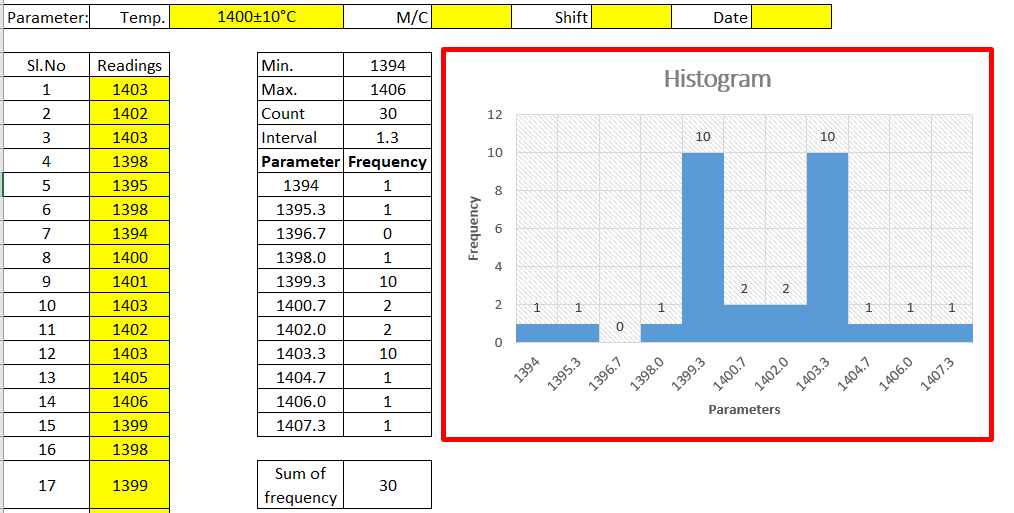
The Histogram Template is prepared in a simple format with an industrial example. We have described the example in below, just go through this article and Download the Template / Format. It’s a very useful tool and is frequently used in manufacturing industries. The main function is to know the frequency distribution, symmetry, and skewness, and it also helps to determine the normality of data by drawing the bell curve.

DOWNLOAD [Histogram Template in Excel format].

Histogram Template
Histogram Template

Basic Information on Histogram:

A histogram is one of the 7QC tools and commonly used graph to show frequency distribution. Helps summarize data from a process that has been collected over a period of time.

A histogram is a representation of the frequency distribution of numerical data. it was first familiarized by Karl Pearson. A histogram is related to merely one type of variable data. You should calculate the interval value to represent the bins. Bins shall give an idea about the how much data falls within the selected data range’s width. Histogram gives the indication about data distribution as normal, skewed, or bi-modal.

How to use our Histogram Template:

Step-1: Download the Histogram Template from the above link.

Step-2: Carefully read the “Note” mentioned in the Excel template.

Step-3: Enter the reading only in the yellow color box. Then other values will calculate automatically and your histogram will be ready for interpretation.

Note:

1. Only yellow colour boxes are changeable

2. Make sure that the sum of frequency is equal to the total count, e.g. sum of frequency in a given example [example is given in histogram excel format, just download and see the example] is 30 and the count is also 30, if not then you have to adjust the parameters and frequency table in frequency distribution format for doing so click on the link given “How to adjust parameters and frequency table in Histogram Template?”.

Useful Links:

How to Plot Pareto Chart in Excel ( with example)

What is SPC | SPC Tools?

Corrective and Preventive Action Format | CAPA with Example.

OEE Calculation-How To Calculate OEE (Overall Equipment Effectiveness) with Example

Implementation of KAIZEN in Industry

Thank you for reading…. Keep visiting Techiequality.Com

Let us know if you have any questions…and drop your comments below.

Popular Post:

Process Capability Analysis | Cp & Cpk Calculation Excel Sheet with Example

Process Capability Analysis

Process Capability Analysis | Cp & Cpk Calculation Excel Sheet with Example

Process Capability Analysis: – The Process Capability (Cp) and Process Capability Index (Cpk) are the important tools, which give an Idea about the Process Capability of a Stable Process. Here we will discuss on Calculation of Cp and Cpk with Examples. We are offering here Process Capability Excel Template / Format for you, hence click on the below links to Download the Excel Format.

DOWNLOAD (Cp & Cpk Excel Template / Format-Sample copy)

Process Capability (Cp):

  • Process Capability (Cp) is a statistical measurement of a process’s ability to produce parts within specified limits on a consistent basis
  • It gives us an idea about the width of the Bell curve.
  • The Process Capability for a stable process is typically defined as ((USL-LSL)/ (6 x Standard Deviation)).
Cpk-Process Capability Index :
  • It shows how closely a process is able to produce the output to its overall specifications.
  • More Value of Cpk means more process capable.
  • The Process Capability Index for a stable process is typically defined as the minimum of CPU or CPL.
Process Capability Analysis:

Industrial Example:

As per the Quality Assurance Plan, The shift engineers of Core Shop have started collecting the readings of the scratch hardness of Core. Given below are the details of Product Characteristics;

Specification of Scratch hardness is 70±10.

The Upper Specification Limit is 80.

The Lower Specification Limit is 60.

Tolerance is 20.

Scratch hardness readings Table:
Table-1
Sl.No. 1 2 3 4 5 6 7 8 9 10
SG 1 72.00 71.00 72.00 71.00 72.00 71.00 73.00 71.00 72.00 73.00
SG2 71.00 72.00 72.00 72.00 72.00 72.00 72.00 73.00 73.00 71.00
SG 3 72.00 72.00 71.00 71.00 71.00 73.00 72.00 72.00 71.00 73.00
SG4 70.00 70.00 70.00 70.00 71.00 70.00 71.00 70.00 71.00 70.00
SG 5 72.00 72.00 72.00 72.00 72.00 72.00 72.00 71.00 72.00 71.00
Table-1 [Scratch hardness readings Table]
Table-2
Sl.No. 11 12 13 14 15 16 17 18 19 20
SG1 71.00 72.00 71.00 71.00 72.00 73.00 71.00 72.00 73.00 71.00
SG2 72.00 73.00 73.00 72.00 71.00 72.00 71.00 73.00 71.00 70.00
SG3 72.00 71.00 73.00 72.00 72.00 72.00 71.00 71.00 71.00 70.00
SG4 71.00 70.00 71.00 70.00 70.00 71.00 70.00 71.00 71.00 70.00
SG5 70.00 70.00 71.00 71.00 72.00 71.00 72.00 71.00 71.00 72.00
Table-2 [Scratch hardness readings Table]

In the above two tables (Table-1 &2), we have taken the 100 readings i.e. (20 times X 5 readings at a time).

Range=Maximum Value-Minimum Value

Average of Range=2.15

Value of d2=2.326 (For Subgroup size 5)

USL = 80, LSL = 60.

Standard Deviation:

 = Average of Range/d2

 2.15/2.326

=0.92

Process Capability (Cp):

 = ((USL-LSL)/ (6 x Standard Deviation))

(80-60)/ (6 x 0.92)

20/5.52

= 3.61

Process Capability Index (Cpk):

CPU:

= ((USL-Average of Mean)/3 x Standard Deviation)

(80-71.43)/ (3 x 0.92)

8.57/ 2.76

= 3.10

CPL:

= ((Average of Mean-LSL)/3 x Standard Deviation)

(71.43-60)/ 2.76

10.4211.43/2.76

=4.14

Cpk= 3.10 (minimum of CPU or CPL).

After doing the Process Capability Analysis on Scratch hardness readings, we got the below result value:

Characteristics: Scratch Hardness
Cp (Process Capability) = 3.61
Cpk (Process Capability Index) = 3.10
[ Cp & CpK ]
Process Capability Analysis with Manufacturing Example

The process engineer has collected the 100 nos laddle temperature reading and the same is mentioned in the below table.

Laddle Temperature Specification= 600 ± 15°C

USL = 615

LSL = 585

Table-1
 12345678910
S1605599610605603604600609605601
S2603601612599601598603610603598
S3604598609610612609605612604603
S4600603605598599610598609600610
S5602602607609605612599605609603
Max.605603612610612612605612609610
Min.600598605598599598598605600598
Range55712131477912
Average of Range9.85         
Mean602.8600.6608.6604.2604606.6601609604.2603
Average of Mean603.92         
Table-2
 11121314151617181920
S1599601602604598598609598600598
S2610598602603603603605603603610
S3598603607598610607612607605598
S4609610609603603598604598607602
S5600603605607598610603610598603
Max.610610609607610610612610607610
Min.598598602598598598603598598598
Range1212791212912912
Mean603.2603605603602.4603.2606.6603.2602.6602.2

d2=2.326

Standard Deviation = Average of Range / d2 = 4.23

Cp = (USL-LSL)/6*Standard Deviation = 1.2

CPU = ((USL-Average of Mean)/3 x Standard Deviation) = 0.872

CPL = ((Average of Mean-LSL)/3 x Standard Deviation) = 1.489

CpK = 0.872(minimum of CPU or CPL).

Note: Download the Cp & Cpk excel template or format and deploy it in manufacturing process. downloading links are provided at top of this Article.
FAQ:
What is the difference between Cp & Cpk?

Ans.: Cp & CpK are termed as process capability and process capability index. In both cases, we would like to verify whether the process can meet the customer’s requirements or not. Generally, it is used when the process is under stable & statically control.

What is the formula of Cp & Cpk?

Cp= ((USL-LSL)/ (6 x Standard Deviation)) , where USL=Upper Specification Limit & LSL=Lower Specification Limit.

Cpk= Minimum of CPU or CPL, where CPU= ((USL-Average of Mean)/3 x Standard Deviation) & CPL= ((Average of Mean-LSL)/3 x Standard Deviation)

What are the good values of Cpk?

Generally, the customers provide the Cpk value to their supplier to maintain it in their manufacturing process. but for your knowledge, a Cpk value of 2 or greater than 2 is an excellent one.

What is cpk?

The cpk is the process capability index which shows how closely a process is able to produce the output to its overall specifications.

What is the IATF 16949 requirement of Statistical Concepts or SPC?

Application of statistical concepts in the IATF 16949 standard has been mentioned in Clause no-9.1.1.3, both Control chart (variable and Attribute) and process capability are the mandatory requirements. The application of statistical concepts shall be understood and used by the employees involved. We have published a separate article on Control Charts for our readers and you can Download Control Chart Excel Template / Format.

More on TECHIEQUALITY