Scatter Diagram Template | Industrial Example | Download Excel Format

Scatter Diagram Template

 Industrial Example of Scatter Diagram | Interpretation of result | Scatter Diagram Template:

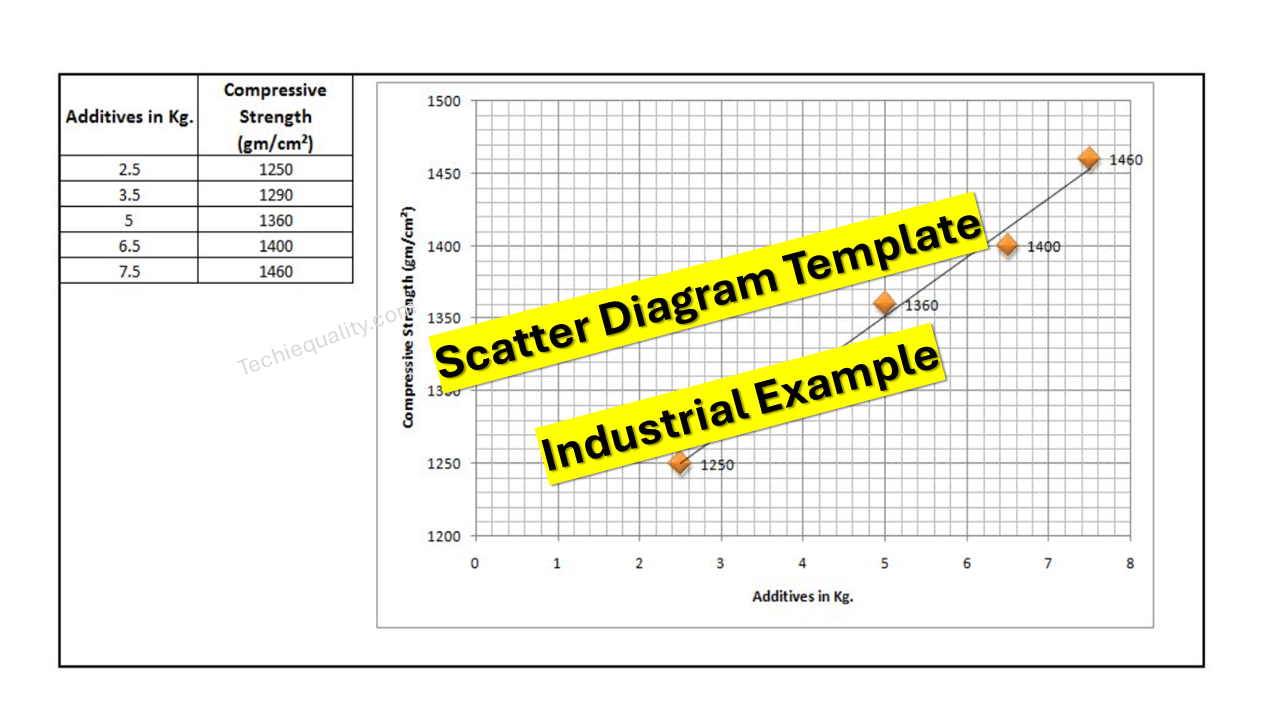
Hi readers! Today we will discuss on Scatter diagram Example with the interpretation of its results. The scatter diagram is one of the popular tools of 7QC tools. It’s a type of diagram to displays the value for typically two continuous variables for a set of data. One variable can be positioned on the X-axis and another variable can be positioned on the Y-axis. This diagram will help you to find out the significant causes among the total collection of potential causes. When you have variable types of data collection of potential causes and you do not know the positive or negative relationship that time you can plot the scatter diagram to know the relationship among them. You can download our simple Excel Scatter Diagram Template from the below link.  

DOWNLOAD– Sample Scatter Diagram Excel Template/ Format.

Example:

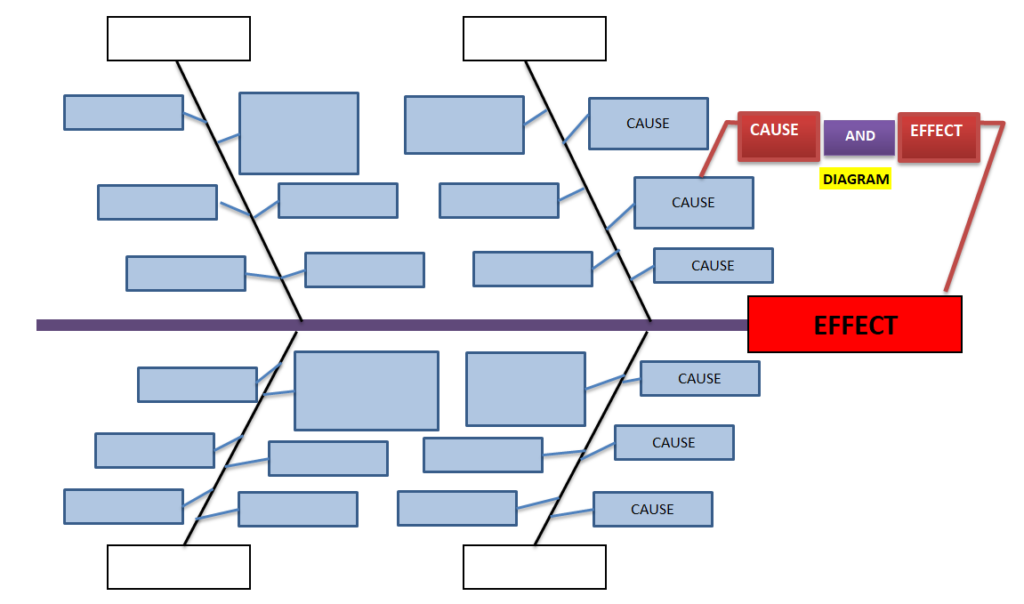
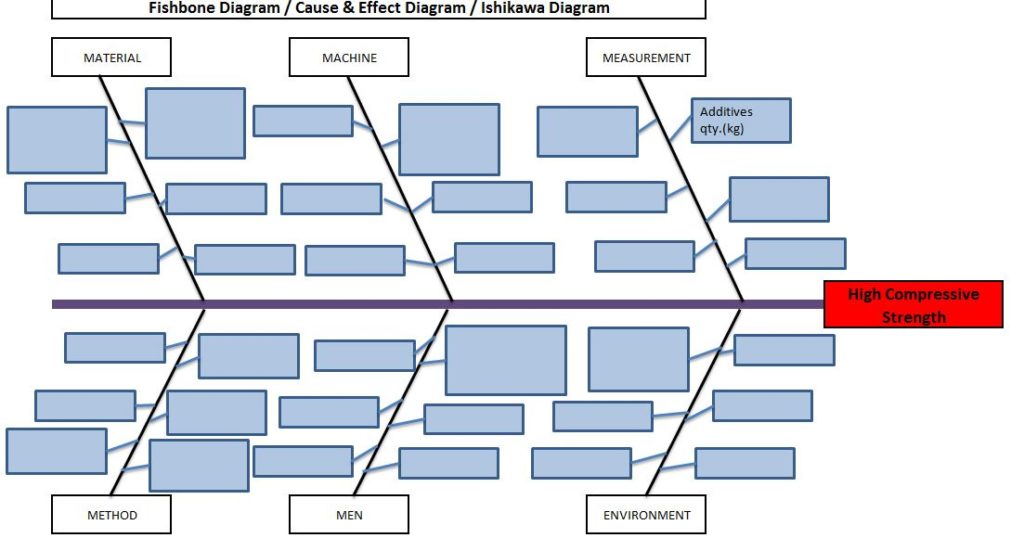
An organization has tried to know the significant causes for the high compressive strength of “X” quantity sand, so initially quality engineer drew the cause& effect diagram with the help of CFT team members and then he started the validation of each potential cause. The same C&F diagram is mentioned below.
Scatter Diagram Template

Here, we have not mentioned the other potential causes like mixing time, water%, etc. because these are already validated but now we have to know the relationship among the two variables as additive quantity v/s compressive strength through a scatter diagram. To do so data has to be collected and then a scatter diagram needs to be drawn.

Data table:

Additives in Kg. Compressive Strength (gm/cm²)
2.5 1245
3.5 1290
5 1330
6.5 1395
7.5 1435

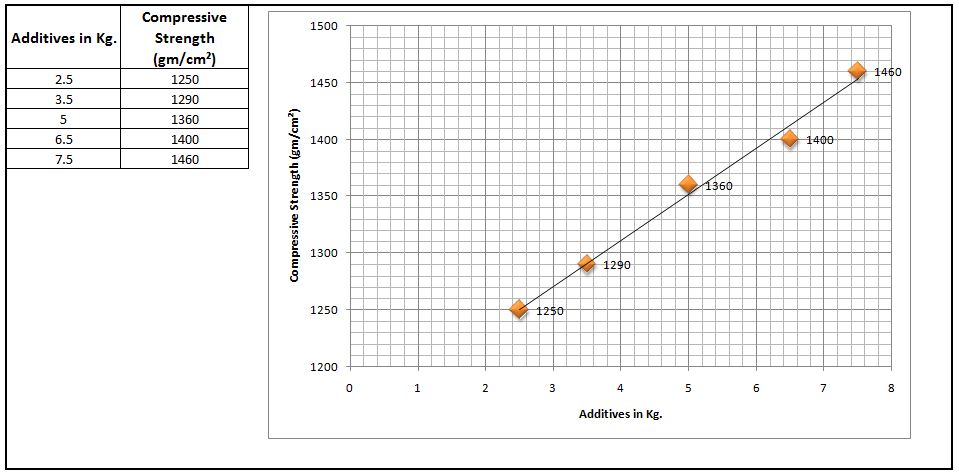
 Scatter Diagram:

Scatter Diagram Template

Interpretation of result:

The above scatter diagram indicates us there is a perfect positive correlation between two variables i.e. Additives in Kg. vs. Compressive Strength (gm/cm²). So we can conclude that more the additive addition can result in high compressive strength.

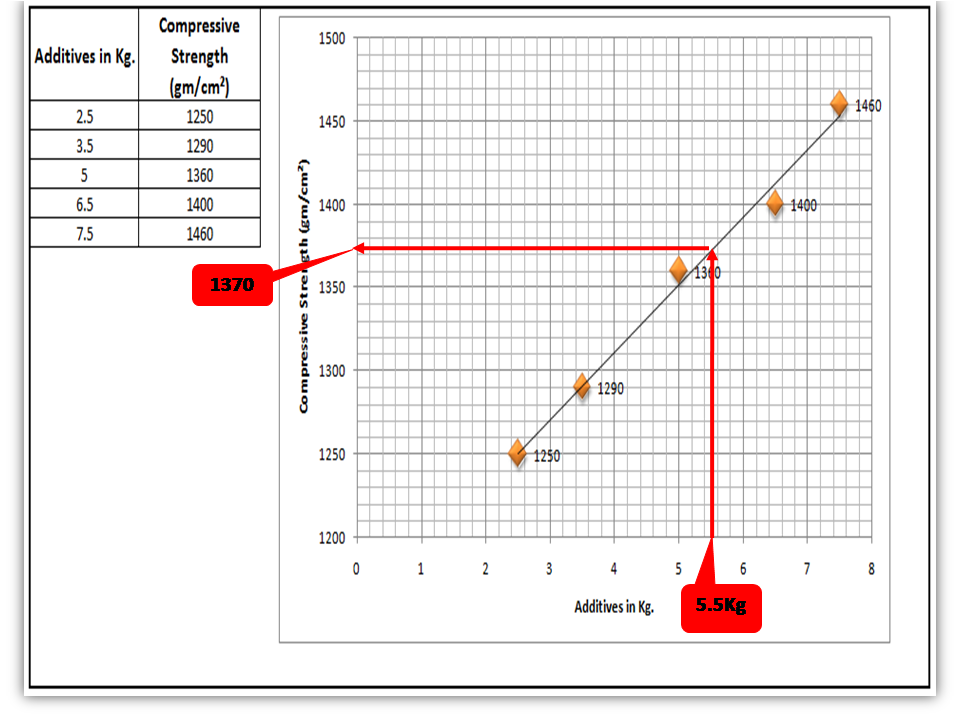
 Interpolation: you can guess the value from the set of data points. From the above graph, I would like to know the compressive strength if I will add 5.5 Kg additives in “X” Kg of Sand.
Scatter Diagram Template

FAQ:

Q1: What are the common possibilities of correlation between two variables of the scatter diagram?

 Ans.: There are so many possibilities but three common correlations are positive, negative, and no correlation. Positive and Negative correlations are further categorized into three types as.

Positive Correlation:

  • Low positive correlation
  • High positive correlation
  • Perfect positive correlation

Negative Correlation:

  • Low negative correlation
  • High negative correlation
  • Perfect negative correlation

Q2: What types of data are used to plot the scatter diagram?

Ans.: Continuous variable type data.

Useful Articles:

Types of Fishbone Diagram |Dispersion Analysis |Enumeration |Process Classification

7 QC Tools Template.

Repeatability vs Reproducibility | Discussion of Key difference.

Free Templates / Formats of QM: we have published some free templates or formats related to Quality Management with manufacturing / industrial practical examples for better understanding and learning. if you have not yet read these free template articles/posts then, you could visit our “Template/Format” section. Thanks for reading…keep visiting techiequality.com

Popular Post

Dispersion Analysis Cause & Effect Diagram Template |Download Excel Format

Dispersion Analysis Cause & Effect Diagram Template

Dispersion Analysis & Process Classification Cause & Effect Diagram Template

Hi readers! Today we will discuss on types of Cause & Effect Diagram/Fishbone diagram. The cause and effect diagram is the most popular and frequently used tool among the seven QC tools. Basically Fishbone diagram is classified into mainly two types as [1] Dispersion Analysis Cause and Effect diagram, and [2] Process Classification Fishbone diagram. The Dispersion analysis fishbone diagram involves identifying the potential cause for a specific quality problem. However, a Process classification cause & effect diagram involves establishing causes related to the Process. In the manufacturing industry, both types of diagrams are used but Dispersion types are most frequently used to identify the potential causes of the quality-related problems.  If you are interested in downloading the Dispersion Analysis Cause & Effect Diagram Template & Process Classification fishbone diagram, then click on the given below links.

DOWNLOAD– Dispersion analysis cause & effect diagram template. (4Ms).

Dispersion Analysis Cause & Effect Diagram Template
4Ms

Dispersion analysis Fishbone Diagram Excel Template. (4Ps)-DOWNLOAD.

Dispersion Analysis Cause & Effect Diagram Template
4Ps

DOWNLOAD– Dispersion analysis cause & effect diagram format. (8Ms).

Dispersion Analysis Cause & Effect Diagram Template
8Ms

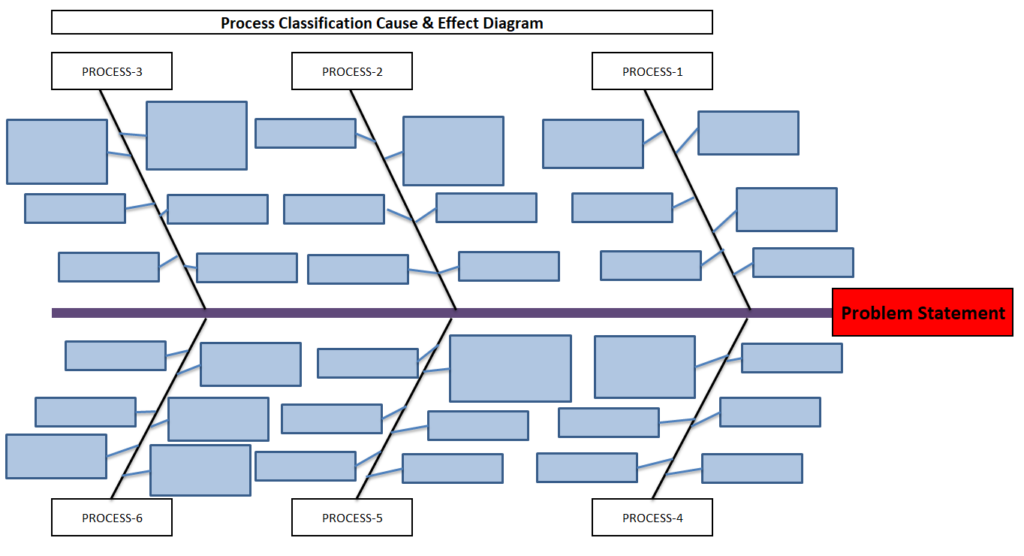
Process Classification cause & effect diagram excel format-DOWNLOAD.

Dispersion Analysis Cause & Effect Diagram Template
Process Classification

Steps for construction of Cause & Effect Diagram:

  • Form a CFT- Team with a multifunctional experienced workforce.
  • The facilitator will listen carefully to the member’s potential causes to represent it in a diagram.
  • Draw a backbone line from left to right, terminating at the Head, and write the Problem statement.
  • Draw the small bone and write the potential cause.
Dispersion Analysis Cause & Effect Diagram Template

Advantages:

  • It helps to identify the potential cause to improve the process.
  • Helps in the root cause identification of the problem.
  • C&E diagram is easily constructed & understood.
  • It is an effective tool for the diagnosis of the various causes of the problem and helping to solve the problem.

Disadvantages:

  • Waste of time to identify the other causes that are not critical to the Problem.
  • It’s a time-consuming methodology.

Dispersion Analysis Cause & Effect diagram V/S Process Classification Fishbone diagram:

ishikawa Template
fishbone  Template

Useful Links:

Strategies for Manufacturing Process Improvement |11+ Strategies

7QC Tools for Problem Solving | What are 7 QC Tools

Fishbone Diagram Template With Example

Root Cause Analysis | 8 Steps of RCA

More on TECHIEQUALITY

Thanks for Reading…Keep visiting Techiequality.Com

Popular Post

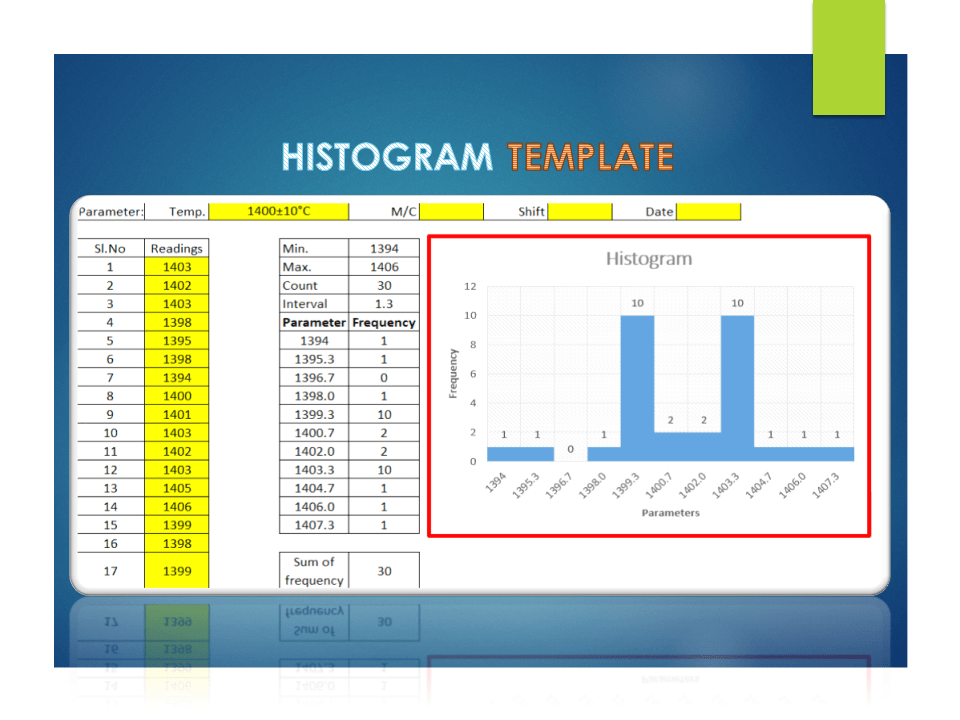
Histogram Template with example | Download

Histogram Template

Histogram Template with example | Download

The Histogram Template is prepared in a simple format with an industrial example. We have described the example in below, just go through this article and Download the Template / Format. It’s a very useful tool and is frequently used in manufacturing industries. The main function is to know the frequency distribution, symmetry, and skewness, and it also helps to determine the normality of data by drawing the bell curve.

DOWNLOAD [Histogram Template in Excel format].

Histogram Template
Histogram Template

Basic Information on Histogram:

A histogram is one of the 7QC tools and commonly used graph to show frequency distribution. Helps summarize data from a process that has been collected over a period of time.

A histogram is a representation of the frequency distribution of numerical data. it was first familiarized by Karl Pearson. A histogram is related to merely one type of variable data. You should calculate the interval value to represent the bins. Bins shall give an idea about the how much data falls within the selected data range’s width. Histogram gives the indication about data distribution as normal, skewed, or bi-modal.

How to use our Histogram Template:

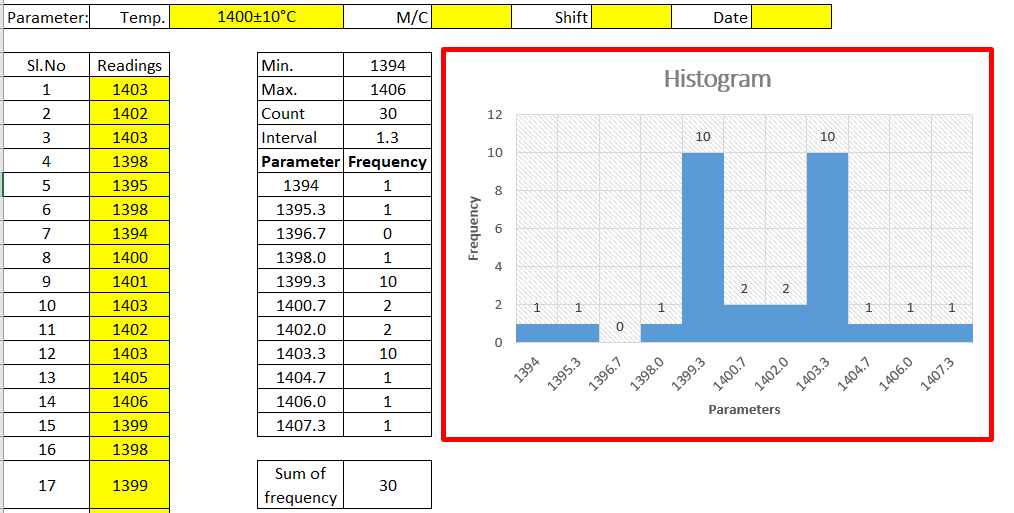
Step-1: Download the Histogram Template from the above link.

Step-2: Carefully read the “Note” mentioned in the Excel template.

Step-3: Enter the reading only in the yellow color box. Then other values will calculate automatically and your histogram will be ready for interpretation.

Note:

1. Only yellow colour boxes are changeable

2. Make sure that the sum of frequency is equal to the total count, e.g. sum of frequency in a given example [example is given in histogram excel format, just download and see the example] is 30 and the count is also 30, if not then you have to adjust the parameters and frequency table in frequency distribution format for doing so click on the link given “How to adjust parameters and frequency table in Histogram Template?”.

Useful Links:

How to Plot Pareto Chart in Excel ( with example)

What is SPC | SPC Tools?

Corrective and Preventive Action Format | CAPA with Example.

OEE Calculation-How To Calculate OEE (Overall Equipment Effectiveness) with Example

Implementation of KAIZEN in Industry

Thank you for reading…. Keep visiting Techiequality.Com

Let us know if you have any questions…and drop your comments below.

Popular Post:

Pareto Chart Excel Template | Download format

Pareto Chart Excel Template

Pareto Chart Excel Template | Step by Step guide of template usages:-

Hi Readers! In this article, we have discussed on Pareto Chart Excel Template with a manufacturing example. and also you can learn here, the Pareto chart principle (80/20 rule). if you would like to download our excel template or format then, go through the below link.

DownloadPareto chart Excel Template.

Pareto Chart Excel Template

[Figure 1]

How to Use Pareto Chart Excel Template:

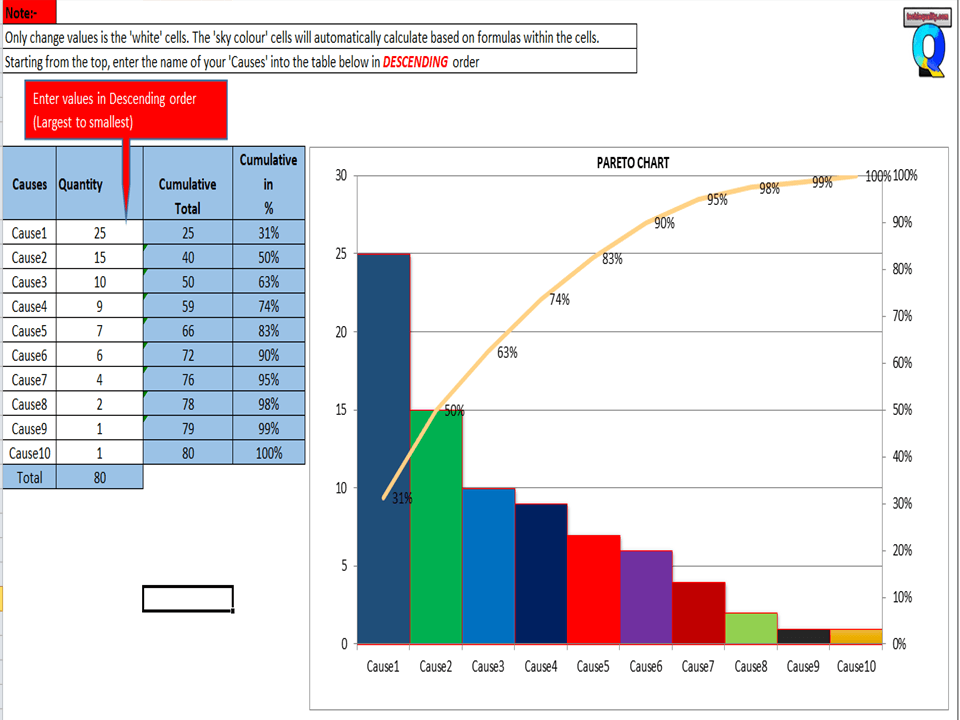
After downloading, the above Pareto Chart Excel Template Carefully read the Note and red highlighted box marked in excel.

Note 1:- White cells are only changed values. The sky colour cells will automatically calculate based on the formula within the cells.

Note 2:- Starting from the top, enter the name of causes into the table below in descending order (Largest to Smallest Values)

Example of Pareto chart:

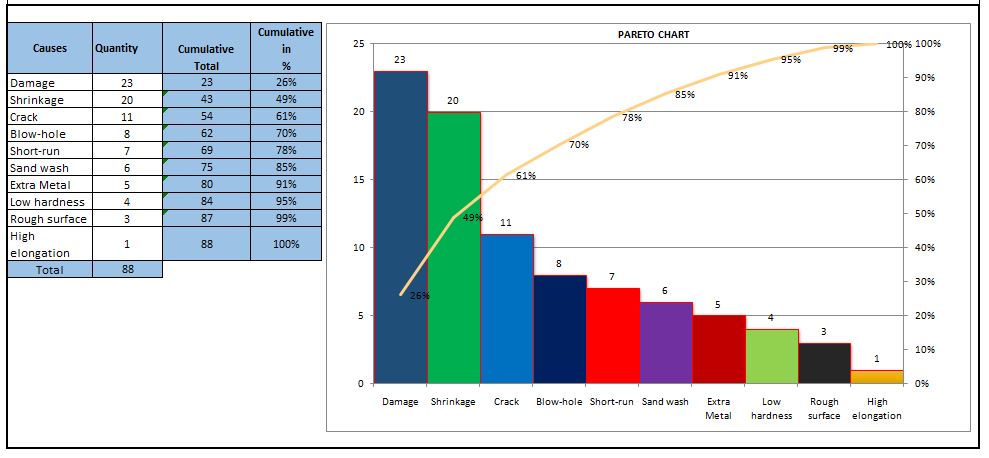
Let us have ten causes as Damage, Crack, Shrinkage, Short-run, Blowhole, Pin-hole, Extra Metal, Sand-wash, Rough Surface, Low hardness, and High elongation.

Causes Rejection Quantity
Damage 23
Shrinkage 20
Crack 11
Short-run 7
Blow-hole 8
Extra Metal 5
Sand wash 6
Rough surface 3
Low hardness 4
High elongation 1

Now you have to do the sorting of Rejection Quantity in Descending order (Largest to smallest value)

Descending order of Rejection Quantity of above causes are,-

Causes Rejection Quantity
Damage 23
Shrinkage 20
Crack 11
Blow-hole 8
Short-run 7
Sand wash 6
Extra Metal 5
Low hardness 4
Rough surface 3
High elongation 1

Now directly we have to enter the name of causes and Rejection quantity (After sorting the value in descending order) into white cells of the Excel template sheet. After entering the values the Pareto chart will look like as below.

Pareto chart example
Pareto Principle (80/20 Rule):-

The 80/20 Rule or Pareto Principle is the most important part of Pareto Analysis. The rule 80/20 says that 80% of the effects come from 20% of the causes.

In Italy, Vilfredo Pareto has originally observed that 20% of people were owned 80% of the land. This principle was applied to quality control and favoured the use of the statement of phrase, which is “The Vital few and useful many” to define the 80/20 rule in the 20th century by Dr. Joseph M. Juran. Nowadays this principle is so popular and very useful in describing the contribution of the causes.

Understanding of Principle:-

Let’s get started with this principle, and how it is applicable in different sectors like manufacturing and non-manufacturing unit or service sectors. This principle is not limited to any particular sector or unit’s problems or defects to identify the contribution. It will help you to resolve 80% of problems/causes/defects among the 100% of problems.  

How this principle is related to the different fields: – (Example)-

  • Filed failure (for example (a)-80% of the field failure comes from 20% of the Causes.
    (b)-80% of the field failure comes from 20% of the Customer).
  •  80% of the results come from 20% of the Team.
  • Risk Management (e.g. 80% of the Risk comes from 20% of the Causes).

Let us have ten types of Causes and individual causes having a number of defects. Now we need to work on merely an 80% contribution to resolve the problem. But the things are how to identify the causes those are coming under the 80% contribution. So to identify the contribution we need to use the Pareto chart for knowing the contribution. So I would recommend you to download the above Pareto Chart Excel Template then, follow the steps and identify the contribution.

Advantages of Pareto Chart:

1. Production Optimisation.

2. Rejection Reduction.

3. Cost of Poor Quality Reduction.

4. Quality level Improvement.

5. Product Performance Improvement

6. Customer satisfaction Enhancement.

7. Rework cost reduction.

Etc.

The Pareto chart is the most commonly used tool in manufacturing industries, I remember when I was working in the quality department, how frequently I used this tool in our daily quality issue analysis. I used this tool on a daily line rejection analysis, as well as in different types of QA or QC projects like quality circle projects, SGA projects, Six Sigma projects, etc. With the help of the Pareto chart, you can easily visualize the defect’s contribution and accordingly, you can do an analysis of the majority contribution for improvement.

FAQ:

The Pareto chart is one of the commonly used 7 QC tools in manufacturing industries.

Similar Articles:

Histogram Example | Foundry Industries Examples.

Histogram Template with example | Download.

How to plot Histogram in Excel (Step by step guide with example)

SPC Format |DOWNLOAD Excel Template of SPC Study

7QC Tools for Problem Solving | What are 7 QC Tools

Root Cause Analysis | 8 Steps of RCA

More on TECHIEQUALITY

Thanks for reading…Keeps Visiting Techiequality.Com

Popular Post:

Fishbone Diagram Template With Example

Fishbone Diagram Template

Fishbone Diagram Template With Example | Download Template

Download the Fishbone Diagram Template by clicking on the below link. Fishbone Diagram will help you to represent the Potential Causes of a Problem.

DOWNLOAD the Cause & Effect Diagram / Fishbone Diagram.

How to Use Fishbone Diagram Template:

Fishbone Diagram Template

[Figure-1]

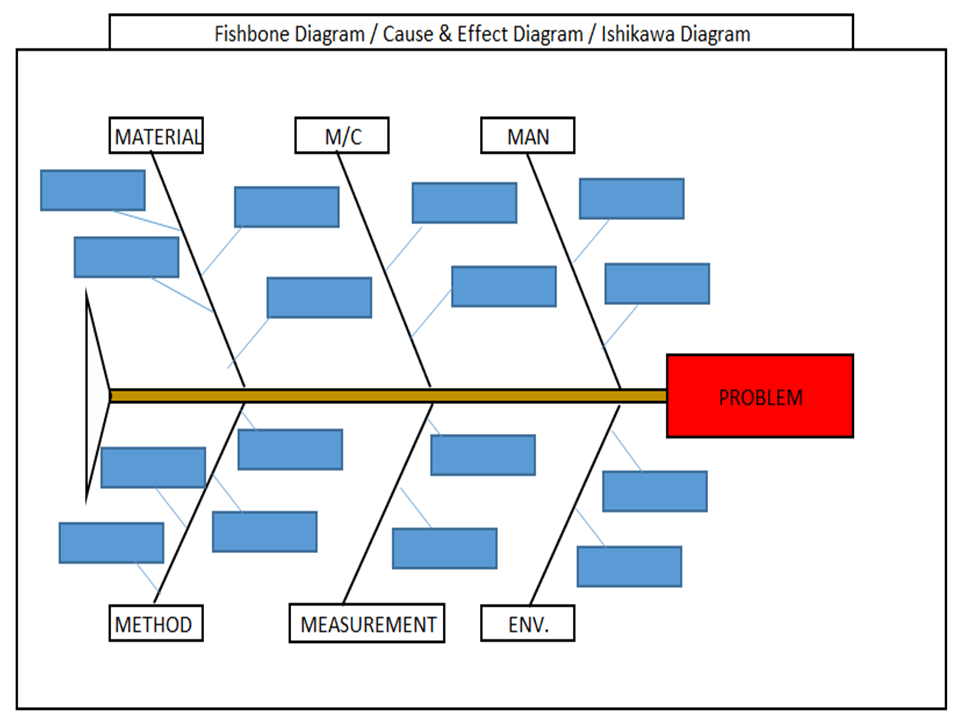
Step-1: Download the Fishbone Diagram Template (Link is given at the top)

Step-2: Enter the Name of the Problem in the Red Highlighted Box, marked in the Excel template (e.g. refer to the above Figure-1 for easy understanding)

Step-3: Identify and then enter the Potential causes in the Sky color box in the Excel template under Man, Machines, Material, Method, Measurement, and Environment. 

How to Identify the Potential Causes of a Problem:

Step-1: To make a CFT Team (Cross-Functional team). Members of CFT should be from different and different processes/areas or departments. E.g. someone from production, Quality, technical, R&D, Maintenance, etc.

Step-2: Individually identify the Causes through Brainstorming.

Step-3:  Before you identify the causes by all team members, you have to list up all causes without any repetition. Next, all members of the team should sit together to identify the new causes through Brainstorming. And finally, do the list up of all causes identify by individual and team.

Step-4: Represent all potential causes in the Cause and Effect Diagram Template or Fishbone Diagram Template or Ishikawa Diagram Template.

Step-5: Identify the Significant Causes with the help of Hypothesis testing.

Step-6: Do the Root cause analysis with the help of Why- why Analysis to identify the Root Cause

Step-7: Take Corrective and Preventive Action on the Root cause.

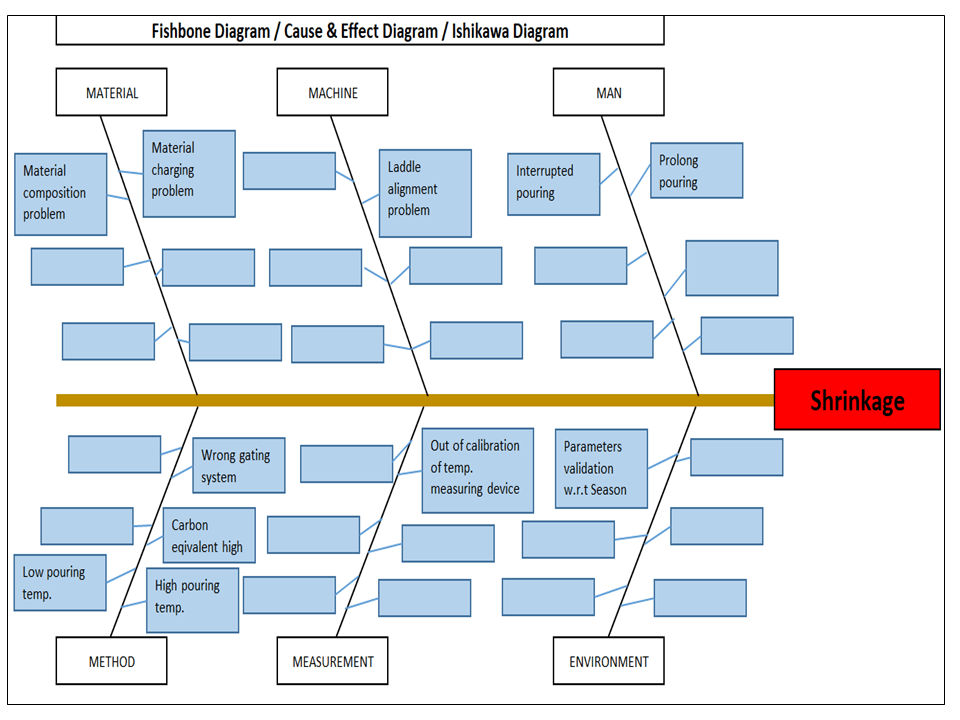
Example-1: Casting Shrinkage Problem.

I have taken a Problem from the Iron casting Process as Shrinkage. Here I need to represent the Potential causes of Shrinkage in the Fishbone Diagram Template or Cause and Effect Diagram Template or the Ishikawa Diagram template. First of all, I made a CFT team considering the members from the production process, quality, Development, and Maintenance Department.

Instructed all members to identify the Potential cause relevant to their work function in individually through Brainstorming. Next, collect all Potential causes. And then call a meeting for further identification of Causes together with all members through Brainstorming. List up all Causes and represent those in the Fishbone Diagram Template, just like the below figure.  

Fishbone Diagram Example
Example-2: Casting Blow-hole Problem:

Below are the potential causes that may cause the blow-hole problem in raw casting products;

  • Improper manual core spray.
  • Improper manual mould spray.
  • Unskilled operators.
  • Core curing time is not validated w.r.t season.
  • Core curing m/c burner problem.
  • LP gas regulator issue.
  • Electric heater -heating issue.
  • Mould spray gun damage.
  • No deslagging.
  • Wet core used.
  • Low permeability.
  • Extremely high sand strength.
  • No venting system.
  • High moisture.
  • Core used without treatment.
Fishbone Diagram Template
Benefits of Fishbone Diagram:
  • It represents and displays the relationship of potential causes w.r.t Problem: – All Possible causes will represent them under which category among the man, machines, method, measurement, material, and environment.
  • Accumulate the possible Reasons in a single diagram: – It will be very difficult to resolve the problem without any idea of the Possible or Potential causes of any problem. So this diagram will show you all the causes simultaneously.
  • Involvement in Brainstorming: – It will help you to boost and structure the brainstorming to identify the possible causes or reasons.
  • It will help you to maintain the team focus to achieve the common goal: – As you know the team mission is to achieve the common goal means to identify the possible causes or reasons. All team members will identify the Causes or Reasons individually and together in a team to list-up the possible causes.

How to plot Ishikawa or cause and effect diagram of customer complaint:

first of all, download the cause and effect diagram template or Ishikawa diagram template from the given above link (at the top) and then follow the below steps. As per my own experience regarding the preparation of cause and effect diagrams related to customer complaints. at first, when I received a customer complaint, I just tried to understand the nature and type of problem and immediately called for a meeting for initial problem understanding with team members. Once it’s understood by all the team members, then we form a special team for 8D or CAPA formation.

Before doing the why-why analysis we have to identify the potential causes by using popular tools i.e. fishbone or cause & effect or Ishikawa diagram. To do so, the individual team members should identify the potential cause w.r.t customer complaints, Once you collect the all identified potential causes by individual members, then you have to plot the final fishbone diagram to keep in your mind with the repeated potential causes. when you choose to form the team at that time members should be in CFT of that process where the customer problem is related.

More on TECHIEQUALITY