Correlation analysis in excel |3 best method |step by step guide with example

Correlation analysis in excel

Correlation analysis in excel | 3 best method |step by step guide with example

Hi reader! Today we will discuss on Correlation analysis in excel, this tool is generally used to know the correlation between two variables. There is so many software available in the market that you can execute the correlation test. But in this tutorial, we will explain to you how to do a correlation test in excel with an industrial example. There are three common methods that you can execute for the test i.e. [1] shortcut function method [2] direct function method [3] Through data analysis method. For doing the data analysis method you have to install the analysis tool pack if you have not yet installed then follow the steps to install it. The Link is given below.

Step by step guide for installation of Data Analysis tools in excel.

Processes of Correlation analysis in excel:

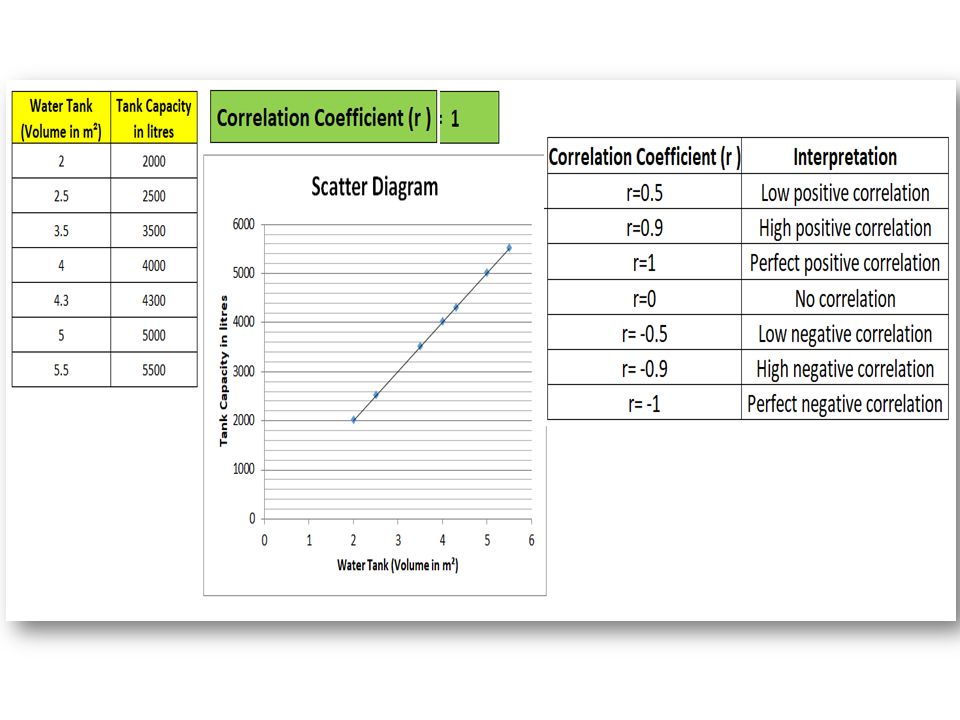
There are three common methods that we are going to explain it step by step. Here we have analyzed the correlation between variables “water tank (volume) vs Tank capacity” to know the interpretation of correlation and value of the coefficient of correlation. A Data table is given below;

Water Tank (Volume in m3) Tank Capacity in liters’
2 2000
2.5 2500
3.5 3500
4 4000
4.3 4300
5 5000
5.5 5500

Method -1;

Step-1:

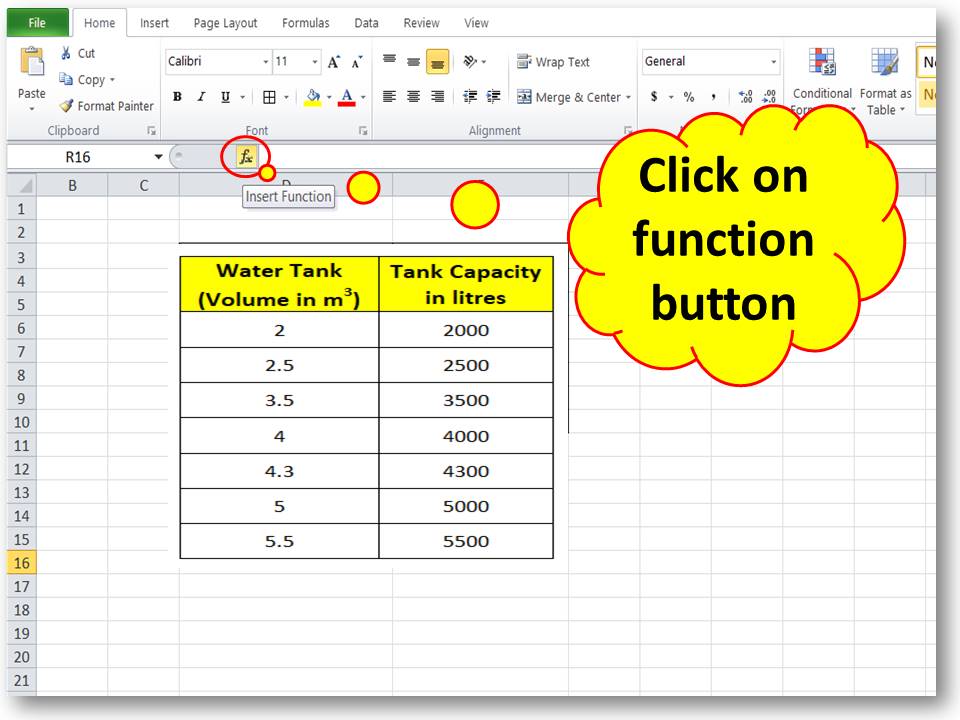
Open the Excel sheet, then create a table of two variables, and next, click on the function button. Follow the below figure.
Correlation analysis in excel

Step-2:

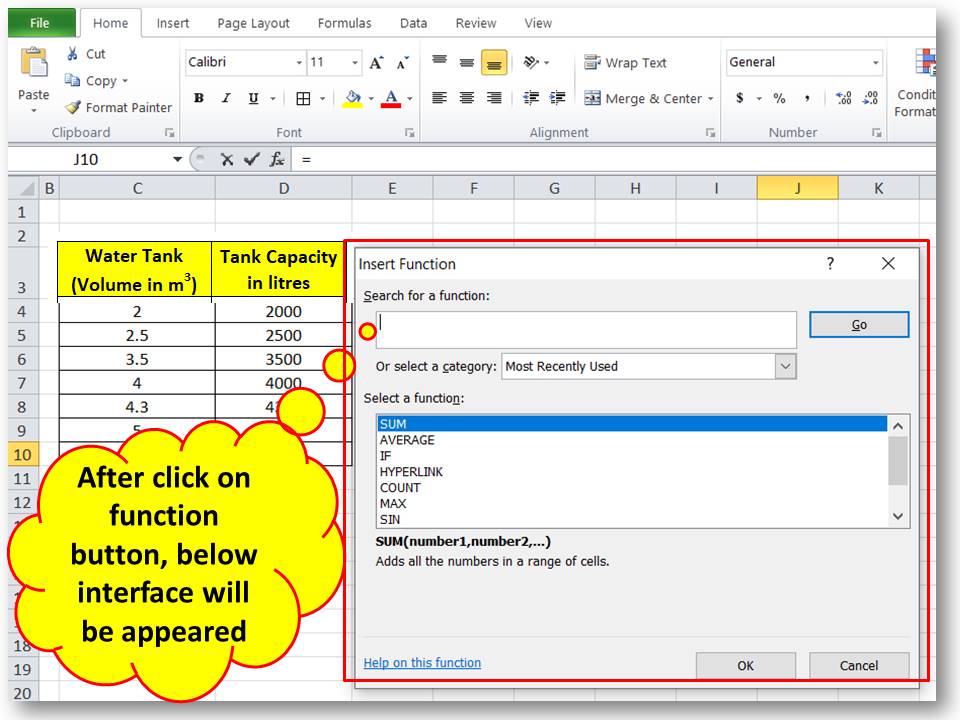
After clicking on the function button, the below interface will appear.
Correlation analysis in excel

Step-3:

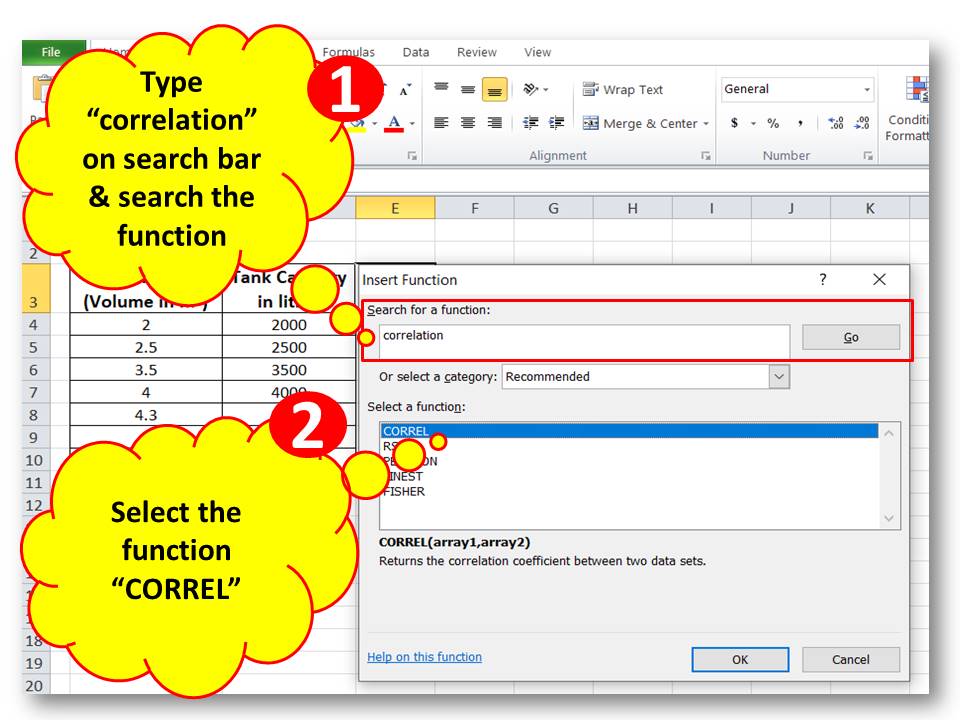
Type “correlation” on the search bar and search the function, then select the function “CORREL”.
step by step guide of correction analysis

Step-4:

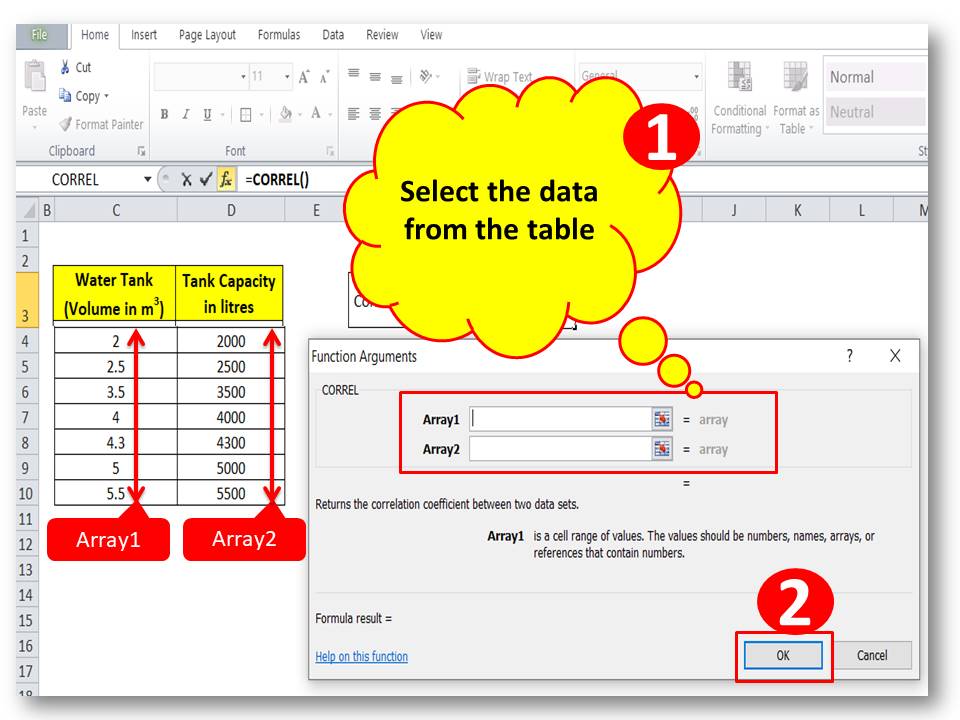
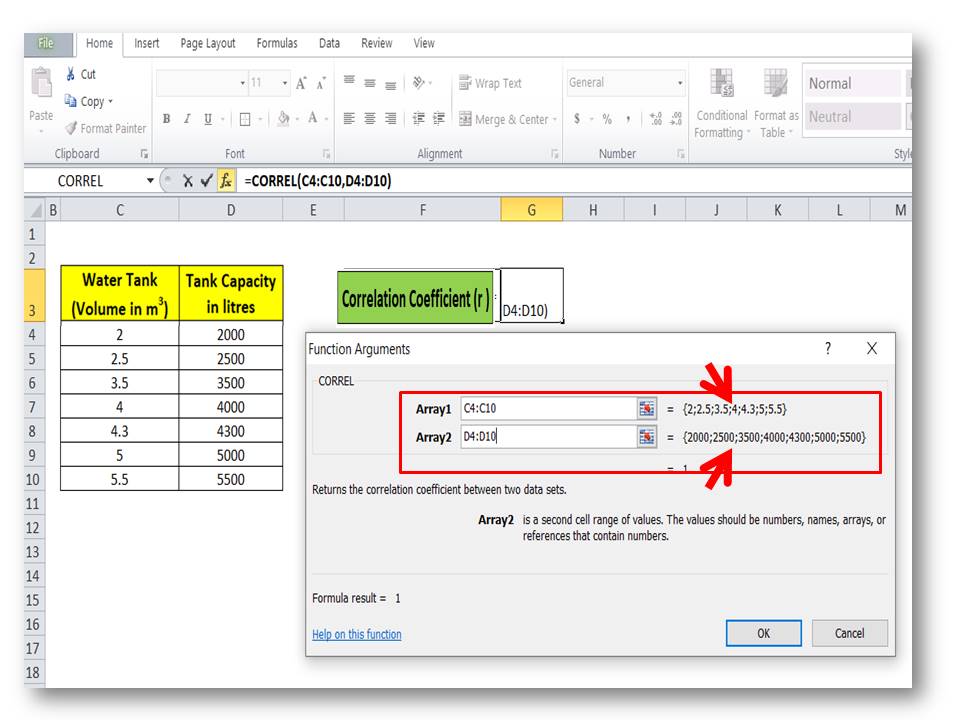
Select the data for array1 and array2; here we have selected the column of water tank volume as array1 and tank capacity as array2.
Correlation analysis in excel
Example

Step-5:

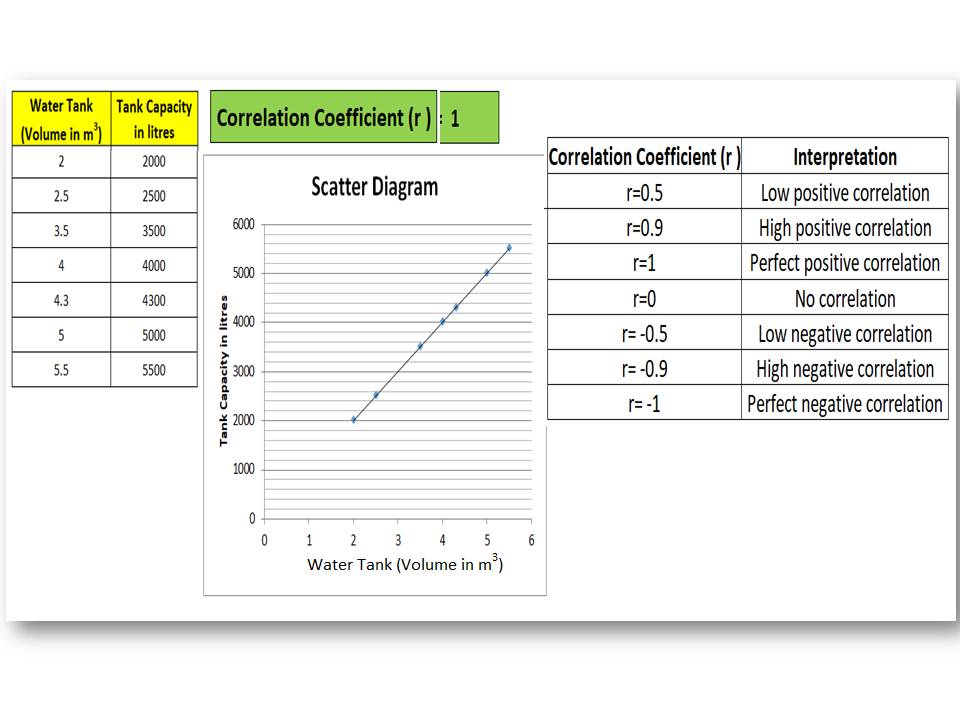
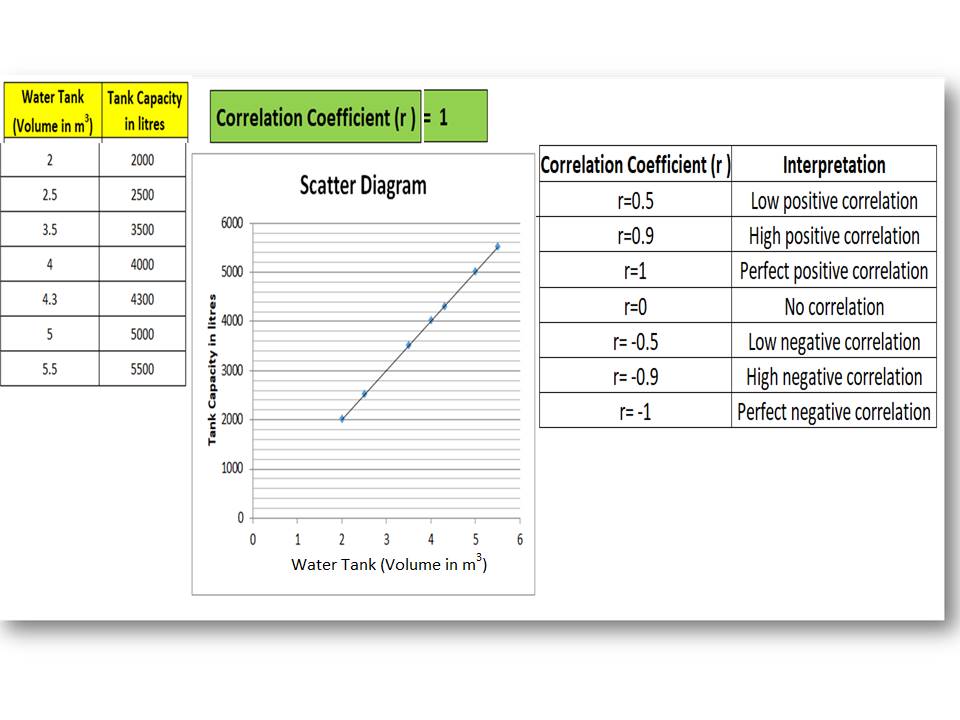
The Correlation coefficient will be calculated automatically. You can see in the below figure the value of the coefficient of correlation is 1. For better understanding, we have plotted the scatter diagram. And the graph and value of the coefficient of correlation indicate that there is a perfect positive correlation between the two variables.
Correlation analysis in excel

Method-2;

Step-1:

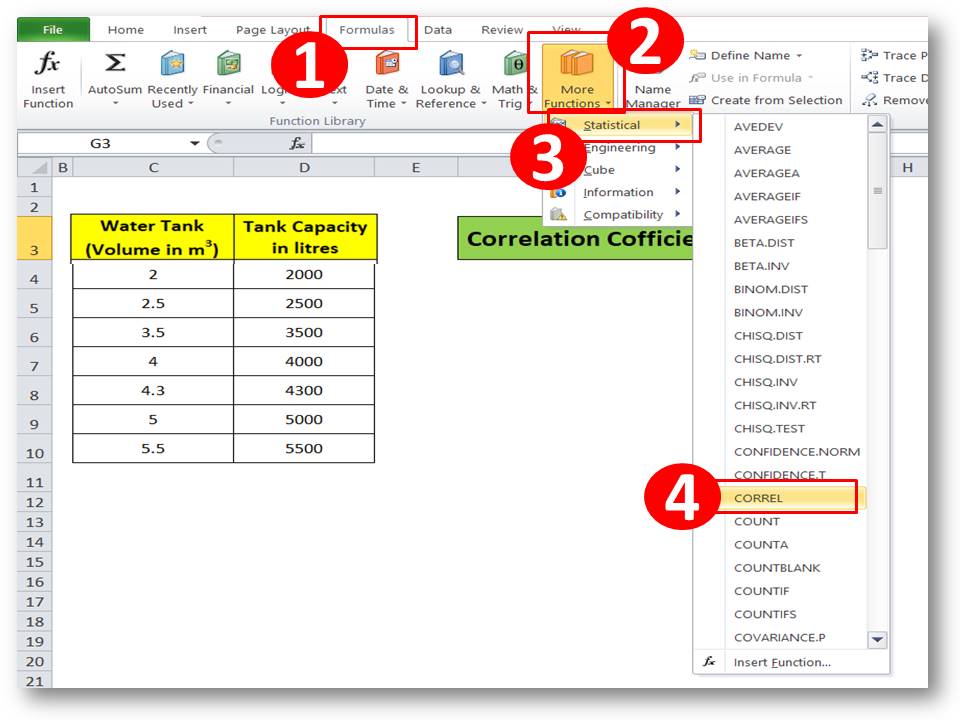
Select the correlation function from the statistical option, and go through the below figure.
Example

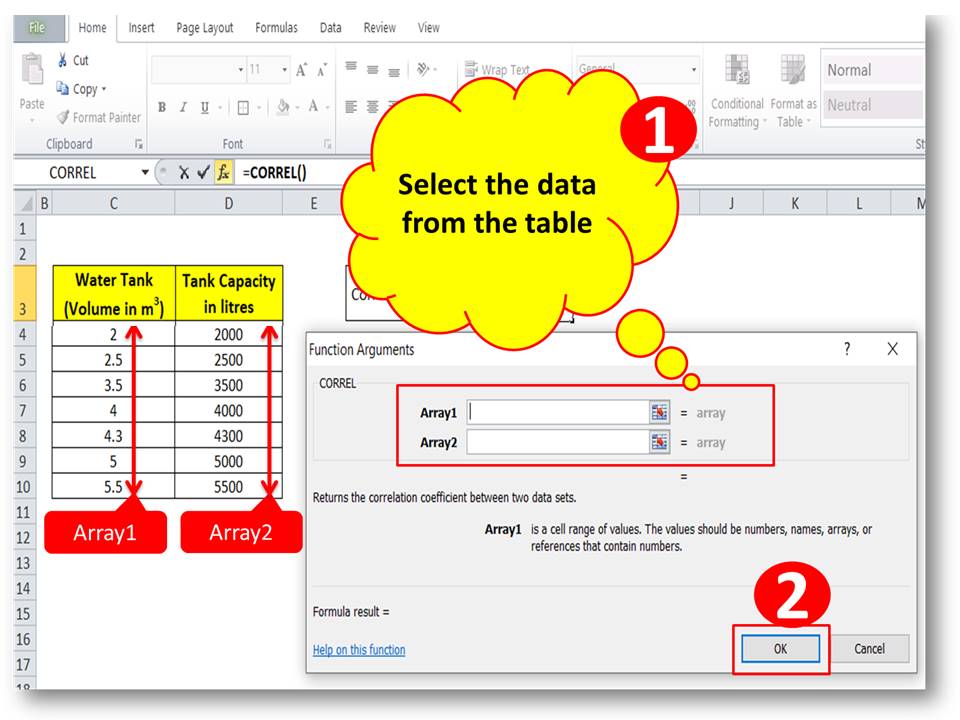
Step-2:

Select the data for array1 and array2 from the data table.
Example

Step-3:

The Value of the coefficient of correlation will be calculated automatically.
Correlation analysis in excel

Method-3;

Step-1:

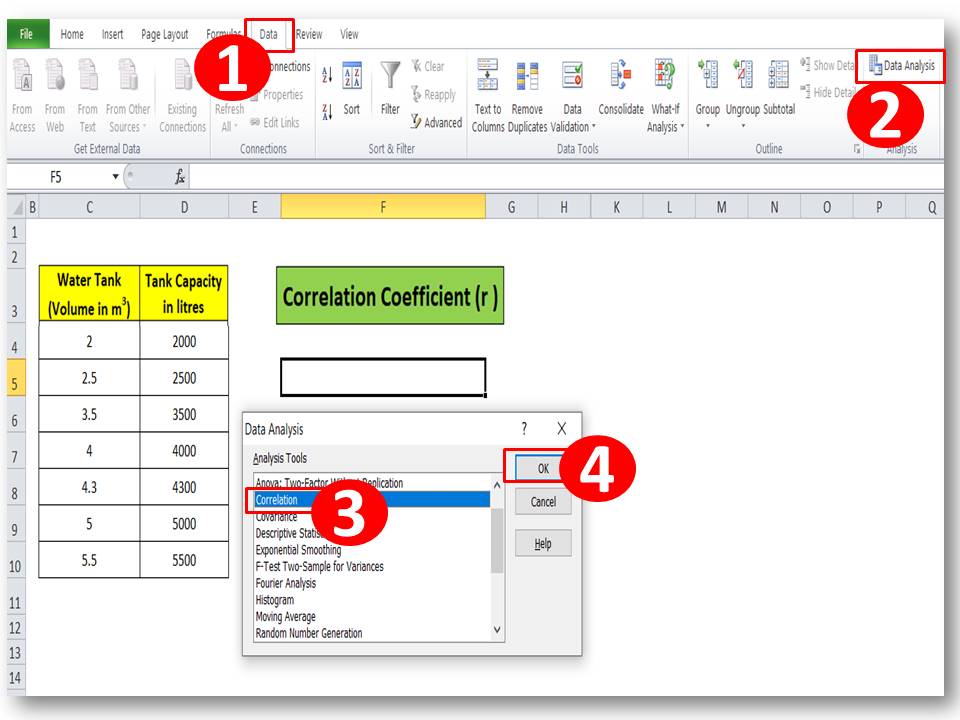
Ensure that the data analysis tool has been installed already in Excel, else click here to learn the step-by-step process. Now go to the data option and select the data analysis option.
Example

Step-2:

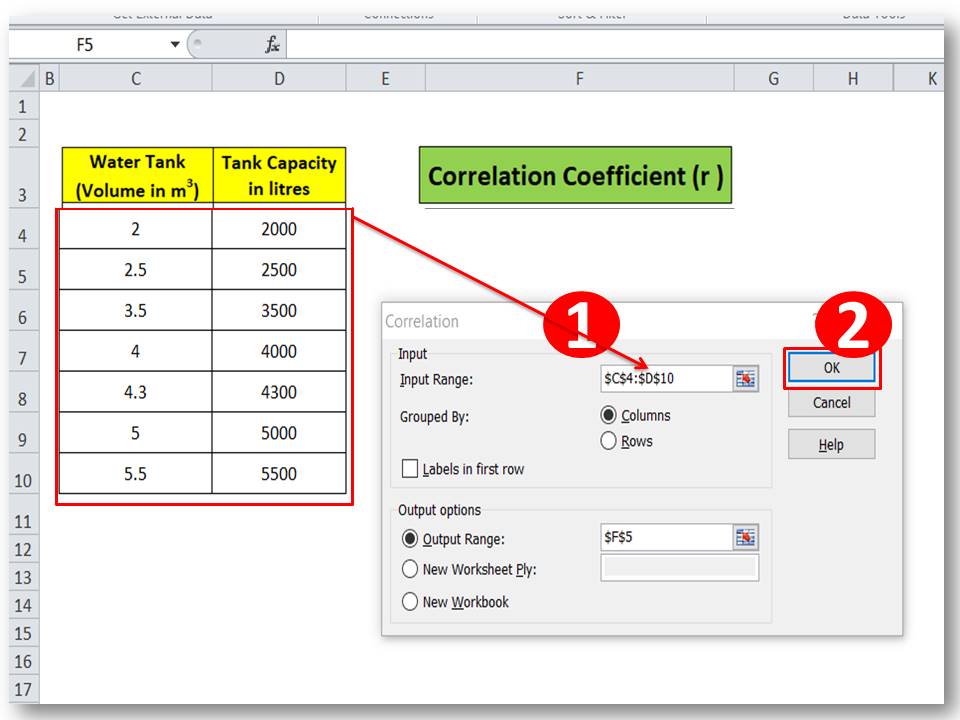
Select the input data range

example-1

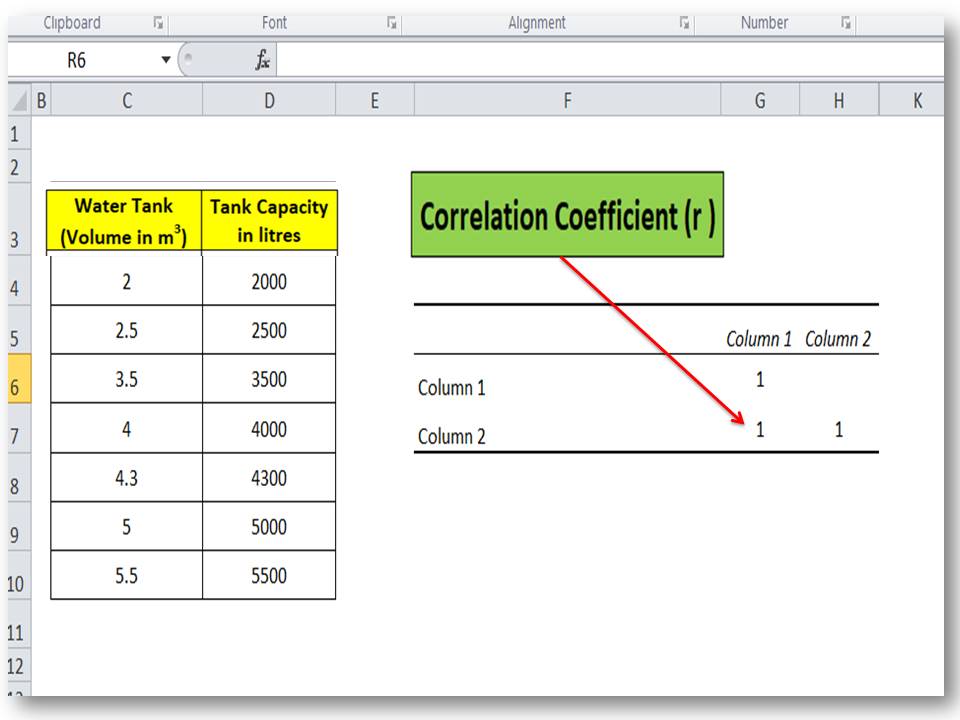
Step-3:

The Correlation coefficient will be calculated automatically.
Correlation analysis in excel

Interpretation of Correlation coefficient (r):

Correlation Coefficient (r ) Interpretation
r=0.5 Low positive correlation
r=0.9 High positive correlation
r=1 Perfect positive correlation
r=0 No correlation
r= -0.5 Low negative correlation
r= -0.9 High negative correlation
r= -1 Perfect negative correlation

Similar Post:

How to Plot Scatter Diagram in Excel? |Guides with example | Interpretation.

Scatter Diagram Template |Industrial Example |Download Excel Format.

Free Templates / Formats of QM: we have published some free templates or formats related to Quality Management with manufacturing / industrial practical examples for better understanding and learning. if you have not yet read these free template articles/posts then, you could visit our “Template/Format” section. Thanks for reading…keep visiting techiequality.com

More on Techiequality

How to Calculate Correlation Coefficient (r) | Correlation Coefficient Formula

How to Calculate Correlation Coefficient

How to Calculate Correlation Coefficient (r) |Correlation Coefficient Formula

Hi readers! Today we will discuss How to Calculate Correlation Coefficient (r)? Basically coefficient of correlation gives an idea about the nature of the correlation between two variables, i.e. No correlation, positive correlation, and negative correlation. A detailed interpretation of the coefficient of correlation is given in Table-A. We have published three similar articles on correlation analysis and links of the individuals mentioned below. But here we will merely explain the calculation part of the correlation coefficient with an example.

How to do correlation analysis in excel?

Step by step guide of Correlation analysis in Minitab.

Correlation Analysis Examples and its Interpretation.

How to Calculate Correlation Coefficient (r) |Correlation Coefficient Formula:

example

Let’s consider a manufacturing-related example to calculate the correlation coefficient (r). The process engineer has applied the Forging force in the billet at four different stages, as you can see in the above figure. At every stage, there is a reduction of height per stroke of the billet. The original height of the billet is 140.0mm. The details data for every stage is mentioned in the below table.  

Forging Force in “N” (X) Reduction of height/Stroke of Billet in “mm” (Y)
500 6.2
750 19
1000 29.5
1250 36
1500 39.5

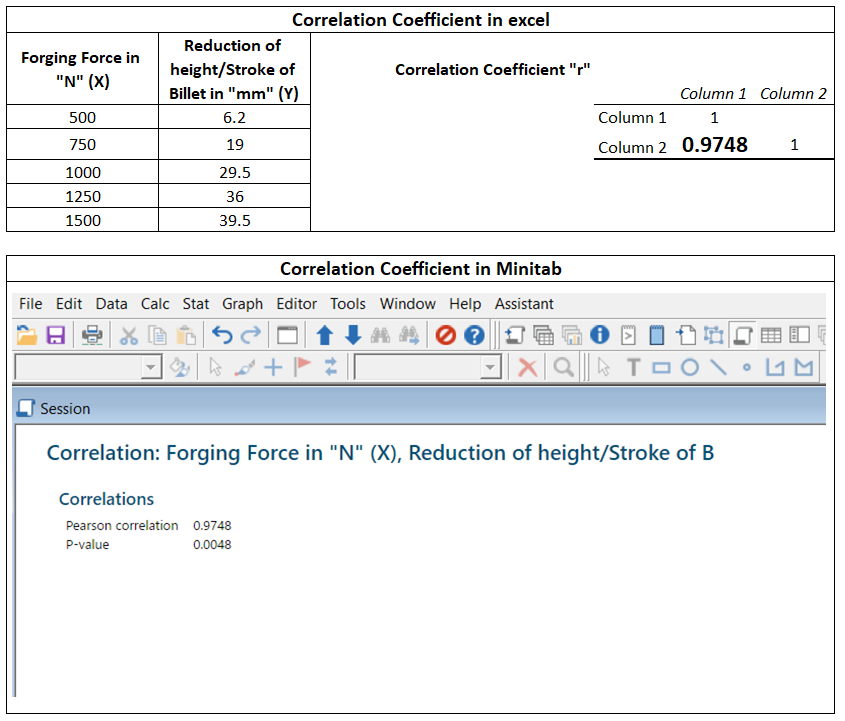
From the above data table, we are going to calculate the correlation coefficient (r). And we will verify the manual calculation of the “r” value against the value calculated by Minitab and Excel.  

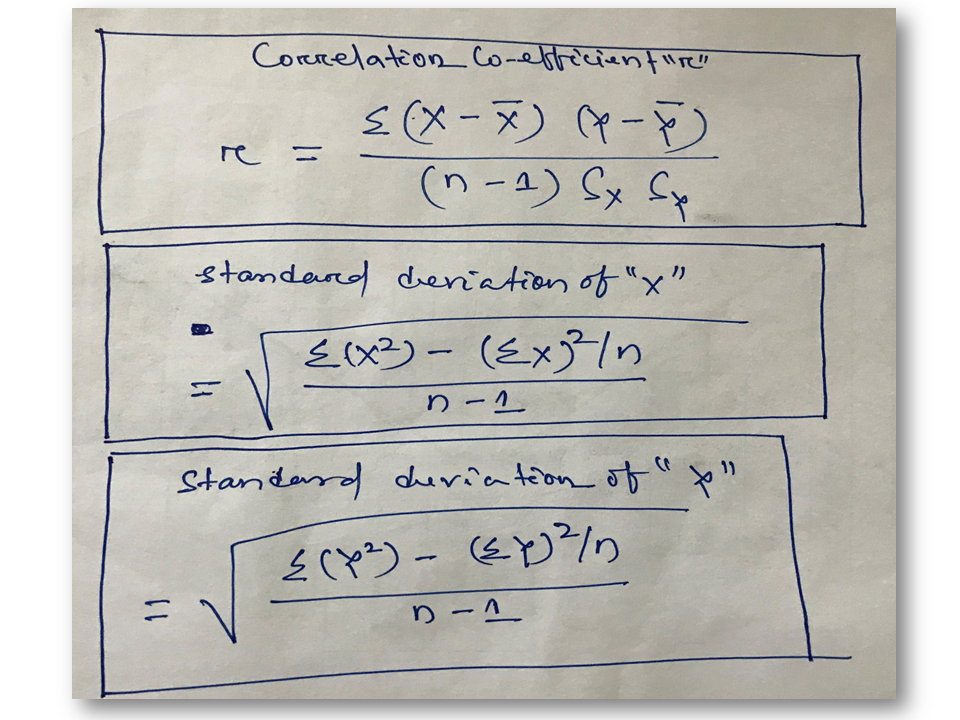
Correlation Coefficient Formula:

How to Calculate Correlation Coefficient

Calculation of Correlation Coefficient “r”:

Data table:

Forging Force in “N” (X) Reduction of height/Stroke of Billet in “mm” (Y)
500 6.2
750 19
1000 29.5
1250 36
1500 39.5

The standard deviation of “X”:

How to Calculate Correlation Coefficient
Forging Force in “N” (X)
500 250000
750 562500
1000 1000000
1250 1562500
1500 2250000
Σ(X²) = 5625000
(ΣX) = 5000
(ΣX)² = 25000000
(ΣX)²/n = 5000000
n-1 = 4
Σ(X²)-(ΣX)²/n = 625000
[{Σ(X²)-(ΣX)²/n}/(n-1)] = 156250
Square root of [{Σ(X²)-(ΣX)²/n}/(n-1)] = 395.2847075

The standard deviation of “Y”:

standard deviation of X
Reduction of height/Stroke of Billet in “mm” (Y)
6.2 38.44
19 361
29.5 870.25
36 1296
39.5 1560.25
Σ(X²) = 4125.94
(ΣX) = 130.2
(ΣX)² = 16952.04
(ΣX)²/n = 3390.408
n-1= 4
Σ(X²)-(ΣX)²/n = 735.532
[{Σ(X²)-(ΣX)²/n}/(n-1)] = 183.883
Square root of [{Σ(X²)-(ΣX)²/n}/(n-1)] = 13.5603466

Correlation Coefficient “r”:

How to Calculate Correlation Coefficient
Forging Force in “N” (X) Reduction of height/Stroke of Billet in “mm” (Y) X-X̅ Y-Y̅ (X-X̅) * (Y-Y̅)
500 6.2 -500 -19.84 9920
750 19 -250 -7.04 1760
1000 29.5 0 3.46 0
1250 36 250 9.96 2490
1500 39.5 500 13.46 6730
X̅ = 1000 Y̅ = 26.04
Σ(X-X̅) (Y-Y̅) = 20900
(Sx) * (Sy) = 5360.197641
(n-1) *((Sx) * (Sy)) = 21440.79056
r= 0.9748

Similarly, we have done the correlation analysis in excel and Minitab and found the value of the Correlation coefficient is 0.9748.

How to Calculate Correlation Coefficient

Interpretation of Correlation coefficient (r), Table-A:

Correlation Coefficient (r ) Interpretation
r=0.5 Low positive correlation
r=0.9 High positive correlation
r=1 Perfect positive correlation
r=0 No correlation
r= -0.5 Low negative correlation
r= -0.9 High negative correlation
r= -1 Perfect negative correlation
Summary of the Above Example:

From the above example, we found the value of “r” (Correlation coefficient) 0.975, which means there is a perfect positive correlation between the two variables.

When and How to Apply Correlation Analysis Tool in Manufacturing Industries?

We are always trying to share our own manufacturing experience so that our readers can easily understand, and learn the concept and can apply it in the manufacturing process to solve the problem. we think the calculation part is clear to all and the next, part we’re going to explain is the application of the Correlation tool. Always keep in your mind that correlation analysis can be applicable only between two variables. it’s a very useful tool generally used in industry to resolve the quality-related problems.

let’s say for example, you have 10 no cast iron blocks in the same shape and size, each and every block has a different percentage of “Mn”, but other compositions are the same in all the blocks. All blocks were tested to know the hardness. After getting the result we analyze both the variables by applying the Correlation tool to know whether block hardness is varied w.r.t Mn % or not. it means whether is there any relation between variables or not. Similarly, you can apply this tool between two quality-related factors like cause and effect to know whether significant relation or in-signification relation between cause and effect. so that you take the action plan to fix-up the problem.

Also Read…

How to Plot Scatter Diagram in Excel? |Guides with example | Interpretation

Scatter Diagram Template |Industrial Example |Download Excel Format

Free Templates / Formats of QM: we have published some free templates or formats related to Quality Management with manufacturing / industrial practical examples for better understanding and learning. if you have not yet read these free template articles/posts then, you could visit our “Template/Format” section. Thanks for reading…keep visiting techiequality.com

More on Techiequality