Vodafone Postpaid Bill Payment by Using My Vodafone App 2024

Vodafone Postpaid Bill Payment

Vodafone Postpaid Bill Payment by Using MyVodafone App. :

Hello! Readers, if you are still going to Vodafone store for paying your monthly postpaid mobile bill, then I wish to tell you that stop paying the bill in offline. Here we will guide you on “Vodafone Postpaid Bill Payment by Using My Vodafone App” so that you could able to save your valuable time from your busy schedule. Please ensure that you have already downloaded the My Vodafone App.

Click-Here to pay your Inactive postpaid Vodafone number’s bill.

Click-Here to pay your Inactive postpaid Airtel number’s bill

As you know that there are so many processes that we could able to pay your postpaid bill as

[1] Offline Process.

[2] Online Process.

In Online process you can pay through “My Vodafone App” or also at Official Vodafone website such process we will discuss later in Separate Article. But today we will discuss on Vodafone Postpaid Bill Payment by Using My Vodafone App. Just follow the beneath Steps.

Step by Step Guide on Vodafone Postpaid Bill Payment by Using My Vodafone App.:
Step-1:

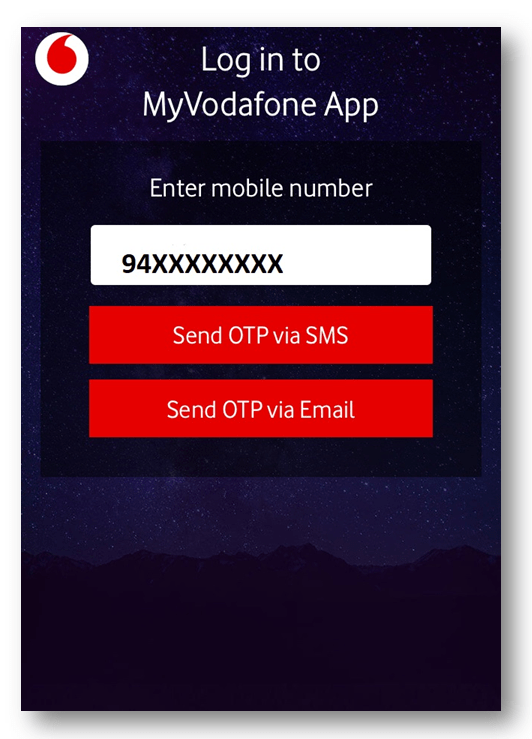
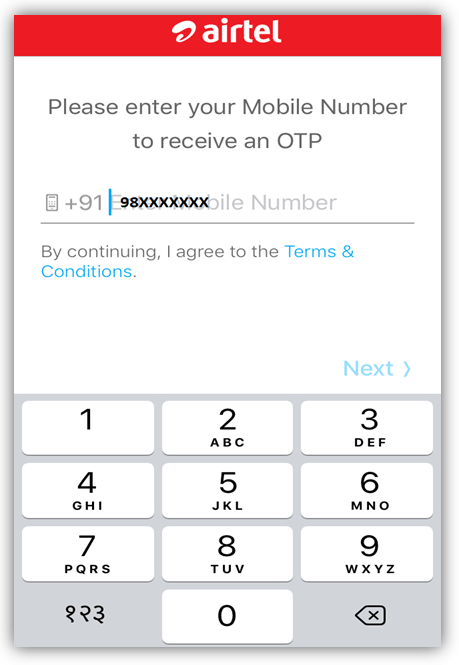
Log-in to MyVodafone App. Enter your Vodafone postpaid mobile number and then send a request for OTP (One time password) via SMS or Email.

Vodafone Postpaid Bill Payment
Step-2:

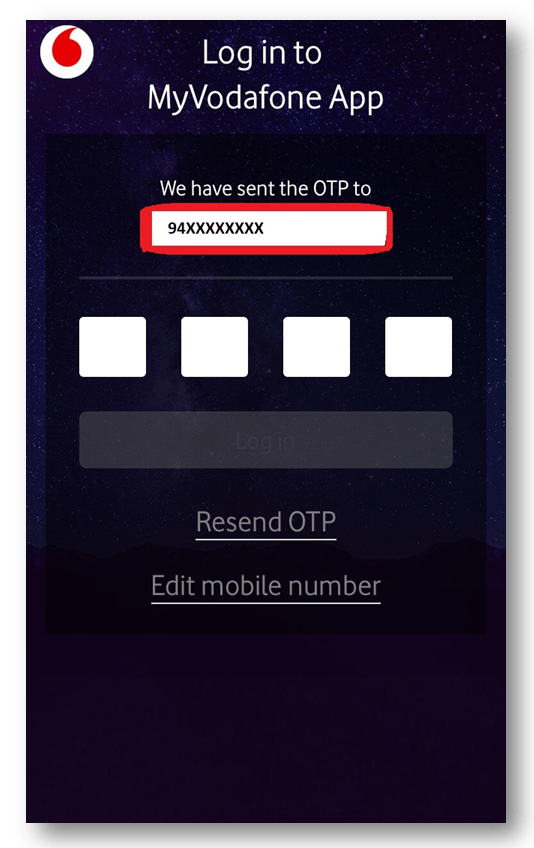
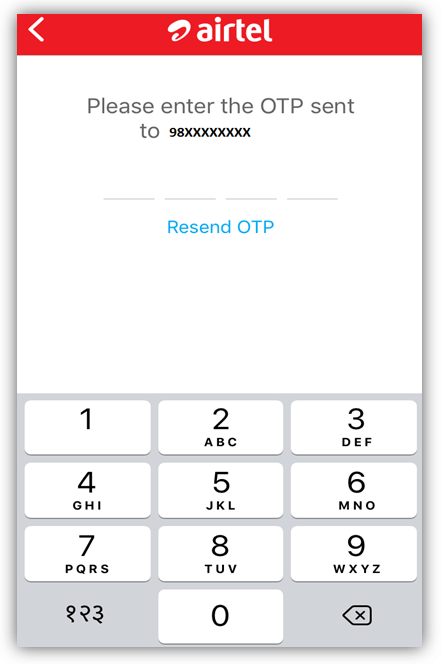
Enter the four digits OTP (One time password) which was received via SMS or Email.

Vodafone Postpaid Bill Payment
Step-3:

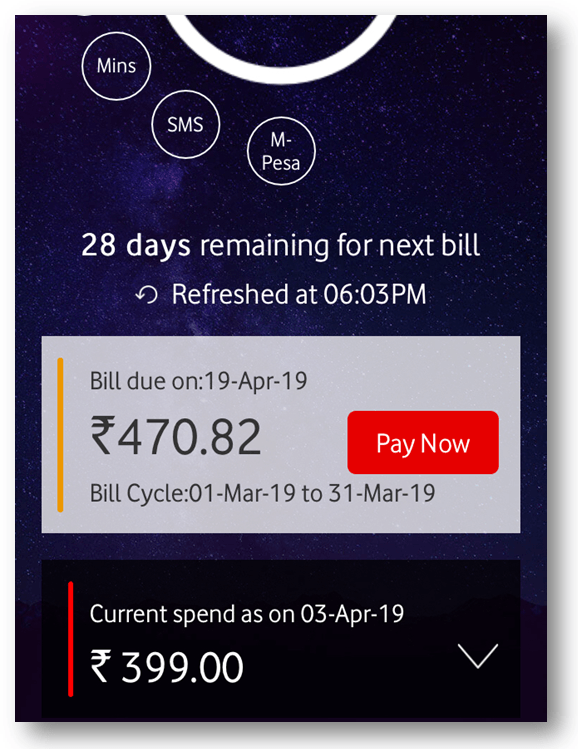
Click on “Pay Now” to proceed the Bill payment.

Vodafone Postpaid Bill Payment
Step-4:

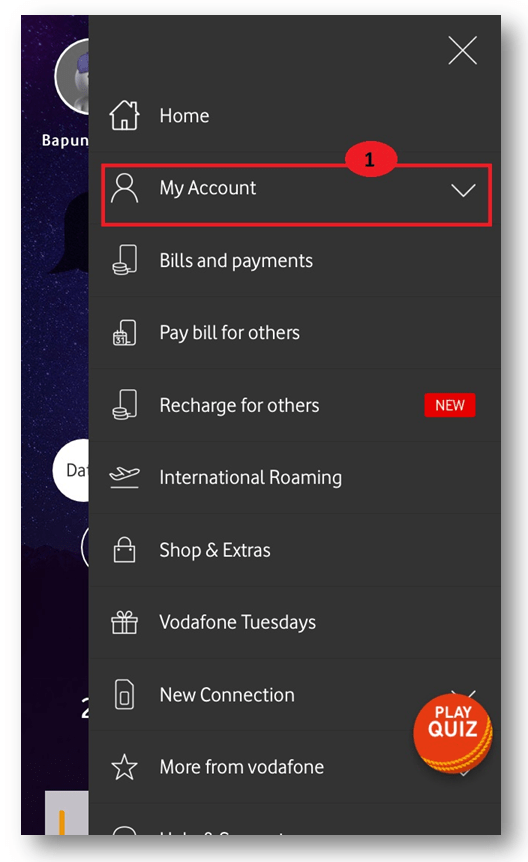
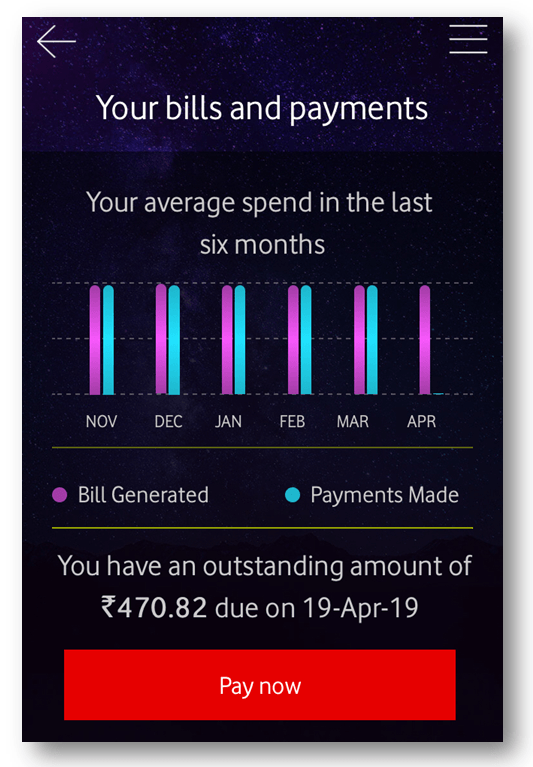
If you are unable to find the bill details in the home screen then click on the “My Account” Section. After clicking on the “my account” section, a new page will appear where you will find the bill details. To proceed with the next process for bill Payment you have to click on the “Pay Now” option.

steps
Figure-4.1
steps
Figure-4.2
Step-5:

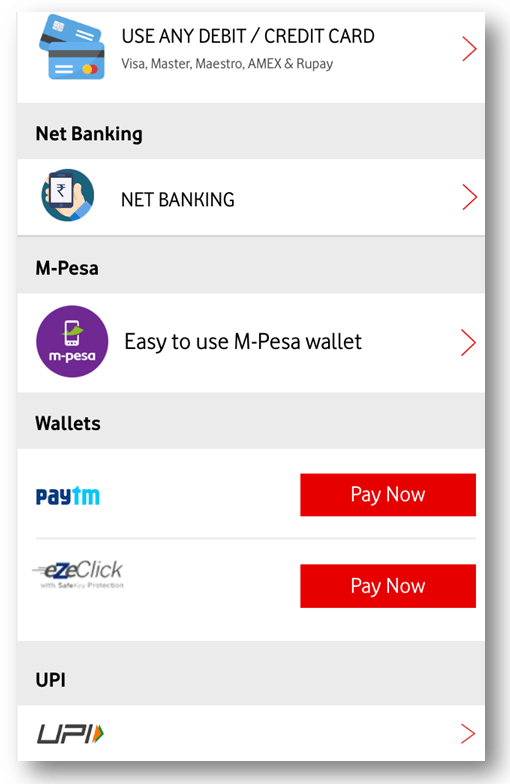
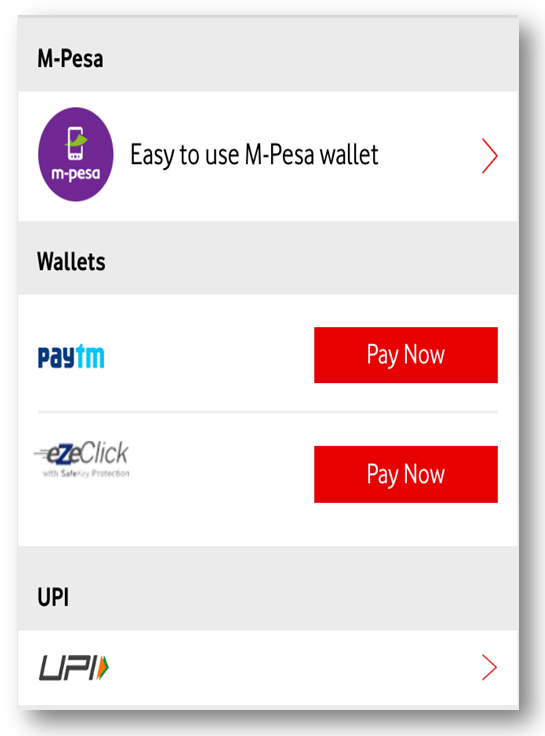
Select Payment methods. Here you could able to pay the bill by using several methods (Credit/Debit card, Net-Banking, M-Pesa, Paytm, UPI ) as per your convenience.

step by step guides
Step-6:

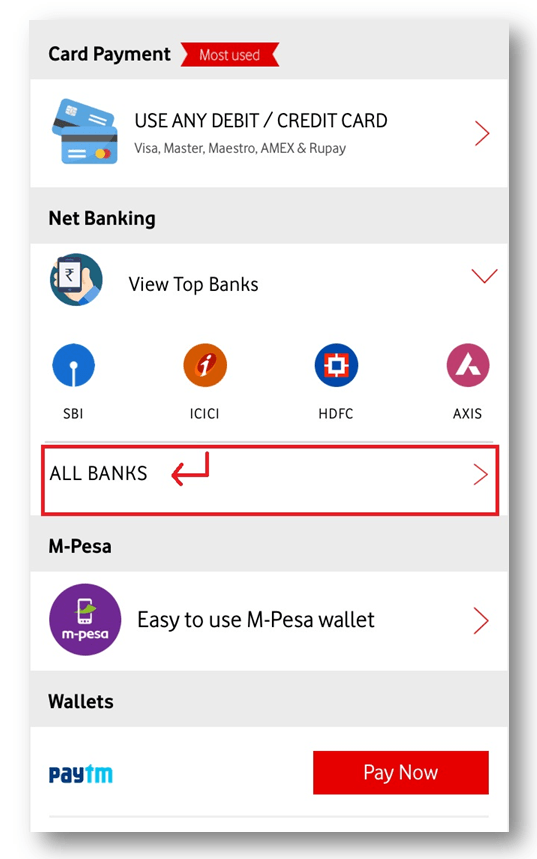
Bill Payment by using Net-Banking. Select the bank and proceed the next by log-in to your net- banking account, next enter the OTP received by your registered mobile number to complete the bill payment transaction.

Vodafone Postpaid Bill Payment
Step-7:

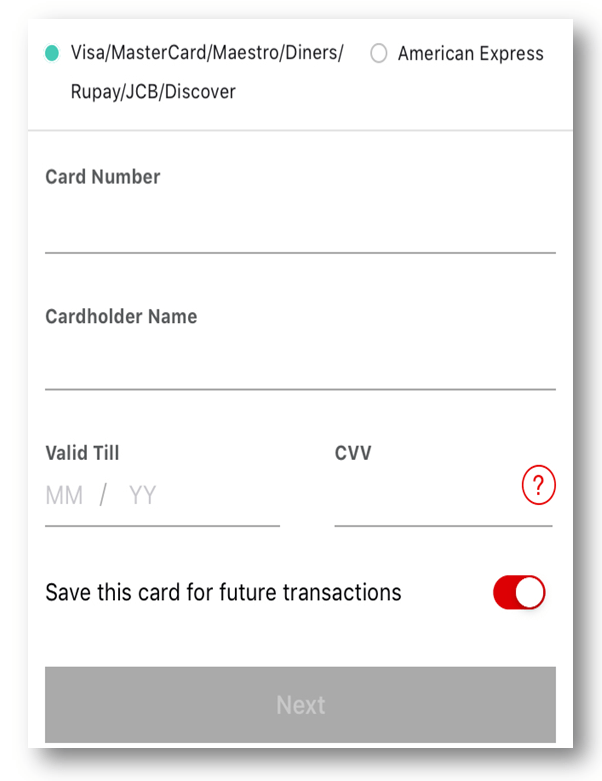
Credit/Debit card Method of payment. Fill up the card details as Types of cards, card number, cardholder name, Valid Till, CVV number, and then process for next. Enter the OTP to complete the transaction.

Vodafone Postpaid Bill Payment
Step-8:

Bill Payment through a digital wallet. Select the digital wallet as per the option is given by them, then, login into the wallet and proceed with the payment.

Vodafone Postpaid Bill Payment

Source: Vodafone apps. the interface may change w.r.t app version.

Thank you for reading……Keep visiting Techiequality.Com

Popular Post:

Airtel Prepaid to Postpaid through Online | offline | Airtel Apps 2024

Airtel Prepaid to Postpaid

Airtel Prepaid to Postpaid through Online |offline |Airtel Apps:

Hello! Readers, we will definitely help you here for mobile number migration from Airtel Prepaid to Postpaid through Airtel Apps. Basically, you could able to convert your prepaid mobile number to postpaid through [1] offline process, or [2] online process.

You could also like to read the below useful articles as:

[1] Prepaid or Postpaid Number MNP Process.

[2] Vodafone Inactive Number Bill Payment through Online Method.

[3] Airtel Inactive Number Bill Payment through Online Method.

Offline Process of Airtel Prepaid to Postpaid Migration:

Step-1: You are supposed to visit nearby Store (like Airtel store, Vodafone store etc.) along with ID proof, Address Proof, and one copy color photo.

Step-2: Fill up the Migration form.

Step-3: Submit the Form and collect New SIM.

Step-4: Insert the new SIM after disconnection of Network in old prepaid SIM.   

Online Process of Airtel Prepaid to Postpaid Conversion:

Step-1: Login to Airtel Apps.

Enter Prepaid Airtel Mobile number to get the OTP.

Airtel Prepaid to Postpaid

Step-2: Enter four digits OTP for login to Airtel Apps.

Airtel Prepaid to Postpaid

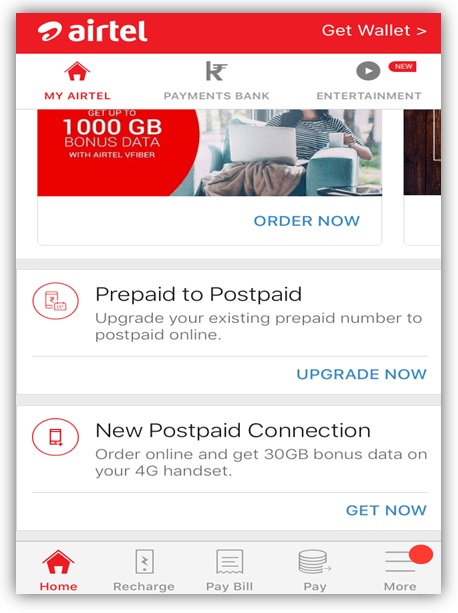
Step-3: Click on the “Prepaid to Postpaid” option. Then follow the below (step-4) to do the next process.

Airtel Prepaid to Postpaid

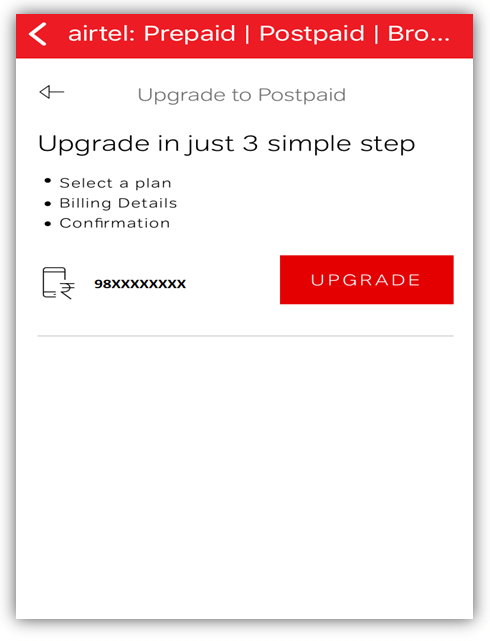
Step-4: Now you have to click on the “UPGRADE” option. Next, you are expected to follow three steps i.e  [1] Select a Plan, [2] Billing Details, [3] Conformation.

Airtel Prepaid to Postpaid

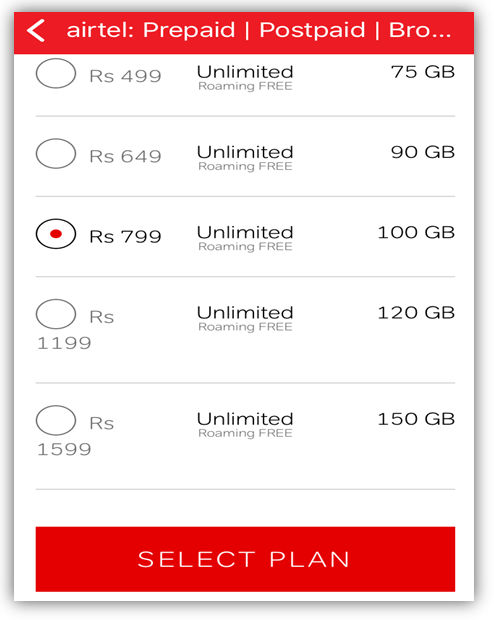
Step-5: Select a Plan.

Airtel Prepaid to Postpaid

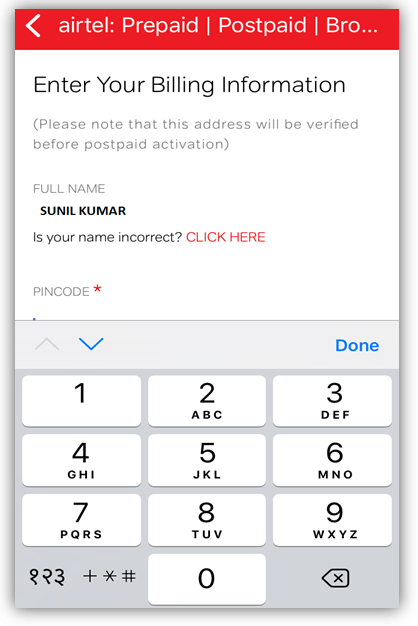
Step-6: Enter your billing information.

Airtel Prepaid to Postpaid

After submission of billing information, Address confirmation will execute.

Within 24 hrs you will receive an SMS regarding postpaid activation thereafter your prepaid number will convert into Postpaid.

If you are further interested to know on how to convert a postpaid
number to Prepaid, and then carefully read the below articles:  

You should visit the nearby Store along with the Address Proof, ID Proof,
and one copy color Photo.

Fill up the migration form and submit it for further processing.

Collect new SIM from your donor service provider.

Insert the new prepaid SIM after disconnection of the network from the old Postpaid SIM.

Source: Airtel, the above interface may change, w.r.t apps versions.

FAQ:

Q1: Could I need to collect a new SIM card? If I migrate the mobile number in offline.

A1: Yes, You have to collect a New SIM from Store.

Q2: Do I have to submit documents for online migration?

A2: No.

Thank you for reading……Keep visiting Techiequality.Com

Popular Post:

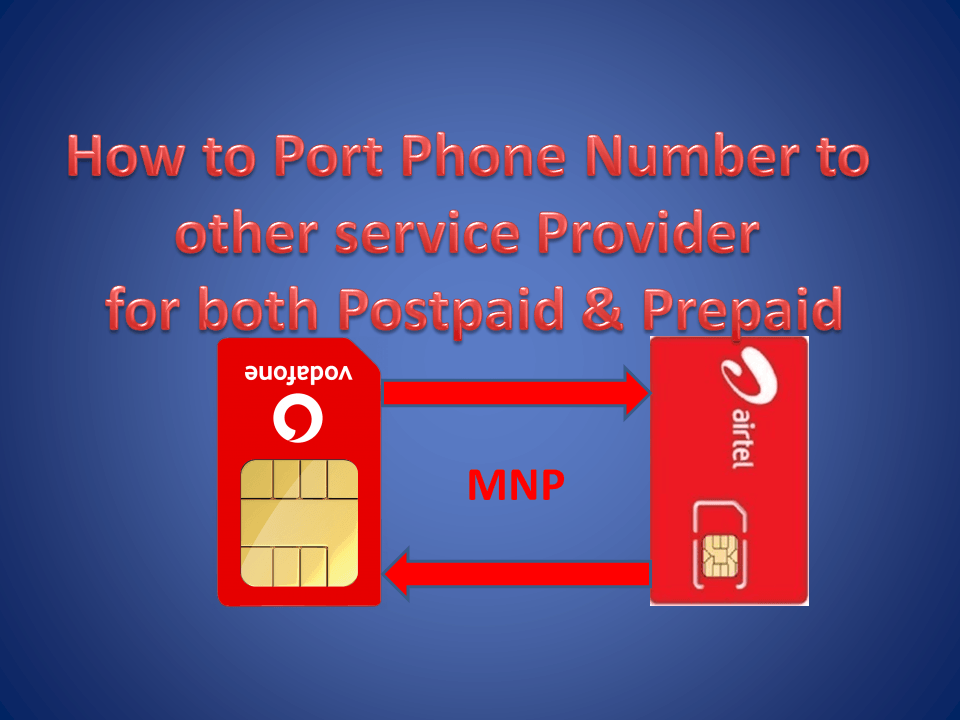
How to Port Phone Number to other service Provider for both Postpaid & Prepaid 2024

How to Port Phone Number

How to Port Phone Number:

Hi! Reader, today we will guide you on How to Port Phone Number to other service Provider for both Postpaid & Prepaid. Before porting you are expected to choose the service provider. Make Ensure that you are an active subscriber of an existing service provider for a minimum period of 90 days. I.e. if you are a new subscriber then you are eligible after 90 days of connectivity. Similarly, you can’t apply for further porting of your mobile number within 90 days of your last porting period. As you are a postpaid user so you have to pay your postpaid bill before you apply for MNP. 

If you have not yet paid your inactive mobile number bill then click on the below link to Pay the outstanding bill amount:

1. Vodafone Inactive Mobile Number Bill Payment

2. Airtel Inactive Mobile Number Bill Payment

Step by Step Procedure on How to Port Phone Number |MNP Guide:

Step-1:

You have to send a SMS to 1900. i.e. PORT <Space> Mobile Number.

For Example, Write a SMS as PORT 968XXXXXX and send it to 1900.

After sending the SMS you will receive an auto generated 8 digits Unique Porting Code (UPC) from your donor operator. The first two characters will Alphabets and the remaining 6 digits will be numerical characters.

Note: For J&K Subscriber, They have to dial 1900 to get an UPC or you may contact your service provider.

Step-2:

Contact to a new service provider to whom you would like to port your mobile number for obtaining the CAF (Customer Acquisition Form) & Porting Form.

Step-3:

You are supposed to fill up the CAF & Porting Form.

Step-4:

Submit the duly filled CAF and Porting Form along with necessary document (I.e Local address proof and one copy Photo).

For the same state member, you can provide one of the below document as Local Address Proof

  1. Aadhar Card
  2. Voter ID
  3. Pan Card + Telephone / Electric bill
  4. Driving License
  5. Telephone / Electric bill

If you are not in same state member then you may provide any of the below document along with local address proof:

  1. For the student, College ID Card Xerox Copy along with college’s letterhead approves paper with a current mailing address.
  2. For Service holder, ID Card Xerox Copy along with Company letterhead approves paper with a current mailing address.
Step-5:

Submit a paid copy of the last bill issued.

Step-6: 

Receive New SIM card from new service provider.

Note: Service provider may charge Rs.4, You can withdraw your porting request within 24 hours of applying but you can’t get back your porting charges.

Step-7:

Now you have to change the old SIM with a new Service Provider’s SIM after the disconnection of current mobile Service.

FAQ:

Q1: How many working days will take for service changeover?

A1: it May take 2 working days for same circle area (Within State) but 4 working days for beyond same circle area (State to state). But for J&K, Assam & North East Service areas, it may take 15 working days.   

Q2: Could I withdraw Porting even after document submission to a new service provider?

A2: Yes, But within 24 hours you have to inform to new service provider regarding MNP withdraw.

Q3: What is expiry date of UPC?

A3: Once you applied for UPC, you will receive an SMS of UPC code along with its expiry date from your donor service provider.

Q4: When will I eligible to apply for MNP?

A4: You are allowed to move to another mobile service provider only after 90 days of the date of activation of your mobile connection or from the date of last porting of your mobile number.

Q5: What is the Process of Prepaid Mobile Number Portability?

A5: Just follow the above Step-1 to Step-7 rather than step-5 (i.e. Step-1 to Step-4, Step-6 & Step-7).

Q6: How to port postpaid Airtel to Vodafone Or postpaid Vodafone to Airtel?

A6: Follow Step-1 to Step-7.

Q7: Could I able to transfer a balance to a new prepaid service provider/ operator?

A7:No.

Q8: How to Port Phone Number from prepaid Airtel to Vodafone?

A8: Follow the Above Step-1 to Step-4, Step-6 and Step-7.

Q9: If I did not port my mobile number before the expiry of UPC then could I able to port my mobile number?

A9: yes, but you have to resend the SMS to generate the New UPC.

Q10: How to Port Phone Number from prepaid Vodafone to Airtel?

A10: Follow the Above Step-1 to Step-4, Step-6 and Step-7.

Q11: Will new Operator charge for porting?

A11: Yes, New Operator may charge Rs. 4

Q12: How to Port Phone Number from Airtel to Vodafone? Or Airtel to Vodafone?

A12: If you’re a Prepaid customer then follow the above Step-1 to Step-4, Step-6 & Step-7, if Postpaid customer, just follow Step-1 to Step-7.

Q13: What is UPC?

A13: Unique Porting Code, which is required for MNP.

Q14: What is MNP?

A14: Mobile Number Portability is the process of porting from one service provider to another.

Q15: could I able to port my mobile number from one circle area to other?

A15: Yes. During the MNP you could choose two options as

  1. One operator to another Operator within the same circle area. Its means within a state.
  2. One state to another state.
Important Information:
If you are a postpaid subscriber, please ensure that you have paid all the dues as per your last bill. Else Click on below link to paid inactive mobile number’s bill:  

Vodafone Inactive Mobile Number Bill Payment

Airtel Inactive Mobile Number Bill Payment  
If you are a Pre-paid subscriber, please note that the balance amount of talk time, if any, at the time of porting will lapse.

Note: contact to your respective service provider to update yourself w.r.t their current terms, conditions, policy & rules.

Thank you for reading……….. Keep visiting Techiequality.Com

Popular Post:

How to Register Mobile Number in J&K Grameen Bank Account 2024

How to Register Mobile Number in J&K Grameen Bank Account

The Detail Process of Mobile Number Registration with J&K Grameen Bank Account:

As we know that in this digital market, how the registered mobile number take an important role while doing the online transaction. To fulfill the online transaction we have required OTP (One Time Password) for a while to successfully complete the transaction. Same OTP will be received by your mobile number which is registered with your bank account. So If you have not yet registered your mobile number with bank account then carefully read the below article and download the application/ letter and submit the application to the bank manager. Today we will guide you on How to Register Mobile Number in J&K Grameen Bank Account?.

Download the Application in Word.

How to Register Mobile Number in J&K Grameen Bank Account:

Day by Day J&K Grameen Bank is getting popular and also people are opening their accounts. If you forget to register your mobile number, then follow the below process to get it done. For doing so you have to visit the J&K Grameen Bank, where you have already opened your account. And need to submit the application to Bank Manager. Links are given below to download the applications and also examples of applications are described below.

AppliCation-1 (Application for Mobile Number Registration with My Bank Account)

Application-2 (Application for Changing of Mobile Number against existing one)

You can read also How to Register Mobile Number in Ellaquai Dehati Bank Account?

Example of Application, (Example-1):

To

     The Bank Manager of J&K Grameen Bank, [mention here the branch location name].

(Subject: Application for Mobile Number Registration with My Bank Account)

Dear Sir,

               With due respect and humble submission, I beg to state that I am [Mention Your Name].

I have an Account in J&K Grameen Bank, [Mention Branch name], [Account Number], [Mobile Number], [Address]. I feel that I had made a Mistake during the opening of Bank Account and forgotten to mention my Mobile number. Now I am mentioning my Current active Mobile number i.e. [Mention here your current active mobile number] for being registered with my Bank account.

Therefore, I shall be Very Grateful if you register my Current Mobile Number With my Bank Account.

Yours faithfully,

Name:

Address:

Mobile Number:

Account Number:

[Note: Don’t Worry just Download the Word file and change the red highlighted color accordingly]

If you are similarly looking for mobile Number Change against existing one, then follow the below sample application and you can download the same in the above link.

Sample Application of Mobile Number Change against the Exist one, (Example-2):

 To

     The Bank Manager of J&K Grameen Bank, [mention here the branch location name].

(Subject: Application for Changing of Mobile Number against existing one)

Dear Sir,

               With due respect and humble submission, I beg to state that I am [Mention Your Name].

I have an Account in J&K Grameen Bank, [Mention Branch name], [Account Number], [Mobile Number], [Address]. My registered mobile number is not active. So hereby I am mentioning my Current Active Mobile Number i.e. [Mention here your current active mobile number] for being Changed.

Therefore, I shall be Very Grateful if you Change my Current Mobile Number against the Existing one.

Yours faithfully,

Name:

Address:

Mobile Number:

Account Number:

[Note: Don’t Worry just Download the Word file and change the red highlighted color accordingly]

Synopsis of How to Register Mobile Number in J&K Grameen Bank Account:

Step-1:- Download the above application. Step-2:- fill up the red highlighted portion only. Step-3:- Submit the filled up application to the bank manager.

Note The above process may change, w.r.t bank policy, term, conditions, rules, so kindly contact with your respective Gramin bank to know more.

Thank you for Reading……………… Keep Visiting Techiequality.Com

Popular Post:

How to Register Mobile Number in Ellaquai Dehati Bank Account 2024

How to Register Mobile Number in Ellaquai Dehati Bank Account

The Detail Process of Mobile Number Registration with Bank Account:

As we know that in this digital market, how the registered mobile number takes an important role while doing online transactions. To fulfill the online transaction we have required OTP (One Time Password) for a while to successfully complete the transaction. The same OTP will be received by your mobile number which is registered with your bank account. So If you have not yet registered your mobile number with your bank account then carefully read the below article and download the application/ letter and submit the application to the bank manager. Today we will guide you on How to Register your Mobile Number in Ellaquai Dehati Bank Account?.

Download the Application in Word.

How to Register Mobile Number in Ellaquai Dehati Bank Account:

Day by Day Ellaquai Dehati Bank is getting popular and also people are opening their accounts. If you forget to register your mobile number, then follow the below process to get it done. For doing so you have to visit the Ellaquai Dehati Bank. where you have already opened your account. And need to submit the application to Bank Manager. Links are given below to download the applications and also examples of applications are described below.

AppliCation-1 (Application for Mobile Number Registration with My Bank Account)

Application-2 (Application for Changing of Mobile Number against existing one)

Example of Application, (Example-1):

To

     The Bank Manager of Ellaquai Dehati Bank, [mention here the branch location name].

(Subject: Application for Mobile Number Registration with My Bank Account)

Dear Sir,

               With due respect and humble submission, I beg to state that I am [Mention Your Name].

I have an Account in Ellaquai Dehati Bank, [Mention Branch name], [Account Number], [Mobile Number], [Address]. I feel that I had made a Mistake during the opening of my Bank Account and forgot to mention my Mobile number. Now I am mentioning my Current active Mobile number i.e. [Mention here your current active mobile number] for being registered with my Bank account.

Therefore, I shall be Very Grateful if you register my Current Mobile Number With my Bank Account.

Yours faithfully,

Name:

Address:

Mobile Number:

Account Number:

[Note: Don’t Worry just Download the Word file and change the red highlighted color accordingly].

If you are similarly looking for a mobile Number Change against the existing one, then follow the below sample application and you can download the same in the above link.

Sample Application of Mobile Number Change against the Exist one, (Example-2):

 To

     The Bank Manager of Ellaquai Dehati Bank, [mention here the branch location name].

(Subject: Application for Changing of Mobile Number against existing one)

Dear Sir,

               With due respect and humble submission, I beg to state that I am [Mention Your Name].

I have an Account in Ellaquai Dehati Bank, [Mention Branch name], [Account Number], [Mobile Number], [Address]. My registered mobile number is not active. So hereby I am mentioning my Current Active Mobile Number i.e. [Mention here your current active mobile number] for being Changed.

Therefore, I shall be Very Grateful if you Change my Current Mobile Number to the Existing one.

Yours faithfully,

Name:

Address:

Mobile Number:

Account Number:

[Note: Don’t Worry just Download the Word file and change the red highlighted color accordingly].
Synopsis of How to Register Mobile Number in Ellaquai Dehati Bank Account:

Step-1:- Download the above application.

Step-2:- fill up the red highlighted portion only.

Step-3:- Submit the filled-up application to the bank manager.

Note The above process may change, w.r.t bank policy, terms, conditions, and rules, so kindly contact your respective Gramin bank to know more.

Thank you for Reading……………… Keep Visiting Techiequality.Com

Popular Post: