Vodafone Postpaid Online Bill Payment by using Credit Card or Debit Card or Net-Banking or UPI or Paytm

Vodafone Postpaid Online Bill Payment

Vodafone Postpaid Online Bill Payment by using Credit Card or Debit Card or Net-Banking or UPI or Paytm:

Hello! Readers, if you are still going to Vodafone store for paying your monthly postpaid mobile bill, then I wish to tell you that stops paying the bill in offline. Here we will guide you on “Vodafone Postpaid Online Bill Payment through Vodafone official Website” so that you could able to save your valuable time from your busy schedule. Please follow the below steps to complete the payment transaction by using a Credit card or Debit card or Net-Banking or UPI or Paytm.

Click-Here to pay your Inactive postpaid Vodafone number’s bill.

Click-Here to pay your Inactive postpaid Airtel number’s bill.

As you know that there are so many processes that we could able to pay your Vodafone postpaid bill as

[1] Offline Process.

You are supposed to visit the nearer Vodafone store to pay an outstanding bill amount.

[2] Online Process.

In Online process, you can pay Postpaid Vodafone bill through “My Vodafone App” (click here to pay the bill by using MyVodafone App) or also through the Official Vodafone website. Today we will discuss on Vodafone Postpaid Online Bill Payment through Vodafone’s official Website. Just follow the beneath Steps.

Step by Step Guide on Vodafone Postpaid Online Bill Payment through Vodafone official Website:

Step-1:

1.1- Open Vodafone official website in your browser or Click-Here to directly open the Vodafone official website.

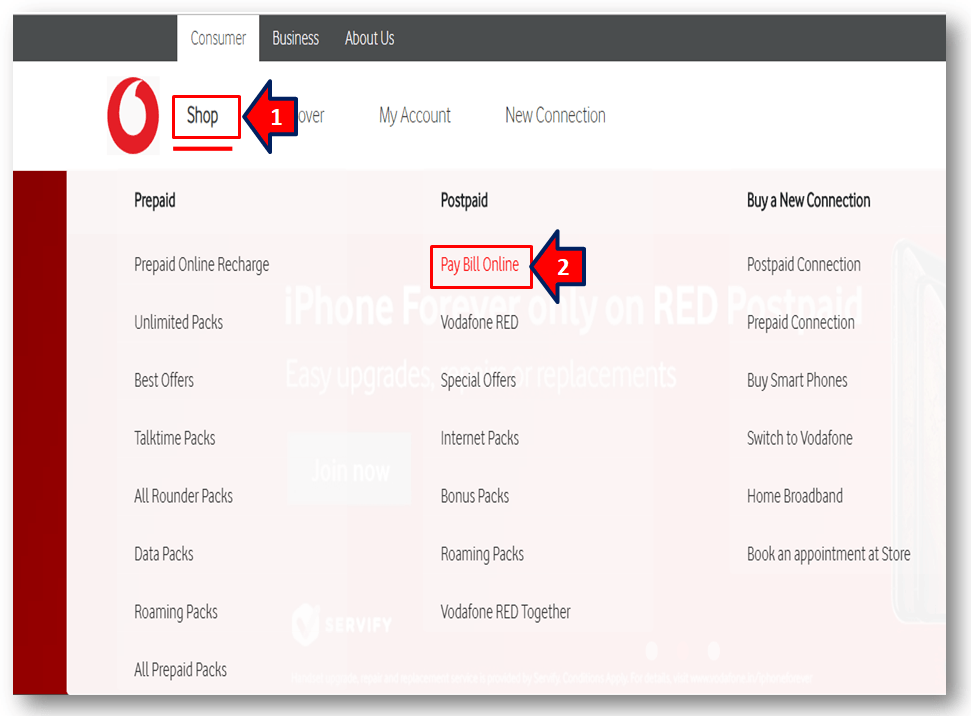
1.2- Click on “Shop” then next click on “Pay Bill Online”. (Shop>>Pay Bill Online). Please go through the below figure to understand better.
Vodafone Postpaid Online Bill Payment
Step-2:

2.1- Enter postpaid Vodafone mobile number and outstanding bill amount.

2.2- Enter on “Pay” option to proceed the next

(Note –If you have forgotten your bill amount, then click on “generate OTP to view amount” (Sl.No-3 in below figure). You will receive OTP on your postpaid mobile number).

If you would like to directly open the below page then Click-Here.
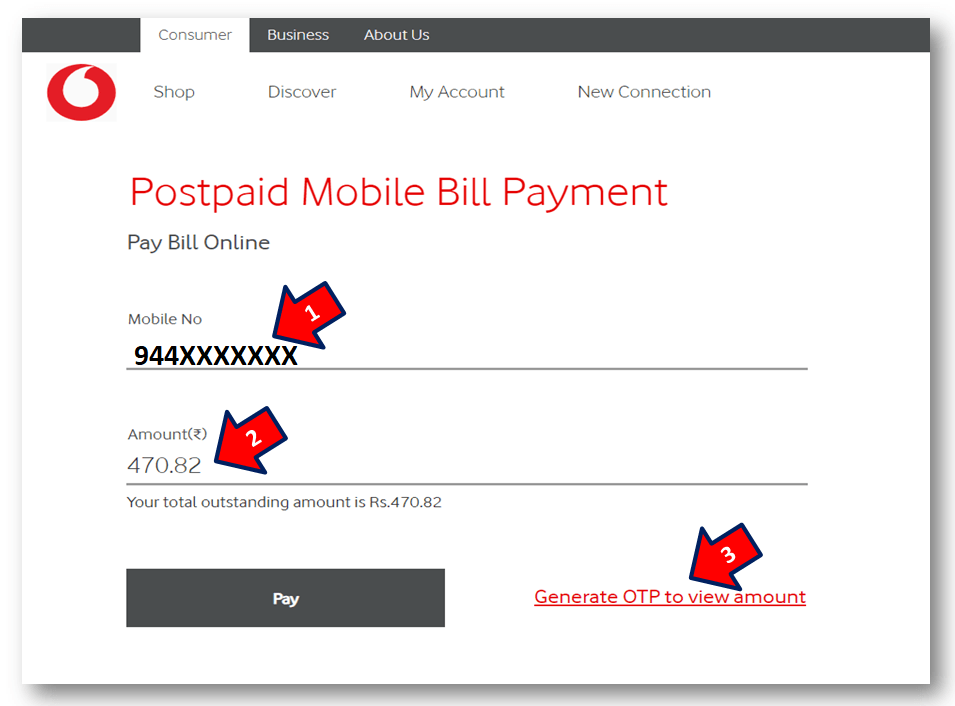
Vodafone Postpaid Online Bill Payment
Step-3: Pay bill amount through net-banking:

3.1- Enter on Internet Banking Option.

3.2- Select the Bank.

3.3- Enter on “Pay Securely” Option to proceed the next.
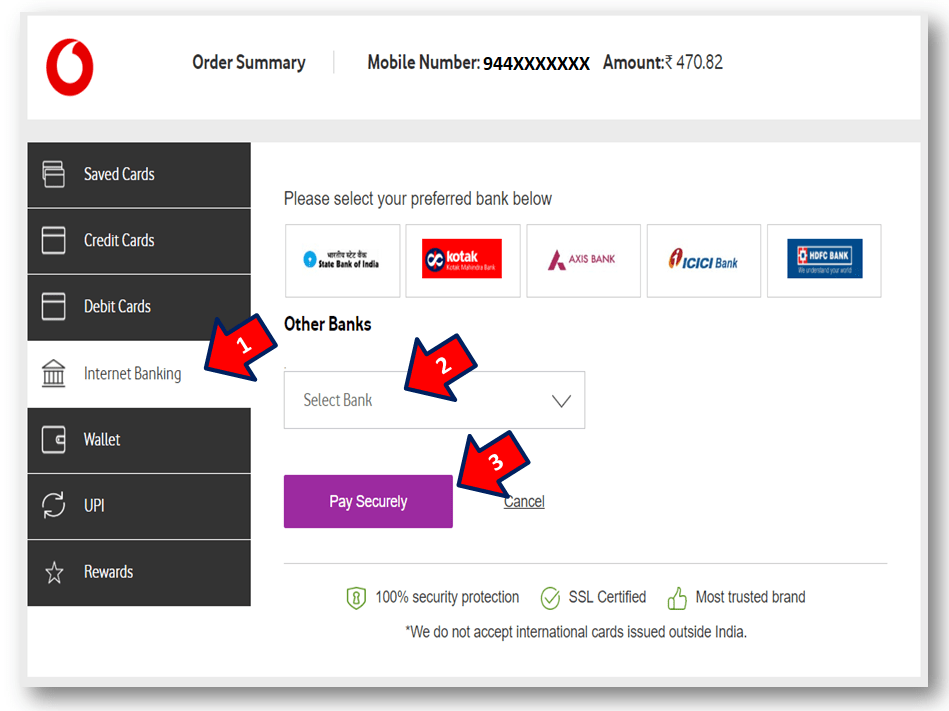
step by step guide
Step-4: Bill Payment through Credit Card:

4.1- Select Credit Card Option to pay your mobile bill.

4.2- Fill up the useful data as;

  • Card Number
  • Card Expiry Date
  • CVV Number
  • Credit Card Holder Name.

4.3- Enter on “Pay Securely” Option to proceed the next.
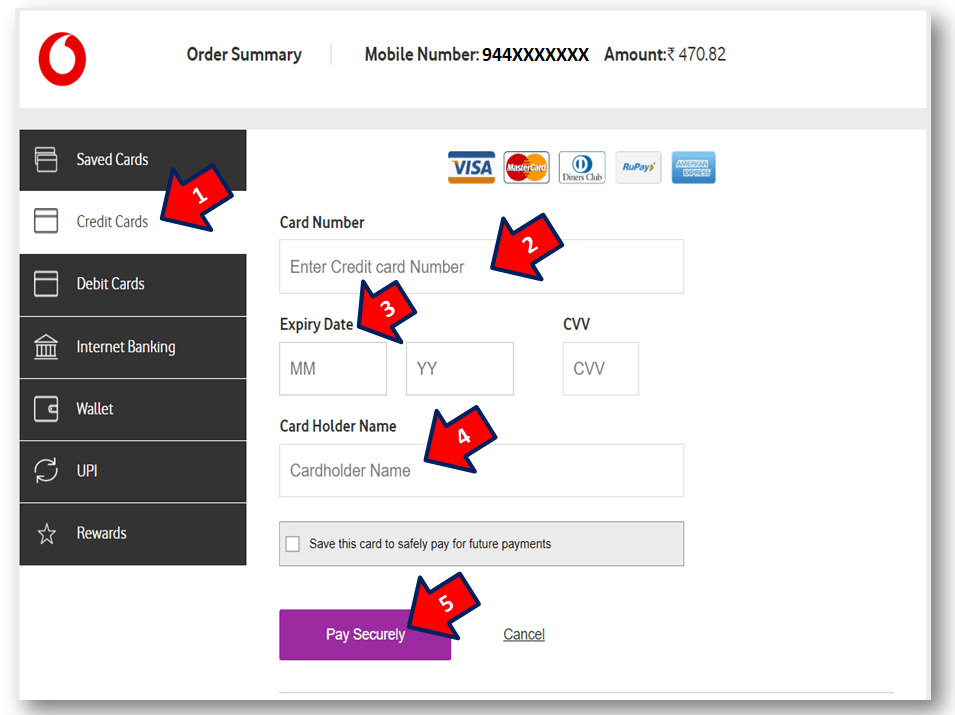
step by step guides
Step-5: Pay bill amount by using digital wallet:

5.1- Enter on Wallet option.

5.2- You will find only two options as [1] Paytm and [2] eZeClick, so select as per your convenience.
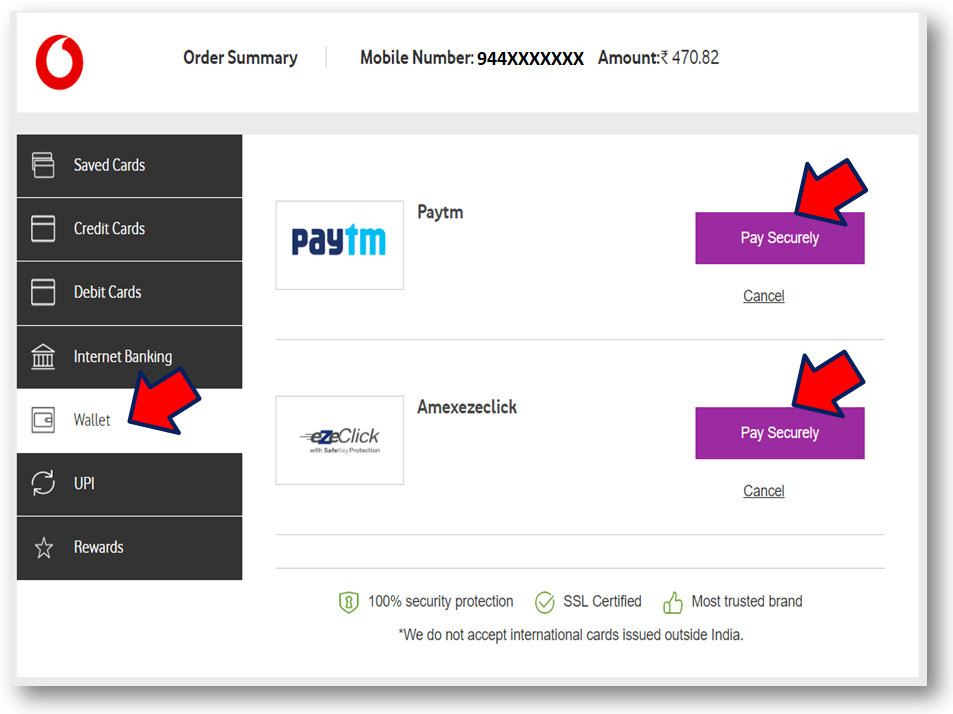
Vodafone Postpaid Online Bill Payment
Step-6: Bill Payment through Debit Card:

6.1- Select Debit Card Option to pay your mobile bill.

6.2- Fill up the useful data as;

  • Card Number
  • Card Expiry Date
  • CVV Number
  • Debit Card Holder Name.

6.3- Enter on “Pay Securely” Option to proceed the next.
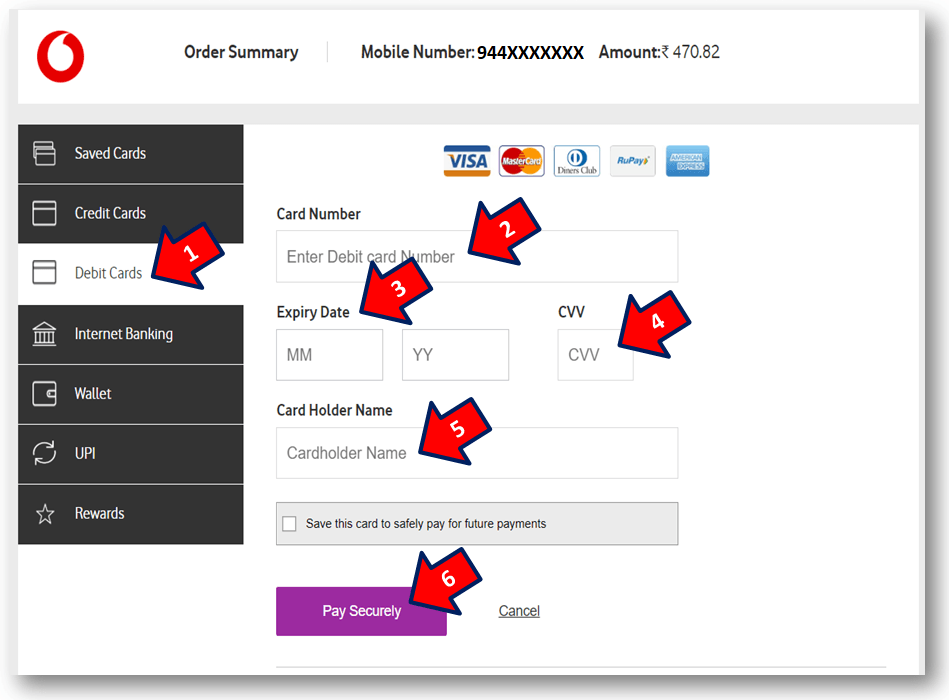
Vodafone Postpaid Online Bill Payment

Note: The above interface may change w.r.t updated apps.

Source: Vodafone.

Thank you for reading……Keep visiting Techiequality.Com

Popular Post:

Airtel Inactive Number Bill Payment

Airtel Inactive Number Bill Payment

Airtel Inactive Number Bill Payment:

Airtel Inactive Number Bill Payment, Hello everybody! If you have ported your Airtel Number into other services and there is an outstanding amount bill felt to pay. Don’t worry here is the solution and step-by-step guide that how to pay inactive Airtel bills online.

[similarly, if you would like to pay a bill of Vodafone Inactive Number, then Clickhere].

Methods/Process of Airtel Inactive Number Bill Payment Online:

There are several modes of payment that you can do as;

  • Cash Payment.

(For Cash Payment, you have to visit a nearby Airtel store to pay your outstanding bill amounts.)

The other three types of payment modes are described below –

  • Debit Card Payment.
  • Credit card Payment
  • Net-banking transfer or through digital fintech Apps

For the above three methods of payment, you have to pay in online mode, beneath is the step-by-step guide for online payment of your Airtel outstanding bills.

Before you pay, you have to keep the Relationship Number/ Account Number ready for processing the online payment, you can find the relationship number from your previous Airtel bill, Alternatively, you can collect the relationship number from Airtel customer care. Please note that the Relationship number is the Account number, so don’t confuse during the final payment because on Airtel’s official website, you can find the Account Number instead of the Relationship Number but in the Airtel bill, it’s written as Relationship Number, so once again telling to you don’t confuse account number and Relationship number is same.

Now, here is the step-by-step guide to Postpaid Airtel Inactive Number Bill Payment Methods:

Step-1: 

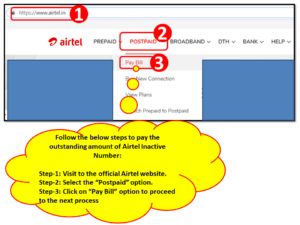
In the below figure there are three steps (i.e. step 1 to 3), first of all, you have to visit the Airtel official website or click here to directly visit the website. Next to select the “Postpaid” option (step-2 of the below figure), then, click on the “Pay Bill” option (Step-3 of the below figure). After clicking on the Pay-bill option, a new tab will open.

Airtel Inactive Number Bill Payment
   Step-2:

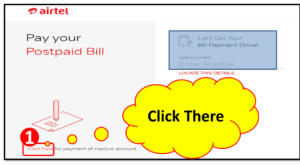
After clicking on the “Pay-Bill” option in the previous step, the new tab will be opened like the below picture, Now you have to click on the inactive account payment option (Go through the below picture, we have marked as a red highlighted box), thereafter a new page will open just follow the next step to complete the online payment.

red highlighted box to directly open the below Airtel Postpaid Airtel Inactive Number Online Bill Payment Page.

Airtel Inactive Number Bill Payment
 Step-3: 

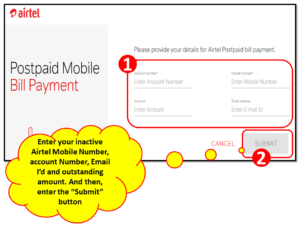
As you can see figure below red highlighted box name as “1” is marked there, so now you have to provide the four important data as Account Number (which is the Relationship number mentioned in your previous Airtel bill), email ID, Mobile Number and Outstanding amount which you need to pay. After fill-up the below data, you can submit for payment. The Next Payment section page will open and there you can select the mode of payment as Net-banking, credit card, or Debit card option, and finally, after a transaction of payment, your section will finish.

Click here to open the direct link of Airtel inactive Number bill Payment.

Airtel Inactive Number Bill Payment
FAQ:-

Q- What is the Inactive Airtel Number?

A- When you will change your Airtel Network to another network without changing your Mobile Number, after successfully changing of network, your Mobile number will be termed as an Airtel inactive number.

Q- What is the Relationship No. of your Airtel Mobile Number and where to find the RN?

A- A Relationship Number is nothing it’s a customer ID or transaction number, where all your monthly payments will be transacted through this number. So it’s important for the postpaid Customer. Generally, the Relationship number is available in your Bill Paper. If you forget your RN then you can call customer care otherwise, visit the nearby Vodafone store to get back your Vodafone relationship number.

Please note that during payment, you can find the terminology Account Number instead of Relationship Number. But actually, the Relationship number is the Account Number, some telecom Services write it as a Relationship Number or Account number.

Similarly, If you would like to know the step-by-step Procedure for Vodafone Inactive Number Bill Payment Through online, then Click Here

Ref.- Source@Airtel official website. Disclaimer: Check carefully before executing the online payment. You can confirm the process by contacting with Airtel teams/office.

FAQ:-

Are you worried about inactive postpaid Airtel number bill payments after porting to other networks? then the solution is here, you can completely read our above article, definitely, it will definitely help you to resolve your problem. We have mentioned a step-by-step process for online bill payment of inactive Airtel postpaid numbers. But I would like to draw your attention over here that you can pay bills by either online or offline as well.  The online process is illustrated in above. But for offline bill payments, you may have to visit the Airtel office.

More on TECHIEQUALITY

Thank you for reading…Keep visiting Techiequality.Com

Popular Post

Vodafone Inactive Number Bill Payment

Vodafone Inactive Number Bill Payment

Vodafone Inactive Number Bill Payment:

Vodafone Inactive Number Bill Payment, Hello everyone! If you have ported your Vi (Vodafone & Idea) number into other services and there is an outstanding amount bill felt to pay. Don’t worry here is the solution and step-by-step guide on how to pay inactive Vi (Vodafone & Idea) bills in online.

[Similarly, If you would like to pay a bill of Airtel Inactive Number, Then Clickhere].

Process/Methods of Vodafone Inactive Number Bill Payment Through Online:

There is many more mode of payment that you can pay your inactive Vodafone & Idea number’s unpaid amount through the below methods

  • Cash Payment.

[For the Cash payment, you have to visit the nearby Vodafone & Idea (Vi) store to pay your outstanding bill amounts].

  • Debit Card Payment.
  • Credit card Payment
  • Net-banking transfer or Through Digital Fintech apps.

For the above three methods of payment, you have to pay in online mode. Beneath is the step-by-step guide for online payment of your Vodafone & Idea (Vi) outstanding bills.

Before you pay, you have to keep the Relationship Number ready. you can find your Vodafone & Idea (Vi) mobile number’s relationship number from your previous Vodafone & Idea bill, alternatively, you can collect the relationship number from Vodafone & Idea customer care.

Now, here is the step-by-step guide for Postpaid Vodafone Inactive Number Bill Payment (Vodafone is currently called Vi)

Step-1:
Vodafone Inactive Number Bill Payment

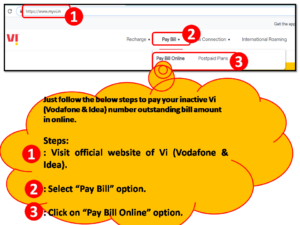
In the above figure, there are three steps (i.e. steps 1 to 3), first of all, you have to visit the Vodafone & Idea official website. Click here to directly visit the website.

After opening the official website of Vodafone then, you have to select the “Pay Bill” option (Step-2 of the above figure), and next click on the “Pay Bill Online” option(step-3 of the above figure).

Step-2:
Vi inactive number bill payment

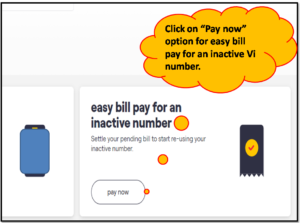
 After clicking on the “Pay Bill Online” option, the above interface will appear on the webpage. Now, you have to click on the “Pay now” option to proceed to the next process.

Click-here to directly open the above Vodafone Postpaid Online Bill Payment page.

 Step-3:
Vodafone Inactive Number Bill Payment

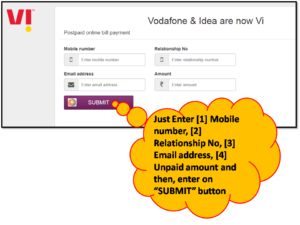
Now, you have to just enter four important data [1] Mobile number, [2] Relationship no. (You can find this in your previous bill), [3] Email ID, and [4] Outstanding amount that you need to pay. After entering that data, you have to submit it for payment. Next, the payment section page will open and there you can select the mode of payment options like Net-banking, credit card, or Debit card option, and finally, after the transaction of payment, your section will finish.

Click here to open the direct web page of Quick Bill Pay of the inactive Vodafone & Idea (Vi) mobile number.

  FAQ-

Q-What is the Inactive Vodafone & Idea (Vi) Number?

A-When you will change your Vodafone & Idea (Vi) Network to another network without changing your Mobile Number, after successfully changing of network, your Mobile number will be termed as a Vodafone & Idea (Vi) inactive number.

Q-What is the Relationship No. of your Vodafone & Idea Mobile Number and where to find the RN?

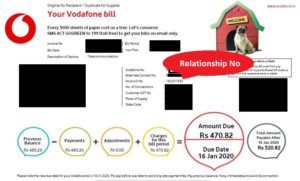
A-Relationship Number is nothing it’s a customer ID or transaction number, where all your monthly payments will be transacted through this number. So it’s important for the postpaid Customer. Generally, the Relationship number is available in your Bill Paper. If you forget your RN then you can call to customer care otherwise visit the nearby Vodafone & Idea (Vi) store to get back your Vodafone & Idea (Vi) relationship number. Given below is a sample copy of the Vodafone postpaid bill.

Vodafone sample relationship number
[Vodafone relationship number (Example)]

Click Here to Learn the Step-by-Step Procedure for Airtel Inactive Number Bill Payment Through Online.

Ref.- Source@Vodafone & Idea (Vi) official website. Disclaimer: Check carefully before executing the online payment. You can confirm the process by contacting with VI teams/offices (Vodafone & Idea).

FAQ:

Are you facing difficulty with the bill payment of inactive Vodafone & Idea (VI) postpaid numbers after porting to other networks? then you are on the right platform to get the solution, so you can read our aforementioned article, definitely, it will help you to resolve your problem. We have described the step-by-step process for online bill payment of inactive Vodafone & Idea (VI) postpaid numbers. But I would like to draw your attention over here that you can pay bills by either online or offline also.  The online process is illustrated in the aforesaid. But for offline bill payment, you may have to visit the VI (Vodafone & Idea) office.

More on TECHIEQUALITY

Thank you for reading…Keep Visiting Techiequality.Com

Popular Post

Income Tax Registration Process | Step by step guides | How to do 2024

Income Tax Registration Process

Income Tax Registration Process | Step by step guides | How to do?

Hi Readers, as we know that every year an income tax return needs to be filed by an individual or a company to submit their annual income statement to the government. Now the question arises in the mind of an individual whether to file or not an income tax return. So the answer to this is it’s more of a responsibility as a citizen of the country to file income tax returns timely and accurately. So here we are going to discuss on Income Tax Registration Process, details are given below. 

The government has framed tax slabs to determine the rate of tax one needs to pay against their income or rather we can say slabs to determine how much tax one owe to the government. The filing income tax return also helps us to claim refund of tax deducted against the salaries or investments made. (Details about the same will be soon uploaded).

Let us go through the Tax slab for a better understanding:-

Income SlabIndividuals below the age of 60 years
Upto Rs 2.5 lakhsNil
Rs 2.5 lakhs to Rs 5.00 lakhs5%
Rs 5.00 lakhs to Rs 10.00 lakhs20%
>Rs 10.00 lakhs30%

However, people avoid income tax filing due to the filing agents charging thousands of rupees for even a nil return. To help you come out of this trouble techiequality has taken up this initiative to teach you the whole return filing process for individuals at zero cost. What is required is just a few hours of your time and you get your return filed. Before stepping into return filing you need to get yourself registered as a taxpayer. Oh, don’t panic we are here to solve this issue. Today we will show you how you can register yourself in just a few minutes to become eligible to file an income tax return.

Step-by-step guide of Income Tax Registration Process:

Let’s go step by step to check the whole procedure:-

Step 1:- First we need to open the Efiling portal of income tax. Link attached https://www.incometax.gov.in/iec/foportal

Step 2:-

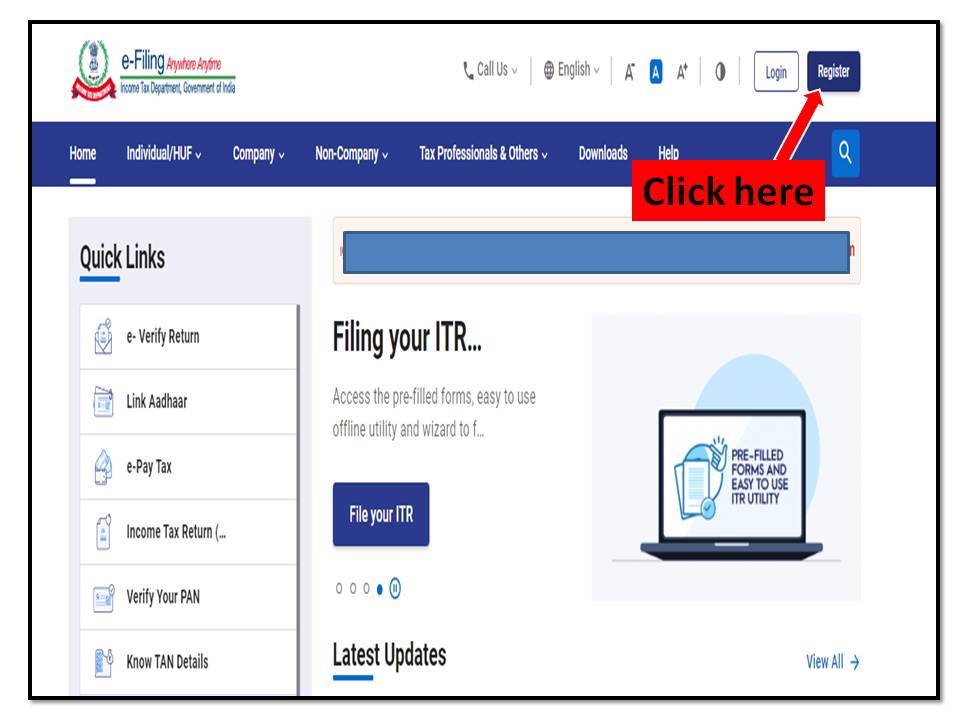
After clicking on the above link income tax page will be displayed where you need to click on register, to begin with the registration procedure. The image is attached for easy reference.
Income Tax Registration Process

Step 3:-

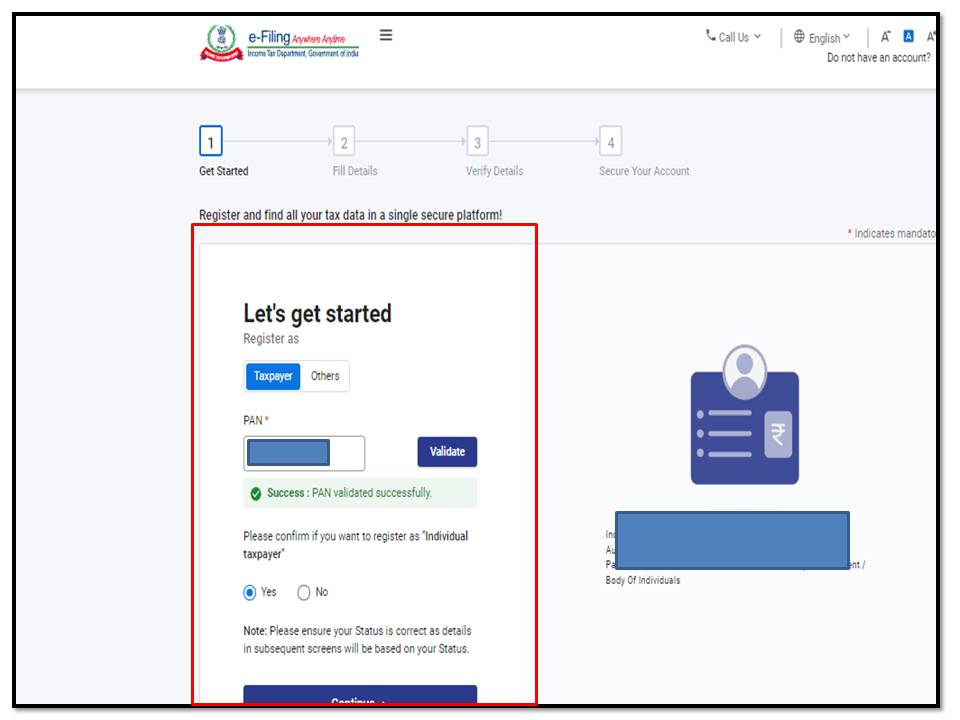
When you click on register home page will be displayed with four-step registration. Here you need to add your PAN number and then select taxpayer to validate it and click on continue.

Image is attached for easy reference.
Income Tax Registration Process

Step 4:-

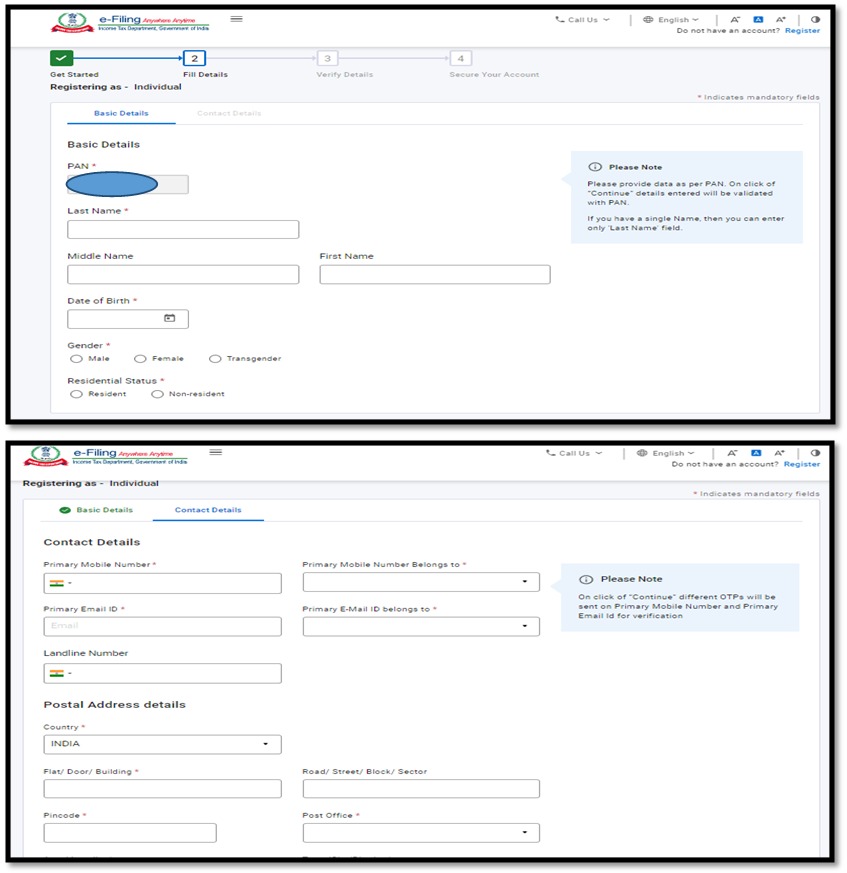
Now fill in all your personal details. (Here they ask for very minimum details like Name,Address , Date of Birth , and Residency)

Income Tax Registration Process

After filling in all the details you will be required to verify with an OTP which you will receive on your mail id as well as your phone number. Insert both of them and then click on continue. After which you will be directed to choose your PASSWORD which should be at least 8 to 16 characters (the password should include Capital letters, Small letters, Numbers, and Symbols). Save it for future reference. Then all the details will be displayed which you need to verify and confirm. In case of any changes, you have the edit option there to modify the same.
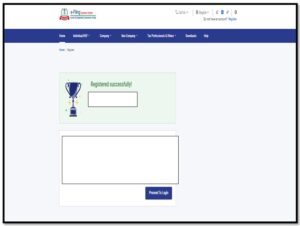
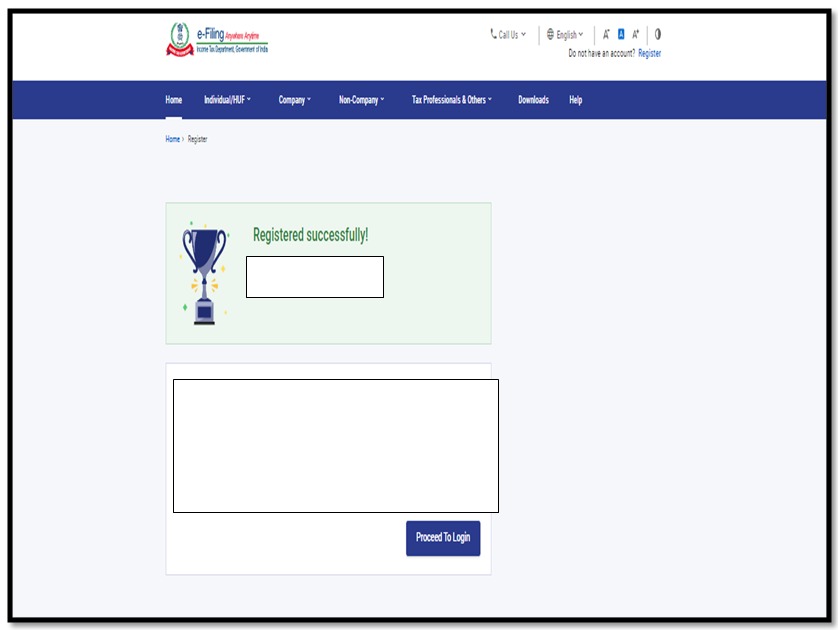
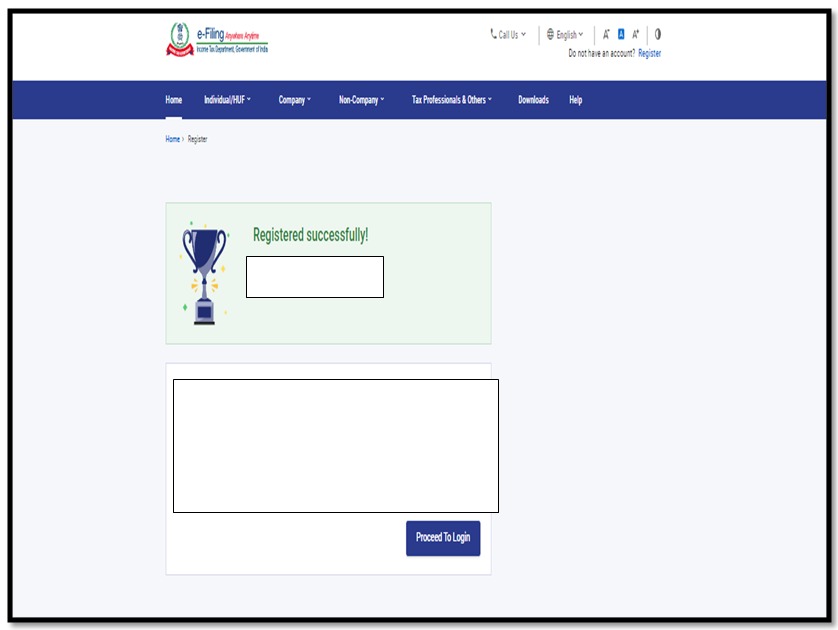
After completing all the above steps you will get a popup message of successful registration.
ITR

Thus this completes your registration on the income tax site. Then you can login using your ID and Password.

Our next article will be on how cans an individual file an Income Tax Return by self. Till then keep learning

Disclaimer note: Source reference: Income Tax Dept. Govt. of India. (https://www.incometax.gov.in/iec/foportal)

The income tax slab is only for reference purposes. The slab may be changed from time to time by govt. of India, so kindly visit the official website of govt. to know the exact & accurate value of the tax slab. The author is not responsible for any loss at your end.

Thank you for reading…Keep visiting Techiequality.Com

Popular Post

Professional tax return filing online | West Bengal professional tax return 2024

Professional tax return filing

Professional tax return filing online | West Bengal professional tax return:

Hi Readers, Now Professional tax return filing is in your hands no more persual to an expert to file a return. Just you need to follow a few simple steps, and you are done.

In our previous post, we understood all about Ptax. What is it, who is eligible for it, when to pay, what are the slabs, and How to pay online?

In this post, we will learn the whole procedure to file a Professional tax return filing in online. Professional Tax is filed annually. As per West Bengal State, a Professional Tax return needs to be filed annually on 30th April of the respective year.

Filing returns after the due date will attract a fine @Rs 200/- in the 1st month of default. And Rs 100/- for each subsequent month thereon will be levied on individuals.

Now, let’s start with the procedure of filing a return:-

(Images of each step are attached for easy reference)

Step 1-

Firstly login into https://wbprofessiontax.gov.in/

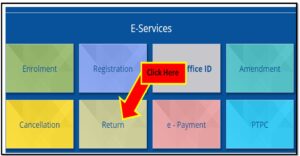
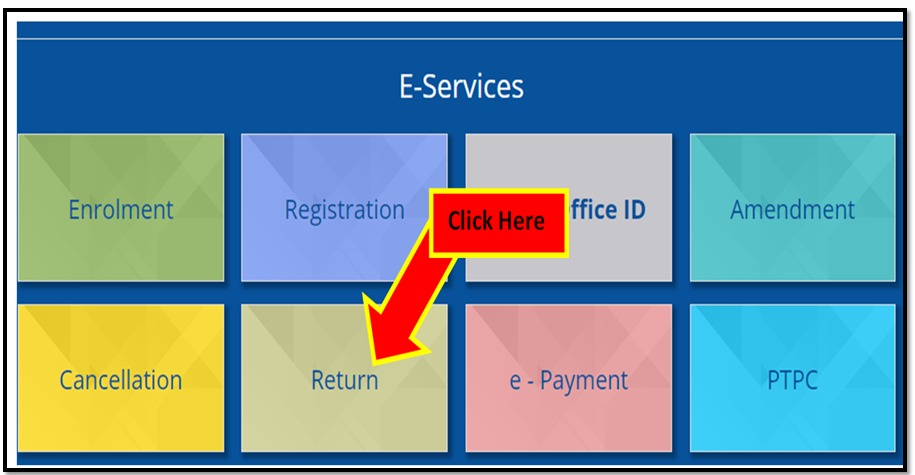
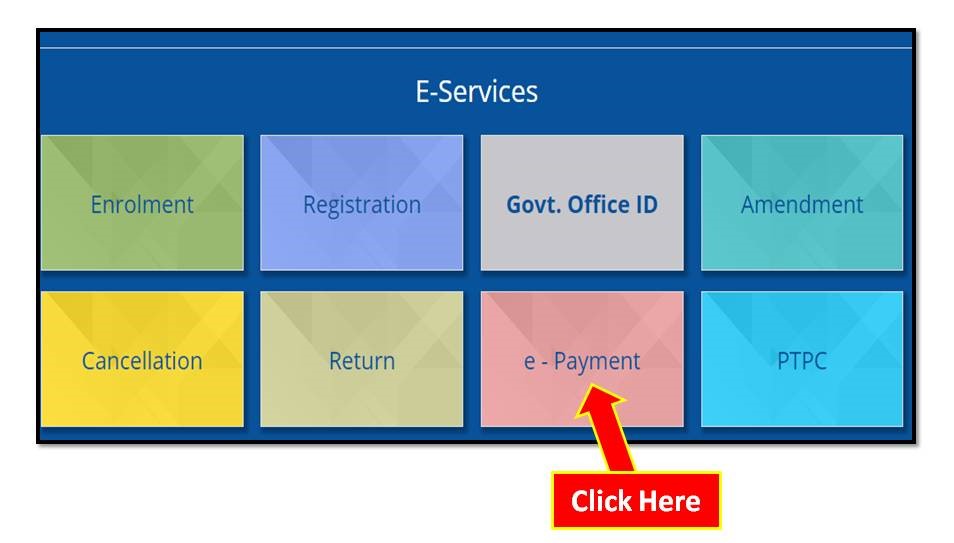
Then under E-services go to the Return option as shown below

Professional tax return filing

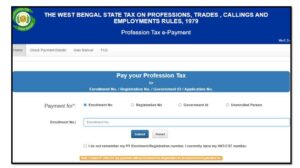
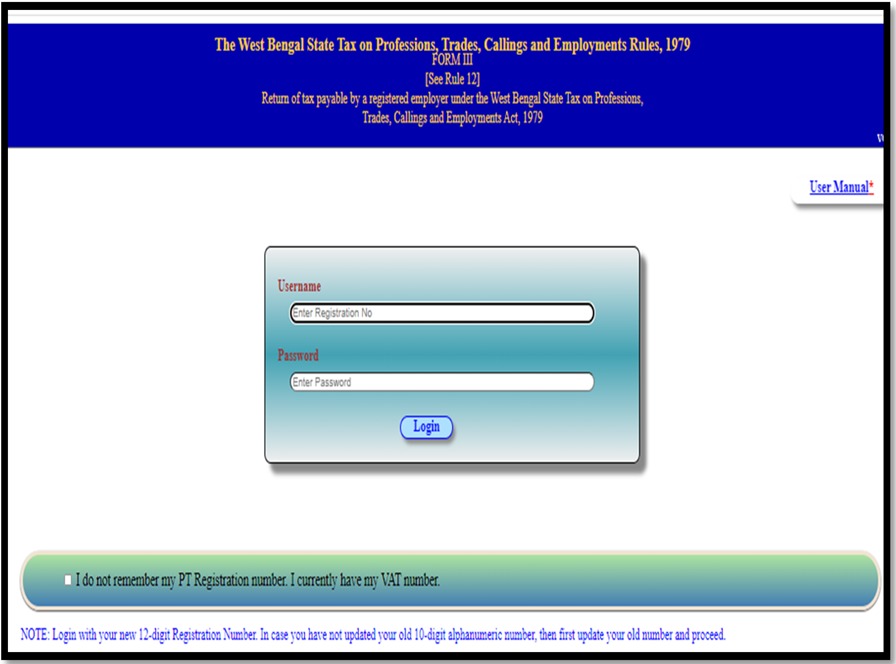
Then a login page will be displayed as shown below:-

Step 2:-

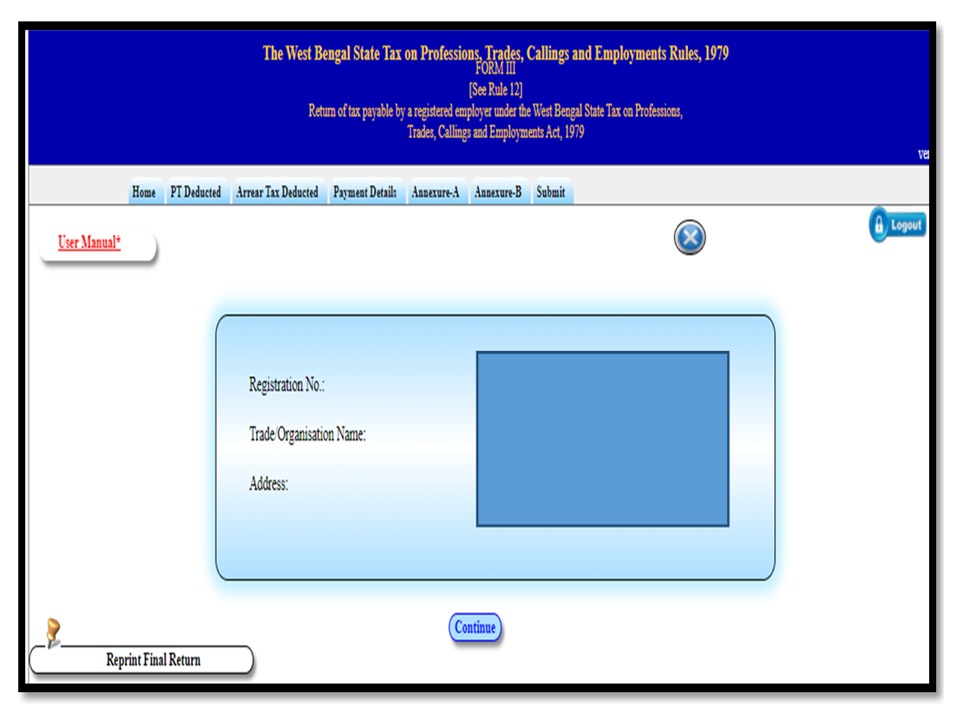
Login in using your User name and Password . After which your home page with all the details like Registration number, Trade name, and Address will be displayed (Image attached ).

Professional tax return filing

Step 3:-

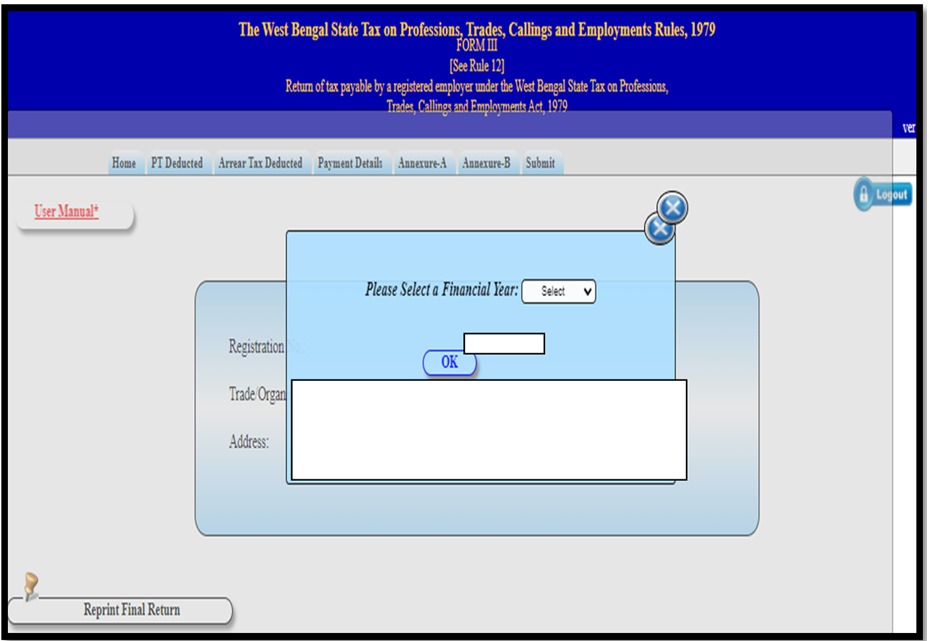
Select the year for which you need to file the return (remember you need to select the financial year). Once the financial year is selected PT Deducted page will be displayed.

Professional tax return filing

Step 4:-

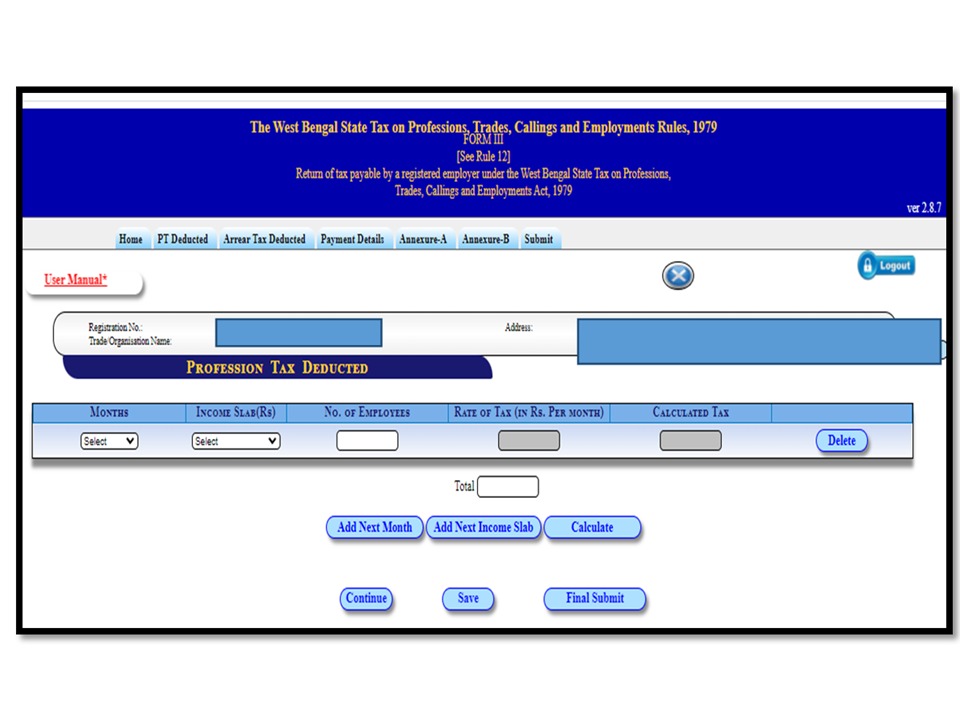
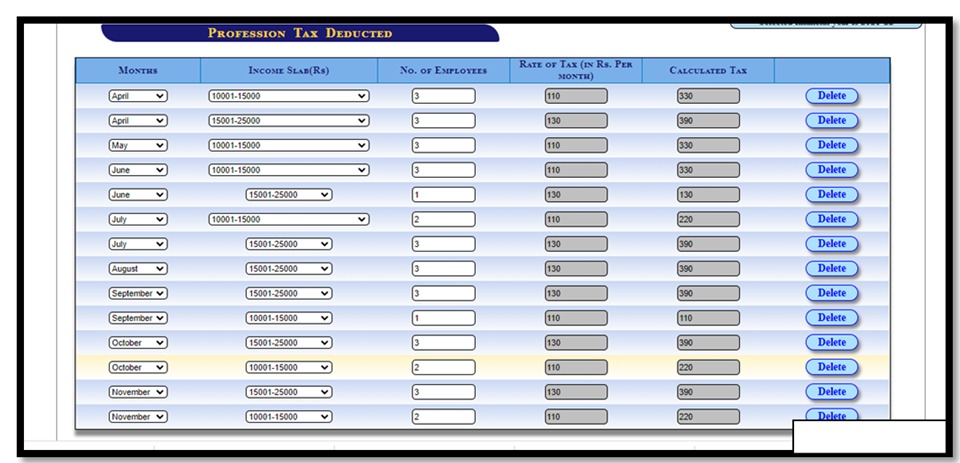
PTAX Deducted page will be displayed where you need to fill in all the details -Month of deduction, Select the slab(which is present in the dropdown ), and Number of employees  (Note:-Different slabs to be selected for each month )Ready image attached for easy reference.

Slabs for West Bengal are as follows:-

Monthly SalaryAmount of tax to be deducted
Upto  Rs 10,000/-Nil
Rs 10,0001 to Rs 15,000/-Rs 110
Rs 15,0001 to Rs 25,000/-Rs 130
Rs 25,0001 to Rs 40,000/-Rs 150
Above Rs 40,001/-Rs 200
Professional tax return filing

After filling in all the details on the professional Tax deducted page you need to click on save and continue to proceed further.

Professional tax return filing

Step5:-

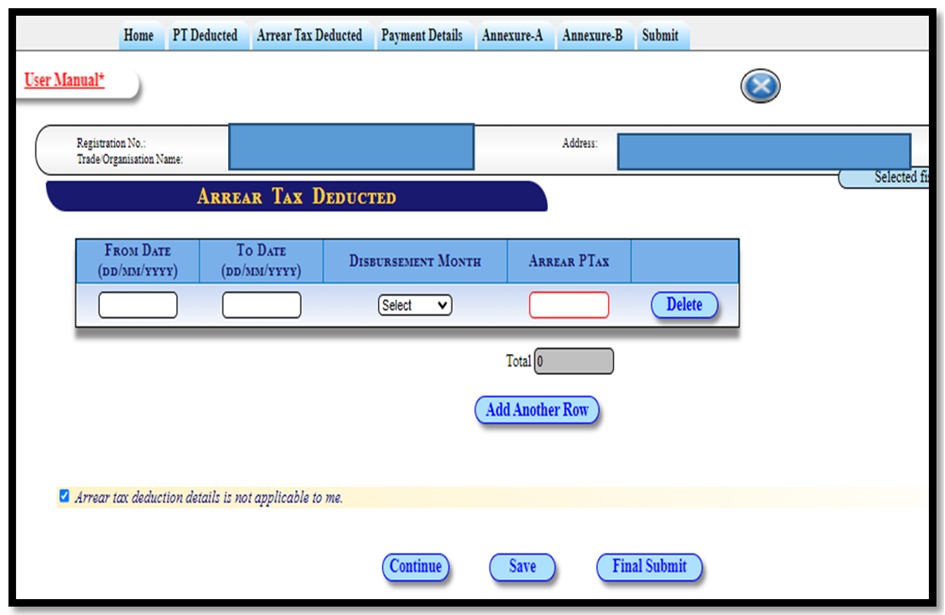
After clicking continue you will be taken to the next page Arrear Tax Deducted(here you need to fill in details of any tax arrears previously. If nothing then simply click on the check box of Arrear tax deduction not applicable to me and click save and continue)

ptax return

Step 6:-

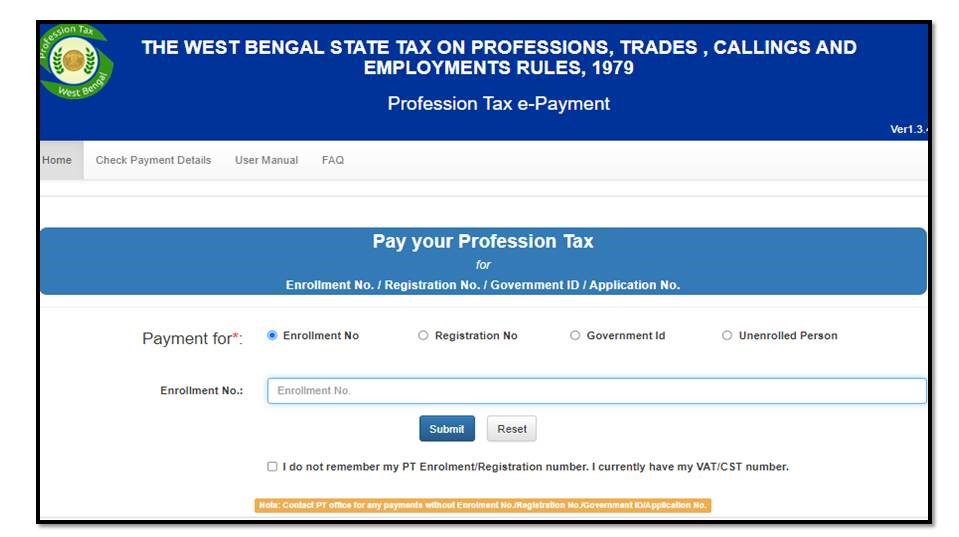
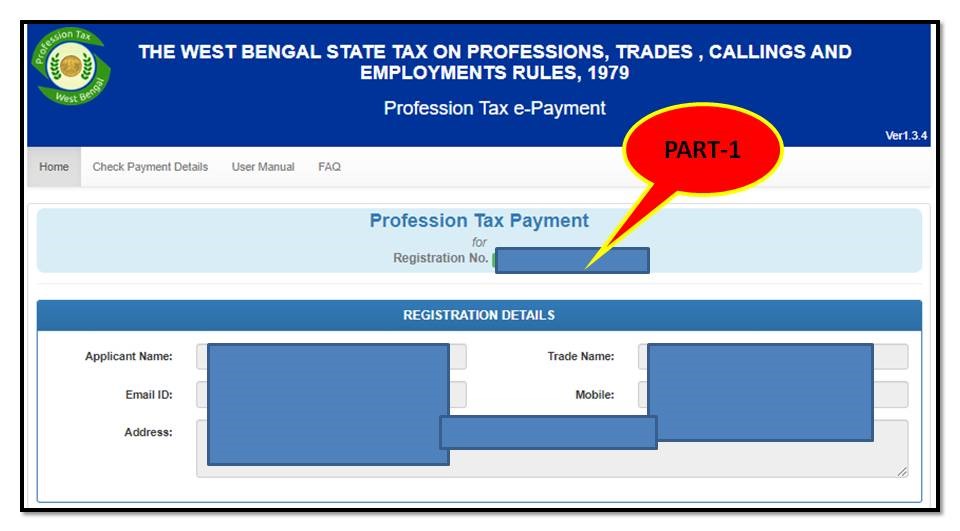
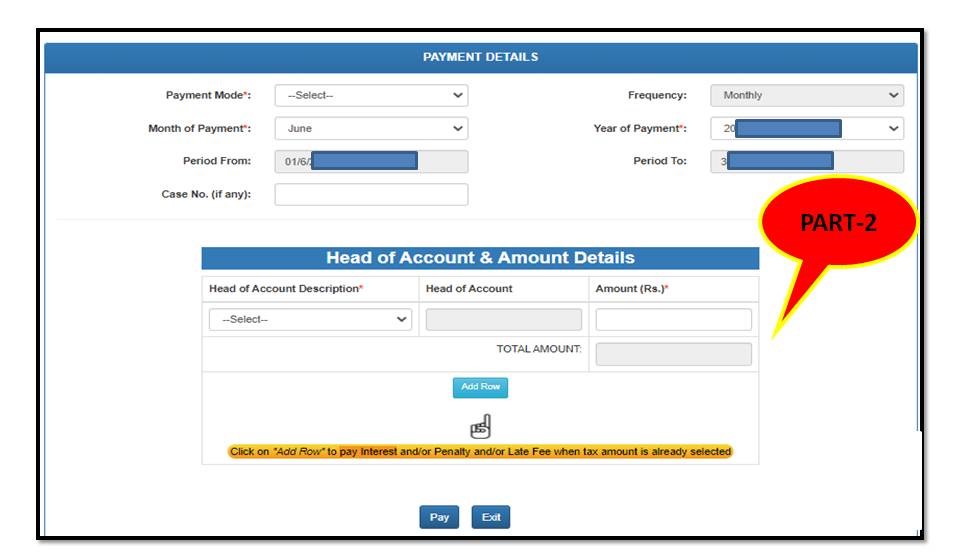
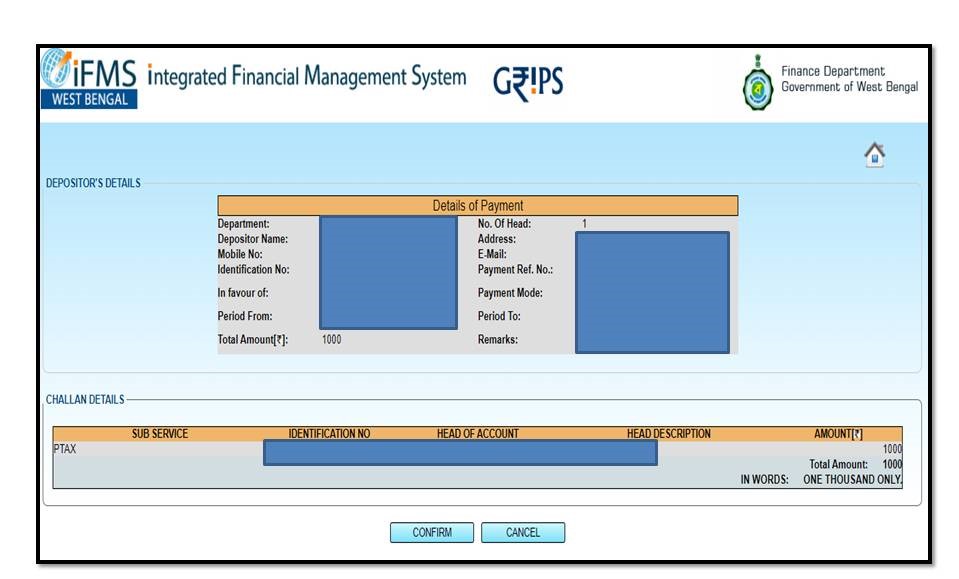
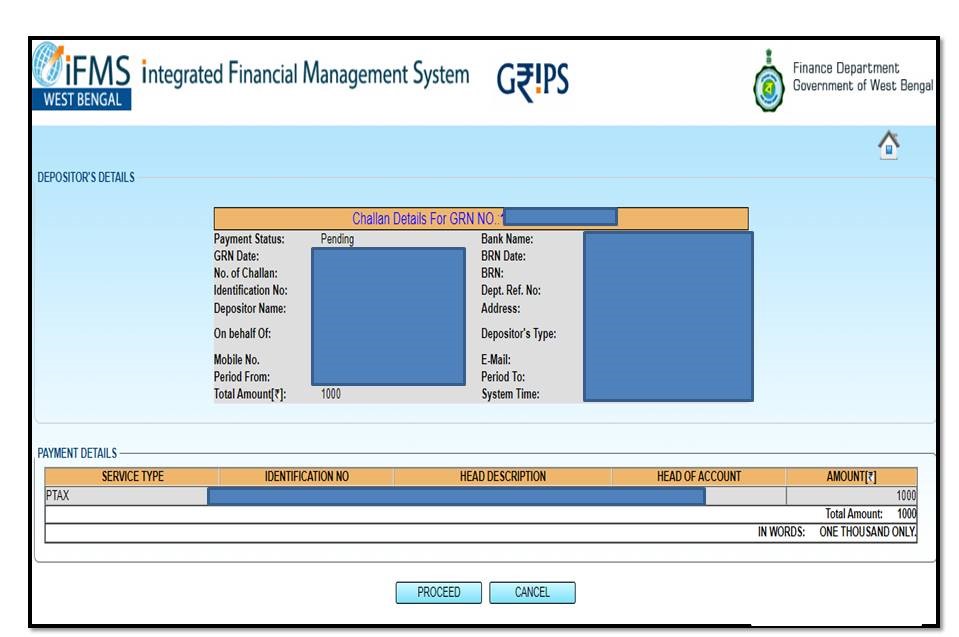
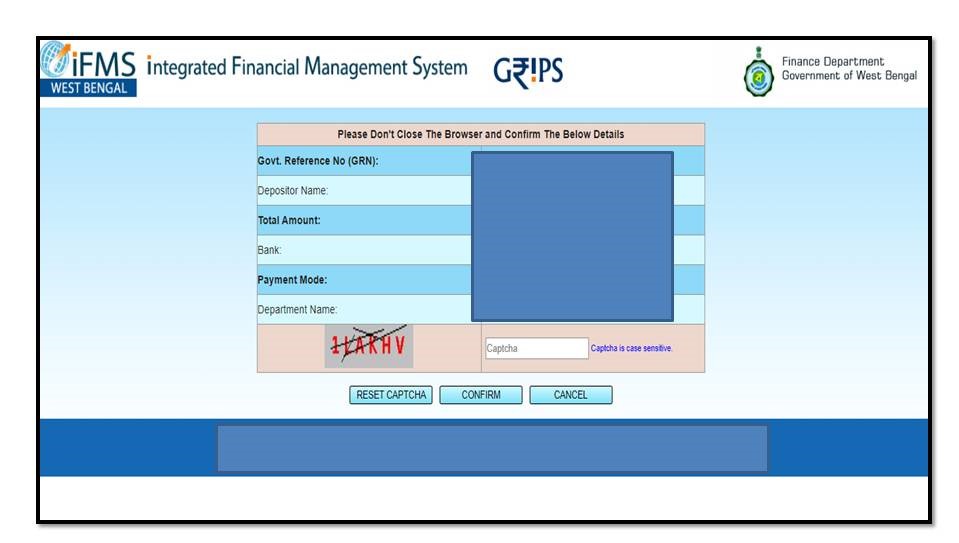
Next, you will be taken to the payment page where details of monthly payments made by you will be displayed (You can check the procedure to pay Ptax online.).

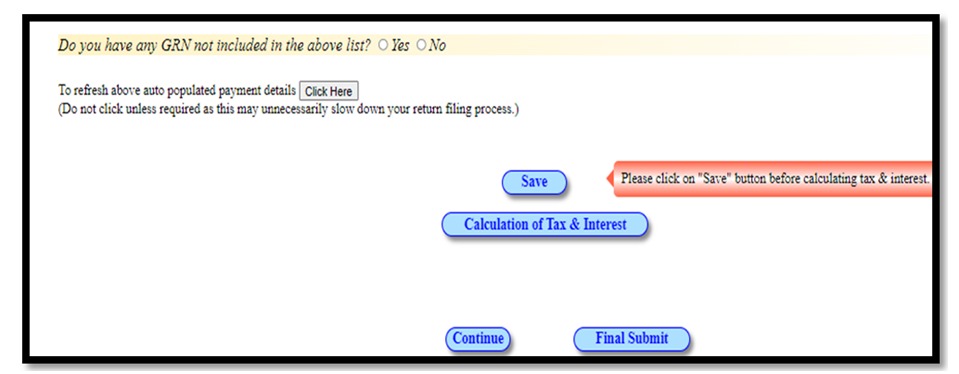
All the challan details with month and amount will be displayed on this page, which you can cross verify and confirm. If you find any challan missing you have a check box there where they ask you if you have any GRN missing you can choose between yes and no accordingly.

Then go to Calculation of Tax and interest, this option helps you to auto calculate the tax and interest amount. If there’s a shortfall you will be asked to pay challan against the same which after payment takes 3 days minimum to get added to the page. After this click on the calculation of Tax and Interest where you will be taken to the final computation page.

ptax return

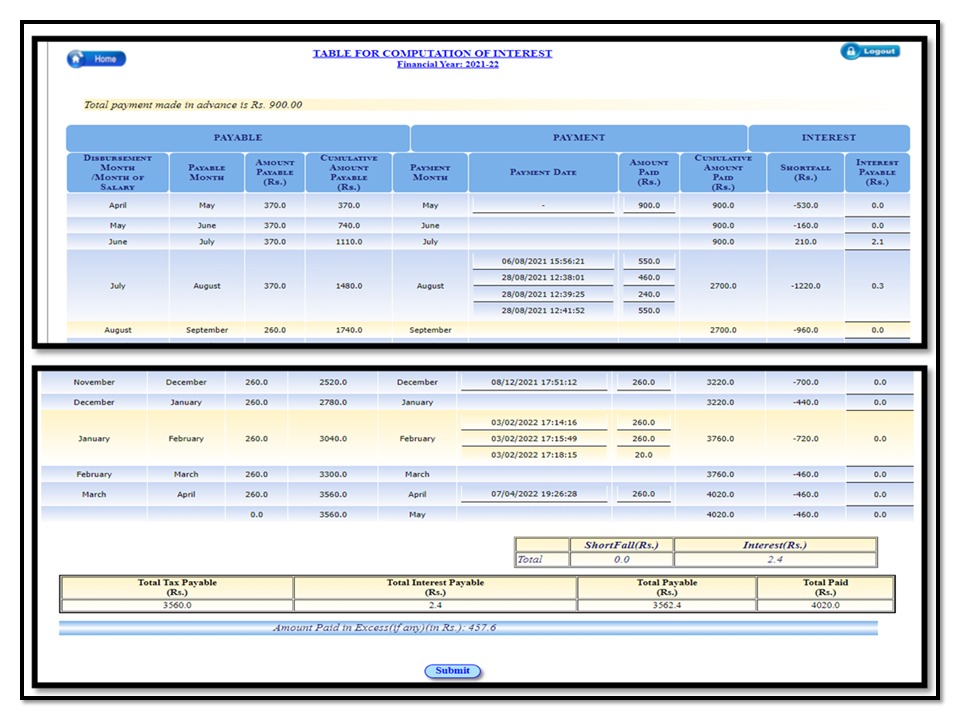
After final completion of the whole procedure, you will be presented with the table which displays the computation of payment and interest.

Check and verify the same and then finally submit it. After submission, an acknowledgment page will be displayed. which you need to download the pdf file where you will get a zip file with payment challan and acknowledgment slip.

You need to send hardcopies of the same to the office of professional tax in your respective charge. and submit the same. Also, carry two copies of the document to get a stamp signed by the respective authority for future reference.

ptax return

Disclaimer note: Source reference: Professional tax, West Bengal-https://wbprofessiontax.gov.in/.

Please visit and ensure the ptax slab, method, or process through source reference / official website. The author is not responsible for any loss at your end.

Thank you for reading…Keep visiting Techiequality.Com

Popular Post