Vodafone Postpaid Bill Payment by Using My Vodafone App 2024

Vodafone Postpaid Bill Payment

Vodafone Postpaid Bill Payment by Using MyVodafone App. :

Hello! Readers, if you are still going to Vodafone store for paying your monthly postpaid mobile bill, then I wish to tell you that stop paying the bill in offline. Here we will guide you on “Vodafone Postpaid Bill Payment by Using My Vodafone App” so that you could able to save your valuable time from your busy schedule. Please ensure that you have already downloaded the My Vodafone App.

Click-Here to pay your Inactive postpaid Vodafone number’s bill.

Click-Here to pay your Inactive postpaid Airtel number’s bill

As you know that there are so many processes that we could able to pay your postpaid bill as

[1] Offline Process.

[2] Online Process.

In Online process you can pay through “My Vodafone App” or also at Official Vodafone website such process we will discuss later in Separate Article. But today we will discuss on Vodafone Postpaid Bill Payment by Using My Vodafone App. Just follow the beneath Steps.

Step by Step Guide on Vodafone Postpaid Bill Payment by Using My Vodafone App.:
Step-1:

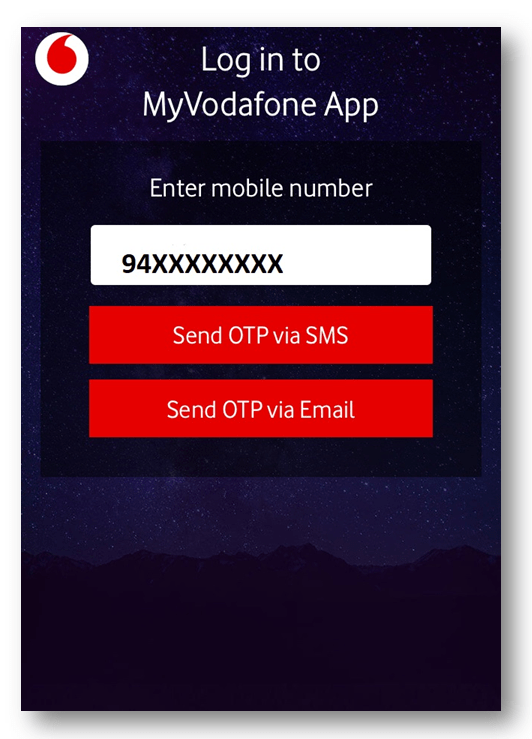
Log-in to MyVodafone App. Enter your Vodafone postpaid mobile number and then send a request for OTP (One time password) via SMS or Email.
Vodafone Postpaid Bill Payment
Step-2:

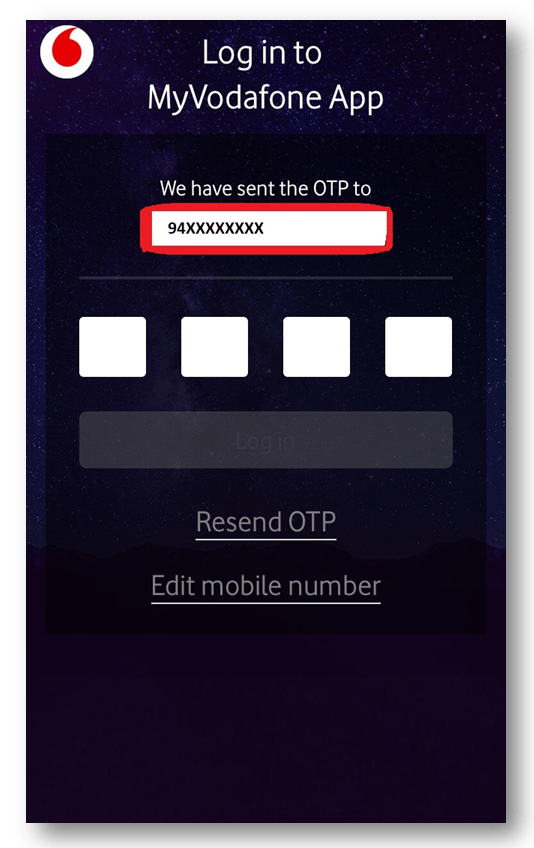
Enter the four digits OTP (One time password) which was received via SMS or Email.
Vodafone Postpaid Bill Payment
Step-3:

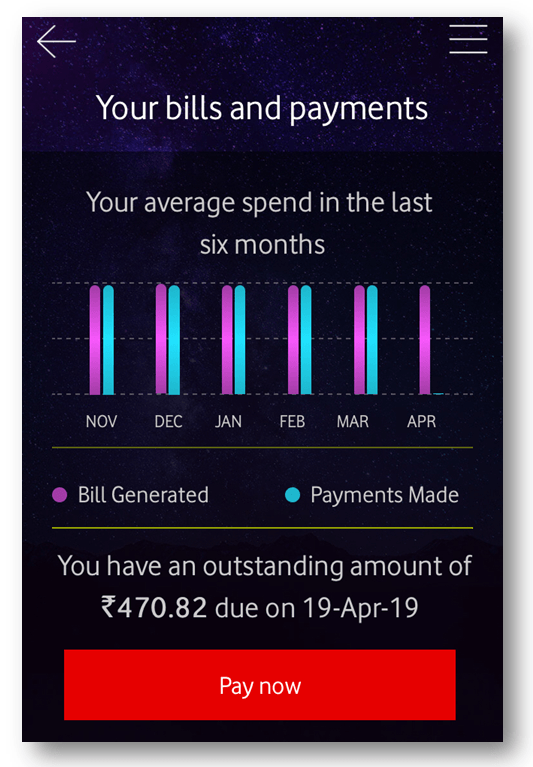
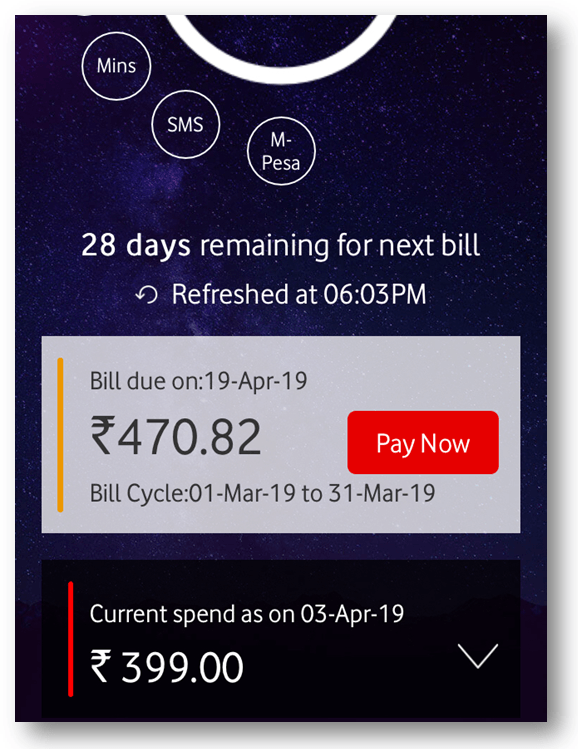
Click on “Pay Now” to proceed the Bill payment.
Vodafone Postpaid Bill Payment
Step-4:

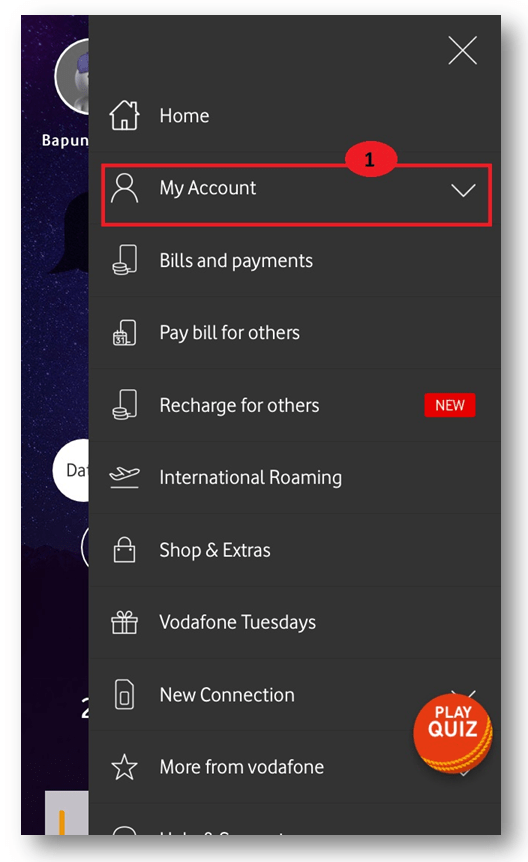
If you are unable to find the bill details in the home screen then click on the “My Account” Section. After clicking on the “my account” section, a new page will appear where you will find the bill details. To proceed with the next process for bill Payment you have to click on the “Pay Now” option.
steps
Figure-4.1
steps
Figure-4.2
Step-5:

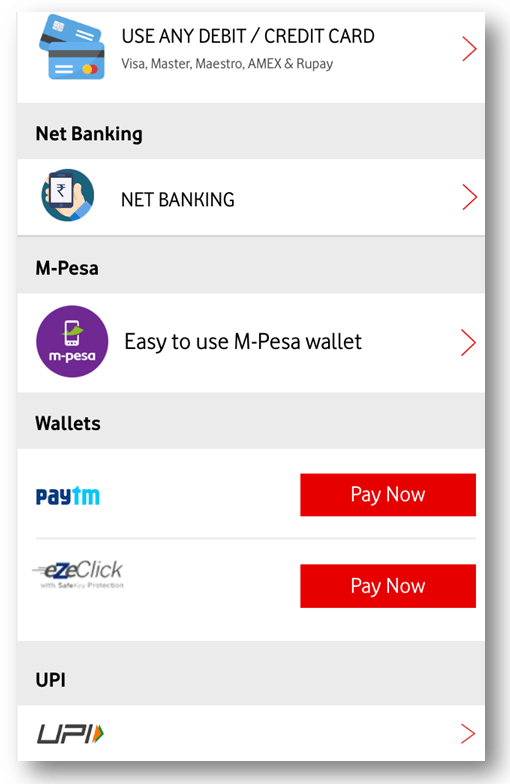
Select Payment methods. Here you could able to pay the bill by using several methods (Credit/Debit card, Net-Banking, M-Pesa, Paytm, UPI ) as per your convenience.
step by step guides
Step-6:

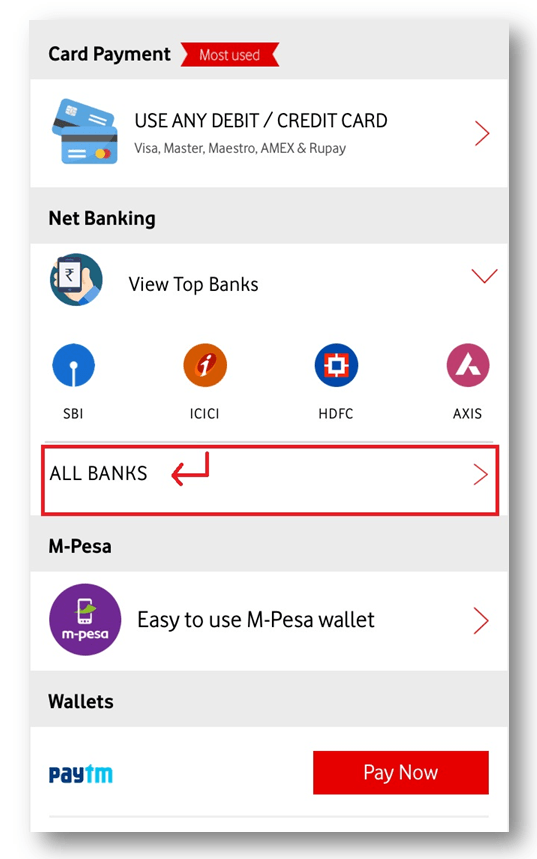
Bill Payment by using Net-Banking. Select the bank and proceed the next by log-in to your net- banking account, next enter the OTP received by your registered mobile number to complete the bill payment transaction.
Vodafone Postpaid Bill Payment
Step-7:

Credit/Debit card Method of payment. Fill up the card details as Types of cards, card number, cardholder name, Valid Till, CVV number, and then process for next. Enter the OTP to complete the transaction.
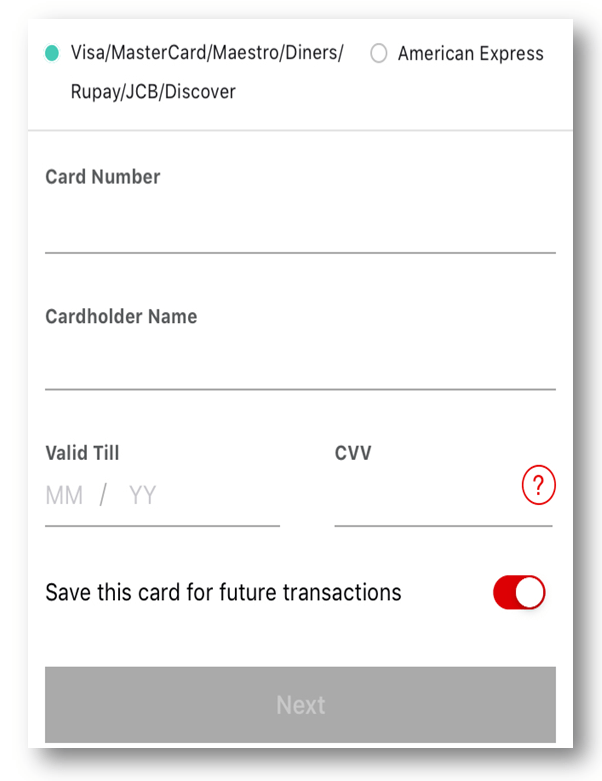
Vodafone Postpaid Bill Payment
Step-8:

Bill Payment through a digital wallet. Select the digital wallet as per the option is given by them, then, login into the wallet and proceed with the payment.

Vodafone Postpaid Bill Payment

Source: Vodafone apps. the interface may change w.r.t app version.

Thank you for reading……Keep visiting Techiequality.Com

Popular Post:

SBI Net Banking Registration Through Online

SBI Net Banking Registration Through Online

SBI Net Banking Registration Through Online | step by step guides:

Hello friends, still you do not have SBI Net banking even after having the SBI Accounts. And also making bill payments, and fund transfers in offline. Guys, what are you thinking now? Are you wishing to register for SBI net banking? Just wait!! Now no need to visit the nearby SBI bank to register the net banking. In this tutorial, I will guide you step by step to register and activate the SBI net banking through online. the details process of SBI Net Banking Registration Through Online is given below, just go through it.

Step by Step Guides:

Step-1: Visit the SBI official website i.e https://retail.onlinesbi.com/retail/login.htm or

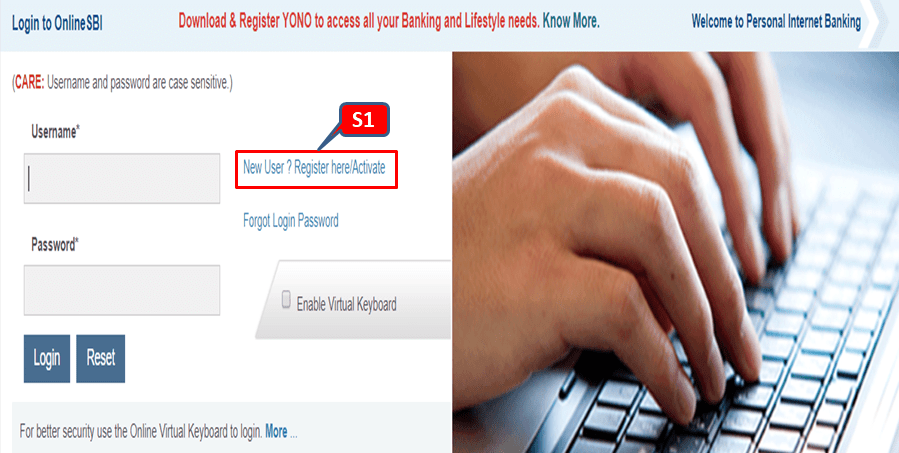
CLICK HERE to directly open the SBI web page. Next, you have to click on “New User/Register here/Active” (here it is marked as S1 in the below red highlighted box). Move on to the step-2 for subsequent processing.

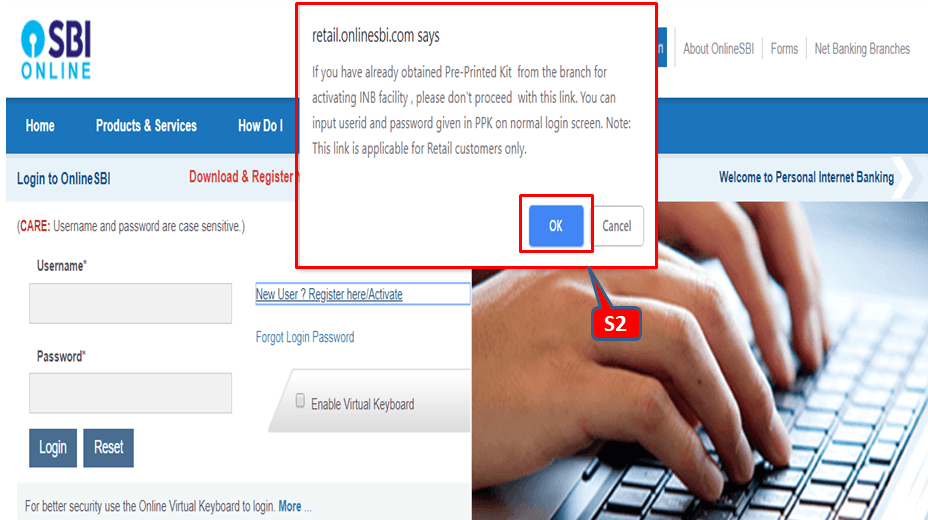
Step-2: In this step, after completion of step-1 you have to click on “ok” (which is marked in the below figure as S2).

SBI Net Banking Registration Through Online

Step-3: 

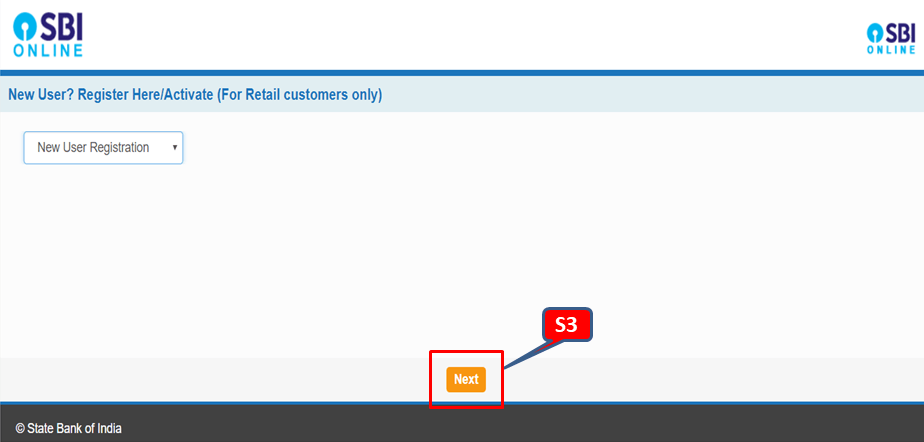
Have you completed the step-2? If yes, then just click on “next”. Which is highlighted in the red box in below figure?

SBI Net Banking Registration Through Online

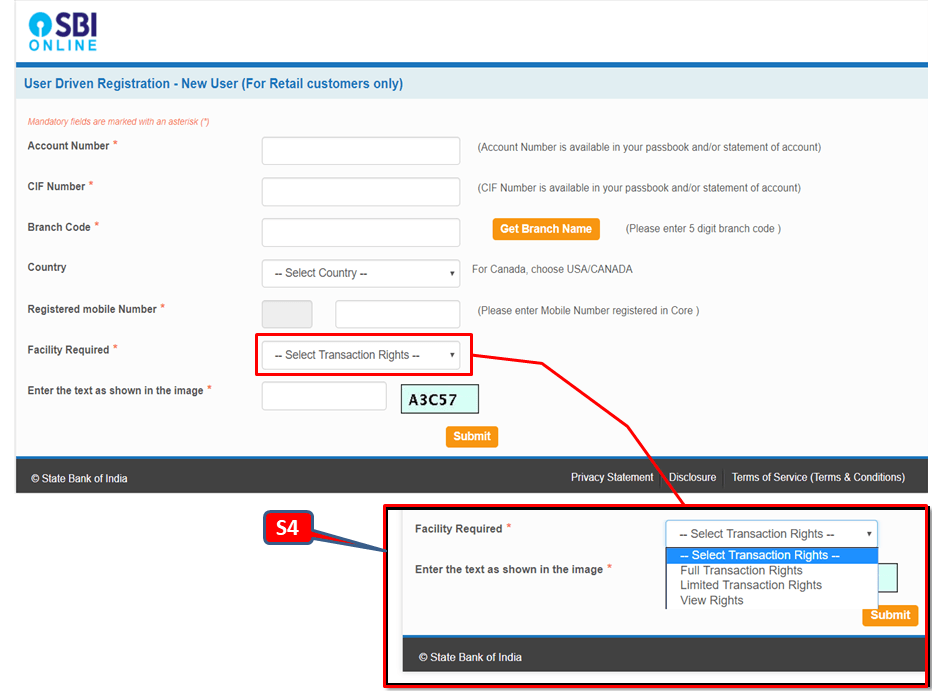
Step-4: Before proceeding with this step; you have to keep ready of account number. CIF number and Branch code. The CIF number is generally available in your passbook. And for the Branch code, there is a search option; by which you can easily find the branch code. In the section of facility requirements; SBI provides three options for their customer as [1] Full transaction rights [2] Limited transaction rights [3] view rights. Here you just select the full transaction rights. After filling up the all options on this page just do submit and continue to the next.

SBI Net Banking Registration Through Online

Step-5: They will send you the OTP to your register number. Next, you have to put the same OTP in the web page for confirmation.

Step-6: After confirming the OTP system will appear on a web page. There you have to choose the first option as “I have my ATM Card” then submit and follow the next step.

Step-7: After completion of step-6. A new page will appear; there you have to fill up and submit the details of the ATM card as [1] card number [2] valid up to [3] cardholder name and ATM pin.

Step-8: After submission of ATM details, the system will show you a temporary username and will ask you to create a password. After creating the password you will receive the temporary username and password to your registered mobile number.

Step-9: With the help of a temporary username and password you have to login the first time to create the permanent login and profile password.

FAQ:

Q1- What are the transaction rights available?

A- Three transaction rights [1] full transaction rights [2] limited transaction rights [3] view rights.

Q2- What do you mean by view rights?

A- You can’t do any transaction but you can view only data.

Q3- What is full transaction rights and limited transaction rights

A-full transaction rights: you can do transactions to any bank and you enjoy full facilities provided by the bank.

Limited transaction rights: you can just do the transaction to the bank those are within the same CIF circle.

Q4- Can I upgrade the transaction right in the future?

A-yes,

Source: SBI.

Thank you for reading……keep visiting Techiequality

Popular Post: