Spicejet web check in link 2024

Spicejet web check in link

Spicejet web check in link:

Still, you are doing check-in in offline at the airport and standing in a long queue. Just wait! Today we will help you regarding so. Please go through the below Link for the web check-in of SpiceJet flight and also we have provided the links to the step-by-step guide on how to do online web check-in for the SpiceJet flight. Just go through the given below Spicejet web check in link to complete the process.

Online Web Check-in Link (SpiceJet Flight)

How to do online web Check-in of SpiceJet Flight? (Step by Step guide).

Spicejet web check in link

Steps:

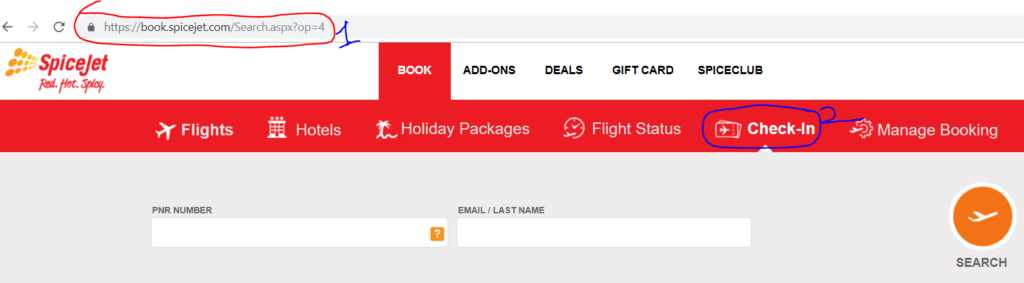
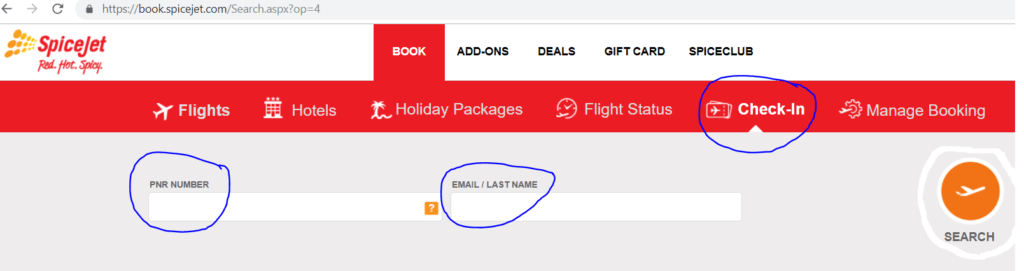
  1. Visit the official website of SpiceJet or Click-here.
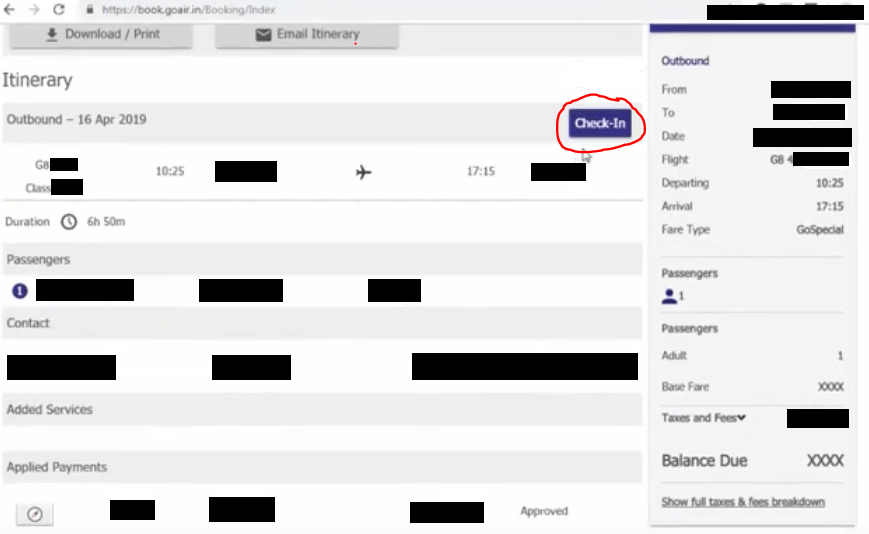
  2. Enter on Check-in option.
Spicejet web check in link

If you would like to proceed to the next step to complete the check-in process and to get the Email Boarding pass then go through the below link.

Link (How to do the web check-in of SpiceJet Flight?).

General Information:

Important steps that you are supposed to obey at the Airport:

  • Print and carry the boarding pass on the day of the departure.
  • Get your photo identification proof checked at the airport security section and boarding gate.
  • If you are carrying merely cabin baggage, you can directly proceed for the security check.
  • If you have check-in baggage, then you should go to the baggage drop counter and deposit your baggage.

FAQ:

Q: How to get the boarding gate No?

A:  You can ask at the Spicejet counter or you can directly check the gate no. on the Flight information display screen.

Q: Shall I get the two boarding passes, if there is a single connecting flight.

A: Yes,

Q: When does the boarding gate close?

A: The Boarding gate will close 25 minutes before departure time.

Q: When does the Check-in counter close?

A: For Domestic: Check-in counters close 45 minutes before departure. But for the International: Check-in counters close 75 minutes before departure.

Note: Please visit the SpiceJet official website to know the timetable, terms, conditions, and stipulated norms. The Mentioned time period is not limited to, You are requested to carefully read and understand the norms( like boarding gate closing time, check-in counter closing time, Allowable Baggage weight for hand and Check-in, dangerous goods & restricted articles, etc.), source: Spicejet website.

Similar Articles:

Goair web check in link

Indigo web check in link…

How to do web check in of Vistara flight?| Step by Step guides

How to do web check in of Spicejet flight?| Step by Step guides

Indigo Web Check in Process | Step by Step guides

How to do web check in of goair flight?| Step by Step guides

How to do web check-in?

Thank you for reading…..Keep visiting Techiequality.com

Popular Post:

Goair web check in link 2024

Goair web check in link

Goair web check in link:

Still, you are doing check-in in offline at the airport and standing in a long queue. Just wait! Today we will help you regarding so. Please go through the below Link for the web check-in for the Goair flight and also we have provided the links of Step by step-by-step guide on how to do online web check-in for a Goair flight. Just go through the given below Goair web check in link to complete the process.

Online Web Check-in Link (GoAir Flight)

How to do online web Check-in of GoAir Flight? (Step by Step guide).

Goair web check in link
Steps:
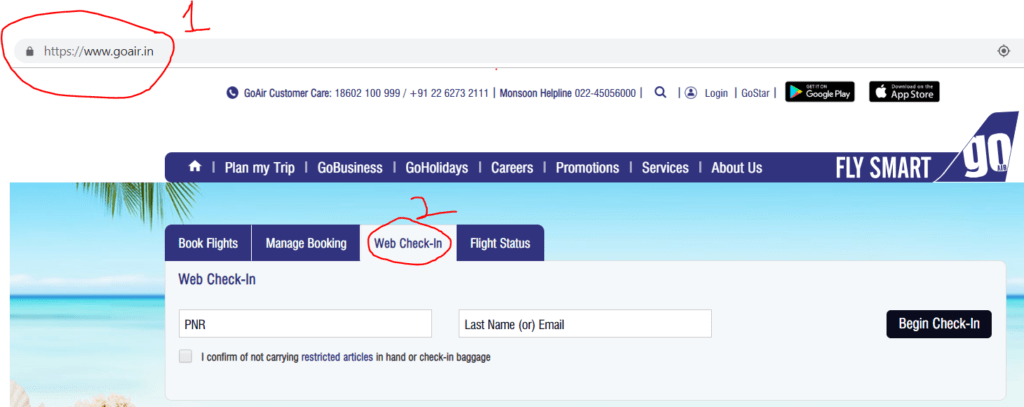
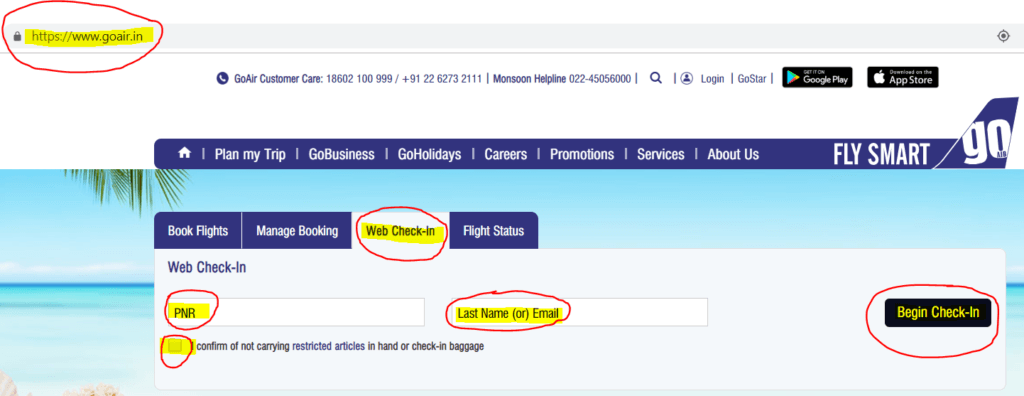
  1. Visit the official website of GoAir or Click-here.
  2. Enter on Check-in option.
Goair web check in link

If you would like to proceed the next step to complete the check-in process and to get the Email Boarding pass then go through the below link.

Link (How to do the web check-in of GoAir Flight?).

General Information:

Important steps that you are supposed to obey at the Airport:

  • Print and carry the boarding pass on the day of the departure.
  • Get your photo identification proof checked at the airport security section and boarding gate.
  • If you are carrying merely cabin baggage, you can directly proceed for the security check.
  • If you have check-in baggage, then you should go to the baggage drop counter and deposit your baggage.
FAQ:

Q: How to get the boarding gate No?

A:  You can ask at the Goair counter or you can directly check the gate no. on the Flight information display screen.

Q: Shall I get the two boarding pass, if there is a single connecting flight?

A: Yes,

Q: When does the boarding gate close?

A: Boarding gate will close 25 minutes before departure time.

Q: When does the Chen-in counter close?

A: For Domestic: Check-in counters close 45 minutes before departure. But for the International: Check-in counters close 75 minutes before departure.

Note: Please visit the GoAir official website to know the timetable, terms, conditions, and stipulated norms. The Mentioned time period is not limited to, You are requested to carefully read and understand the norms( like boarding gate closing time, check-in counter closing time, Allowable Baggage weight for hand and Check-in, dangerous goods & restricted articles, etc.), source: goAir website.

Similar Articles:

Indigo web check in link…

How to do web check in of Vistara flight?| Step by Step guides

How to do web check in of Spicejet flight?| Step by Step guides

Indigo Web Check in Process | Step by Step guides

How to do web check-in?

Thank you for reading…..Keep visiting Techiequality.com

Drop me a line if I can do anything else for you

Popular Post:

Indigo web check in link 2024

Indigo web check in link

Indigo web check in link:

Hello…Readers, Please go through the below Link of the online web check-in of Indigo flight and also we have provided the links of Step a step-by-step guide on how to do the online web check-in of Indigo flight.

Online Web Check-in Link (Indigo Flight)

How to do online web Check-in of Indigo Flight? (Step by Step guide).

Indigo web check in link

Steps:

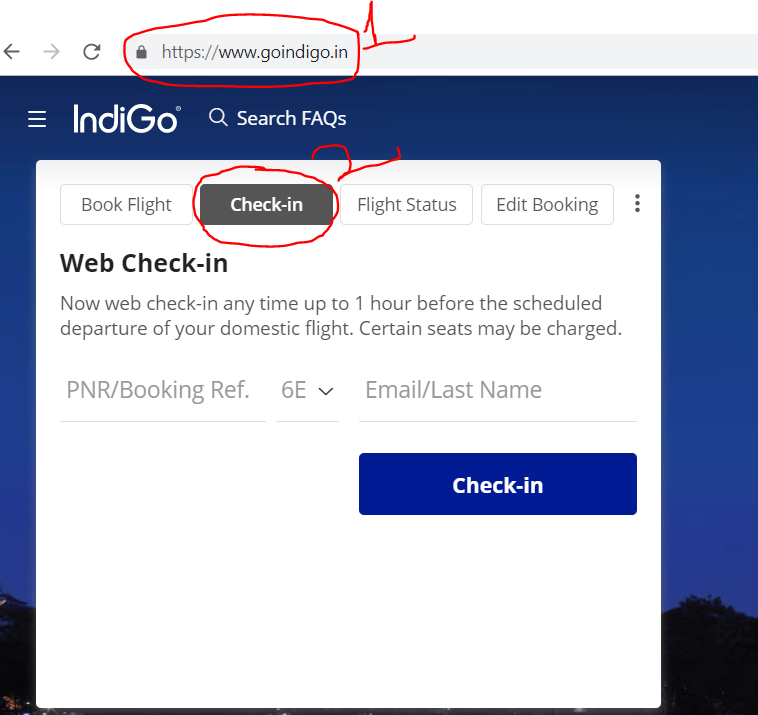
  1. Visit the official website of Indigo or Click-here.
  2. Enter on Check-in option.
Indigo web check in link

If you would like to proceed the next step to complete the check-in process and to get the Email Boarding pass then go through the below link.

Link (How to do the web check-in of Indigo Flight?).

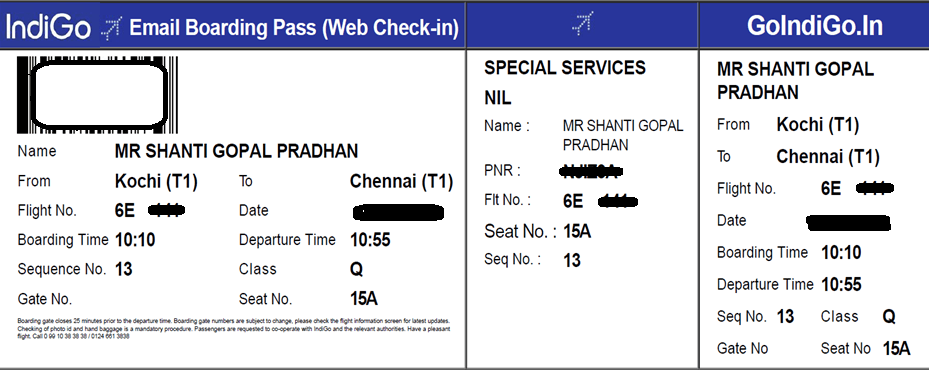
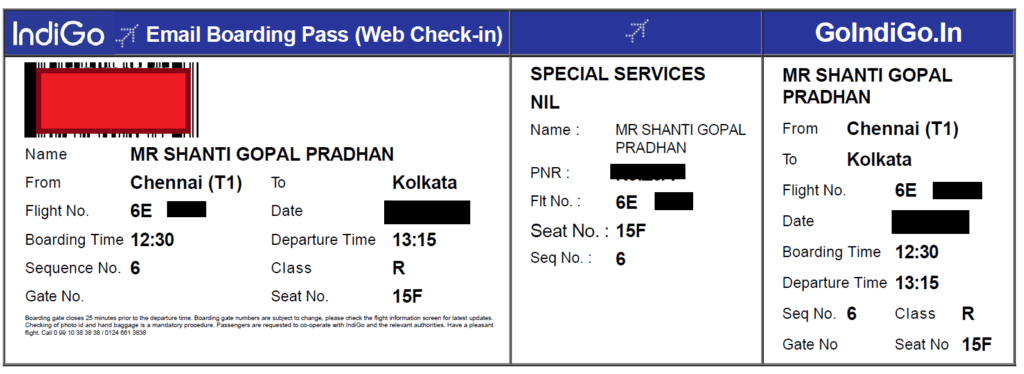
Sample Email Boarding Pass:

Indigo web check in link

General Information:

Important steps that you are supposed to obey at the Airport:

  • Print and carry the boarding pass on the day of the departure.
  • Get your photo identification proof checked at the airport security section and boarding gate.
  • If you are carrying merely cabin baggage, you can directly proceed for the security check.
  • If you have check-in baggage, then you should go to the baggage drop counter and deposit your baggage.

FAQ:

Q: How to get the boarding gate No?

A:  You can ask at Indigo counter or you can directly check the gate no. on the Flight information display screen.

Q: Shall I get the two boarding pass, if there is a single connecting flight?

A: Yes,

Q: When does the boarding gate close?

A: Boarding gate closes 25 minutes prior to the departure time.

Q: When does the Chen-in counter close?

A: For Domestic: Check-in counters close 45 minutes before departure. But for the International: Check-in counters close 75 minutes before departure.

Note: Please visit the Indigo official website to know the timetable, terms, conditions, and stipulated norms. The Mentioned time period is not limited to, You are requested to carefully read and understand the norms( like boarding gate closing time, check-in counter closing time, Allowable Baggage weight for hand and Check-in, dangerous goods & restricted articles, etc.), source: indigo website.

Similar Articles:

How to do web check-in?

How to do web check in of goair flight?| Step by Step guides

Indigo Web Check in Process | Step by Step guides

How to do web check in of Spicejet flight?| Step by Step guides

How to do web check in of Vistara flight?| Step by Step guides

Thank you for reading…..Keep visiting Techiequality.com

Popular Post:

How to do web check in of Vistara flight?| Step by Step guides 2024

How to do web check in of Vistara flight

How to do web check in of Vistara flight:

Hello…Readers, if you are often traveling by flight or first time traveling in flight then today articles is very useful to you. Because today, I will help you to do the web check-in of domestic Vistara flight? So you can save your valuable time and skip the check-in process at Airport (if you are carrying only hand baggage as per stipulated norms of the respective service company). Click-in below link to directly open the Check-in page of Vistara flight.

Vistara (Web Check-in) Link.

How to do web check in of Vistara flight
Steps:
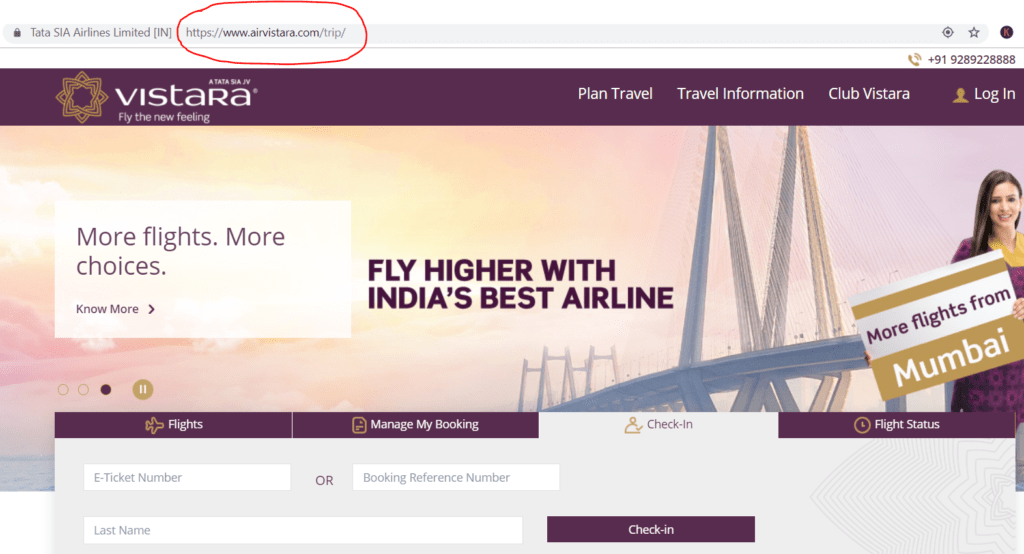
  1. Keep ready of E-ticket number or Booking reference number and the last name of the passenger.
  2. Visit the Vistara official website or Click-here to open the Vistara Web check-in page.
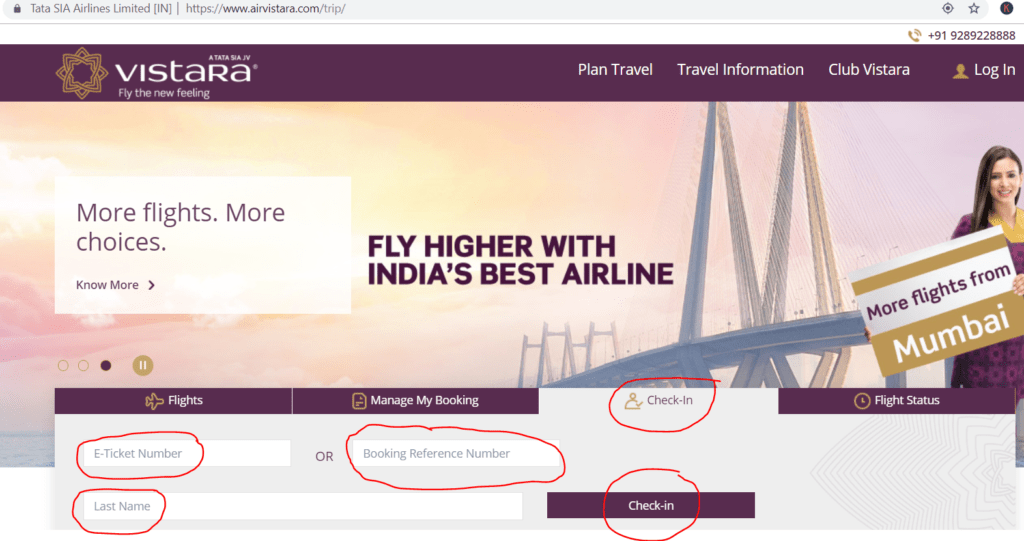
  3. Enter the E-ticket number or Booking reference number and last name of the passenger in the prescribed field.
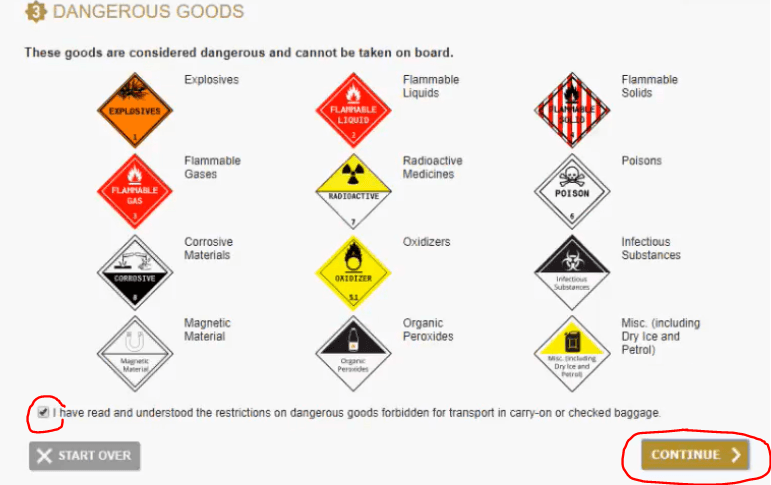
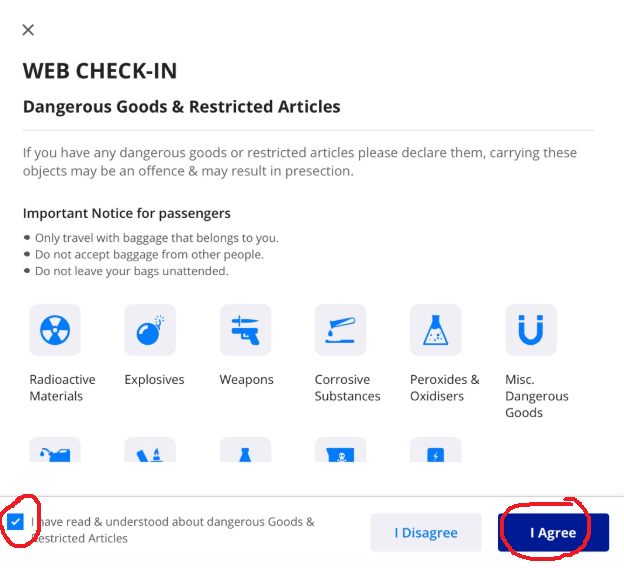
  4. Read and understand the restrictions on dangerous goods and click on the “Continue” option to proceed the next.
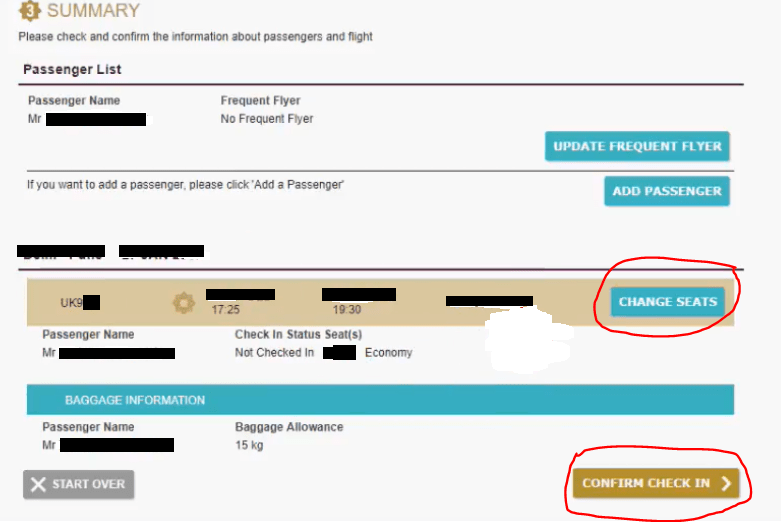
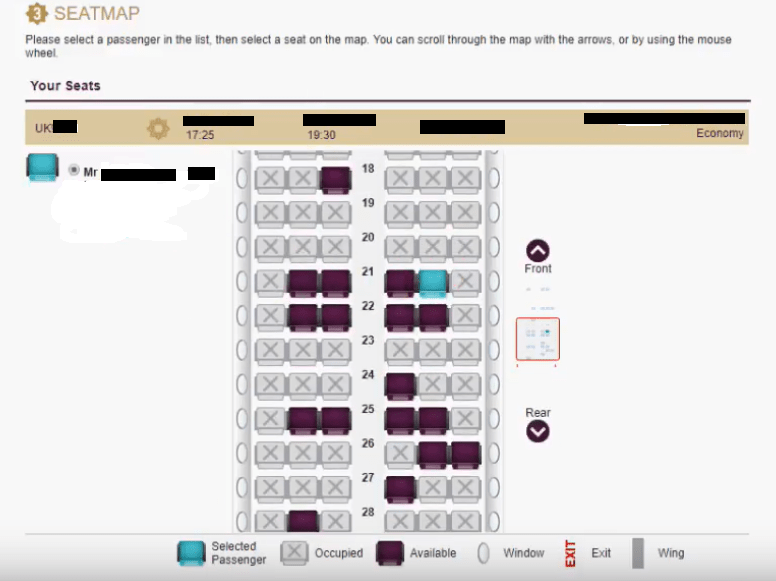
  5. Select the seat as per your choice in click on the “Change Seats” option. And then proceed to the next.
  6. If you select a chargeable seat then you have to pay the amount by online otherwise, proceed to the next step.
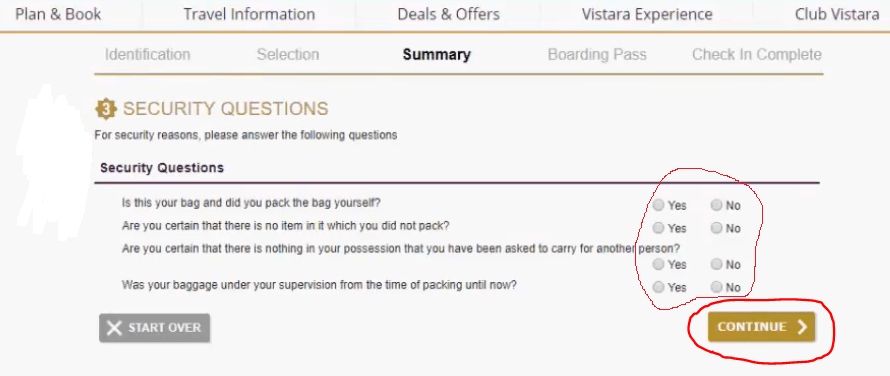
  7. Answer Security Questions.
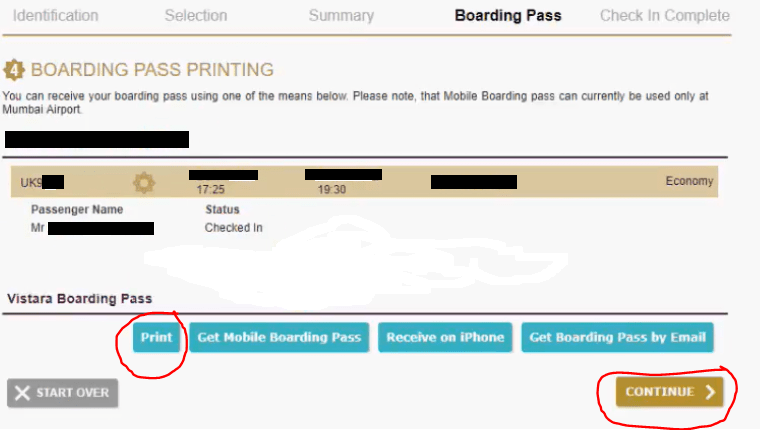
  8. Boarding Pass printing.
  9. Your web check-in is complete.
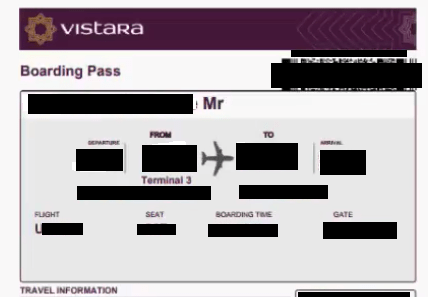
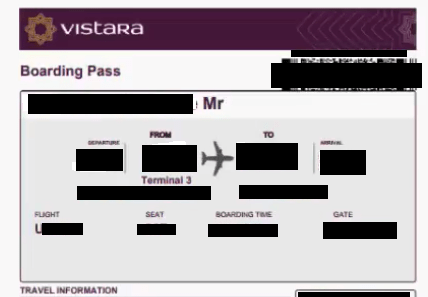
Sample Email Boarding Pass:
Sample Vistara boarding pass
Illustration of the above steps:

Step-1: Vistara Web check-in page:

How to do web check in of Vistara flight
Step-2: Check-in:
How to do web check in of Vistara flight
Step-3: Read and Understand the Stipulated Norms:
How to do web check in of Vistara flight
Step-4: Select Seat:
How to do web check in of Vistara flight
Step-5: Select Seat (Continue):
How to do web check in of Vistara flight
Step-6: Security Questions:
How to do web check in of Vistara flight
Step-7: Boarding Pass Printing:
How to do web check in of Vistara flight
Step-8: Boarding Pass:
process
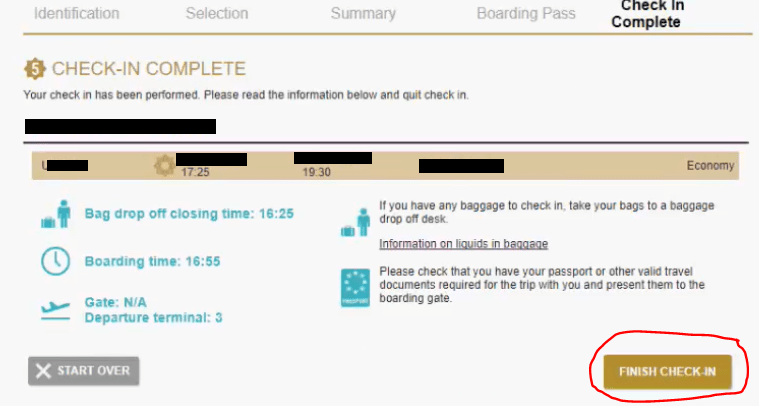
Step-9: Ckeck-in Complete:
process
How to do web check in of Vistara flight

[Note: Photos are provided for reference only.]

Important steps that you are supposed to obey at the Airport:
  • Print and carry the boarding pass on the day of the departure.
  • Get your photo identification proof checked at the airport security section and boarding gate.
  • If you are carrying merely cabin baggage, you can directly proceed for the security check.
  • If you have check-in baggage, then you should go to the baggage drop counter and deposit your baggage.
FAQ:

Q: How to get the boarding gate No?

A:  You can ask at the Vistara counter or you can directly check the gate no. on the Flight information display screen.

Q: Shall I get the two boarding pass, if there is a single connecting flight?

A: Yes,

Q: When does the boarding gate close?

A: The boarding gate closes 25 minutes prior to the departure time.

Q: When does the Chen-in counter close?

A: For Domestic: Check-in counters close 45 minutes before departure. But for the International: Check-in counters close 75 minutes before departure.

Note: Please visit the Vistara official website to know the timetable, terms, conditions, and stipulated norms. The Mentioned time period is not limited to, You are requested to carefully read and understand the norms( like boarding gate closing time, check-in counter closing time, Allowable Baggage weight for hand and Check-in, dangerous goods & restricted articles, etc.), source: Vistara website.

Useful Articles:

How to do web check in of Spicejet flight?| Step by Step guides

How to do web check in of goair flight?| Step by Step guides

Indigo Web Check in Process | Step by Step guides

How to do web check-in?

More on TECHIEQUALITY

Thank you for reading…..Keep visiting Techiequality.com

Should you need any further information, please do not hesitate to contact us…

Popular Post:

How to do web check in of Spicejet flight?| Step by Step guides 2024

How to do web check in of Spicejet flight

How to do web check in of Spicejet flight:

Hello…Readers, if you are often traveling by flight or first time traveling in flight then today articles is very useful to you. Because today, I will help you to do the web check-in of domestic Spicejet flight? So you can save your valuable time and skip the check-in process at Airport (if you are carrying only hand baggage as per stipulated norms of the respective service company). Click-in below link to directly open the Check-in page of Spicejet flight.

Spicejet (Web Check-in) Link

How to do web check in of Spicejet flight
Steps:
  1. Keep ready of Last Name/Email of the passenger and PNR Number of the e-ticket.
  2. Visit the Spicejet official website or Click-here to open the Spicejet Web check-in page.
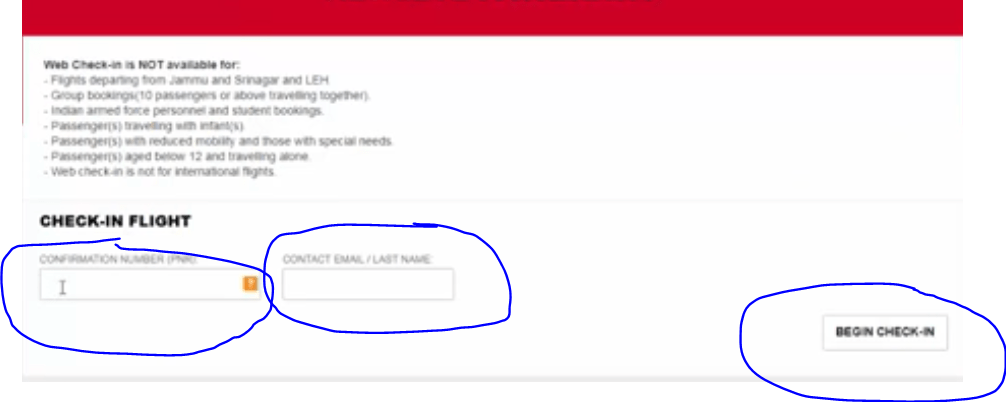
  3. Enter the Last Name/Email of the passenger and PNR Number of e-ticket in the prescribed field.
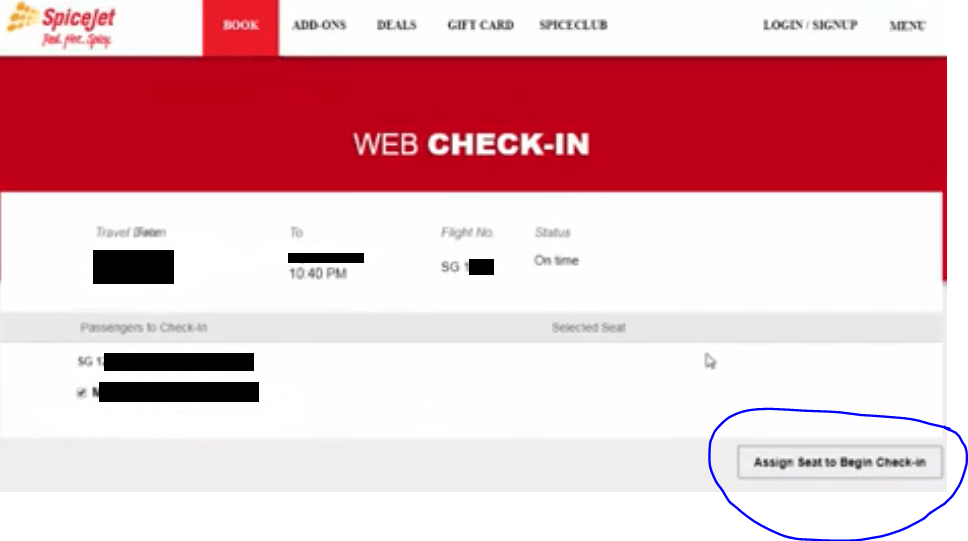
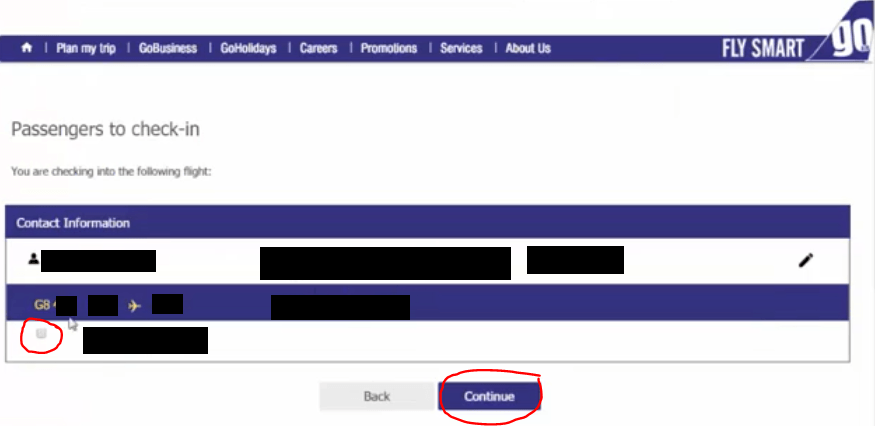
  4. Select the Passenger name.
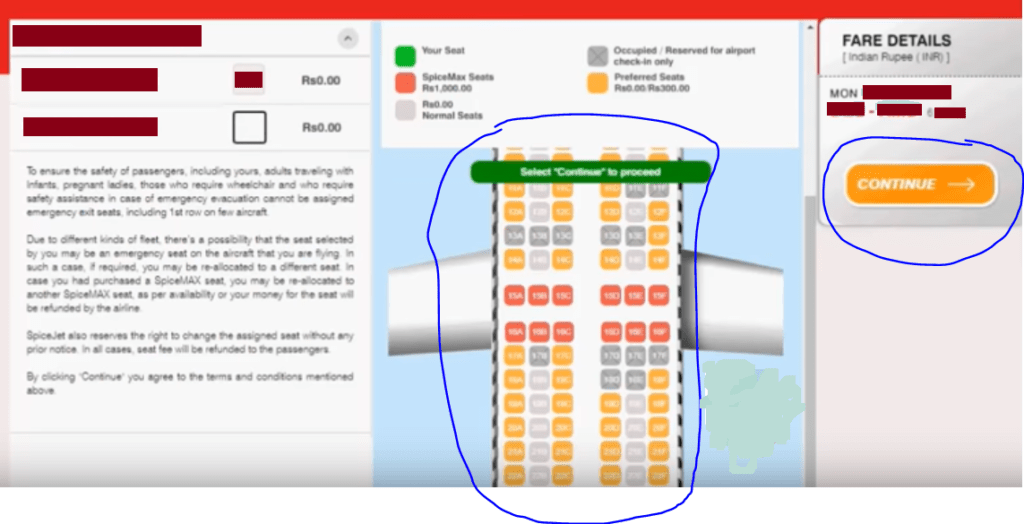
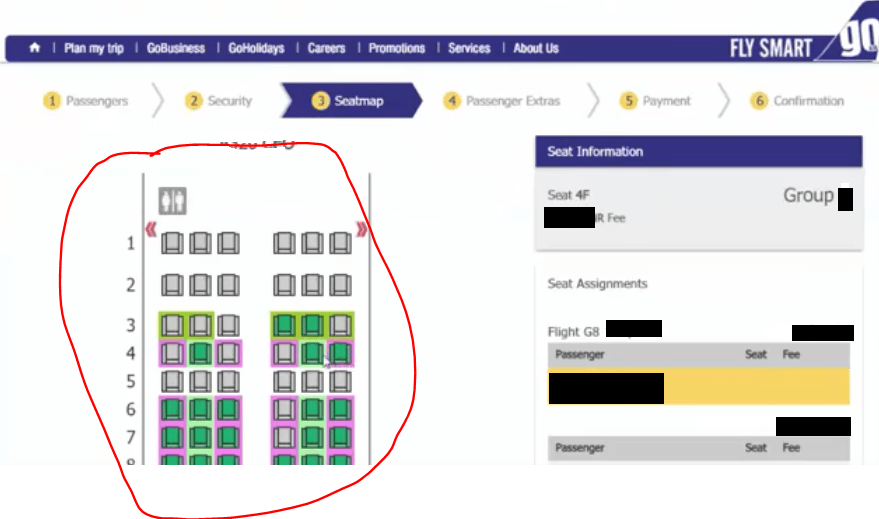
  5. Select the seat as per your choice.
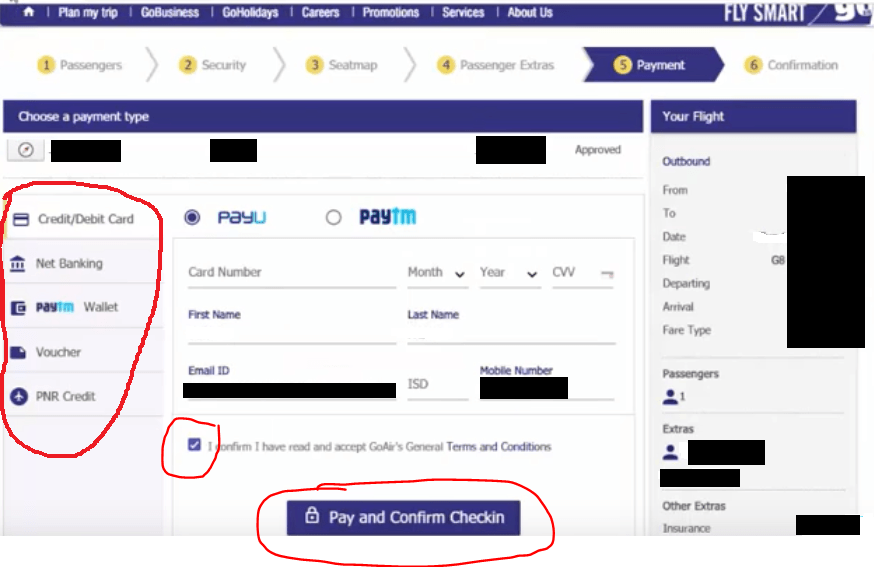
  6. If you select chargeable seat then you have to pay the amount by online otherwise, proceed to next step.
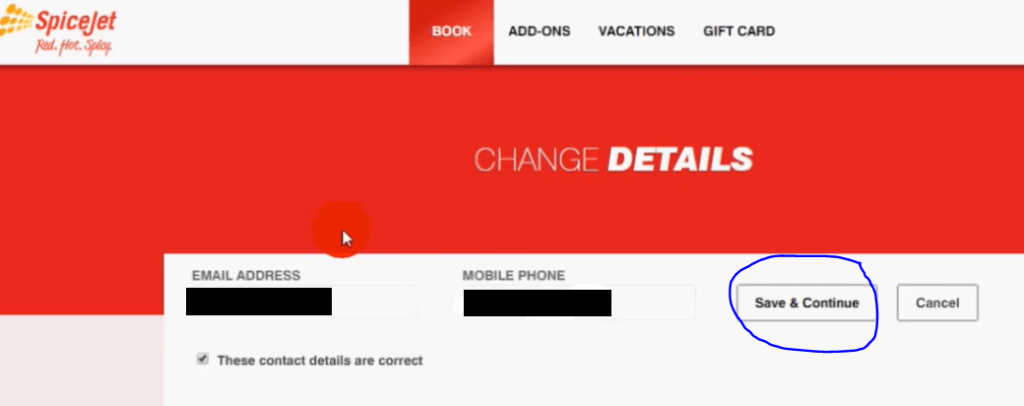
  7. You can edit the details of Passenger (like email id, mobile number), otherwise, enter on “continue” option to move-on to next process.
  8. Your web check-in is successful.

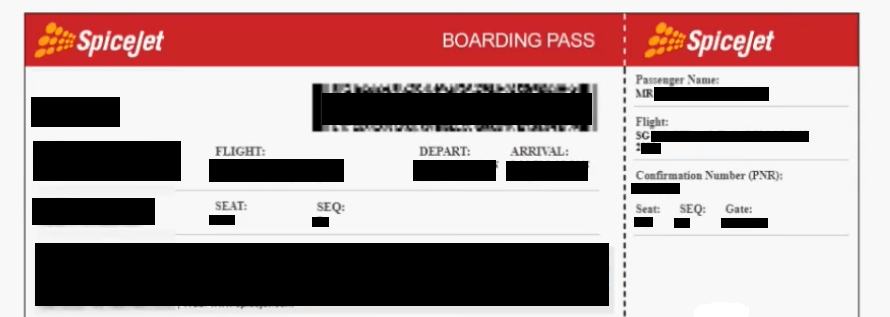
Note: You can print the Email boarding pass and also can send to your register mail id.

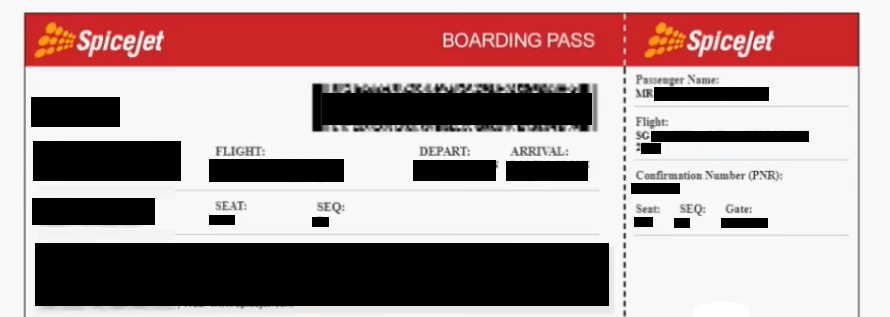
Sample Email Boarding Pass:
How to do web check in of Spicejet flight
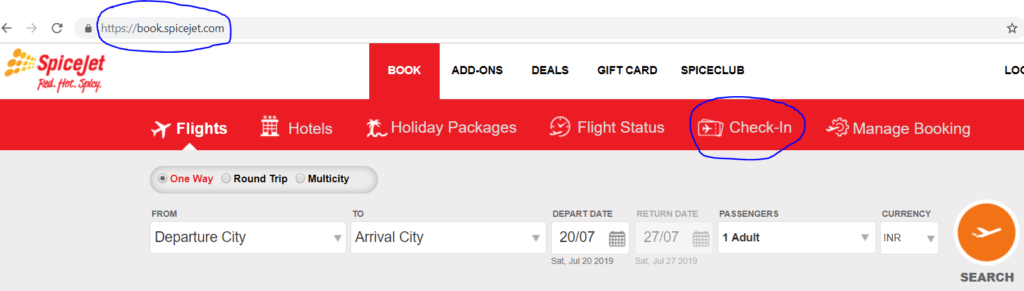
Illustration of the above steps:

Step-1: Spicejet Web check-in page:

How to do web check in of Spicejet flight
Step-2: Check-in:
How to do web check in of Spicejet flight
Step-3: Check-in (Continue page):
How to do web check in of Spicejet flight
Step-4: Select the Passenger:
process
Step-5: Select Seat:
How to do web check in of Spicejet flight
Step-6: Change Details (If need):
step by step guides
How to do web check in of Spicejet flight
Step-7: Email Boarding Pass sample Copy for your reference and understand:
step by step guide
How to do web check in of Spicejet flight

[Note: Photos are provided for reference only.]

Important steps that you are supposed to obey at Airport:
  • Print and carry the boarding pass on the day of the departure.
  • Get your photo identification proof checked at the airport security section and boarding gate.
  • If you are carrying merely cabin baggage, you can directly proceed for the security check.
  • If you have check-in baggage, then you should go to the baggage drop counter and deposit your baggage.
FAQ:

Q: How to get the boarding gate No?

A:  You can ask at the Spicejet counter or you can directly check the gate no. on the Flight information display screen.

Q: Shall I get the two boarding pass, if there is a single connecting flight?

A: Yes,

Q: When does the boarding gate close?

A: Boarding gate closes 25 minutes prior to the departure time.

Q: When does the Chen-in counter close?

A: For Domestic: Check-in counters close 45 minutes before departure. But for the International: Check-in counters close 75 minutes before departure.

Note: Please visit the Spicejet official website to know the timetable, terms, conditions, and stipulated norms. The Mentioned time period is not limited to, You are requested to carefully read and understand the norms ( like boarding gate closing time, check-in counter closing time, Allowable Baggage weight for hand and Check-in, dangerous goods & restricted articles, etc.), source: Spicejet website.

Useful Articles:

How to do web check in of goair flight?| Step by Step guides

Indigo Web Check in Process | Step by Step guides

How to do web check-in?

How to Register Mobile Number in Gramin Bank Account?

More on TECHIEQUALITY

Thank you for reading…..Keep visiting Techiequality.com

Should you need any further information, please do not hesitate to contact us…

Popular Post:

How to do web check in of goair flight?| Step by Step guides 2024

How to do web check in of goair flight

How to do web check-in of Goair flight:

Hello…Readers, if you are often traveling by flight or first time traveling in flight then today articles is very useful to you. Because today, I will help you to do the web check-in of domestic GoAir flight. So you can save your valuable time and skip the check-in process at the Airport (if you are carrying only hand baggage as per stipulated norms of the respective service company). Click-in below link to directly open the Check-in page of goair flight.

GoAir (Web Check-in)

How to do web check in of goair flight
Steps:
  1. Keep ready of PNR of the e-ticket and the Email/Last Name of the passenger.
  2. Visit the Goair official website or Click-here to open the Goair Web check-in page.
  3. Enter the PNR and Email/Last Name of a passenger in the prescribed field.
  4. Select the Passenger name.
  5. Select the seat as per your choice.
  6. If you select a chargeable seat then you have to pay the amount by online otherwise, enter on “confirm”.
  7. Your web check-in is successful.

Note: You will receive a soft copy Boarding Pass in your mail ID.

Sample Email Boarding Pass:
How to do web check in of goair flight
Illustration of the above steps:

Step-1: Web check-in

How to do web check in of goair flight
Step-2: Check-in
How to do web check in of goair flight
Step-3: Passenger:
How to do web check in of goair flight
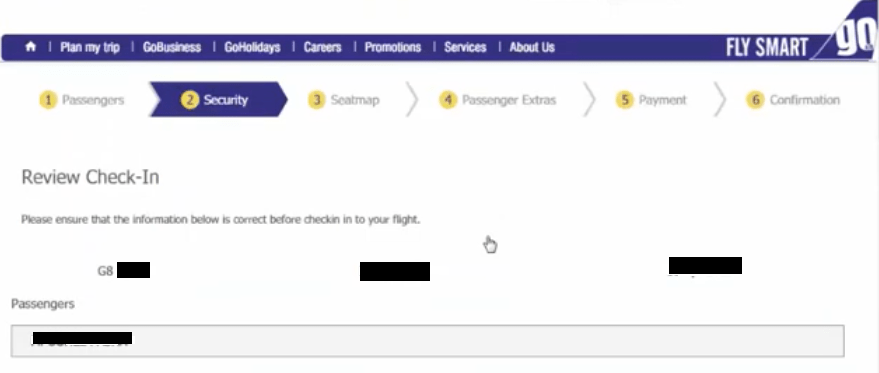
Step-4: Security:
How to do web check in of goair flight
Step-5: Seat-map:
step by step guides
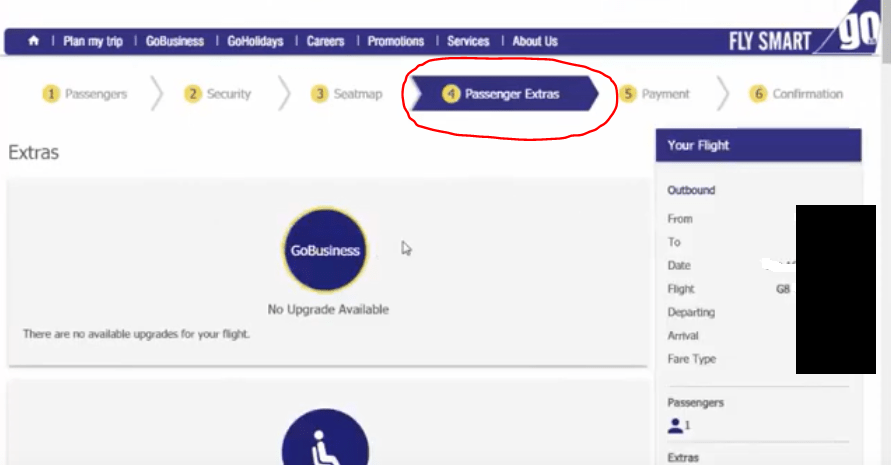
Step-6: Passenger Extras:
step by step guides
Step-7: Payment:
step by step guides

[Note: Photos are mentioned here for reference only.]

Important steps that you are supposed to obey at the Airport:
  • Print and carry the boarding pass on the day of the departure.
  • Get your photo identification proof checked at the airport security section and boarding gate.
  • If you are carrying merely cabin baggage, you can directly proceed for the security check.
  • If you have check-in baggage, then you should go to the baggage drop counter and deposit your baggage.
FAQ:

Q: How to get the boarding gate No?

A:  You can ask at the GoAir counter or you can directly check the gate no. on the Flight information display screen.

Q: Shall I get the two boarding pass, if there is a single connecting flight?

A: Yes,

Q: When does the boarding gate close?

A: The boarding gate closes 25 minutes prior to the departure time.

Q: When does the Chen-in counter close?

A: For Domestic: Check-in counters close 45 minutes before departure. But for the International: Check-in counters close 75 minutes before departure.

Note: Please visit the Goair official website to know the timetable, terms, conditions, and stipulated norms. The Mentioned time period is not limited to, You are requested to carefully read and understand the norms( like boarding gate closing time, check-in counter closing time, Allowable Baggage weight for hand and Check-in, dangerous goods & restricted articles, etc.), source: goair website.

Useful Articles:

Indigo Web Check in Process | Step by Step guides

How to do web check-in?

More on TECHIEQUALITY

Thank you for reading…..Keep visiting Techiequality.com

Should you need any further information, please do not hesitate to contact us…

Popular Post:

Indigo Web Check in Process | Step by Step guides 2024

Indigo Web Check in Process

How to do web check-in of Indigo flight:

Hello…Readers, if you are often traveling by flight or first time traveling in flight then today’s articles are very useful to you. Because today, I will help you to do the web check-in of domestic Indigo flight? So you can save your valuable time and skip the check-in process (if you are carrying only hand baggage as per stipulated norms of a respective service company). Click on the given below link to directly open the Check-in page and also follow the step-by-step guides to know the Indigo Web Check in Process.

IndiGo (Web Check-in) Link.

Indigo Web Check in Process
Indigo Web Check-in Process
Steps:
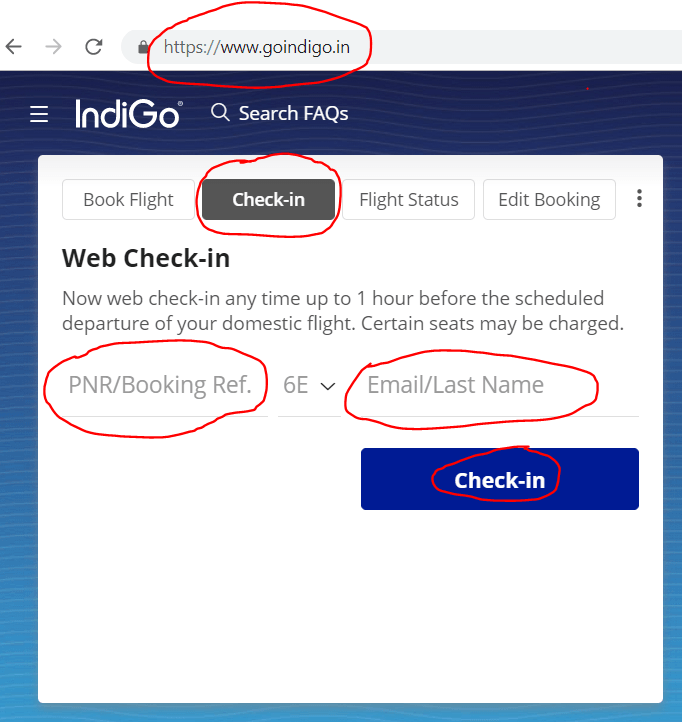
  1. Keep ready of PNR/Booking reference of e-ticket and Email/Last Name of the passenger.
  2. Visit the Indigo official website as https://www.goindigo.in/ or Click-here to directly go to the Indigo Web check-in page.
  3. Enter the PNR/Booking Ref. and Email/Last Name in the prescribed field.
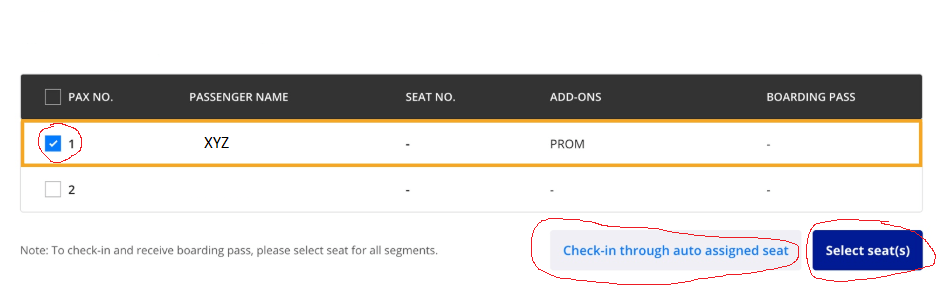
  4. Select the Passenger name.
  5. You can select the seat as per your choice or you can check-in through the auto-assigned seat.
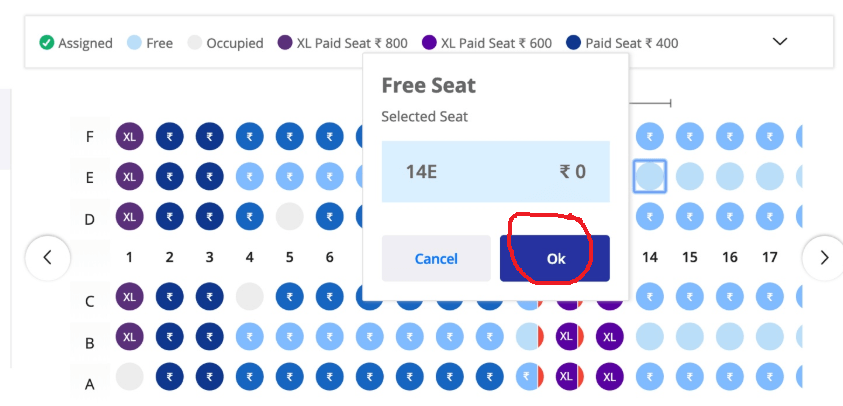
  6. Select the seat as you wish.
  7. Read & Understood the stipulated norms and click on “I Agree”.
  8. If you are selected chargeable seat then you have to pay the amount online.
  9. Your web check-in is successful.

Note: You will receive a soft copy Boarding Pass in your mail Id.

Sample Email Boarding Pass:
Indigo Web Check in Process

Illustration of the above steps:

Step-1
Indigo Web Check in Process
Step-2:
Indigo Web Check in Process
Step-3:
Indigo Web Check-in Process
Step-4:
process
step -4
Step-5:
boarding pass
Indigo Web Check-in Process

[Note: Photos are mentioned here for reference only.]

Important steps that you are supposed to obey at the Airport:
  • Print and carry the boarding pass on the day of the departure.
  • Get your photo identification proof checked at the airport security section and boarding gate.
  • If you are carrying merely cabin baggage, you can directly proceed for the security check.
  • If you have check-in baggage, then you should go to the baggage drop counter and deposit your baggage.
FAQ:

Q: How to get the boarding gate No?

A:  You can ask at the Indigo counter or you can directly check the gate no. on the Flight information display screen.

Q: Shall I get the two boarding pass, if there is a single connecting flight?

A: Yes,

Q: When does the boarding gate close?

A: The boarding gate closes 25 minutes prior to the departure time.

Q: When does the Chen-in counter close?

A: For Domestic: Check-in counters close 45 minutes before departure. But for the International: Check-in counters close 75 minutes before departure.

Note:

Please visit the Indigo official website to know the timetable, terms, conditions, and stipulated norms. The Mentioned time period is not limited to, You are requested to carefully read and understand the norms( like boarding gate closing time, check-in counter closing time, Allowable Baggage weight for hand and Check-in, dangerous goods & restricted articles, etc.), source: indigo official website.

Useful Articles:

How to do web check-in?

Different Platform of Digital Marketing

How to Port Phone Number to other service Provider for both Postpaid & Prepaid

Thank you for reading…..Keep visiting Techiequality.com

If you require any further information, feel free to contact us.

Popular Post:

How to do web check-in 2024

How to do web check-in

Web check-in process of domestic flight:

Hello…Readers, if you are often traveling by flight or first time traveling in flight then today’s articles are very useful to you because today, I will help you to do the web check-in for a domestic flight. So you can save your valuable time and skip the offline check-in process (if you are carrying only hand baggage as per stipulated norms of a respective service company). below are the steps provided to know How to do web check-in? just go through the process.

How to do web check-in
[online process]
Steps:
  1. You must keep ready two important things i.e. PNR/Booking reference of the e-ticket and Email/Last Name (Surname) of the passenger.
  2. Visit the respective service company’s online check-in page.
  3. Enter the PNR/Booking reference of the e-ticket and the Email/Last Name (Surname) of the passenger in the fields to initiate the check-in process.
  4. Select the Passenger name
  5. You can select the seat as you wish or you can check in with the auto-assigned seat.
  6. Select the seat (some seats may be chargeable and some seats are free)
  7. Read the stipulated norms and click on “I Agree”.
  8. If you are selected a chargeable seat then you are supposed to pay the amount online.
  9. Your web “check-in” is successful.

As you all know the individual airline service sector has separate URL for processing. hence, we have mentioned the below details process of some common airlines for your help. just go through the below links.

Click on the below links to open the check-in web page of…

we understand your valuable time, if we can save your time then you can utilize the same for other purposes. That is why we have given the above links in one place.

Note: Please read the terms, conditions, and stipulated norms of the service company/sector before doing the web check-in.

Thank you for reading…..Keep visiting Techiequality.com

If you require any further information, feel free to contact us.

Popular Post:

How to Convert Vodafone Prepaid to Postpaid by Online |Offline |MyVodafone App.

Vodafone Prepaid to Postpaid

How to Convert Vodafone Prepaid to Postpaid by Online |Offline |MyVodafone App.

Vodafone Prepaid to Postpaid Conversion Process: – Hello! Readers, today, we will guide you to convert your Vodafone Prepaid number to Postpaid by using any one method among three as offline, online or MyVodafone app.  Basically, you could able to convert Vodafone Prepaid to postpaid through [1] offline process, or [2] online process by using MyVodafone App.

Similarly, you Could also able to convert Airtel Prepaid number to Postpaid, Click-Here to Know more…

Vodafone Prepaid to Postpaid
Offline Process of Vodafone Prepaid to Postpaid Conversion:

Step-1: You have to visit the nearby Vodafone Store/Vodafone mini store along with ID proof, Address Proof, and one copy color photo.

(Note-ID Proof/Address Proof: Aadhaar Card, Voter ID, Electric bill, Telephone bill, Driving License, etc.)

Step-2: Fill up the Migration/conversion form.

Step-3: Submit the Form along with essential documents and collect New SIM.

Step-4: Insert the new SIM after disconnection of Network in old prepaid SIM.   

Online Process of Vodafone Prepaid to Postpaid Conversion by using MyVodafone App:

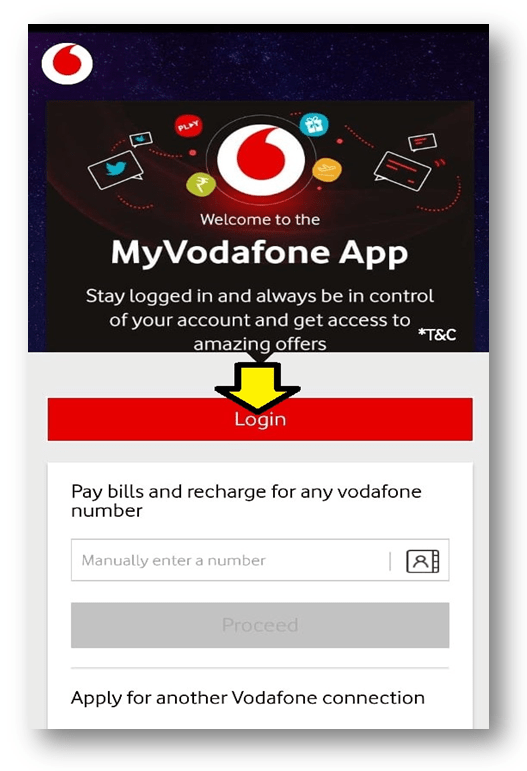
Step-1: Login to MyVodafone Apps.

Vodafone Prepaid to Postpaid

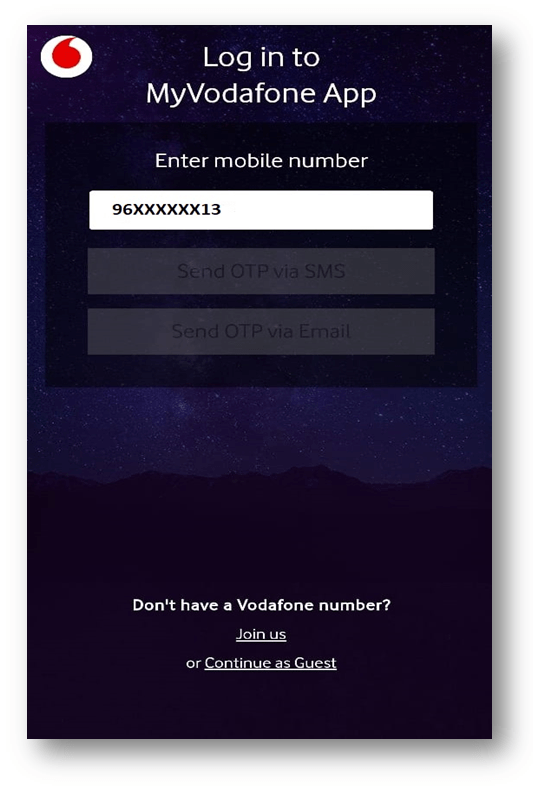
Step-2: Enter your prepaid Vodafone number and select the OTP receiving methods.

Vodafone Prepaid to Postpaid

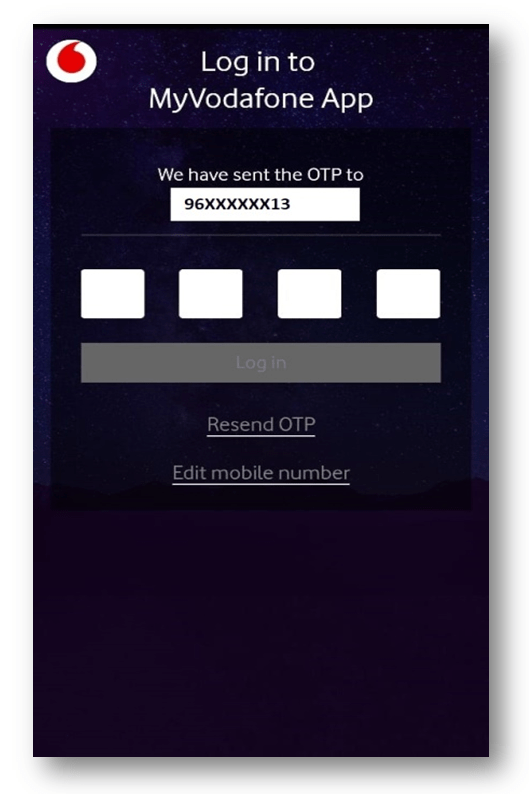
Step-3: Enter four digits OTP (One time Password) and login to the home page.

Vodafone Prepaid to Postpaid

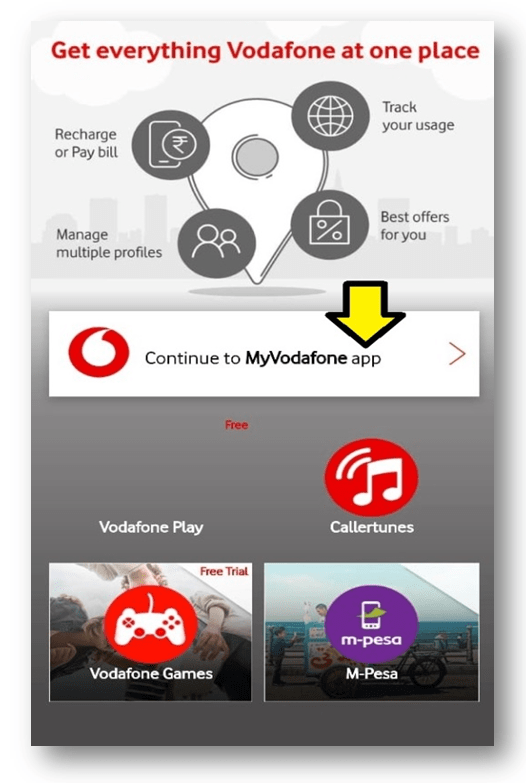
Step-4: Enter on “continue to MyVodafone app” to open the user page.

Vodafone Prepaid to Postpaid

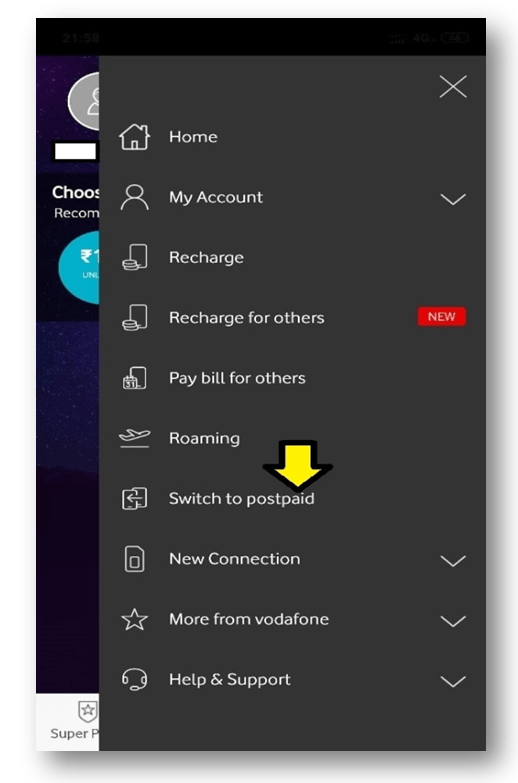
Step-5: Select on “Switch to Postpaid” option to proceed to next.

Vodafone Prepaid to Postpaid

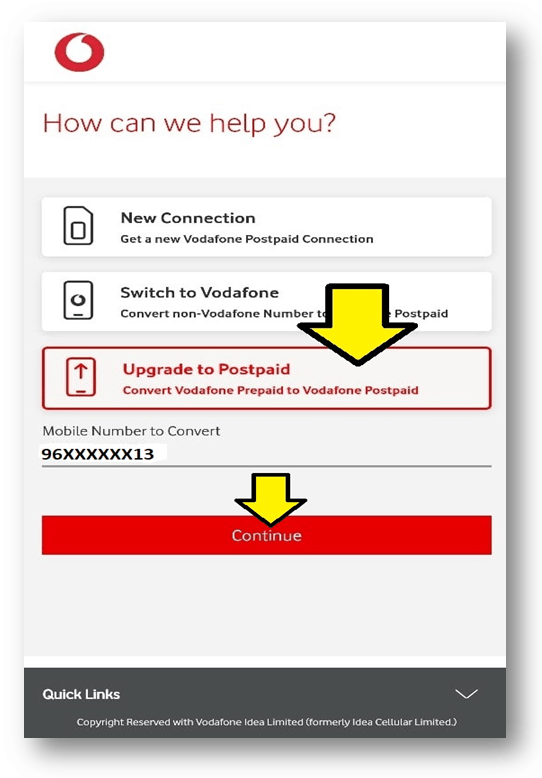
Step-6: Select on potion “Upgrade to Postpaid” and then enter on Continue bottom.

process

Step-7: Select a plan.

step by step guides

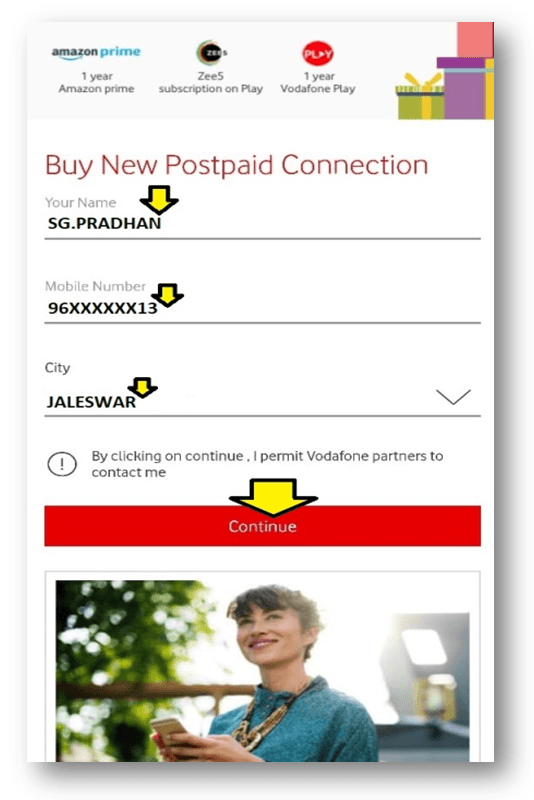
Step-8: Select the City and enter the billing information.

process

Step-9: Confirm the Detail information and submit for Prepaid to postpaid conversion.

After submission of billing information, Address confirmation will execute. Within 24 hrs you will receive an SMS regarding postpaid activation thereafter your prepaid number will convert into Postpaid.

If you are further interested to know on how to convert postpaid number to Prepaid, then carefully read below Steps:  
Step-1: You should visit a nearby Store along with the Address Proof, ID Proof, and one copy color Photo. Step-2: Fill up the migration form and submit it for further processing. Step-3: Collect new SIM from your donor service provider. Step-4: Insert the new prepaid SIM after disconnection of the network from the old Postpaid SIM.

Note:-Interface may change subject to updated apps.

FAQ:

Q1: Shall I need to collect a new SIM after converting my Vodafone prepaid number to postpaid through offline?

A1: Yes, You have to collect a New SIM from Store.

Q2: Do I have to submit documents for online migration?

A2: No.

Q3: Is there any hard copy document submission requirements for the online process?

A3: No.

Q4: Shall I need to collect a new SIM after converting my Vodafone prepaid number to postpaid through online?

A4: No.

Thank you for reading……Keep visiting Techiequality.Com

Popular Post: