How to Register Mobile Number in Malwa Gramin Bank Account 2024

How to Register Mobile Number in Malwa Gramin Bank Account

How to Register Mobile Number in Malwa Gramin Bank Account? Detail Process:

As we know that in this digital market, the registered mobile number plays an important role while doing online transactions. To fulfill the online transaction we need OTP (One Time Password) for a while to successfully complete the transaction. The same OTP will be received by your mobile number which is registered with your bank account. So If you have not yet registered your mobile number with your bank account then carefully read the below article and download the application/ letter and submit the application to the bank manager. Today we will guide you on How to Register Mobile Number in Malwa Gramin Bank Account? Download the application from the below links.

DOWNLOAD-AppliCation-1 (Application for Mobile Number Registration in My Bank Account)

Application-2- DOWNLOAD– (Application for Changing of Mobile Number against existing one)

How to Register Mobile Number in Malwa Gramin Bank Account:
How to Register Mobile Number in Malwa Gramin Bank Account

Day by Day Malwa Gramin Bank is getting popular and also people are opening their accounts. If you forget to register your mobile number, then follow the below process to get it done. To do so you have to visit the Malwa Gramin Bank, where you have already opened your bank account. And need to submit the application to the Bank Manager.

Example of Application, (Example-1):

To

     The Bank Manager of Malwa Gramin Bank, [mention here the branch location name].

(Subject: Application for Mobile Number Registration in my Bank Account)

Dear Sir,

               With due respect and humble submission, I beg to state that I am [Mention Your Name].

I have a Bank Account in Malwa Gramin Bank, [Mention Branch name], [Account Number], [Mobile Number], [Address]. I feel that I had made a mistake during the opening of bank account and forgotten to mention my mobile number. Now I am mentioning my current active mobile number i.e. [Mention here your current active mobile number] for being registered in my bank account.

Therefore, I shall be very grateful if you register my current mobile number in my bank account.

Yours faithfully,

Name:

Address:

Mobile Number:

Account Number:

[Note: Don’t Worry just Download the Word file and change the red highlighted color accordingly]

If you are similarly looking for a mobile number change against the existing one, then follow the below sample application and you can download the same from the above link.

Sample Application of Mobile Number Change against the Exist one, (Example-2):

 To

     The Bank Manager of Malwa Gramin Bank, [mention here the branch location name].

(Subject: Application for changing of mobile number against existing one)

Dear Sir,

               With due respect and humble submission, I beg to state that I am [Mention Your Name].

I have a bank account in Malwa Gramin Bank, [Mention Branch name], [Account Number], [Mobile Number], [Address]. My registered mobile number is not active. So hereby I am mentioning my Current Active Mobile Number i.e. [Mention here your current active mobile number] for being changed.

Therefore, I shall be very grateful if you Change my Current Mobile Number against the existing one.

Yours faithfully,

Name:

Address:

Mobile Number:

Account Number:

[Note: Don’t worry just download the word file and change the red highlighted color accordingly]

Synopsis of How to Register Mobile Number in Malwa Gramin Bank Account:

Step-1:- Download the above application.

Step-2:- fill up the red highlighted portion only.

Step-3:- Submit the filled up application to the bank manager.

Note that some banks may be asked for both the application and bank’s form for mobile number registration or may be either bank’s form or application, so you are requested to confirm by concerned bank personnel that which document needs to be provided for registration.

Note: The above process may change, w.r.t individual bank policy, term, condition, rules, so to know more kindly contact with respective Gramin bank.

Thank you for Reading……………… Keep Visiting Techiequality.Com

Popular Post

How to Register Mobile Number in Maharashtra Gramin Bank Account 2024

How to Register Mobile Number in Maharashtra Gramin Bank Account

How to Register Mobile Number in Maharashtra Gramin Bank Account? Detail Process:

As we know that in this digital market, the registered mobile number plays an important role while doing online transactions. To fulfill the online transaction we need OTP (One Time Password) for a while to successfully complete the transaction. The same OTP will be received by your mobile number which is registered with your bank account. So If you have not yet registered your mobile number with your bank account then carefully read the below article and download the application/ letter and submit the application to the bank manager. Today we will guide you on How to Register Mobile Number in Maharashtra Gramin Bank Account? Download the application from the below links.

DOWNLOAD-AppliCation-1 (Application for Mobile Number Registration in My Bank Account)

Application-2- DOWNLOAD– (Application for Changing of Mobile Number against existing one)

How to Register Mobile Number in Maharashtra Gramin Bank Account:

How to Register Mobile Number in Maharashtra Gramin Bank Account

Day by Day Maharashtra Gramin Bank is getting popular and also people are opening their accounts. If you forget to register your mobile number, then follow the below process to get it done. To do so you have to visit the Maharashtra Gramin Bank, where you have already opened your bank account. And need to submit the application to the Bank Manager.

Example of Application, (Example-1):

To

     The Bank Manager of Maharashtra Gramin Bank, [mention here the branch location name].

(Subject: Application for Mobile Number Registration in my Bank Account)

Dear Sir,

               With due respect and humble submission, I beg to state that I am [Mention Your Name].

I have a Bank Account in Maharashtra Gramin Bank, [Mention Branch name], [Account Number], [Mobile Number], [Address]. I feel that I had made a mistake during the opening of bank account and forgotten to mention my mobile number. Now I am mentioning my current active mobile number i.e. [Mention here your current active mobile number] for being registered in my bank account.

Therefore, I shall be very grateful if you register my current mobile number in my bank account.

Yours faithfully,

Name:

Address:

Mobile Number:

Account Number:

[Note: Don’t Worry just Download the Word file and change the red highlighted color accordingly]

If you are similarly looking for a mobile number change against the existing one, then follow the below sample application and you can download the same from the above link.

Sample Application of Mobile Number Change against the Exist one, (Example-2):

 To

     The Bank Manager of Maharashtra Gramin Bank, [mention here the branch location name].

(Subject: Application for changing of mobile number against existing one)

Dear Sir,

               With due respect and humble submission, I beg to state that I am [Mention Your Name].

I have a bank account in Maharashtra Gramin Bank, [Mention Branch name], [Account Number], [Mobile Number], [Address]. My registered mobile number is not active. So hereby I am mentioning my Current Active Mobile Number i.e. [Mention here your current active mobile number] for being changed.

Therefore, I shall be very grateful if you Change my Current Mobile Number against the existing one.

Yours faithfully,

Name:

Address:

Mobile Number:

Account Number:

[Note: Don’t worry just download the word file and change the red highlighted color accordingly]

Synopsis of How to Register Mobile Number in Maharashtra Gramin Bank Account:

Step-1:- Download the above application.

Step-2:- fill up the red highlighted portion only.

Step-3:- Submit the filled-up application to the bank manager.

Note that some banks may be asked for both the application and bank’s form for mobile number registration or may be either bank’s form or application, so you are requested to confirm by concerned bank personnel that which document needs to be provided for registration.

Note: The above process may change, w.r.t individual bank policy, term, condition, rules, so to know more kindly contact with respective Gramin bank.

Thank you for Reading……………… Keep Visiting Techiequality.Com

Popular Post

Vistara web check in link 2024

Vistara web check in link

Vistara web check in link:

Still, you are doing check-in in offline at the airport and standing in a long queue. Just wait! Today we will help you regarding so. Please go through the below Link for web check-in of the Vistara flight and also we have provided the links of Step by step-by-step guide on how to do online web check-in for the Vistara flight. Just go through the given below Vistara web check in link to complete the process.

Web Check-in link (Vistara Flight).

Click-Here to learn the online web check-in process for Vistara flights. (Step by Step guide).

Vistara web check in link

Steps:

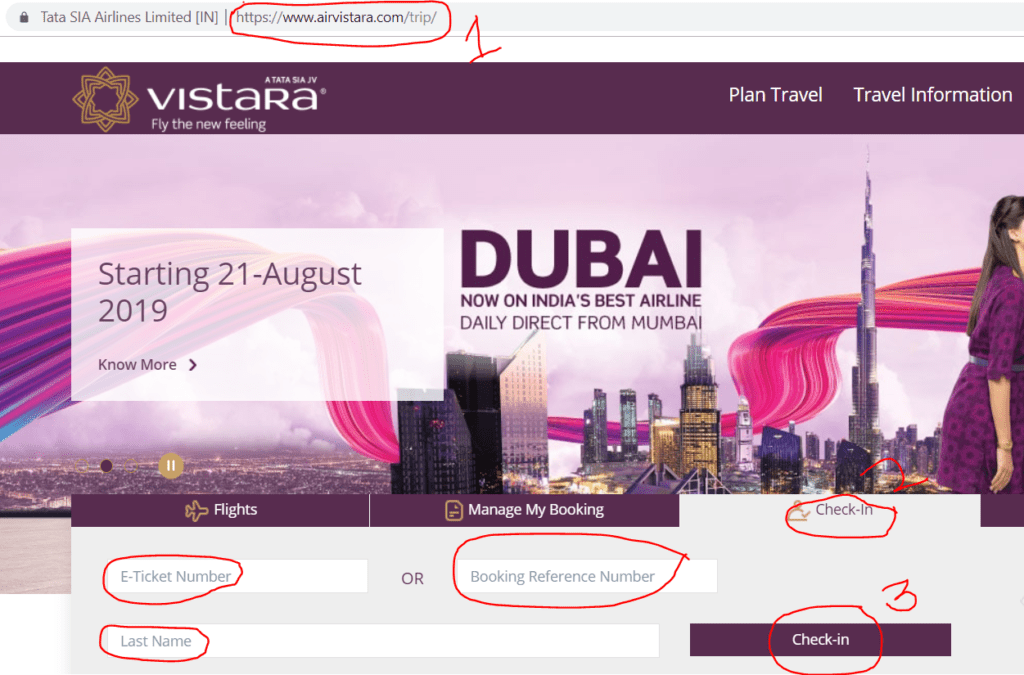
  1. Visit the official website of Vistara or Click-here.
  2. Enter on Check-in option.

Please go through the below figure and strictly follow the steps.

Vistara web check in link

If you would like to proceed to the next step to complete the check-in process and to get the Email Boarding pass then go through the below link.

Vistara Boarding Pass / Web Check-in.

General Information:

Important steps that you are supposed to obey at the Airport:

  • Print and carry the boarding pass on the day of the departure.
  • Get your photo identification proof checked at the airport security section and boarding gate.
  • If you are carrying merely cabin baggage, you can directly proceed for the security check.
  • If you have check-in baggage, then you should go to the baggage drop counter and deposit your baggage.

FAQ:

Q: How to get the boarding gate No?

A:  You can ask at the Vistara counter or you can directly check the gate no. on the Flight information display screen.

Q: Shall I get the two boarding passes, if there is a single connecting flight.

A: Yes,

Q: When does the boarding gate close?

A: The boarding gate will close 25 minutes before departure time.

Q: When does the Check-in counter close?

A: For Domestic: Check-in counters close 45 minutes before departure. But for the International: Check-in counters close 75 minutes before departure.

Note: Please visit the Vistara official website to know the timetable, terms, conditions, and stipulated norms. The Mentioned time period is not limited to, You are requested to carefully read and understand the norms( like boarding gate closing time, check-in counter closing time, Allowable Baggage weight for hand and Check-in, dangerous goods & restricted articles, etc.), source: Vistara website.

Similar Articles:

Spicejet web check in link

Goair web check in link

Indigo web check in link

How to do web check in of Spicejet flight?| Step by Step guides

Indigo Web Check in Process | Step by Step guides

Thank you for reading…..Keep visiting Techiequality.com

I hope the above is useful to you

Popular Post: