How to plot the Run Chart in Excel | Run Chart Excel Template:

Run Chart Excel

How to plot the Run Chart in Excel?

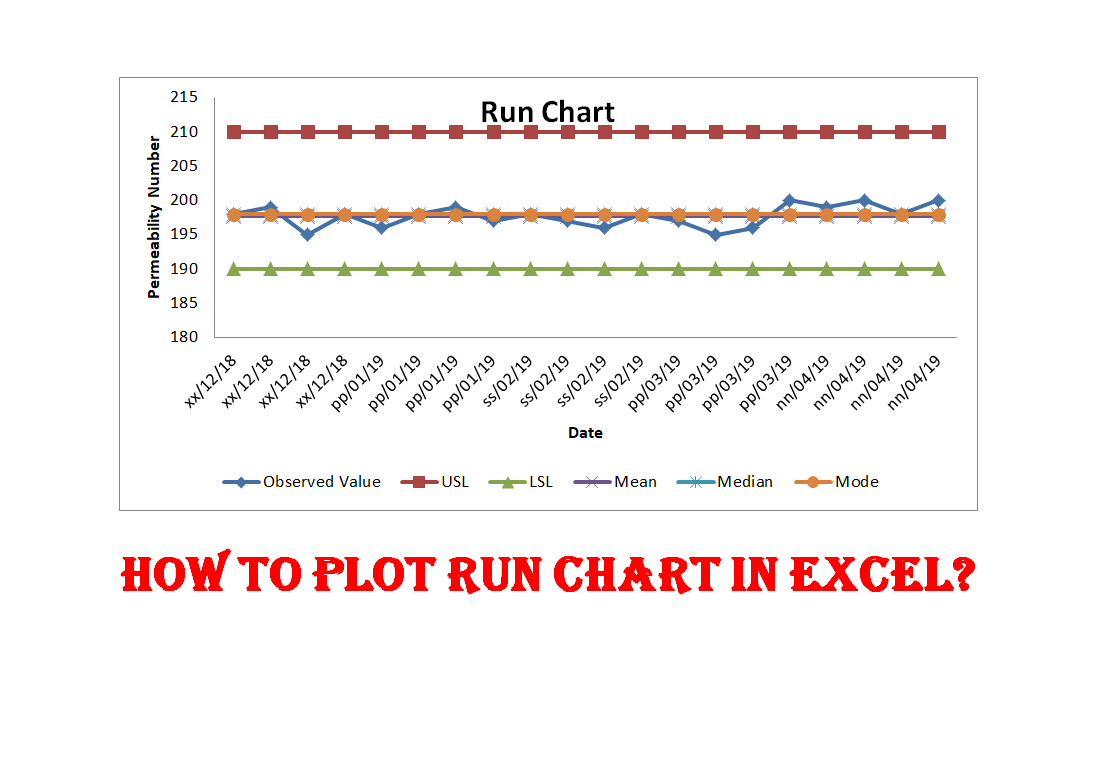
A run chart is also termed a Line Chart. You can use it on the shop floor to monitor the Process variation. In the run chart, you could able to set up the mean value, upper specification limit, lower specification limit, Median & mode. A Run chart will not be able to give an idea about the control limits. It represents the variation in summarizing data of Process, or Product characteristics. However, it can show you how the process is running. Today we will discuss on how to plot a run chart in Excel. Download the Run Chart Excel template from the below link.

Download Template.

Step by Step guide on How to plot Run Chart in Excel:

Step-1: Enter the reading in the Excel sheet.

Step-2: Calculate the Mean, Median, and Mode values in Excel

Step-3: Put the USL & LSL in an Excel sheet.

Step-4: Select the Excel data table and then follow the below step to select the line chart;

“Insert>>Line graph”

Illustration with Example:

Step-1:

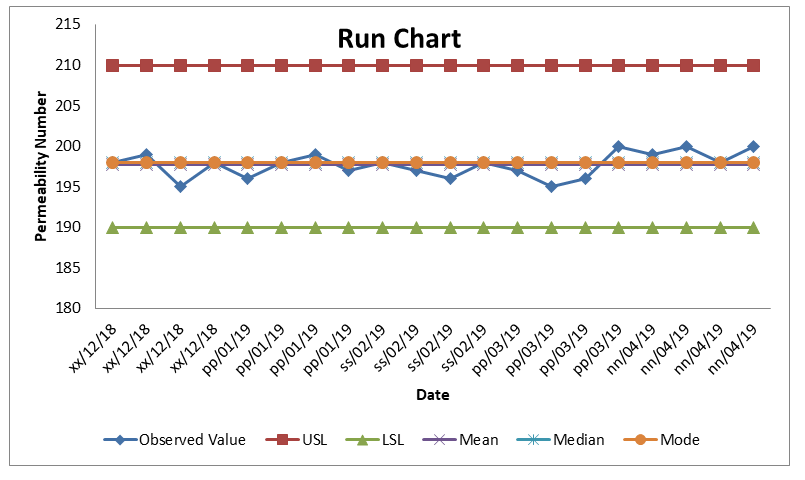
We are going to plot the run chart of the Permeability Number of green sand. Hence we have observed the readings four times per day; these readings are given below;

Date Permeability Number
xx/12/18 198
xx/12/18 199
xx/12/18 195
xx/12/18 198
pp/01/19 196
pp/01/19 198
pp/01/19 199
pp/01/19 197
ss/02/19 198
ss/02/19 197
ss/02/19 196
ss/02/19 198
pp/03/19 197
pp/03/19 195
pp/03/19 196
pp/03/19 200
nn/04/19 199
nn/04/19 200
nn/04/19 198
nn/04/19 200
Step-2:

Calculate the mean, median, and mode of observed value;

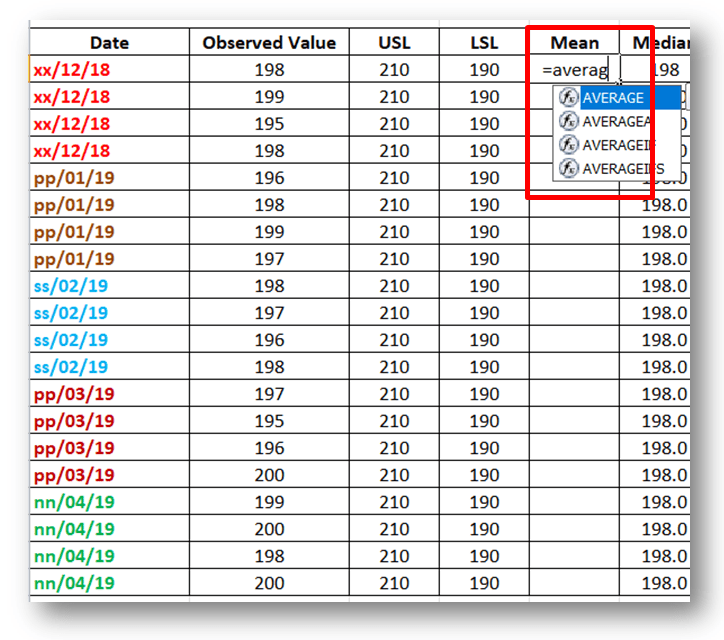
Mean: Use the Excel formula to calculate the average value automatically. Details are described in the below figure.
step
Run Chart

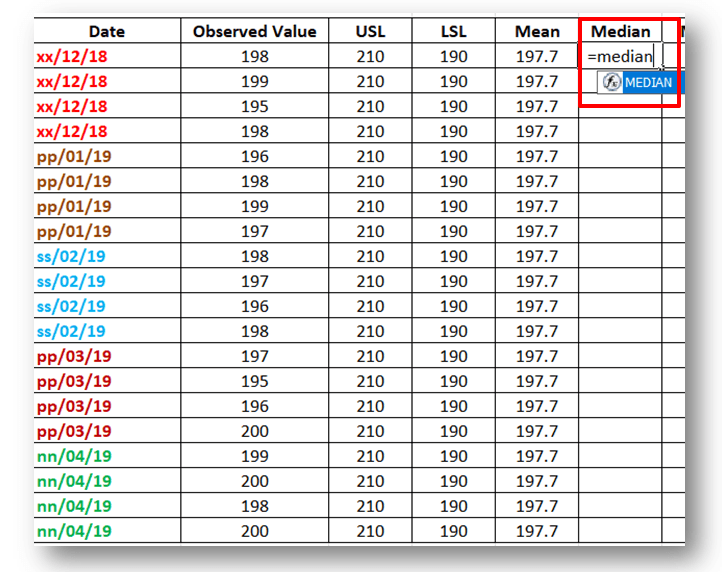
Median: Select the Excel Median formula to calculate the Median value automatically. For better understanding, kindly go through the highlighted portion of the below figure.
steps
Run Chart

Mode: use the Excel formula to calculate the mode value for the details formula, kindly go through the below figure highlighted portion.
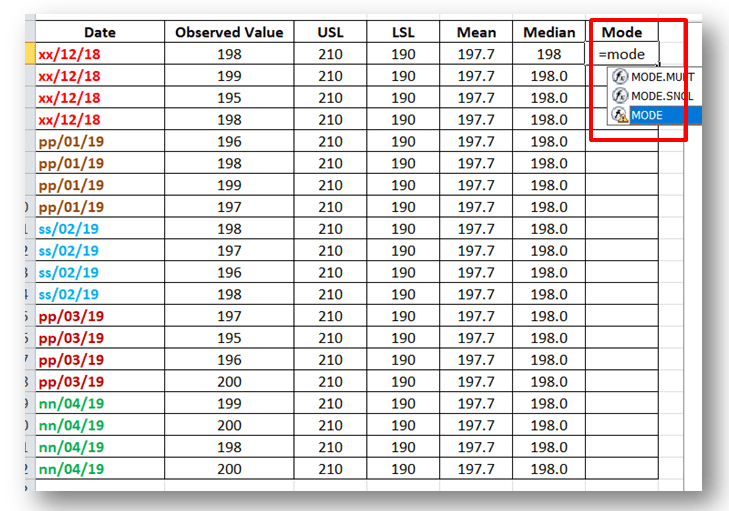
steps
Run Chart
Step-3:

Put USL and LSL values in Excel, if you would like to draw the line in the run chart. So here specification of Permeability is 200±10. USL is 210 and LSL is 190.

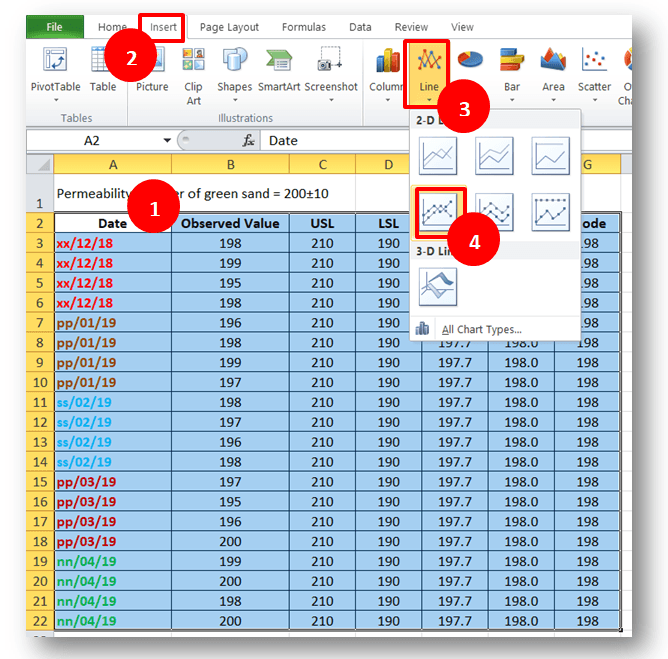
Step-4: To draw the run chart, kindly follow the sequence from “1” to “4” as per the below figure.

Sequence-1: Select the data table.

Sequence-2: Select the “Insert” option in the Excel sheet.

Sequence-3: Select the “Run Chart/ Line Chart” in Excel sheet.
Run Chart
Run Chart
Step-5: Run Chart:
Run Chart
Run Chart

[Run Chart]

(Click-Here to learn about the interpretation of the Run Chart)

Useful Links:
Run Chart Excel
Download

Thank you for reading….Keep visiting Techiequality.Com

Popular Post:

Run Chart Example | Concept & Interpretation of Result with Case Study | Industrial Example:

Run Chart Example

Run Chart Example | Concept & Interpretation of Result with Case Study | Industrial Example:

Hi readers! today we are going to discuss on Run Chart Example. A run chart is also called a Line graph. It’s a live Chart that you can use it on the shop floor to monitor the Process variation. In the run chart, you could able to set up the mean value, upper specification limit, and lower specification limit. A Run chart will not be able to give an idea about the control limits. It represents the variation in summarizing data of Process, or Product characteristics. However, it can show you how the process is running.

Download the Run Chart Example Template in Excel.

Interpretation of Result with Case Study:

  • Interp.-1: Six or more consecutive points fall above or below the centre line (Median Line). 
  • Interp.-2: Five or more successive points are going up or down.
  • Interp.-3: Too many or too few runs.
  • Interp.-4: An astronomical data point.

If any, one of the above interpretations has been identified in the run chart, it means variation (non-random variation) present in the process’s characteristics.

Industrial Practical Example of Run Chart (Run Chart Example):

We are going to take an example from the Iron manufacturing industry. Such a company is produced as an automobile part with the following specifications.

Pouring Temperature =1400°C±20°C.

The company has decided to maintain the variation trend of Pouring temperature. They have implemented a run chart on the shop floor to monitor and measure the variation of pouring temperature w.r.t time period. The process engineer promptly started to measure the temperature readings four times a day (three working shifts) for five days. Below are the readings for your reference as;

Temperature Reading Table:

 Date Observed Value
xx/yy/19 1397
xx/yy/19 1398
xx/yy/19 1401
xx/yy/19 1405
pp/qq/19 1407
pp/qq/19 1400
pp/qq/19 1398
pp/qq/19 1405
ss/gg/19 1398
ss/gg/19 1405
ss/gg/19 1398
ss/gg/19 1401
pp/ss/19 1425
pp/ss/19 1399
pp/ss/19 1402
pp/ss/19 1398
nn/gg/19 1403
nn/gg/19 1400
nn/gg/19 1398
nn/gg/19 1407
Now, we are supposed to calculate the mean, median, and mode values to plot the run chart.
Date Observed Value USL LSL Mean Median Mode
xx/yy/19 1397 1420 1380 1402.25 1400.5 1398
xx/yy/19 1398 1420 1380 1402.25 1400.5 1398
xx/yy/19 1401 1420 1380 1402.25 1400.5 1398
xx/yy/19 1405 1420 1380 1402.25 1400.5 1398
pp/qq/19 1407 1420 1380 1402.25 1400.5 1398
pp/qq/19 1400 1420 1380 1402.25 1400.5 1398
pp/qq/19 1398 1420 1380 1402.25 1400.5 1398
pp/qq/19 1405 1420 1380 1402.25 1400.5 1398
ss/gg/19 1398 1420 1380 1402.25 1400.5 1398
ss/gg/19 1405 1420 1380 1402.25 1400.5 1398
ss/gg/19 1398 1420 1380 1402.25 1400.5 1398
ss/gg/19 1401 1420 1380 1402.25 1400.5 1398
pp/ss/19 1425 1420 1380 1402.25 1400.5 1398
pp/ss/19 1399 1420 1380 1402.25 1400.5 1398
pp/ss/19 1402 1420 1380 1402.25 1400.5 1398
pp/ss/19 1398 1420 1380 1402.25 1400.5 1398
nn/gg/19 1403 1420 1380 1402.25 1400.5 1398
nn/gg/19 1400 1420 1380 1402.25 1400.5 1398
nn/gg/19 1398 1420 1380 1402.25 1400.5 1398
nn/gg/19 1407 1420 1380 1402.25 1400.5 1398

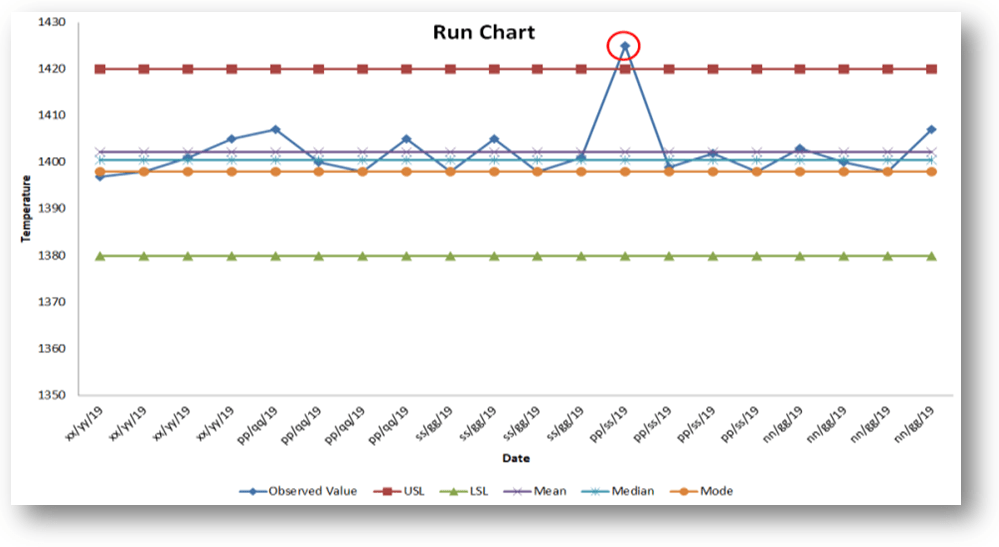
By using the aforesaid data table, we have plotted a run chart/line chart with the help of Excel. But you can also plot the run chart by Minitab such a process we will discuss later in separate articles.

Run Chart Example
Run Chart Example

[Run Chart Plot by Excel]

Interpretation of the above run chart:

Before, we discuss the result of the above run chart. I would like to request you kindly go through the above chart prudently.

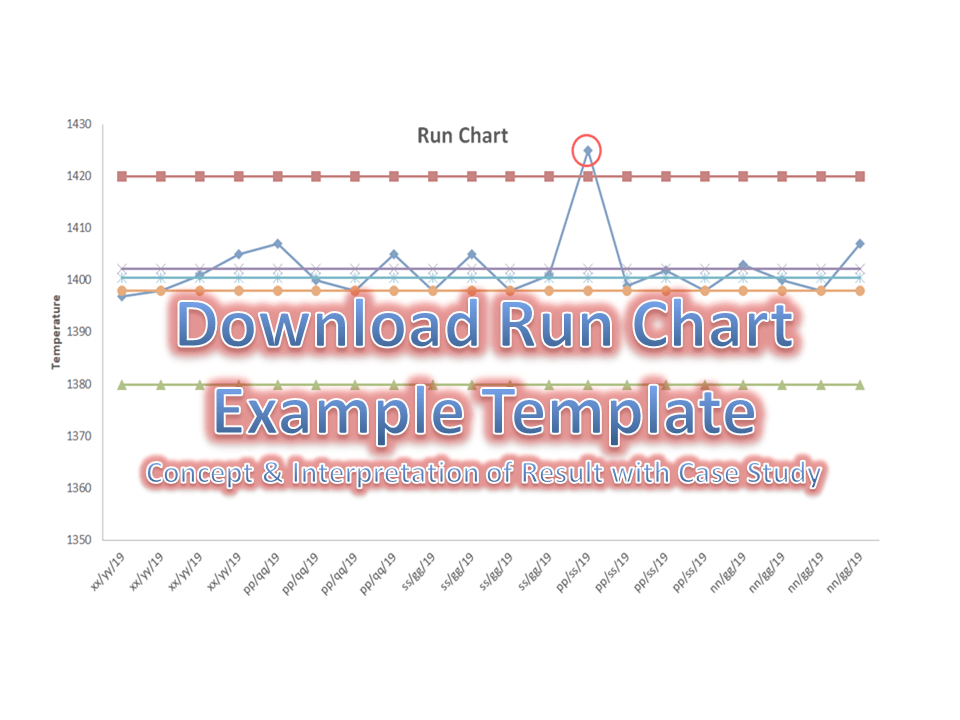
In the above chart, one reading (red highlighted point) suddenly goes up and the chart represents an astronomical data point interpretation. It means there is the existence of variation in the process and it is a non-random variation. In such a way you can plot the run chart to know how the process is running and according you could able to act on it.

Useful Links: (Download Template)

Thank you for reading….Keep visiting Techiequality.Com

Popular Post: