Airtel Inactive Number Bill Payment:
Airtel Inactive Number Bill Payment, Hello everybody! If you have ported your Airtel Number into other services and there is an outstanding amount bill felt to pay. Don’t worry here is the solution and step-by-step guide that how to pay inactive Airtel bills online.
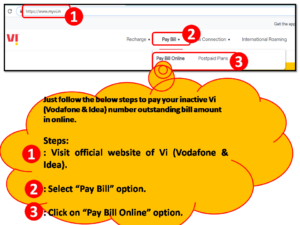
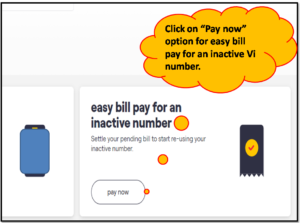
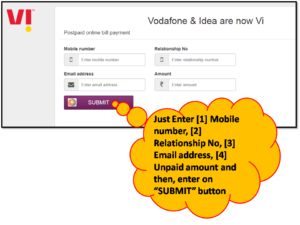
[similarly, if you would like to pay a bill of Vodafone Inactive Number, then Clickhere].
Methods/Process of Airtel Inactive Number Bill Payment Online:
There are several modes of payment that you can do as;
- Cash Payment.
(For Cash Payment, you have to visit a nearby Airtel store to pay your outstanding bill amounts.)
The other three types of payment modes are described below –
- Debit Card Payment.
- Credit card Payment
- Net-banking transfer or through digital fintech Apps
For the above three methods of payment, you have to pay in online mode, beneath is the step-by-step guide for online payment of your Airtel outstanding bills.
Before you pay, you have to keep the Relationship Number/ Account Number ready for processing the online payment, you can find the relationship number from your previous Airtel bill, Alternatively, you can collect the relationship number from Airtel customer care. Please note that the Relationship number is the Account number, so don’t confuse during the final payment because on Airtel’s official website, you can find the Account Number instead of the Relationship Number but in the Airtel bill, it’s written as Relationship Number, so once again telling to you don’t confuse account number and Relationship number is same.
Now, here is the step-by-step guide to Postpaid Airtel Inactive Number Bill Payment Methods:
Step-1:
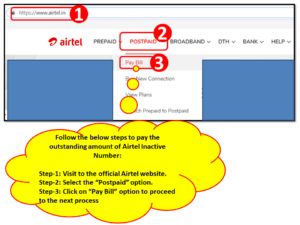
In the below figure there are three steps (i.e. step 1 to 3), first of all, you have to visit the Airtel official website or click here to directly visit the website. Next to select the “Postpaid” option (step-2 of the below figure), then, click on the “Pay Bill” option (Step-3 of the below figure). After clicking on the Pay-bill option, a new tab will open.
Step-2:
After clicking on the “Pay-Bill” option in the previous step, the new tab will be opened like the below picture, Now you have to click on the inactive account payment option (Go through the below picture, we have marked as a red highlighted box), thereafter a new page will open just follow the next step to complete the online payment.
red highlighted box to directly open the below Airtel Postpaid Airtel Inactive Number Online Bill Payment Page.

Step-3:
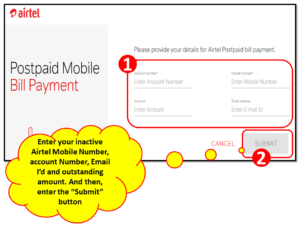
As you can see figure below red highlighted box name as “1” is marked there, so now you have to provide the four important data as Account Number (which is the Relationship number mentioned in your previous Airtel bill), email ID, Mobile Number and Outstanding amount which you need to pay. After fill-up the below data, you can submit for payment. The Next Payment section page will open and there you can select the mode of payment as Net-banking, credit card, or Debit card option, and finally, after a transaction of payment, your section will finish.
Click here to open the direct link of Airtel inactive Number bill Payment.
FAQ:-
Q- What is the Inactive Airtel Number?
A- When you will change your Airtel Network to another network without changing your Mobile Number, after successfully changing of network, your Mobile number will be termed as an Airtel inactive number.
Q- What is the Relationship No. of your Airtel Mobile Number and where to find the RN?
A- A Relationship Number is nothing it’s a customer ID or transaction number, where all your monthly payments will be transacted through this number. So it’s important for the postpaid Customer. Generally, the Relationship number is available in your Bill Paper. If you forget your RN then you can call customer care otherwise, visit the nearby Vodafone store to get back your Vodafone relationship number.
Please note that during payment, you can find the terminology Account Number instead of Relationship Number. But actually, the Relationship number is the Account Number, some telecom Services write it as a Relationship Number or Account number.
Similarly, If you would like to know the step-by-step Procedure for Vodafone Inactive Number Bill Payment Through online, then Click Here
Ref.- Source@Airtel official website. Disclaimer: Check carefully before executing the online payment. You can confirm the process by contacting with Airtel teams/office.
FAQ:-
Are you worried about inactive postpaid Airtel number bill payments after porting to other networks? then the solution is here, you can completely read our above article, definitely, it will definitely help you to resolve your problem. We have mentioned a step-by-step process for online bill payment of inactive Airtel postpaid numbers. But I would like to draw your attention over here that you can pay bills by either online or offline as well. The online process is illustrated in above. But for offline bill payments, you may have to visit the Airtel office.
More on TECHIEQUALITY






Thank you for reading…Keep visiting Techiequality.Com
Popular Post

Shanti Gopal Pradhan is an experienced professional in Quality Management Systems, QA, Operations, Business Excellence, and Process Improvement. He has strong expertise in international standards including IATF 16949, ISO 9001, ISO 14001, ISO 45001, and ISO 17025, along with methodologies such as TQM, TPM, and Six Sigma.
He holds a degree in Mechanical Engineering along with an MBA, combining strong technical acumen with strategic business insight, he is a Certified Internal Auditor, Lead Auditor, and Six Sigma Black Belt, with a proven track record in driving quality transformation and operational excellence.