How to open PPF Account online in SBI and PNB | what is PPF 2024
Last updated on November 29th, 2023 at 07:32 am
How to open PPF Account online in SBI and PNB | What is PPF?
Hi Readers! Here, we are going to discuss on how to open ppf account by online. As we know we can open the PPF account in the bank and post-office as well through online or offline processes. If you are interested in opening the PPF account then follow the below step-by-step process to open an account by online process. Why do we burden ourselves with the one-time arrangement of funds for our future requirements when we have a convenient option of planning it beforehand and organizing the funds easily. As we are all familiar with digital banking why not use it for our own benefit. Today we will discuss about how we can pre-plan our future funding without any burden by following a few simple steps. Yes, we will learn how PPF can solve all our future issues.
First, let us understand what PPF is and who is eligible to open PPF.
What is PPF?
Public Provident Fund (PPF) is a scheme backed by the government for individuals who want to park their idle money for the future as long-term savings cum investment. It is Apt for an individual who avoids risk in their savings. Here investors not only get assured returns but also exemption in income tax up to Rs. 1.5lakh annually u/s 80C.
Who can open PPF:
Any individual can have a single PPF account. However, if they are left with an additional amount even after investing Rs 1.5 lakh annually they can open a PPF account in the name of their family member. In the case of a minor, a parent can open a PPF account in the name of their minor child. Now, let’s understand how does a PPF works its calculation time period, and its procedure.
Deposit Maturity and Return:
A PPF account can be operated with a minimum amount of 500/- and a maximum Rs 1.5 lakh per annum. The deposit can be done as per individual convenience lump sum or monthly as per convenience.
Calculation of PPF with Example:
Now let’s see a simple calculation of how by investing little by little you can create your future security. Here I am considering that a person X aged 25 years getting a salary of 25000/- pm is having a surplus of around 10000 after all his expenses for a month .X decides to put the surplus amount in PPF account as he wants to buy a 8 seater car by the age of 40. Now let’s see if he can achieve his target of buying the car by the age of 40. Here we have taken Amount of Investment as 10000 per month for a period of 15 years @ 7.1% which is the current rate of interest of PPF and we find that X would receive around 32 LAKHS (approx.) at the age of 40 and achieve his target of buying a 8 seater easily without any burden of one time arrangement of funds.
Calculation as below:
| Monthly Investment | 10000 |
| Time Periods in months | 180 |
| Rate of Interest | 7.1% |
| Invested Amount | 1800000 |
| Total Interest | 1454567 |
| Maturity Value | 3254567 |
Note: The above calculation is only for reference, to know the exact value please contact with concerned service provider
How to open PPF Account online in PNB (Punjab National Bank):
Step-1:
- Login to your Internet banking ID using your login id and password.
- Your dashboard page will be displayed.
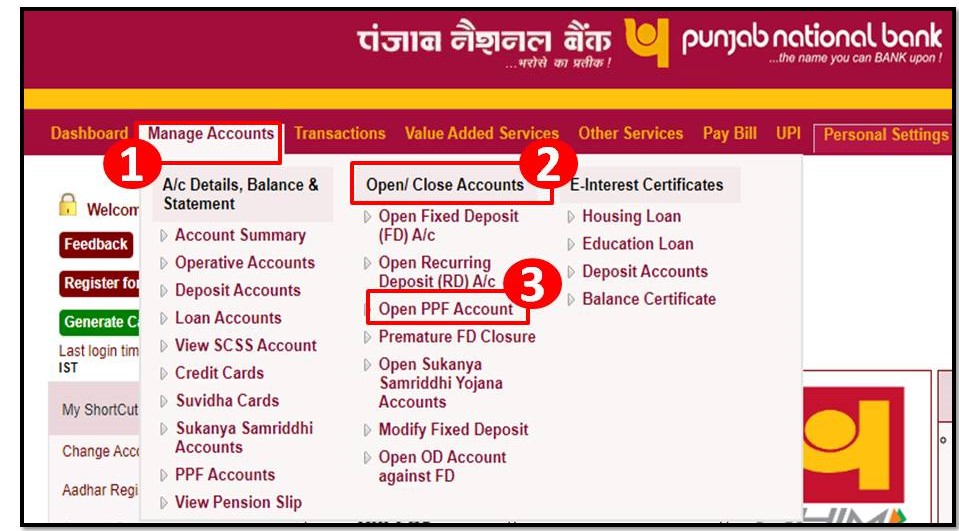
- Go to manage accounts option and select Open PPF account as shown in the image below.
Step-2:
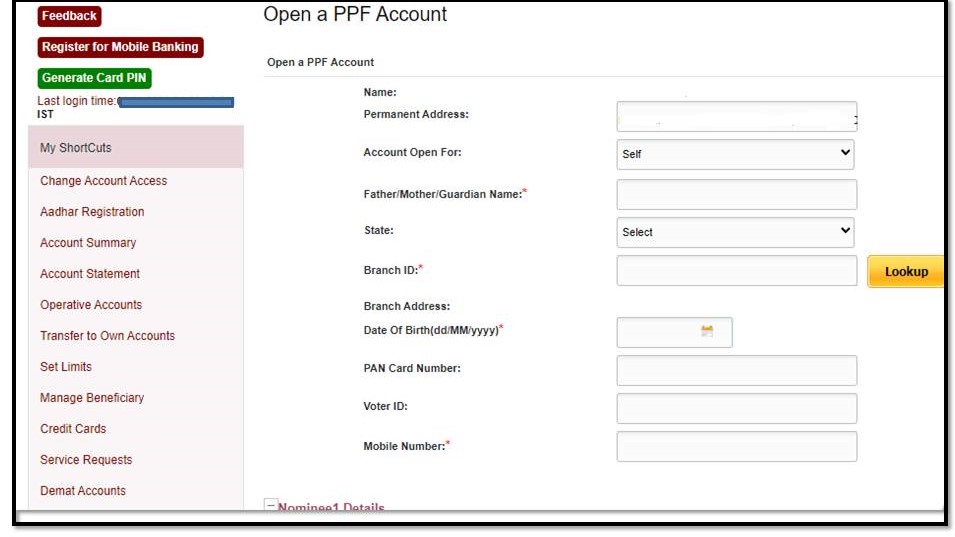
A Page for PPF account opening would be displayed.
Fill in the details now here you have the option of opening the account for yourself or a minor. Here I am opening up an account for a minor. Fill in all the details:
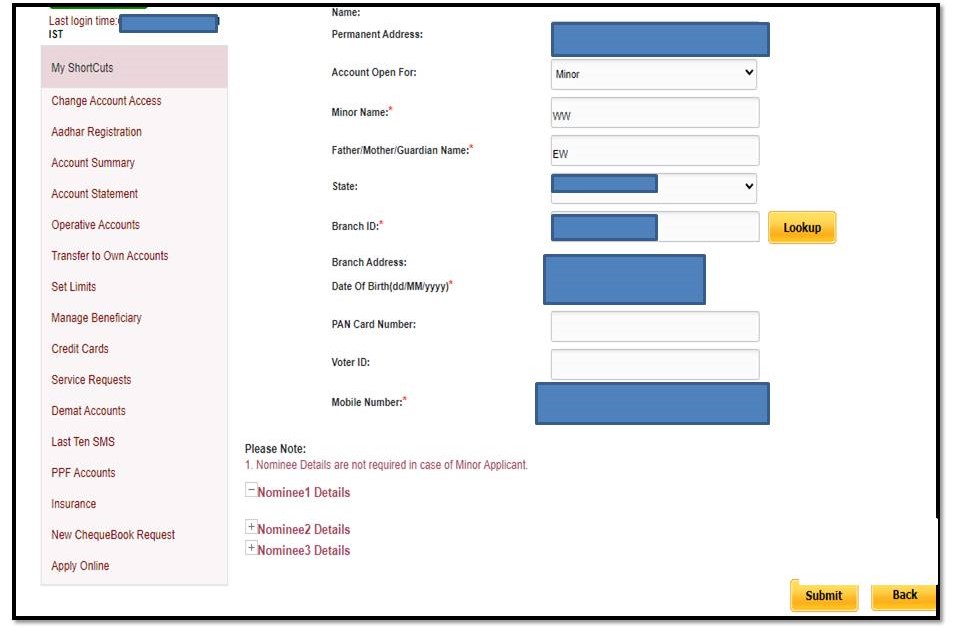
Now if you open up a self account you need to fill in the details for the nominee as well. Here you can fill up to 3 nominee details with the distribution of shares amongst them. Details include the Nominee’s Name Address, Guardian, and share of amount. As I am opening up a minor account nominee details get frezzed in that case. As shown below:
Step-3:
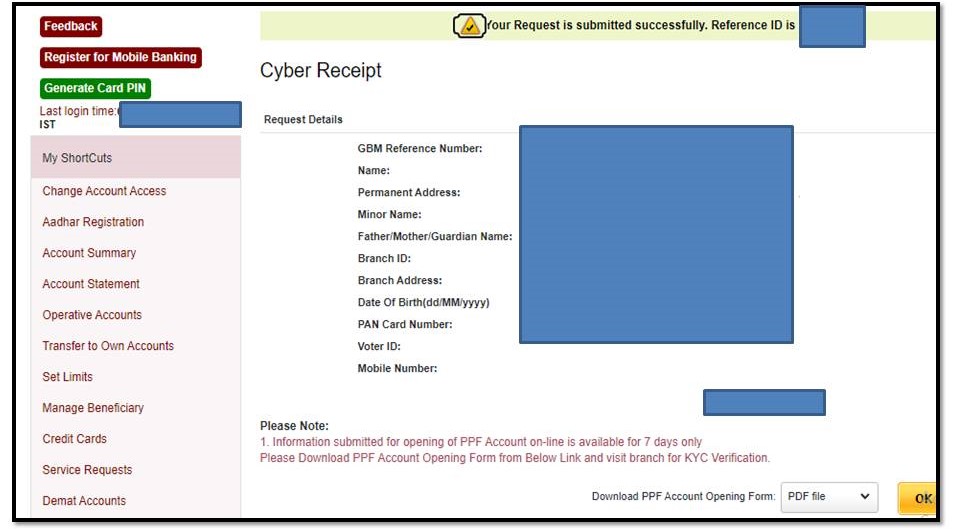
Now a Request confirmation page will pop up where you need to add your transaction password to confirm the submission of account opening details. After which you will get a reference id along with PDF file of PPF Account opening form which needs to be submitted in bank in hard copy within 7 days of submission. As after 7 days the registration becomes invalid.
Step-4:
While carrying the form as shown below to the bank take along your passport size photograph along with aadhar copy .You need to submit a minimal amount to get your account activated which needs to be a cash deposit .After confirmation of your payment you will be provided with a passbook. Bank links your PPF account to your main account via which you can easily transact online and create your future security.
Screenshot of the form to be submitted at the bank attached below.
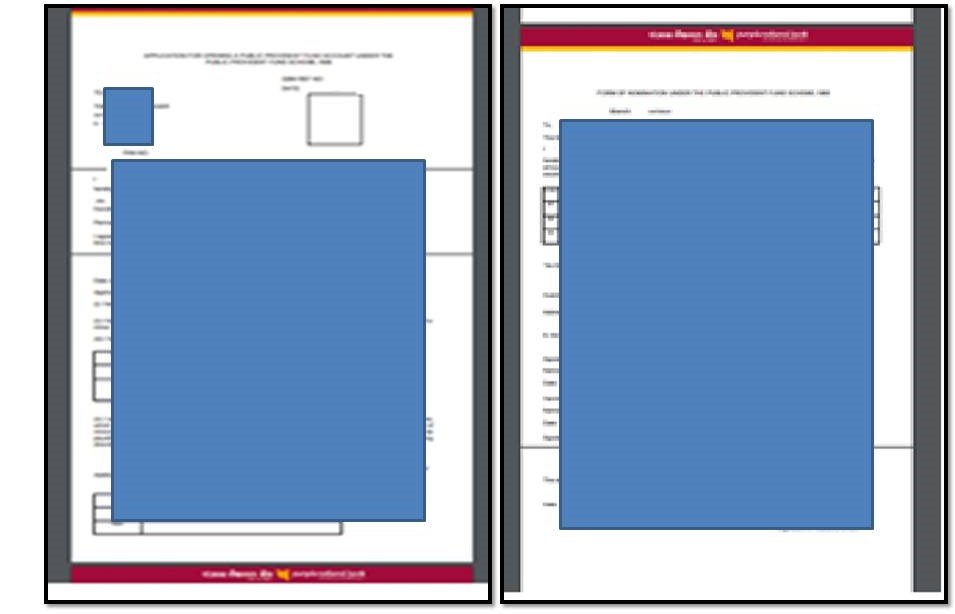
By following these few simple steps you can easily make your future secure and burden free.
Similarly you can open up a PPF account in any bank by simply visiting their website .If you want us to share the PPF account opening procedure for any particular bank do comment us ,we will try our best to provide the information for the same.
How to open PPF Account online in SBI:
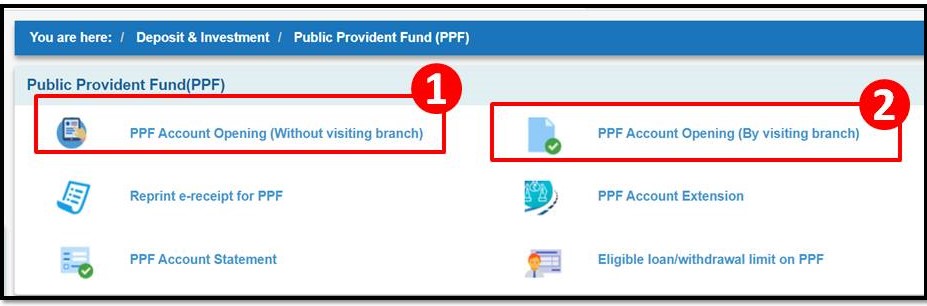
You can open the PPF account by online or visiting the bank as well, but here we will describe the online process. SBI giving two options to their customer for online registration to open the PPF account i.e. [1] without visiting branch, [2] by visiting branch. Here, we will explain both the process. Just go through the below steps.
Step-1:
Login to your online SBI (Net-banking) account.
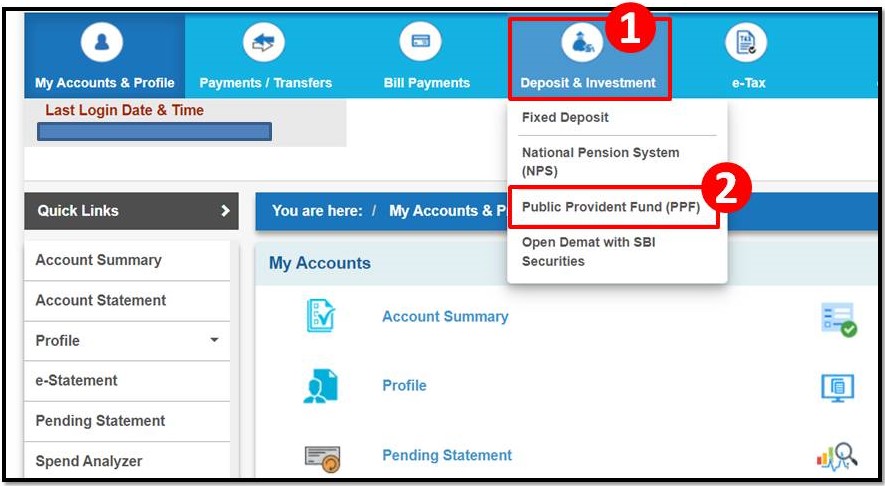
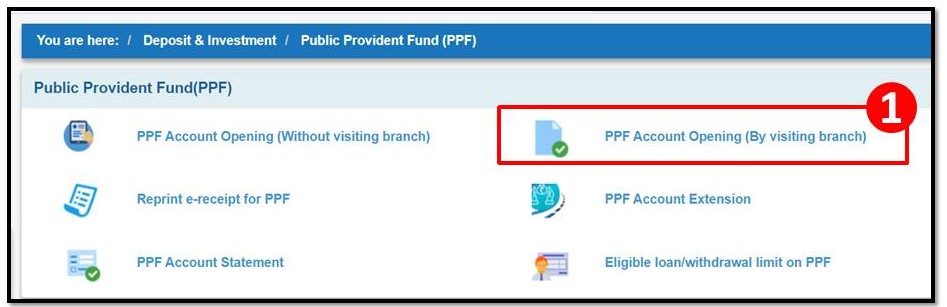
Go to the “deposit & Investment” option shown in below image, then click on the “Public provident fund (PPF) option.
Step-2:
SBI giving two options for online processing of opening of PPF account. So you can select any option as per your convenience.
Step-3:
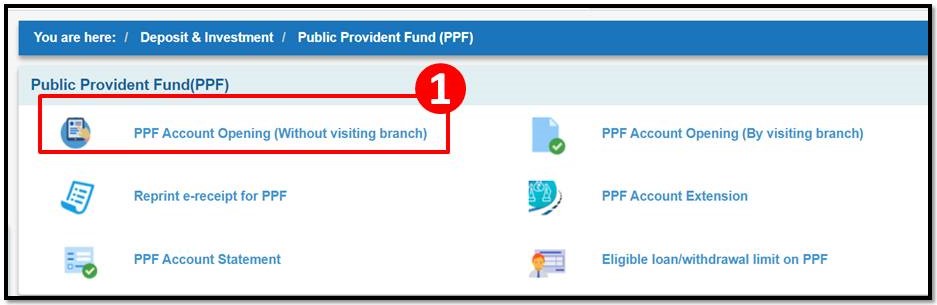
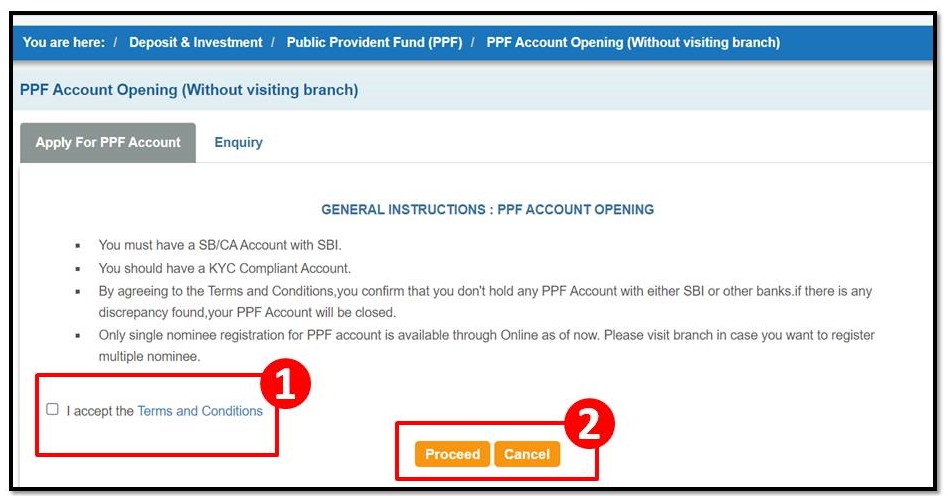
If you are selecting the first option as “PPF account opening –without visiting branch”, then select the same option and follow the instruction and steps
Step-4:
Read the T&C and accept it, then select the proceed options.
Follow the further instruction and steps to complete the registration for opening the PPF account.
Step-5:
Now, let’s go through the second option as “PPF Account opening by visiting branch)
If you would like to open the account by visiting the branch then select the same option.
Step-6:
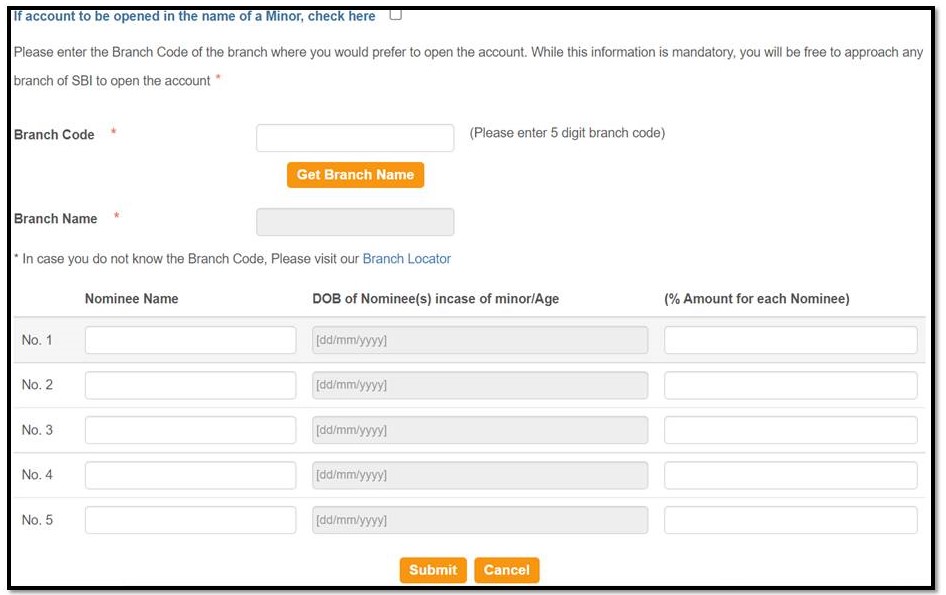
Once, you do the step-5 then below application file will be appeared.
Now, you have to fill up the data and do submit.
After submission of data through online, you have to visit the branch with printout of online application file along with necessary documents (like Aadhar card, Photo, PAN card, address proof and id proof, etc), once you submit the document at branch a minimum amount need to be deposited. Then finally collect the bank PPF passbook.
Disclaimer: The above process is for reference only, the process may be changed from time to time by branch, so kindly contact your branch/bank.
Source reference: PNB website (net-banking) & SBI website (net-banking).
Thank you for reading…Keep visiting Techiequality.Com
Popular Post

How to Register Mobile Number in Central Madhya Pradesh Gramin Bank Account 2024

How to do web check-in 2024

How to Register Mobile Number in Prathama UP Gramin Bank Account 2024
About Author

TECHIEQUALITY
The Author is an Expert in Quality Management System, Operation Management, Business Excellence, Process Excellence, IATF 16949, ISO 9001, ISO 14001, ISO 45001, ISO 17025, TQM, TPM & QA. He is a Mech. Engg. & MBA graduate, Certified IA of ISO 9001, IATF 16949, ISO 14001, ISO 17025 & ISO 45001 Standard, lead auditor & BB in 6-Sigma.